1. Introduzzjoni
Thank you for choosing the OKP Life L1 Lidar Robot Vacuum Cleaner. This manual provides essential information for the safe operation, maintenance, and troubleshooting of your device. Please read it thoroughly before use and retain it for future reference.
2. Istruzzjonijiet Importanti dwar is-Sigurtà
Biex tnaqqas ir-riskju ta' korriment jew ħsara, aqra dawn l-istruzzjonijiet ta' sigurtà bir-reqqa u żommhom fil-qrib meta tkun qed twaqqaf, tuża, u żżomm ir-robot tiegħek.
- Dan l-apparat jista' jintuża minn tfal minn 8 snin 'il fuq u persuni b'kapaċitajiet fiżiċi, sensorji jew mentali mnaqqsa jew b'nuqqas ta' esperjenza u għarfien jekk ikunu ngħataw superviżjoni jew struzzjoni dwar l-użu tal-apparat b'mod sikur u jifhmu l-perikli involuti .
- It-tfal għandhom ikunu sorveljati biex jiżguraw li ma jilagħbux bl-apparat.
- It-tindif u l-manutenzjoni tal-utent m'għandhomx isiru minn tfal mingħajr superviżjoni.
- Uża biss l-adapter tal-enerġija oriġinali pprovdut mill-manifattur.
- Tużax ir-robot f'ambjenti b'fjammi mikxufa jew oġġetti fraġli.
- Ensure the robot is used on dry surfaces only.
- Żomm ix-xagħar, il-ħwejjeġ laxki, is-swaba’, u l-partijiet kollha tal-ġisem 'il bogħod minn fetħiet u partijiet li jiċċaqilqu.
3. Kontenut tal-Pakkett
Ivverifika li l-komponenti kollha huma preżenti fil-pakkett:
- OKP Life L1 Robot Vacuum Cleaner
- Baċir tal-Iċċarġjar
- Adapter tal-Enerġija
- Xkupilji tal-ġenb (2 pari)
- HEPA Filter (1 extra)
- Għodda tat-Tindif
- Manwal għall-Utent
4. Prodott Aktarview
Familiarize yourself with the components of your OKP Life L1 robot vacuum.

Figura 4.1: Fuq view of the OKP Life L1 Lidar Robot Vacuum Cleaner alongside its mobile application interface. The robot is white with a dark grey Lidar sensor on top and a power button. The app shows cleaning status and control options.
Komponenti tar-robot:
- Lidar Sensor: Għal navigazzjoni u mmappjar preċiżi.
- Buttuna tal-Qawwa: To start/pause cleaning or power on/off.
- Trab tat-trab: Collects debris.
- Xkupilji tal-ġenb: Knes il-fdalijiet fil-mogħdija prinċipali tal-pinzell.
- Main Brush Roll: Agitates and lifts debris from floors.
- Kuntatti tal-Iċċarġjar: For automatic recharging at the dock.
- Sensuri tal-irdum: Evita li r-robot jaqa' mit-taraġ.
- Bamper: Jidentifika ostakli.
5. Twaqqif u Użu Inizjali
5.1 Tħejjija tar-Robot
- Neħħi l-films u l-istikers protettivi kollha mir-robot u mid-dock tal-iċċarġjar.
- Installa l-ixkupilji tal-ġenb billi tagħfashom fuq il-pilastri sakemm jagħmlu klikk.
5.2 Tqegħid tal-Baċir tal-Iċċarġjar
Place the charging dock against a wall in an open, uncluttered area. Ensure there is at least 0.5 meters (1.6 feet) of clear space on both sides and 1.5 meters (4.9 feet) in front of the dock. Plug in the power adapter.
5.3 Ħlas Inizjali
Place the robot on the charging dock. The indicator light will show charging status. Fully charge the robot before its first use (approximately 5-6 hours).
5.4 Connecting to the OKP Life App
The OKP Life L1 supports remote control via the OKP Life App. This allows for scheduling, mode customization, and real-time monitoring.
- Download the "OKP Life" app from your mobile device's app store.
- Irreġistra kont u illoggja.
- Follow the in-app instructions to add your L1 robot vacuum. Ensure your Wi-Fi network is 2.4GHz.
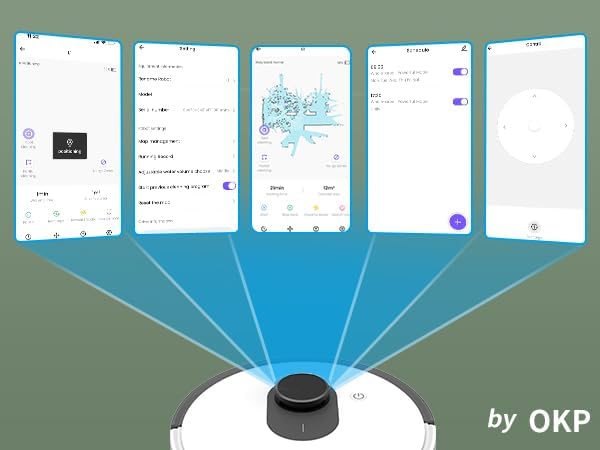
Figura 5.1: Various screenshots of the OKP Life mobile application, demonstrating features like device connection, settings, mapping, and remote control options.
5.5 Integrazzjoni tal-Kontroll tal-Vuċi
The L1 is compatible with Amazon Alexa and Google Assistant for hands-free operation.
- Ensure your robot is connected to the OKP Life App.
- Iftaħ l-app Alexa jew Google Home.
- Fittex għal the "OKP Life" skill/service and enable it.
- Link your OKP Life account.
- You can now use voice commands such as "Alexa, turn on L1" or "Hey Google, start cleaning with L1."

Figura 5.2: The OKP Life L1 robot vacuum on a rug, with an Amazon Echo Dot speaker and a smartphone displaying the control app. This illustrates the voice and app control capabilities.
6. It-Tħaddim tal-Vacuum Robot Tiegħek
6.1 Modi ta' Tindif u Navigazzjoni
The L1 utilizes advanced LDS laser radar and SLAM navigation to create accurate real-time maps of your home, optimizing cleaning routes and ensuring comprehensive coverage.

Figura 6.1: The OKP Life L1 robot vacuum navigating a living room, with blue lines illustrating its precision LiDAR mapping and navigation path.
Ir-robot joffri diversi modi ta’ tindif aċċessibbli permezz tal-app:
- Nadif Awtomatiku: Ir-robot inaddaf id-dar kollha tiegħek b'mod intelliġenti.
- Spot Clean: Cleans a specific area with concentrated effort.
- Tindif taż-Żona: Select specific rooms or areas on the map for cleaning.
- Tindif Skedat: Issettja ħinijiet speċifiċi biex ir-robot inaddaf awtomatikament.

Figura 6.2: The OKP Life L1 robot vacuum next to a smartphone displaying its app, which shows a floor plan map where a user can select a specific zone for vacuuming using the LiDAR sensor data.

Figura 6.3: The OKP Life L1 robot vacuum on a rug, with a smartphone displaying the app's features including No-Go Zones, Real-time Mapping, Recharge Resume, Partial Cleaning, and Spot Cleaning.
6.2 Qawwa tal-Ġbid u Spinta tat-Tapit
The L1 features a 4000Pa suction motor for effective cleaning. It automatically increases suction power when detecting carpets for deeper cleaning.

Figura 6.4: The OKP Life L1 robot vacuum moving from a hard floor to a carpet, illustrating its ability to boost suction power for effective carpet cleaning.
6.3 No-Go Zones and Invisible Walls
Use the OKP Life App to define "No-Go Zones" or "Invisible Walls" to prevent the robot from entering specific areas or protecting fragile items.

Figura 6.5: The OKP Life L1 robot vacuum demonstrating its ability to respect "No-Go Zones" (preventing entry into a pet area) and "Invisible Walls" (blocking access to a specific room entrance).
6.4 Evitar ta' Ostakli
Freemove 3.0 obstacle avoidance technology ensures the robot navigates smoothly around furniture, stairs, walls, and pets, minimizing collisions and preventing it from getting stuck.
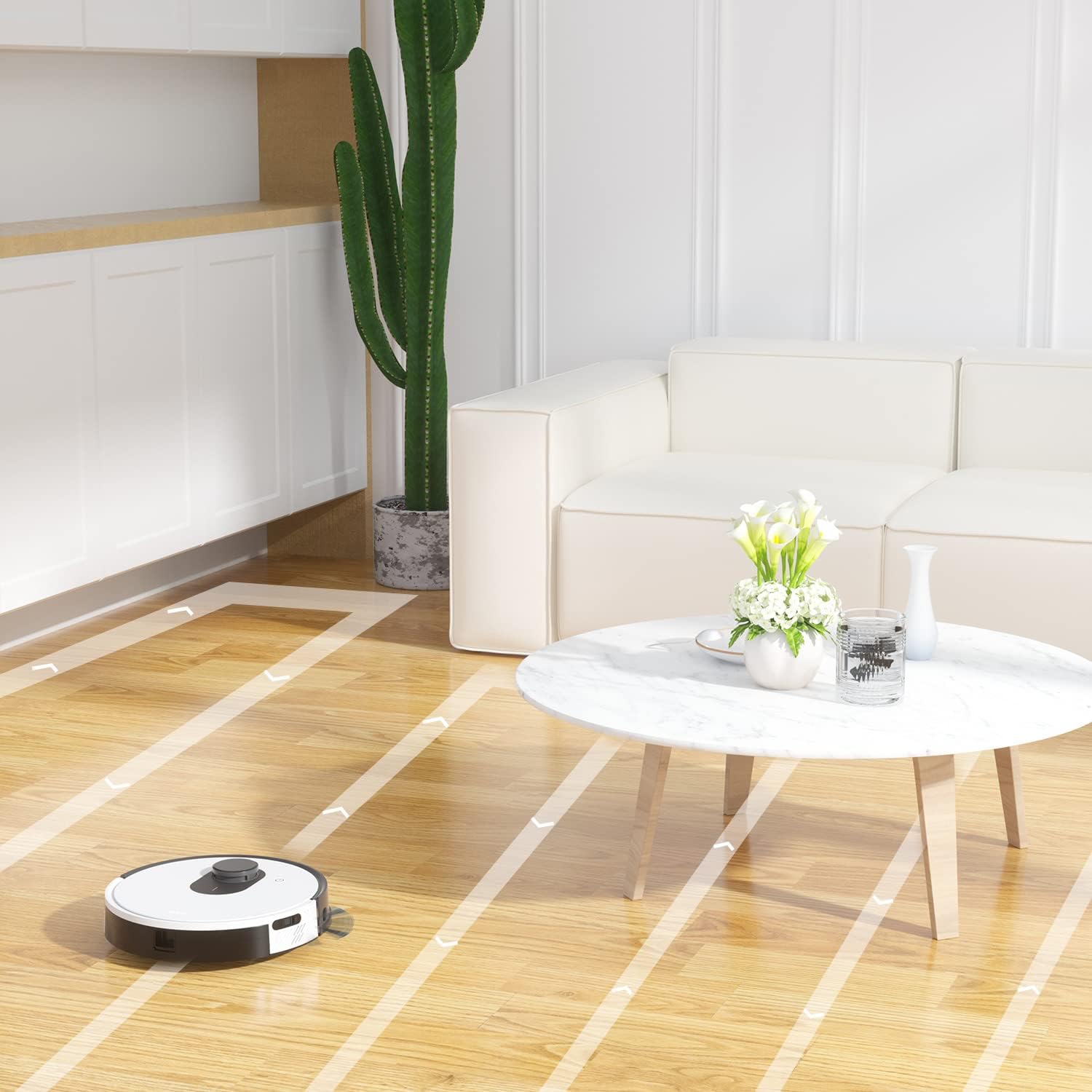
Figura 6.6: The OKP Life L1 robot vacuum cleaning a room, illustrating its efficient path planning and obstacle avoidance capabilities.
6.5 Ġestjoni tal-batterija
The robot features a 4000mAh battery, providing up to 200 minutes of continuous cleaning. When the battery is low or cleaning is complete, the robot automatically returns to its charging dock.
7. Manutenzjoni
Manutenzjoni regolari tiżgura prestazzjoni ottimali tal-vacuum cleaner robot tiegħek.
7.1 Tbattil tal-landa taż-żibel
Empty the dustbin after each cleaning cycle. Press the dustbin release button, remove the dustbin, and discard collected debris. Clean the filter inside the dustbin.
7.2 Cleaning the Main Brush Roll
The self-cleaning brush roll reduces hair tangles. However, periodically remove the main brush roll and use the provided cleaning tool to remove any tangled hair or debris.
7.3 Tindif tal-Pniezel tal-Ġenb
Check side brushes regularly for wear or damage. Remove any tangled hair or debris. Replace worn brushes as needed.
7.4 Tindif tas-Sensuri u l-Kuntatti tal-Iċċarġjar
Wipe the cliff sensors, bumper sensor, and charging contacts on both the robot and the charging dock with a clean, dry cloth to ensure proper function.
7.5 Sostituzzjoni tal-Filtru
Replace the HEPA filter every 3-6 months, or more frequently depending on usage, to maintain optimal suction performance.
8 Issolvi l-problemi
Irreferi għal din it-taqsima għal kwistjonijiet komuni u s-soluzzjonijiet tagħhom.
| Problema | Kawża Possibbli | Soluzzjoni |
|---|---|---|
| Robot ma jixgħelx. | Batterija baxxa; Mitfi l-iswiċċ tal-enerġija. | Iċċarġja r-robot; Kun żgur li s-swiċċ tal-enerġija jkun mixgħul. |
| Ir-robot ma jistax jirritorna lejn id-dock tal-iċċarġjar. | Il-moll tal-iċċarġjar imfixkel; Ir-Robot wisq 'il bogħod mill-moll. | Clear obstacles around the dock; Manually place robot near dock. |
| Il-qawwa tal-ġbid hija dgħajfa. | Il-kontenitur tat-trab huwa mimli; il-filtru huwa mblukkat; ix-xkupilja prinċipali mħabbta. | Vojta l-kontenitur tat-trab; Naddaf/ibdel il-filtru; Naddaf ix-xkupilja prinċipali. |
| Ir-robot jeħel spiss. | Loose cables/rugs; Small obstacles. | Clear floor of obstructions; Use No-Go Zones. |
| Problemi bil-konnessjoni tal-app. | Incorrect Wi-Fi (not 2.4GHz); Router issues. | Ensure 2.4GHz Wi-Fi; Restart router and robot; Re-pair in app. |
9. Speċifikazzjonijiet
| Karatteristika | Dettall |
|---|---|
| Brand | OKP Ħajja |
| Isem tal-Mudell | L1 Lidar Robot Vacuum |
| Karatteristika Speċjali | HEPA Filtration, Vacuums |
| Kulur | Abjad tas-Sħab |
| Dimensjonijiet tal-Prodott | 12"T x 12"W x 3.5"Għ |
| Komponenti Inklużi | Batterija |
| Ħajja tal-batterija | Sa 200 minuta (batterija ta' 4000mAh) |
| Kapaċità (Trab) | 500 Millilitru |
| Batteriji Meħtieġa | 1 batterija tal-jone tal-litju (inkluża) |
| Apparati Kompatibbli | Amazon Echo, Google Home, Smartphones |
| Piż tal-oġġett | 7 liri |
| Manifattur | OKP Ħajja |
| Numru tal-Mudell tal-Oġġett | L1 |
10. Garanzija u Appoġġ
For warranty information and technical support, please refer to the official OKP Life webis-sit jew ikkuntattja s-servizz tal-konsumatur tagħhom. Żomm l-irċevuta tax-xiri tiegħek bħala prova tax-xiri.
Appoġġ onlajn: Visit the official OKP Life websit għal FAQs, gwidi għas-soluzzjoni tal-problemi, u informazzjoni ta’ kuntatt.
Servizz tal-Klijent: Refer to your product packaging or the OKP Life websit għal dettalji speċifiċi ta' kuntatt tas-servizz tal-konsumatur.


