1. Prodott Aktarview
The Lian Li 8.8-inch Universal Screen is a versatile display designed to enhance any PC setup. It features a 60Hz IPS LCD with a 1920x480 resolution and 500-nit brightness, providing clear and vibrant visuals. This screen functions as an independent, USB-powered secondary display, freeing up GPU ports. It includes flexible mounting options and a customizable diffused ARGB lighting frame, all controllable via the L-Connect 3 software.
Karatteristiċi ewlenin:
- Dynamic Screen Control: 60Hz IPS LCD with 1920x480 resolution and 500-nit brightness, customizable through L-Connect 3.
- Mħaddma bl-USB: Connects via USB, operating as an independent monitor without using GPU display ports.
- Immuntar flessibbli: Adjustable mounting bracket for height and tilt, compatible with various PC setups.
- Diffused ARGB Frame: Built-in customizable ARGB lighting strip, synchronizable with L-Connect 3.
- Disinn kompatt: Sleek and space-efficient, ideal for gaming or workstation environments.
2. X'hemm fil-Kaxxa
- 8.8" Universal Screen (SM088W)
- Aċċessorji tal-Immuntar
- Kejbil tal-Konnessjoni USB
- Manwal ta' Istruzzjoni
3. Konfigurazzjoni u Installazzjoni
3.1 Installazzjoni Fiżika
The 8.8" Universal Screen offers versatile mounting options to integrate seamlessly into your PC case or external setup.

Figure 1: Lian Li 8.8-inch Universal Screen displaying system information.
- Bracket tal-immuntar: The screen comes with an adjustable mounting bracket that allows for both height and tilt adjustments, providing flexibility for various placements.
- Fan Mount Compatibility: The included bracket fits standard 120mm fan mounts, and an extra adapter bracket allows for easy installation on 140mm mounts.
- Immuntar adeżiv: The back of the screen supports flat-surface adhesive installation for placement on desk sides, walls, or display stands. It can also be installed directly on the blank area above the motherboard for a clean, integrated look.

Figure 2: Versatile interfaces and flexible installation options for the screen.

Figure 3: Precision tuning with flexible angles for screen adjustment.
Important Screw Warning: When installing the screen stand and the 8.8" Universal Screen, ensure you use the (H) Screws specified in the instruction manual. MA use the longer screw “g”, as this can damage the screen's PCB.
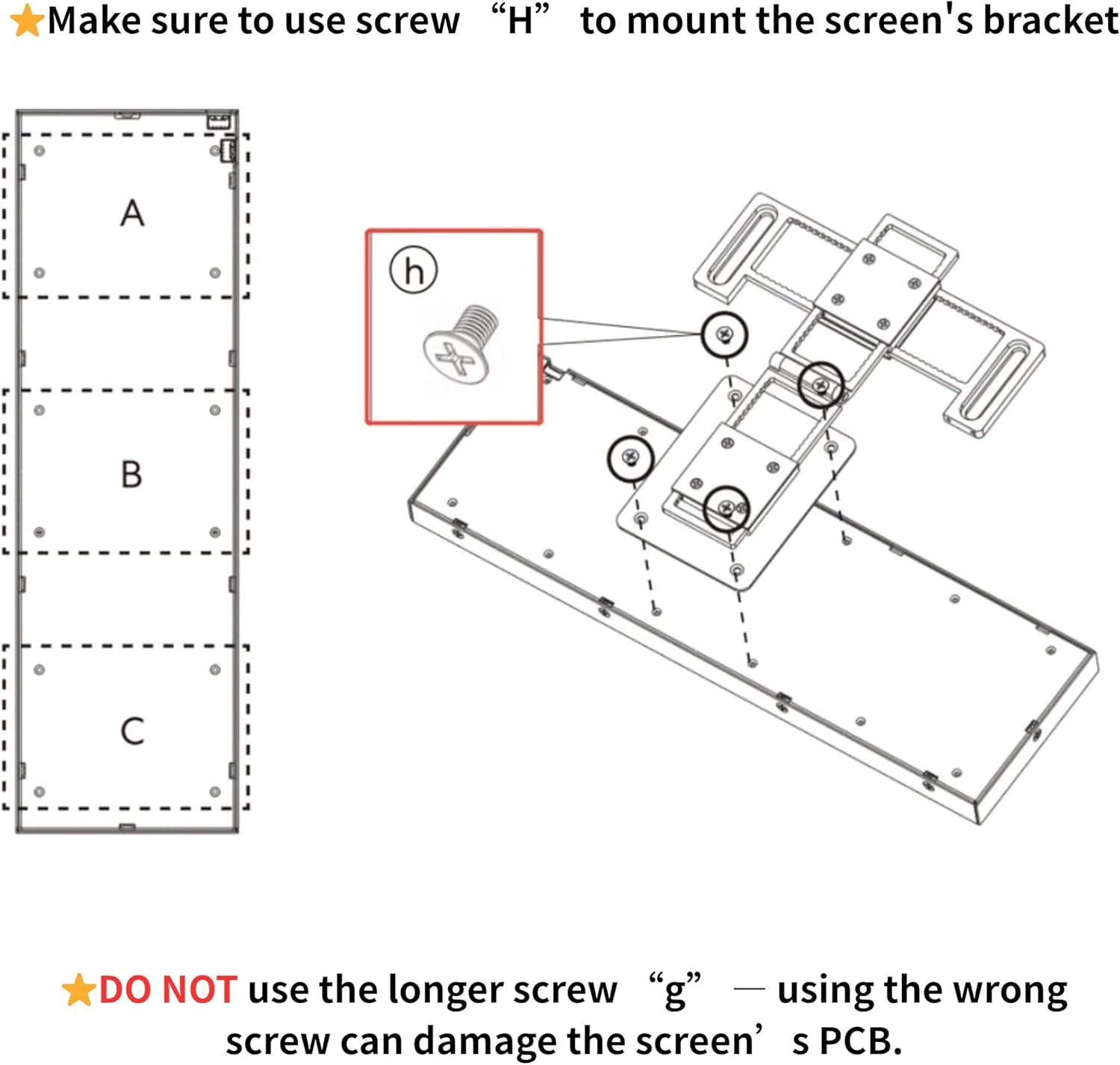
Figure 4: Correct screw usage for screen bracket mounting.
3.2 Installazzjoni tas-Softwer
To unlock the full potential of your 8.8" Universal Screen, install the L-Connect 3 software.
- Download the latest version of L-Connect 3 from the official Lian Li websit: lian-li.com/l-connect3/.
- Segwi l-istruzzjonijiet fuq l-iskrin biex tinstalla s-softwer.
- Connect the 8.8" Universal Screen to your PC via the provided USB cable. It connects either through a motherboard USB 9-pin header or a rear I/O Type-A port.
Video 1: Lian Li 8.8" LCD Screen Unboxing & First Impressions. This video demonstrates the initial setup and appearance of the Lian Li 8.8-inch Universal Screen.
Video 2: Lian Li - 8.8 Universal Screen product video. This video provides an overview tal-karatteristiċi u l-funzjonalità tal-prodott.
4. Istruzzjonijiet Operattivi
4.1 Dynamic Screen Control with L-Connect 3
L-Connect 3 software provides comprehensive control over your 8.8" Universal Screen, allowing for customization of content, lighting, and display settings.
- Content Display: Choose from built-in templates, create your own themes, or upload custom content in MP4, GIF, JPG, or PNG formats.
- Dawl ARGB: Customize the diffused ARGB lighting strip with a spectrum of colors and effects, and synchronize it with your entire system.
- Monitoraġġ tas-Sistema: Display real-time CPU/GPU metrics, system temperatures, and other vital information.

Figure 5: L-Connect 3 software interface for screen control and lighting effects setup.

Figure 6: Personalized themes and modular options in L-Connect 3.
4.2 USB-Powered Secondary Display
The screen functions as an independent secondary display. In L-Connect 3, you can enable a secondary screen mode to use it as a standalone display for video playback, system stats, animations, or live updates.

Figure 7: The 8.8-inch Universal Screen functioning as a USB-powered secondary display.
4.3 Offline Mode Clock
The display supports an offline mode that activates when the PC is turned off but still powered, showing the current time and date. This feature can be toggled on or off within L-Connect 3.

Figure 8: Screen displaying time and date in offline mode.
5. Manutenzjoni
To ensure the longevity and optimal performance of your Lian Li 8.8-inch Universal Screen, follow these general maintenance guidelines:
- Tindif: Use a soft, lint-free cloth to gently wipe the screen surface. For stubborn smudges, slightly dampNaddaf id-drapp bl-ilma jew b'tindif li ma jagħmilx ħsara lill-iskrin. Evita kimiċi ħarxa jew materjali li joborxu.
- Tneħħija tat-Trab: Regularly use compressed air to clear dust from the screen's frame and any ventilation areas to prevent overheating.
- Ġestjoni tal-Kejbil: Ensure all cables are neatly routed and not under excessive tension or pinched, which can lead to damage.
- Kundizzjonijiet Ambjentali: Operate the screen within recommended temperature and humidity ranges to prevent damage. Avoid direct sunlight or extreme temperatures.
6 Issolvi l-problemi
If you encounter issues with your 8.8" Universal Screen, refer to the following common troubleshooting steps:
- Screen Not Detected by L-Connect 3: If the screen is detected in Device Manager but not in L-Connect 3, try installing the latest beta version of the software from lian-li.com/l-connect3/.
- Kwistjonijiet tal-Wiri: Ensure the USB connection is secure and the cable is not damaged. Try connecting to a different USB port.
- Incorrect Screw Usage: If you experience issues after physical installation, verify that you used the correct (H) screws for the screen stand. Using the longer screw (g) can damage the screen's PCB.
- Glitches tas-softwer: Restart L-Connect 3 or your computer. Ensure your operating system and graphics drivers are up to date.
7. Speċifikazzjonijiet
| Karatteristika | Speċifikazzjoni |
|---|---|
| Dimensjonijiet tal-Prodott | 0.51 x 9.33 x 2.87 pulzieri |
| Piż tal-oġġett | 1.17 liri |
| Numru tal-Mudell tal-Oġġett | SM088W |
| Daqs tal-Wiri tal-Iskrin Permanenti | 8.8 Pulzier |
| Proporzjon ta' l-aspett | 16:9 |
| Riżoluzzjoni | 1920 x 480 Pixels |
| Luminożità tal-Immaġni | 500 candela_per_square_meter |
| Deskrizzjoni tal-wiċċ tal-iskrin | Matte |
8. Garanzija u Appoġġ
This product is manufactured by LIAN LI. For detailed warranty information and support, please visit the official Lian Li webis-sit jew ikkuntattja lis-servizz tal-konsumatur tagħhom direttament. Żomm il-prova tax-xiri tiegħek għal kwalunkwe talba ta' garanzija.


