1. Introduzzjoni
Thank you for choosing the WOLFANG WDV01 Portable DVD Player. This manual provides essential information for setting up, operating, and maintaining your device. Please read it carefully before use to ensure optimal performance and longevity of your product.
The WOLFANG WDV01 is designed for portable entertainment, featuring a 9.5-inch unit with a 7.5-inch HD swivel screen, stereo speakers, and a long-lasting battery. It supports various disc and file formats, making it versatile for different media content.
2. Kontenut tal-Pakkett
Ivverifika li l-oġġetti kollha huma preżenti fil-pakkett:
- WOLFANG WDV01 Portable DVD Player
- Kontroll mill-bogħod
- Manwal għall-Utent
- Ċarġer tal-AC
- Ċarġer tal-Karozza
- Cable AV 3-in-1

Image: Contents of the WOLFANG WDV01 package, showing the DVD player, remote control, user manual, AC charger, car charger, and AV cable.
3. Prodott Aktarview
3.1 Karatteristiċi ewlenin
- Wiri: 9.5-inch unit with 7.5-inch HD eye-protection screen.
- Rotazzjoni tal-iskrin: 270° horizontal rotation and 180° vertical flip for flexible viewangoli.
- Awdjo: Kelliema stereo integrati.
- Ħajja tal-batterija: Up to 6 hours of playback on a full charge.
- Għażliet tal-Enerġija: AC power adapter and car charger included.
- Funzjoni tal-memorja: Breakpoint memory resumes playback from the last stopped point.
- Kompatibilità tal-Midja: Supports DVD, SVCD, VCD, CD-R/RW discs.
- File Appoġġ għall-Format: JPEG, WMA, MPG, MP3, DIVX, VOB, AVI.
- Konnettività Esterna: USB port, SD card slot (max 32GB), AV input, AV output, 3.5mm headphone jack.
3.2 Layout tal-Apparat
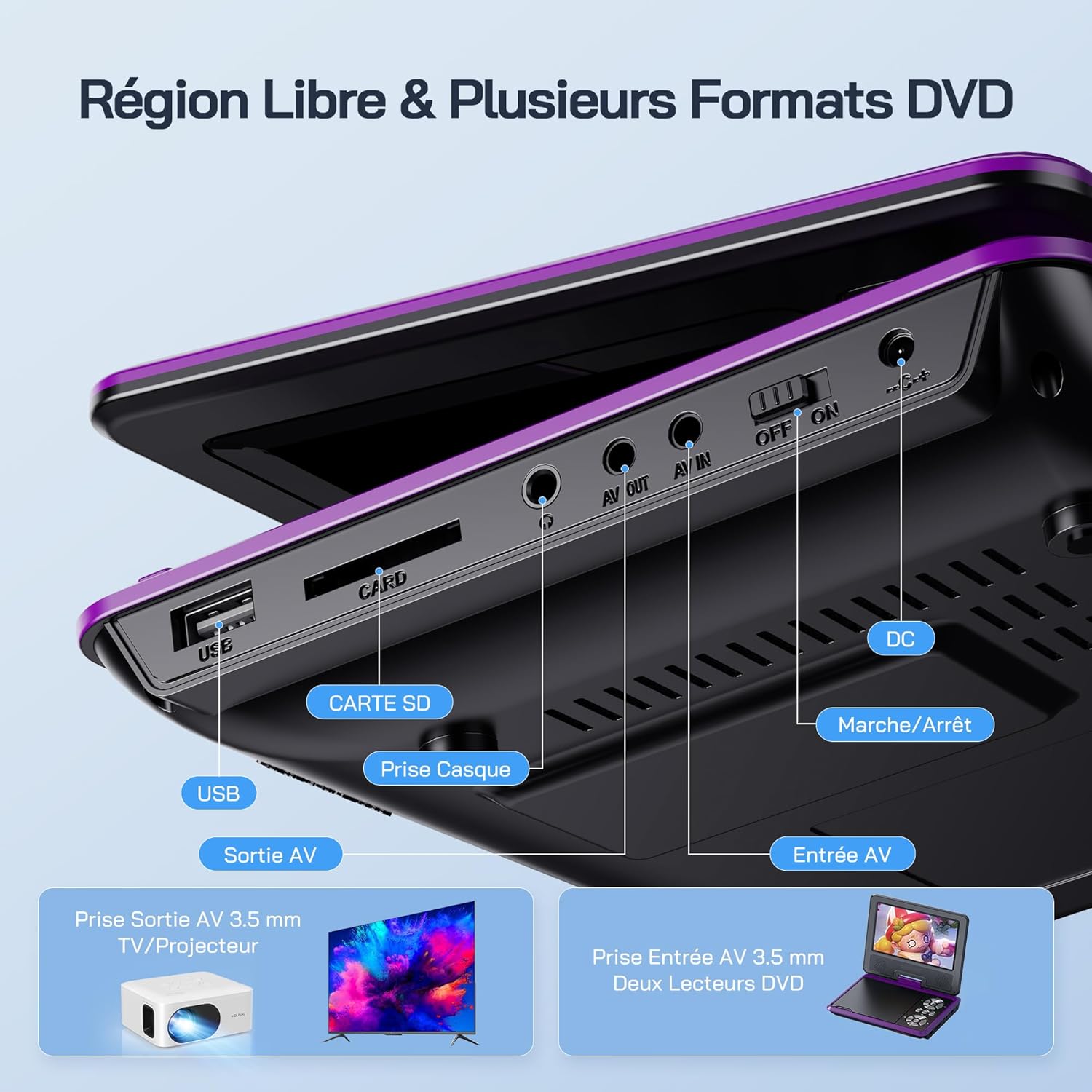
Immaġni: Dettaljata view of the side panel of the WOLFANG WDV01, highlighting the USB port, SD card slot, headphone jack, AV OUT, AV IN, DC power input, and ON/OFF switch.
- Port USB: Għall-konnessjoni ta' flash drives tal-USB.
- Slot tal-Kard SD: For inserting SD/MMC cards.
- Jack tal-headphone: Ħruġ awdjo ta' 3.5mm għall-headphones.
- AV OUT: Audio/Video output for connecting to a TV or projector.
- AV IN: Audio/Video input for connecting external devices or another DVD player.
- DC IN: Power input for AC adapter or car charger.
- Swiċċ mixgħul / mitfi: Kontroll tal-qawwa għall-apparat.
4. Setup
4.1 Iċċarġjar inizjali
Before first use, fully charge the device. Connect the AC charger to the DC IN port on the player and plug it into a wall outlet. The charging indicator light will illuminate. Once fully charged, the light may change color or turn off, depending on the model.
4.2 Tixgħel/Jitfi
To power on the device, slide the ON/OFF switch to the "ON" position. To power off, slide it to the "OFF" position.
4.3 Aġġustament tal-Iskrin
The screen can be rotated 270 degrees horizontally and flipped 180 degrees vertically. Adjust the screen to your preferred viewing angle. This feature is particularly useful for mounting in a car or for shared viewing.

Image: Illustration demonstrating the 270-degree rotation and 180-degree flip capabilities of the WOLFANG WDV01 screen.
5. Istruzzjonijiet Operattivi
5.1 Daqq ta' DVD/CD
- Iftaħ l-għatu tad-diska bil-mod.
- Place a compatible DVD or CD onto the spindle, label side up.
- Agħlaq il-qoxra tad-diska.
- The player will automatically detect and begin playback. If not, select "Disc" from the main menu.
Nota: This device supports DVD, SVCD, VCD, CD-R/RW discs. It is not compatible with 1080p, 4K, or Blu-ray discs.
5.2 Playing from USB/SD Card
- Daħħal flash drive USB fil-port USB jew kard SD fl-islott tal-kard SD.
- From the main menu, select "USB" or "SD" depending on your media source.
- Innaviga fil-fowlders u files using the control buttons or remote control.
- Agħżel dak mixtieq file (JPEG, WMA, MPG, MP3, DIVX, VOB, AVI) to begin playback.
Nota: Maximum supported Micro SD card capacity is 32GB. Video files should have a resolution up to 720x480. Image files should have a resolution up to 2650x1440.
5.3 Breakpoint Memory Function
The player automatically remembers the last playback position. When you power on the device again or re-insert the same disc/media, it will prompt you to resume playback from where you left off. This function may need to be activated in the system settings.

Image: Visual representation of the breakpoint memory feature, illustrating how the player can pause and resume video playback from the exact point of interruption.
5.4 Connecting to an External Display (TV/Projector)
Use the provided 3-in-1 AV cable to connect the player to a TV or projector.
- Connect one end of the AV cable to the AV OUT port on the DVD player.
- Connect the other end of the AV cable to the corresponding AV input ports (Yellow for Video, Red for Right Audio, White for Left Audio) on your TV or projector.
- Agħżel is-sors tad-dħul AV korrett fuq it-TV jew il-proġettur tiegħek.
- The player's screen content will now be displayed on the external screen.

Image: A WOLFANG WDV01 Portable DVD Player connected to a large television screen, displaying content for a family watching together, demonstrating the TV sync feature.
5.5 Connecting to Another DVD Player (AV IN)
The AV IN port allows you to connect another compatible device, such as a second DVD player, to display its content on the WOLFANG WDV01 screen.
- Connect one end of an AV cable to the AV OUT port of the external device.
- Connect the other end of the AV cable to the AV IN port on the WOLFANG WDV01.
- Switch the WOLFANG WDV01 to AV input mode (refer to the on-screen menu or remote control for this option).
6. Manutenzjoni
6.1 Tindif tal-Apparat
- Kun żgur li l-apparat ikun mitfi u splaggjat qabel it-tindif.
- Uża drapp ratba u niexef biex timsaħ il-parti ta' barra tal-plejer.
- For the screen, use a soft, lint-free cloth specifically designed for electronics screens. Do not use abrasive cleaners or solvents.
- To clean the disc lens, use a specialized DVD lens cleaning disc. Do not attempt to clean the lens manually.
6.2 Kura tal-Batterija
- Evita li tesponi l-apparat għal temperaturi estremi (sħan jew kesħin).
- If storing the device for an extended period, charge the battery to approximately 50% to prolong its lifespan.
- Tippruvax tissostitwixxi l-batterija interna int stess. Ikkuntattja l-appoġġ għall-klijenti jekk jinqalgħu problemi bil-batterija.
6.3 Ħażna
Store the player in a cool, dry place away from direct sunlight and moisture. Keep it in its original packaging or a protective case when not in use to prevent damage.
7 Issolvi l-problemi
| Problema | Kawża Possibbli | Soluzzjoni |
|---|---|---|
| Ebda qawwa | Battery drained, power adapter not connected, power switch off. | Charge the battery, ensure power adapter is securely connected, slide power switch to ON. |
| Diska mhux qed tindaqq | Incompatible disc format, disc dirty/scratched, disc inserted incorrectly. | Check disc compatibility (no Blu-ray/4K), clean disc, insert disc label side up. |
| L-ebda ħoss | Volume too low, headphones connected, audio settings incorrect. | Increase volume, disconnect headphones, check audio output settings. |
| L-ebda stampa fuq it-TV | AV cable loose, incorrect TV input selected. | Ensure AV cable is securely connected, select correct AV input on TV. |
| Il-karta USB/SD mhux rikonoxxuta | Incompatible format, card/drive damaged, incorrect file sistema. | Ensure media is formatted to FAT32, check for damage, try another USB/SD card. Max 32GB SD card. |
If the problem persists after trying these solutions, please contact WOLFANG customer support.
8. Speċifikazzjonijiet
| Karatteristika | Dettall |
|---|---|
| Brand | WOLFANG |
| Mudell | WDV01 |
| Daqs tal-Iskrin | 7.5 pulzieri |
| Daqs tal-Unità | 9.5 pulzieri (dijagonali) |
| Riżoluzzjoni tal-Iskrin | Sa 800 x 480 pixels |
| Kompatibilità tad-Diska | DVD, SVCD, VCD, CD-R/RW |
| File Appoġġ għall-Format | Video: AVI, MPG, MP3, DIVX, VOB; Audio: WMA, MP3; Image: JPEG |
| Appoġġ għall-Karta USB/SD | Max 32GB (Micro SD) |
| Video Resolution (USB/SD) | Sa 720 x 480 pixels |
| Image Resolution (USB/SD) | Sa 2650 x 1440 pixels |
| Ħajja tal-batterija | 4-6 sigħat |
| Piż tal-oġġett | 1100 Gramm |
| UPC | 850067892205 |
9. Garanzija u Appoġġ
9.1 Garanzija tal-Manifattur
The WOLFANG WDV01 Portable DVD Player comes with a Garanzija ta' 24-il xahar mill-manifattur mid-data tax-xiri. Din il-garanzija tkopri difetti fil-materjali u l-abbilità taħt użu normali. Ma tkoprix ħsara kkawżata minn użu ħażin, inċidenti, modifiki mhux awtorizzati, jew xedd u kedd normali.
Jekk jogħġbok żomm il-prova tax-xiri tiegħek għal pretensjonijiet ta' garanzija.
9.2 Appoġġ għall-Klijent
For any questions, technical assistance, or warranty claims, please contact WOLFANG customer support. Our team is available to assist you and aims to respond within 24 hours.
Contact information can typically be found on the official WOLFANG webis-sit jew permezz tal-pjattaforma tax-xiri tiegħek.


