Introduzzjoni
This user manual provides comprehensive instructions for the operation and maintenance of your LEMEGA MSY6 Stereo System. Please read this manual thoroughly before using the device to ensure proper functionality and to maximize your listening experience. The MSY6 combines a CD player, FM radio, Bluetooth audio streaming, USB player, and Aux-in capabilities, along with alarm and clock functions, all housed in an acoustic wood cabinet.
X'hemm fil-Kaxxa
- 1 x LEMEGA MSY6 CD Player FM Radio
- 1 x Kontroll mill-bogħod
- 1 x Mains Power Adapter
- 1 x Manwal għall-Utent
Prodott Overview
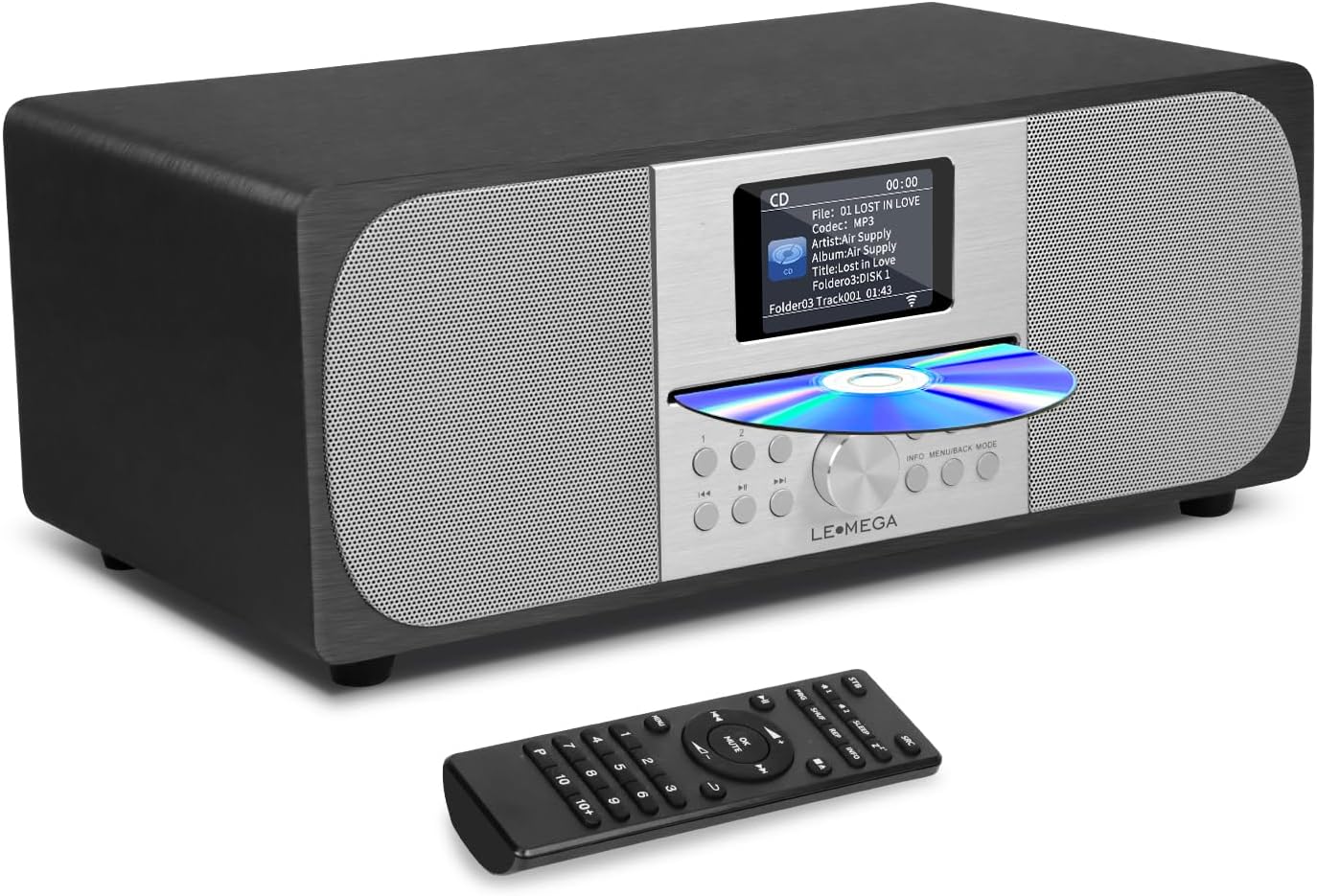
Figure 1: LEMEGA MSY6 Stereo System and Remote Control. The main unit features a central display, CD slot, and control buttons, flanked by speaker grilles. The remote control provides full functionality from a distance.
Setup
- Spakkjar: Neħħi l-komponenti kollha mill-imballaġġ bir-reqqa. Żomm l-imballaġġ għal trasport jew ħażna fil-futur.
- Pjazzament: Place the MSY6 on a stable, flat surface, away from direct sunlight, heat sources, and excessive moisture. Ensure adequate ventilation around the unit.
- Konnessjoni tal-Enerġija: Connect the supplied mains power adapter to the DC IN port on the rear of the MSY6. Plug the adapter into a suitable wall outlet.
- Antenna (FM): Extend the FM antenna fully for optimal radio reception. Adjust its position if reception is poor.
- Qawwa Inizjali Mixgħula: Press the Power button on the unit or remote control to turn on the system. The display will illuminate.
Istruzzjonijiet Operattivi
Operazzjoni Bażika
- Power On/Off: Agħfas il- Qawwa buttuna.
- Kontroll tal-Volum: Dawwar il- Buttuna tal-Volum on the unit or use the VOL +/- buttuni fuq il-remote.
- Għażla tas-Sors: Agħfas il- MODALITÀ or SRC button to cycle through CD, FM, Bluetooth, USB, and Aux-in modes.
- Siekta: Agħfas il- MUTE buttuna fuq il-kontroll remot.
Operazzjoni ta' CD Player
- Daħħal CD: Gently insert a CD into the CD slot with the label side facing up. The system will automatically switch to CD mode and begin playback.
- Play/Pawsa: Agħfas il- Play/Pawsa buttuna.
- Aqbeż il-binarji: Agħfas il- Track li jmiss/preċedenti buttuni (⏭ / ⏮).
- 'l quddiem/rewind malajr: Agħfas u żomm il- Track li jmiss/preċedenti buttuni.
- Waqqaf: Agħfas il- Waqqaf buttuna.
Operazzjoni tar-Radju FM
- Agħżel il-Modalità FM: Agħfas il- MODALITÀ or SRC button until FM mode is selected.
- Skanjar Awtomatiku: Agħfas u żomm il- Play/Pawsa buttuna biex tiskennja u ssalva awtomatikament l-istazzjonijiet FM disponibbli.
- Irfinar Manwali: Uża l- Track li jmiss/preċedenti buttuni biex tirfina l-frekwenza.
- Iffrankar ta' presets:
- Intuna l-istazzjon mixtieq.
- Agħfas u żomm il- PROGRAMM button (or similar preset button).
- Uża l- Track li jmiss/preċedenti buttuni biex tagħżel numru preset (1-20).
- Agħfas OK or PROGRAMM mill-ġdid biex tikkonferma.
- Filwaqt li jfakkru l-Presets: Press the preset number buttons (1-9) on the remote or use the PROGRAMM buttuna biex tiċċaqlaq bejn l-istazzjonijiet salvati.
Operazzjoni Bluetooth
- Agħżel il-Modalità Bluetooth: Agħfas il- MODALITÀ or SRC button until "Bluetooth" is displayed. The system will enter pairing mode.
- Tqabbil ta' Apparat:
- On your Bluetooth-enabled device (smartphone, tablet, etc.), enable Bluetooth.
- Fittex għal available devices. "LEMEGA MSY6" should appear in the list.
- Select "LEMEGA MSY6" to pair. Once connected, the display will indicate a successful connection.
- Bluetooth Headphone Connection (Exclusive to LEMEGA):
- Kun żgur li l-headphones Bluetooth tiegħek jinsabu fil-modalità ta' tqabbil.
- On the MSY6, navigate to the Bluetooth menu (refer to the display for specific menu options).
- Initiate a search for Bluetooth headphones.
- Select your headphones from the list to connect. Note: Headphones must support simple pairing or automatic handshake.
- Kontroll tal-daqq: Use the MSY6's controls or your connected device to play, pause, skip tracks, and adjust volume.
USB & Aux-in Operation
- Daqq USB: Insert a USB flash drive into the USB port. The system will automatically switch to USB mode and begin playing compatible audio files (e.g., MP3). Use the playback controls as with CD mode.
- Aux-in: Connect an external audio device (e.g., MP3 player, smartphone) to the AUX IN port using a 3.5mm audio cable (not supplied). Select AUX mode using the MODALITÀ or SRC button. Control playback from your external device.
Alarms, Clock & Sleep Timer
- Issettjar tal-Arloġġ: Access the system settings menu (usually via MENU or INFO button) to set the time and date.
- Allarmi Doppju: The MSY6 supports two independent alarms.
- Navigate to the Alarm settings in the menu.
- Set the alarm time, source (FM radio or buzzer), and frequency (daily, weekdays, weekends).
- Adjust alarm volume.
- Timer ta 'l-Irqad: Agħfas il- L-IRQAD button on the remote control repeatedly to cycle through sleep timer durations (e.g., 15, 30, 60, 90 minutes, OFF). The system will automatically turn off after the selected time.
Display & EQ Settings
- Display bil-kulur: The 2.4" full-color display shows radio station information, track details, and system settings.
- Ekwalizzatur (EQ): Access the EQ settings via the menu to customize the audio output. Choose from preset EQ modes or manually adjust bass and treble levels to suit your preference for music or speech.
Manutenzjoni
- Tindif: Uża drapp artab u niexef biex tnaddaf il-barra tal-unità. Tużax prodotti tat-tindif li joborxu, xama', jew solventi.
- CD Care: Immaniġġja s-CDs mit-truf tagħhom. Naddaf is-CDs maħmuġin b'ċarruta ratba u mingħajr suf, billi timsaħ miċ-ċentru 'l barra.
- Ventilazzjoni: Kun żgur li l-fetħiet tal-ventilazzjoni ma jkunux imblukkati biex tevita sħana żejda.
- Ħażna: Jekk se taħżen l-unità għal perjodu estiż, skonnettjaha mis-sokit tal-enerġija u aħżenha f'post frisk u niexef.
Issolvi l-problemi
| Problema | Kawża Possibbli | Soluzzjoni |
|---|---|---|
| Ebda qawwa | Power adapter not connected; Power outlet faulty. | Kun żgur li l-adapter tal-enerġija huwa konness sew u pplaggjat f'sokit li jaħdem. |
| L-ebda ħoss | Volum baxx wisq; Mute attivat; Sors mhux korrett magħżul. | Increase volume; Deactivate mute; Select correct audio source (CD, FM, BT, USB, AUX). |
| Akkoljenza fqira tal-FM | L-antenna mhux estiża jew pożizzjonata b'mod korrett. | Fully extend and adjust the position of the FM antenna. Try relocating the unit. |
| Nuqqas ta' pairing Bluetooth | Device too far; Bluetooth not enabled on device; MSY6 not in pairing mode. | Ensure devices are within range; Enable Bluetooth on your device; Put MSY6 into Bluetooth pairing mode. |
| Is-CD jaqbeż jew ma jdoqqx | Is-CD hija maħmuġa jew mibruxa; is-CD imdaħħla ħażin. | Clean the CD; Ensure CD is inserted label side up. Try a different CD. |
Speċifikazzjonijiet
| Karatteristika | Dettall |
|---|---|
| Dimensjonijiet tal-Prodott (L x W x H) | 14 x 8 x 5.5 pulzieri |
| Piż tal-oġġett | 8 liri |
| Numru tal-Mudell | MSY6 |
| Brand | LEMEGA |
| Teknoloġija tal-Konnettività | Auxiliary, Bluetooth, Infrared, USB |
| Kulur | Ballut iswed |
| Tip ta' Kelliem | Stereo |
| Qawwa tal-Ħruġ | 100W |
| Wiri | 2.4" Full Color Display |
Garanzija u Appoġġ
LEMEGA products are designed and manufactured to the highest quality standards. For information regarding warranty coverage and customer support, please refer to the warranty card included with your product or visit the official LEMEGA website. You may also contact LEMEGA customer service directly for assistance with product registration, troubleshooting, or service inquiries.
LEMEGA US Seller: LEMEGA US


