1. Introduzzjoni
Thank you for choosing the WIWU Magnetic Detachable Keyboard Case. This product is designed to enhance your iPad experience by providing a versatile keyboard, a precise trackpad, and robust protection. This manual provides essential information for setup, operation, and maintenance of your new keyboard case.

Image 1.1: The WIWU Keyboard Case with an iPad, illustrating its magnetic detachment and adjustable stand capabilities.
2. Kompatibilità
Din il-kaxxa tat-tastiera hija ddisinjata speċifikament għall-mudelli tal-iPad li ġejjin:
- iPad Air 13-inch (M2 2024, M3 2025)
- iPad Pro 12.9-inch (3rd Gen 2018, 4th Gen 2020, 5th Gen 2021, 6th Gen 2022)
Importanti: Please verify your iPad model before use to ensure proper fit and functionality. This case is le compatible with iPad Pro 13-inch (M4) 2024.

Image 2.1: Visual guide to compatible iPad models, highlighting specific generations and sizes.
3. Kontenut tal-Pakkett
- WIWU Magnetic Detachable Keyboard Case
- Cable tal-Iċċarġjar tal-USB-C
- Manwal għall-Utent
4. Setup
4.1 It-twaħħil tal-iPad mal-Kaxxa
- Align your iPad with the protective back panel of the case.
- The strong magnets will securely attach the iPad to the case, ensuring full-edge coverage and protection.
4.2 Konnessjoni tat-Tastiera permezz tal-Bluetooth
- Kun żgur li t-tastiera hija ċċarġjata (ara t-taqsima 4.3).
- Ixgħel it-tastiera billi tuża l-iswiċċ tal-enerġija li jinsab fuq il-ġenb.
- Fuq l-iPad tiegħek, mur fuq Settings > Bluetooth.
- Enable Bluetooth. The iPad will search for available devices.
- Select "WIWU Keyboard" (or similar name) from the list of devices to pair.
- Once paired, the keyboard is ready for use. Bluetooth 5.3 ensures stable and lag-free connectivity.
4.3 Iċċarġjar tat-Tastiera
The keyboard features a built-in rechargeable battery. Use the provided USB-C cable to charge the keyboard.
- Connect the USB-C end of the cable to the keyboard's charging port.
- Qabbad it-tarf l-ieħor ma' adapter tal-enerġija USB (mhux inkluż) jew mal-port USB tal-kompjuter.
- Ċarġ sħiħ jieħu madwar sagħtejn u jipprovdi sa 100 sigħat ta' użu kontinwu.
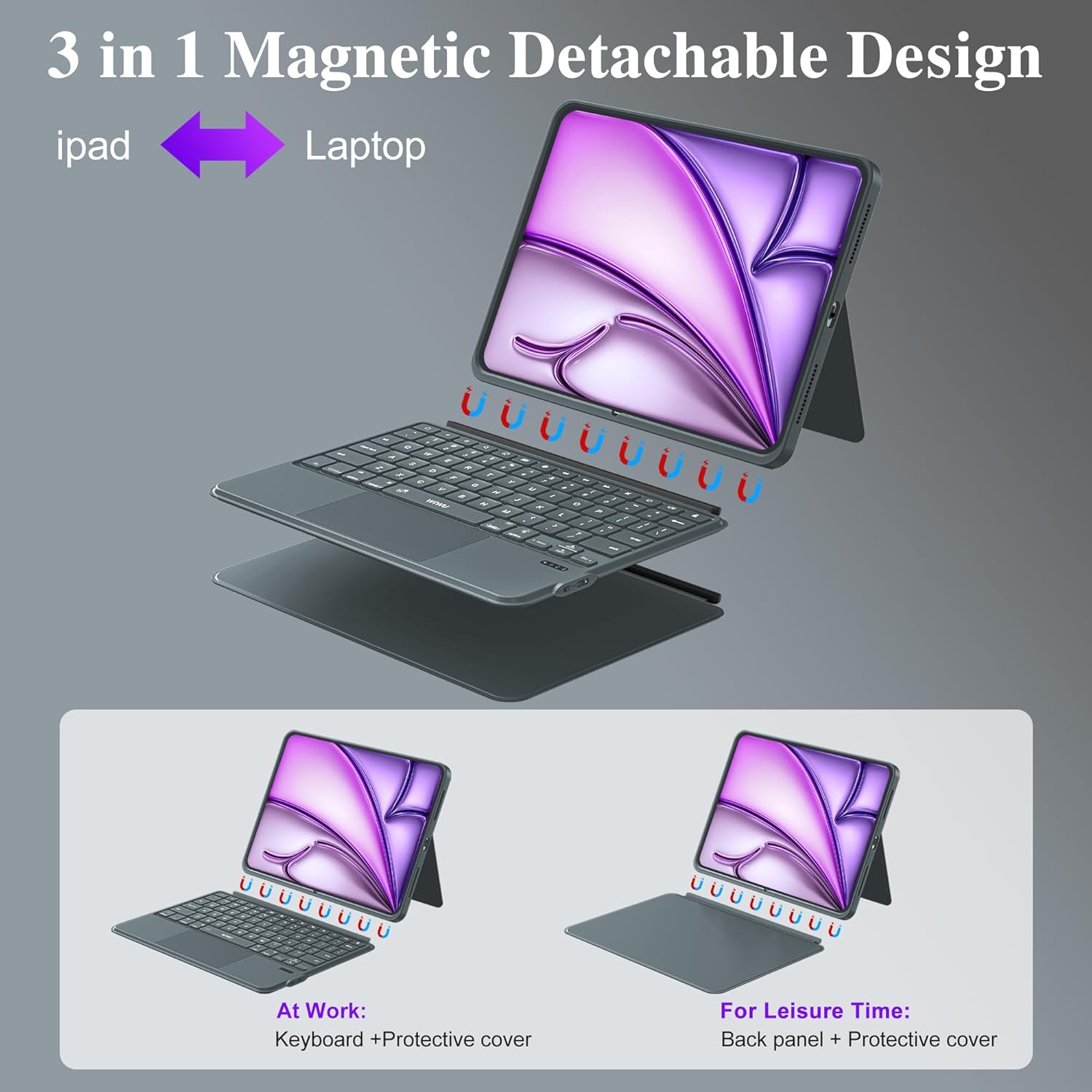
Image 4.1: The keyboard's charging port and indicators for Bluetooth connectivity and battery life.

Image 4.2: The magnetic detachment feature, allowing the keyboard to be separated from the iPad case.
5. Istruzzjonijiet Operattivi
5.1 Stand aġġustabbli
The case features a foldable stand that allows for angle adjustments from 0° to 170°. This provides multiple viewing angles for typing, watching videos, or video calls.
5.2 Ċwievet b'Dawl ta' Wara
The keyboard includes 7 RGB color backlit keys for comfortable typing in various lighting conditions.
- Agħfas il- Bozza tad-Dawl key to cycle through backlight colors.
- Agħfas Fn + Bozza tad-Dawl to adjust backlight brightness levels.
5.3 Keyboard Shortcuts
The keyboard is equipped with dedicated iPadOS shortcut keys to enhance productivity. These include quick access to screenshot, return to desktop, and other multimedia functions.
5.4 Ġesti tat-Trackpad
The integrated multi-touch trackpad supports 18 intuitive gestures for navigation, clicking, and app switching, similar to a laptop experience. It also features palm rejection technology.

Image 5.1: Common single-finger trackpad gestures for iPadOS systems above iOS 14.5.

Image 5.2: Details of the keyboard features, including backlit keys and iPadOS shortcuts.
5.5 Tibdil bejn il-Modalitajiet
The magnetic design allows for easy transformation between three modes:
- Modalità tal-Laptop: iPad attached to the keyboard for typing and trackpad use.
- Modalità Pillola: Keyboard detached, using only the protective case for tablet functionality.
- ViewModalità ta' tħaddim: Keyboard detached, using the protective case's adjustable stand for media consumption.
6. Manutenzjoni
- Tindif: Wipe the case and keyboard with a soft, damp drapp. Evita kimiċi ħarxa jew materjali li joborxu.
- Ħażna: Store the keyboard case in a cool, dry place when not in use.
- Protezzjoni: The PU leather exterior and honeycomb structure back panel provide protection against drops and scratches. Avoid exposing the device to extreme temperatures or direct sunlight.

Image 6.1: Features highlighting the case's durability and design, including the adjustable stand and protective materials.
7 Issolvi l-problemi
- It-tastiera mhux qed tikkonnettja: Ensure Bluetooth is enabled on your iPad and the keyboard is powered on and charged. Try re-pairing the device in iPad's Bluetooth settings.
- Iċ-ċwievet ma jirrispondux: Check if the keyboard is charged. If the issue persists, try restarting both the keyboard and your iPad.
- It-trackpad mhux qed jaħdem: Ensure the keyboard is connected via Bluetooth. Verify that trackpad support is enabled in your iPad's accessibility settings.
- Id-dawl ta' wara mhux qed jaħdem: Press the backlight key or Fn + backlight key to ensure it's not turned off or at the lowest brightness setting.
8. Speċifikazzjonijiet
| Karatteristika | Dettall |
|---|---|
| Numru tal-Mudell | MK-005 |
| Konnettività | Bluetooth 5.3 |
| Ħajja tal-batterija | Sa 100 sigħat (użu kontinwu) |
| Ħin tal-Iċċarġjar | Approximately 2 hours (USB-C) |
| Tip taċ-ċavetta | Scissor-switch keys, 1mm travel |
| Dawl ta' wara | 7-il kulur RGB |
| Trackpad | Multi-Touch with 18 gesture controls, palm rejection |
| Stand aġġustabbli | 0° sa 170° |
| Materjal | Skin-friendly PU Leather, Honeycomb Structure Back Panel |
| Dimensjonijiet tal-Prodott | 12.56 x 10.24 x 1.02 pulzieri |
| Piż tal-oġġett | 2.31 liri |
9. Garanzija u Appoġġ
For warranty information and technical support, please refer to the official WIWU webis-sit jew ikkuntattja lill-bejjiegħ tiegħek. Żomm l-irċevuta tax-xiri tiegħek għal talbiet ta' garanzija.


