1. Introduzzjoni
The Ulefone Armor 34 is a robust 5G rugged smartphone designed for demanding environments. It features a large battery, advanced camera system, powerful processor, and a durable construction to withstand harsh conditions. This manual provides essential information to help you get the most out of your device.
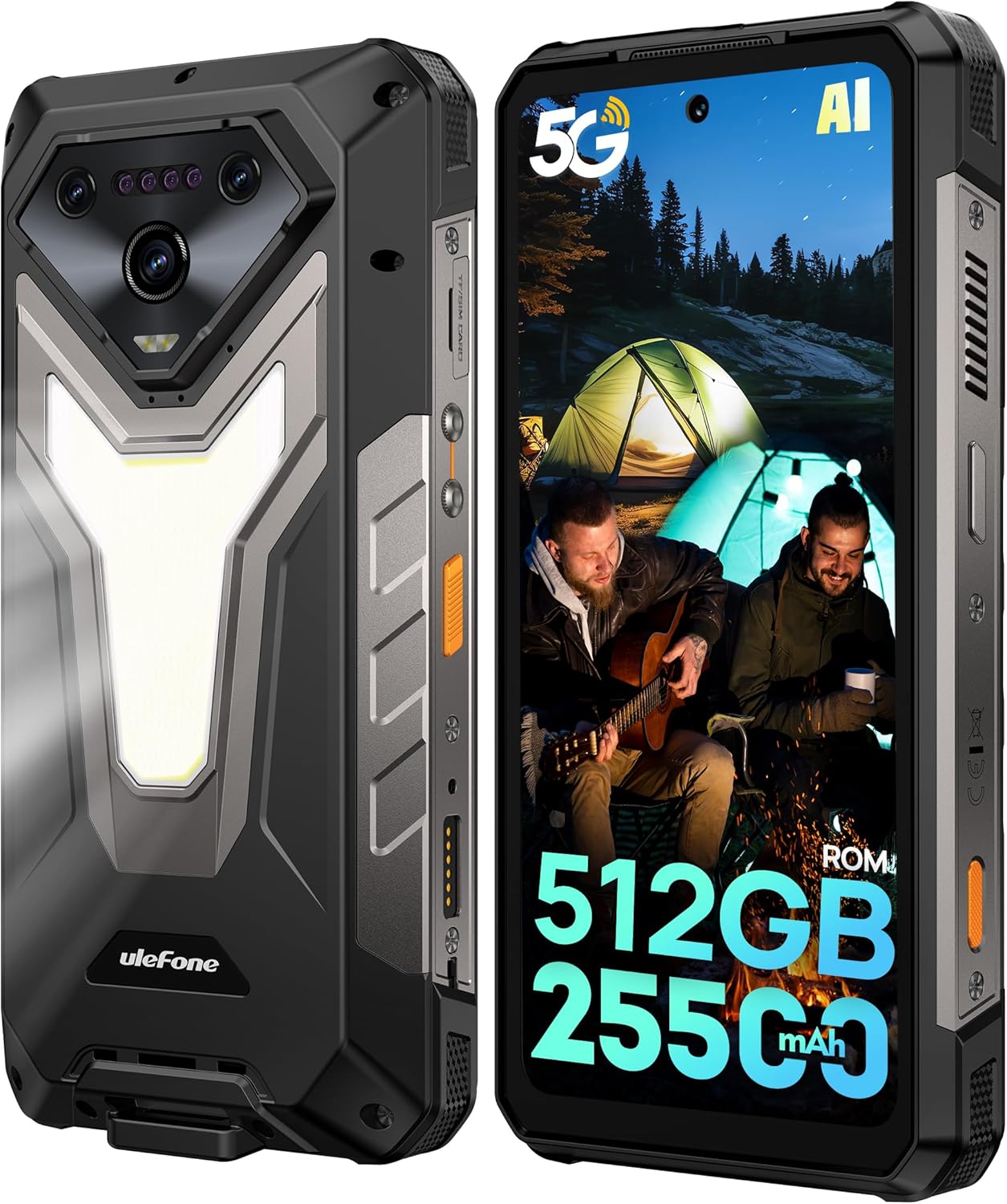
Immaġni: Quddiem u wara view of the Ulefone Armor 34 5G Rugged Phone, highlighting its robust design and rear LED light panel.
2. X'hemm fil-Kaxxa
Upon unboxing your Ulefone Armor 34, please verify that all the following items are included:
- Ulefone Armor 34 5G Rugged Phone
- 66W Power Charger
- Kejbil tad-Dejta USB-C
- Manwal tal-Utent b'ħafna lingwi
- Charging Instruction Card
- Safety Prompt Card
- Karta ta' Garanzija
- Protettur tal-iskrin tal-ħġieġ ittemprat
- Lanyard
- SIM Needle
Video: Ulefone Armor 34 Pro Unboxing. This video demonstrates the contents of the retail package and the initial unboxing experience.
3. Setup
3.1 Inserting SIM/SD Card
- Sib it-trej tal-kard SIM fuq il-ġenb tat-telefon.
- Insert the provided SIM needle into the small hole next to the tray to eject it.
- Poġġi l-kard(s) Nano-SIM u/jew il-kard microSD tiegħek fit-trej skont id-dijagramma.
- Erġa' daħħal it-trej fit-telefon bir-reqqa, waqt li tiżgura li jkun laħlaħ mal-qafas tal-apparat.
3.2 Tixgħel/Jitfi
- To power on: Press and hold the Power button until the Ulefone logo appears.
- Biex titfi: Agħfas u żomm il-buttuna tal-Enerġija, imbagħad agħżel "Itfi" mill-għażliet.
3.3 Setup Inizjali
Follow the on-screen prompts to complete the initial setup, including language selection, Wi-Fi connection, Google account login, and security settings.
4. Istruzzjonijiet Operattivi
4.1 Wiri
The Armor 34 features a 6.95-inch FHD+ display with a 120Hz refresh rate, protected by Corning Gorilla Glass 5. Adjust brightness and display settings via the Settings menu.

Image: The Ulefone Armor 34 displaying vibrant content on its 6.95-inch FHD+ 120Hz screen.
4.2 Sistema tal-Kamera
The phone is equipped with a versatile camera setup:
- Kameras ta' wara: 50MP Primary Sensor, 50MP Ultra-wide Sensor (117.3° FOV), 64MP Night Vision Camera with 4 IR LEDs.
- Kamera ta' quddiem: 32MP għal selfies u sejħiet bil-vidjo.
Access various camera modes like Night Vision, Photo, Video, and more through the camera application.

Immaġni: Dettaljata view of the Ulefone Armor 34's triple rear camera module, including the 64MP Night Vision camera with IR LEDs, and examples of photos taken with the device.
4.3 Batterija u Iċċarġjar
The Armor 34 features a massive 25500mAh battery, supporting up to 10 days of standby time. It supports 66W fast charging for quick power-ups and 10W reverse charging, allowing the phone to act as a power bank for other devices.

Image: Visual representation of the Ulefone Armor 34's 25500mAh battery capacity, 66W fast charging, and 10W reverse charging capabilities, showing it charging a drone.
4.4 Ruggedness Features
The Armor 34 is built to endure. It is certified with IP68/IP69K ratings for water and dust resistance, and MIL-STD-810H for drop resistance, ensuring durability in challenging environments.
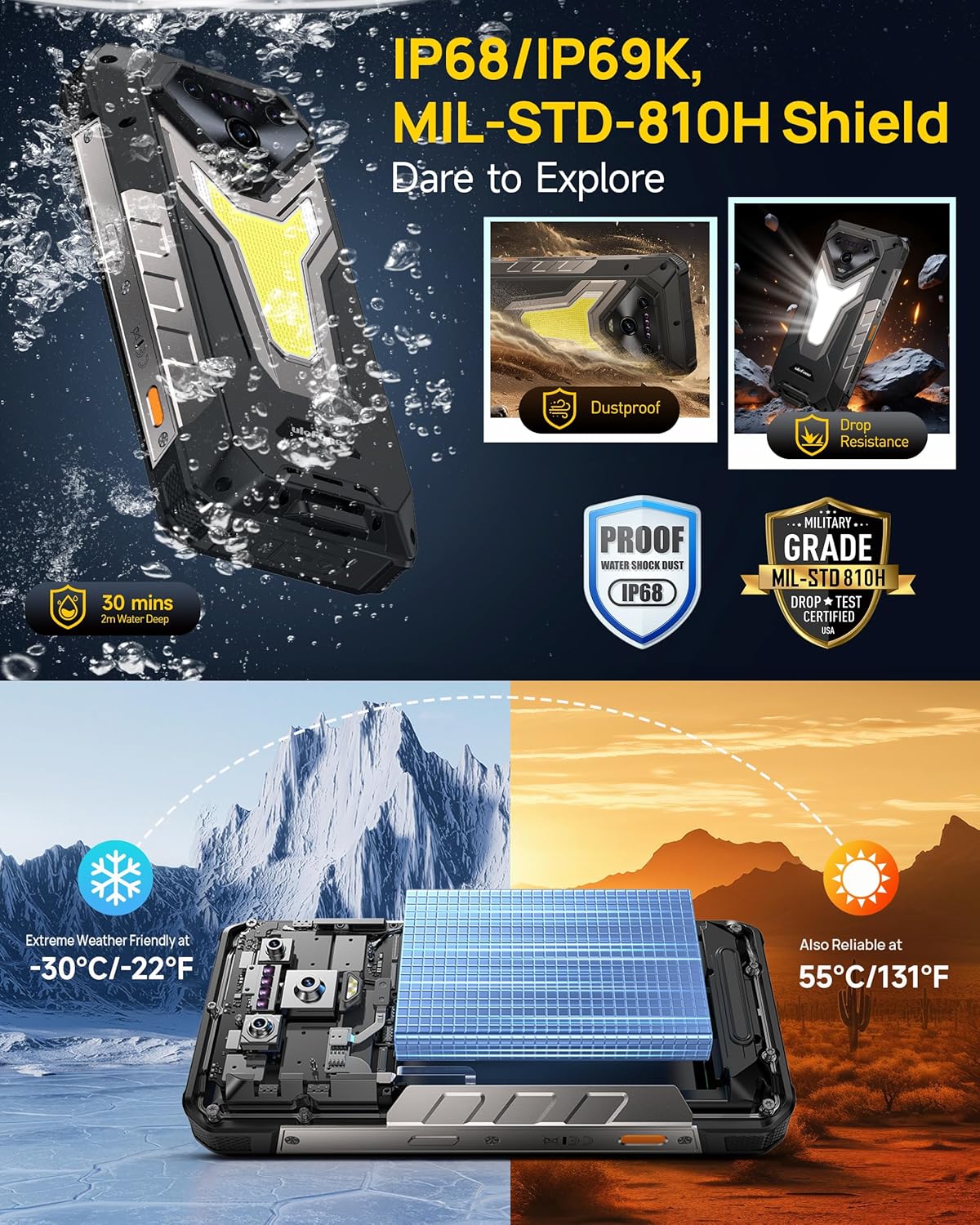
Image: The Ulefone Armor 34 submerged in water and being dropped, illustrating its IP68/IP69K and MIL-STD-810H certifications for water, dust, and drop resistance.
4.5 Versatile LED and Warning Lights
The device includes an 1100 Lumens camping light for illumination and red and blue warning lights for emergencies. These can be activated and controlled via the phone's interface.
Video: Ulefone Armor 34 Pro Versatile LED Light & Warning Light. This video demonstrates the functionality of the phone's integrated camping light and emergency warning lights.
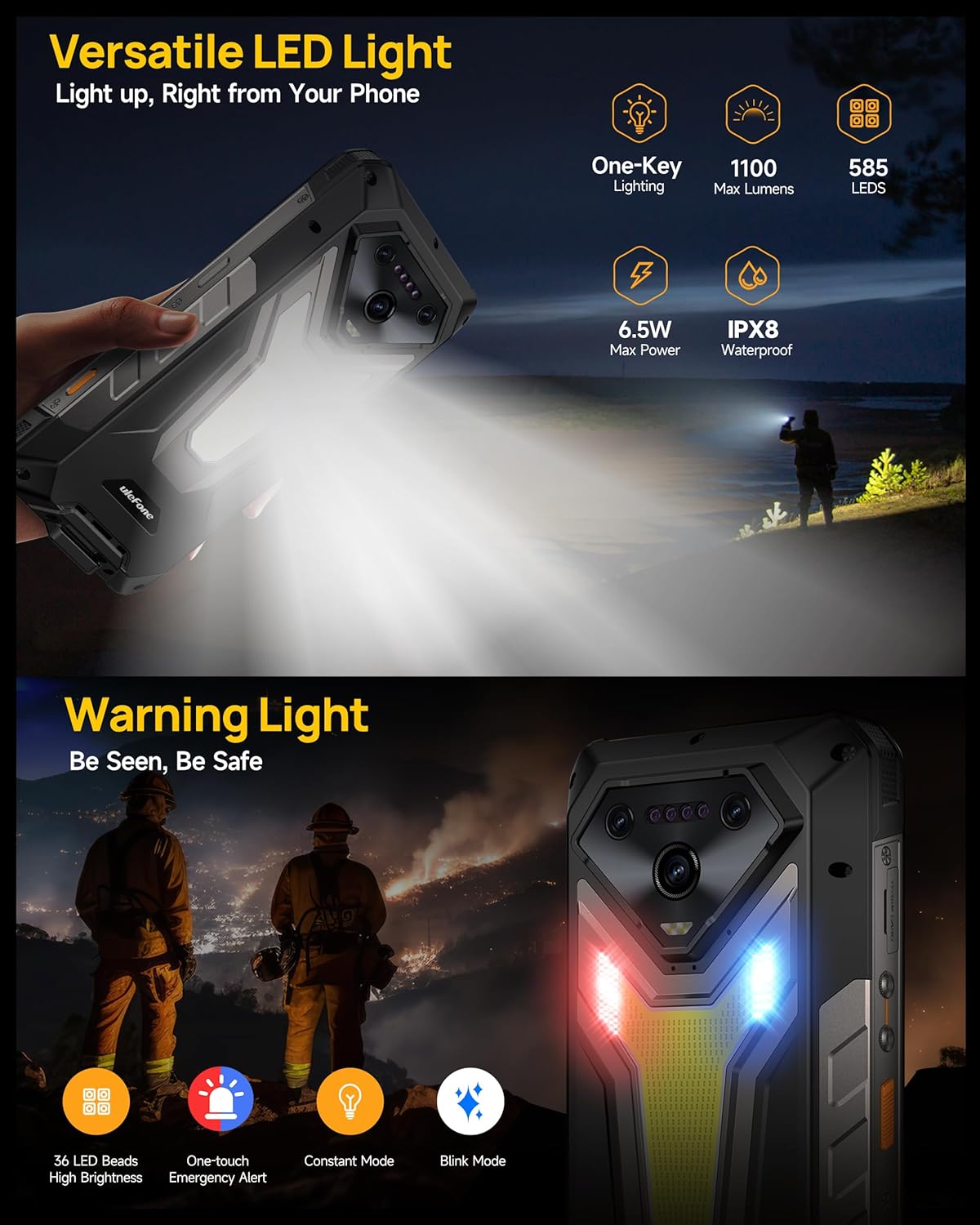
Image: The Ulefone Armor 34 showcasing its powerful 1100 Lumens camping light and the red and blue warning lights in action.
4.6 uSmart Expansion Connector
The uSmart Expansion Connector allows for integration with various external accessories, such as endoscopes and microscopes, enhancing the phone's utility for specialized tasks. These accessories are sold separately.

Image: A close-up of the Ulefone Armor 34's uSmart Expansion Connector, demonstrating its use with an external endoscope accessory.
Video: Ulefone Armor 34 Pro Accessory Ecosystem Showcase. This video highlights various accessories compatible with the uSmart Expansion Connector, such as the Molle Holster, Endoscope, and Microscope.
4.7 Karatteristiċi tal-AI
Powered by the MediaTek Dimensity 7300 and MediaTek NPU 655, the Armor 34 offers enhanced AI performance, including AI Chat with Google Gemini and an AI Pet feature for interactive experiences.
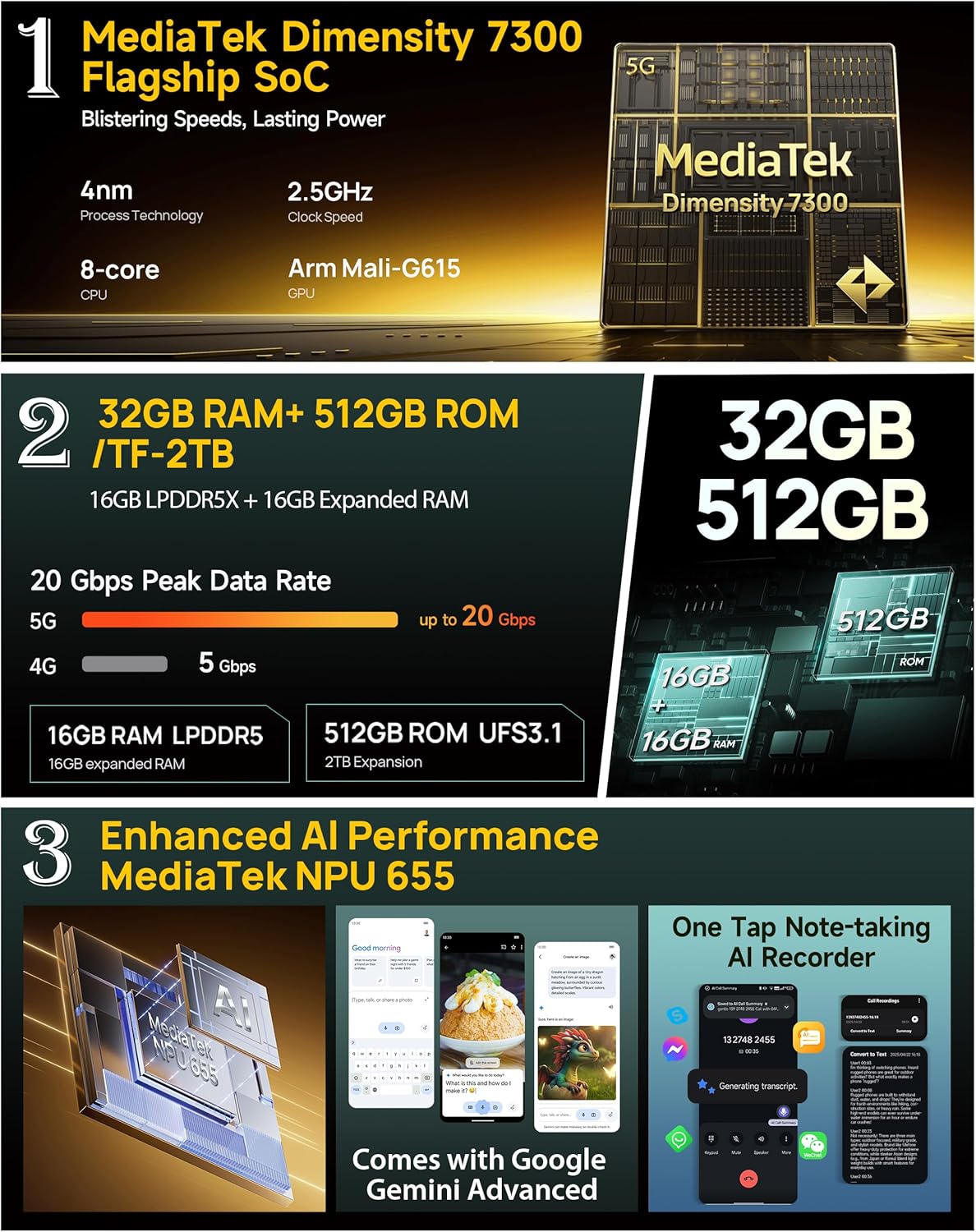
Image: Infographic detailing the MediaTek Dimensity 7300 processor, 32GB RAM, 512GB ROM, and enhanced AI performance with MediaTek NPU 655, including Google Gemini Advanced integration.
5. Speċifikazzjonijiet
| Karatteristika | Speċifikazzjoni |
|---|---|
| Brand | Ulefone |
| Isem tal-Mudell | Armatura 34 |
| Sistema Operattiva | Android 15 |
| Daqs tal-Memorja RAM Installata | 32 GB (16GB + 16GB adjustable) |
| Kapaċità tal-Ħżin tal-Memorja | 512 GB (espandibbli sa 2TB) |
| Veloċità tas-CPU | 2.5 GHz (MediaTek Dimensity 7300) |
| Daqs tal-Iskrin | 6.95 Pulzier |
| Riżoluzzjoni | 4K |
| Riffriskar Rata | 120 Hz |
| Trasportatur Wireless | Jinfetaħ |
| Kapaċità tal-batterija | 25500mAh |
| Iċċarġjar | Iċċarġjar Mgħaġġel ta' 66W, Iċċarġjar Invers ta' 10W |
| Kamera ta' wara | 64MP Night Vision + 50MP Primary + 50MP Ultra-wide |
| Kamera ta' Quddiem | 32MP |
| Tħarbit | IP68/IP69K, Ċertifikat MIL-STD-810H |
| Konnettività | Global 5G Network, Dual SIM Dual Standby, Wi-Fi 6E |
| Karatteristiċi oħra | 1100LM LED & Warning Light, uSmart Expansion Connector, Widevine L1, IR Blaster, Fingerprint Unlock, NFC, Headset-Free FM Radio, Custom Key, Outdoor Toolbox, 3-Card Slot, GPS + GLONASS + Beidou + Galileo, Gloves Mode |
6. Manutenzjoni
- Tindif: Uża artab, damp cloth to clean the phone. Avoid harsh chemicals or abrasive materials.
- Reżistenza għall-Ilma: Ensure all port covers are securely closed before exposing the phone to water. After exposure to water, dry the phone thoroughly before charging or opening any ports.
- Temperatura: Evita li tesponi t-telefon għal temperaturi estremi (sħan ħafna jew kesħin ħafna) għal perjodi twal.
- Aġġornamenti tas-Software: Iċċekkja u installa regolarment aġġornamenti tas-softwer biex tiżgura prestazzjoni u sigurtà ottimali.
7 Issolvi l-problemi
7.1 It-Telefon Mhux Mixgħul
- Kun żgur li l-batterija hija ċċarġjata. Qabbad it-telefon mal-ċarġer għal mill-inqas 10-il minuta.
- Agħfas u żomm il-buttuna tal-Power għal 10-15-il sekonda biex terġa' tibda.
7.2 Poor Network Signal
- Iċċekkja jekk is-SIM card tiegħek hijiex imdaħħla sew.
- Kun żgur li tinsab f'żona b'kopertura tan-netwerk.
- Ibda mill-ġdid it-telefon.
7.3 Apps Crashing/Freezing
- Clear the cache and data of the problematic app in Settings > Apps.
- Iddiżinstalla u installa mill-ġdid l-app.
- Ensure your phone's software is up to date.
7.4 Water Damage (Despite Ratings)
While the phone is highly water-resistant, extreme conditions or improper sealing can lead to issues. If water enters the device, power it off immediately, dry it thoroughly, and seek professional assistance.
8. Garanzija u Appoġġ
The Ulefone Armor 34 comes with a 12-month manufacturer warranty service in the US. For any product-related inquiries, technical support, or warranty claims, please contact Ulefone customer service through their official webis-sit jew il-bejjiegħ bl-imnut minn fejn xtrajt l-apparat.
Please refer to the included Warranty Card for detailed terms and conditions.


