Introduzzjoni
This manual provides detailed instructions for the installation, operation, and maintenance of your Alpine ILX-W670-S 7-inch Double-DIN Digital Multimedia Receiver with Backup Bullet Camera. Please read this manual thoroughly before using the product to ensure proper operation and to prevent damage.
Informazzjoni dwar is-Sigurtà
Always observe the following safety precautions to prevent injury or damage to the unit and vehicle:
- Tħaddimx l-unità b'mod li jtelliflek mis-sewqan. Dejjem agħti prijorità lis-sigurtà fit-triq.
- Ensure all wiring is correctly connected to prevent short circuits or electrical hazards. Incorrect wiring can cause fire or damage.
- Ikkonsulta professjonist għall-installazzjoni jekk m'intix ċert dwar xi passi.
- Żomm il-volum f'livell li jippermettilek tisma' ħsejjes minn barra, bħal vetturi ta' emerġenza.
- Do not disassemble or modify the unit. This may cause damage and void the warranty.
Kontenut tal-Pakkett
Ivverifika li l-oġġetti kollha huma preżenti fil-pakkett:
- Alpine ILX-W670-S Digital Multimedia Receiver
- BULCAMC-1 Backup Bullet Camera
- Ċineg tal-Wajers u Konnetturi
- Ħardwer tal-Immuntar
- Manwal għall-Utent (dan id-dokument)

Figura 1: Alpine ILX-W670-S Digital Multimedia Receiver with included Backup Bullet Camera. The image displays the 7-inch touchscreen receiver unit, the compact bullet-style backup camera, and a small key fob accessory.
Setup
Installazzjoni tar-riċevitur
The ILX-W670-S is designed for standard double-DIN vehicle openings. Its shallow-mount chassis is beneficial for vehicles with limited dash space. Professional installation is recommended for optimal performance and safety.
- Preparazzjoni: Skonnettja t-terminal negattiv tal-batterija tal-vettura qabel tibda kwalunkwe xogħol elettriku.
- Immuntar: Secure the receiver into the double-DIN opening using the provided mounting hardware. Ensure it is firmly seated.
- Konnessjonijiet tal-Wiring:
- Connect the main power harness (constant 12V, accessory 12V, ground).
- Qabbad il-wajers tal-ispiker mas-sistema tal-ispikers tal-vettura.
- Connect the backup camera input cable.
- Connect the USB and AUX input cables as needed.
- For steering wheel control integration, connect the SWC adapter via the 3.5mm mini jack.
- Jekk tuża esterna amplifiers, connect the 4V pre-outs (front, rear, subwoofer).
- Ittestjar: Reconnect the battery and perform a basic function test before fully reassembling the dashboard.
Installazzjoni tal-Kamera tal-Backup
The BULCAMC-1 bullet camera provides a wide-angle view for enhanced safety when reversing.

Figura 2: Close-up view of the BULCAMC-1 Backup Bullet Camera. This image highlights the compact design and mounting bracket of the camera, which is designed for discreet installation.
- Post tal-Immuntar: Choose a central location at the rear of the vehicle, typically near the license plate, that offers a clear, unobstructed view.
- Immuntar Sikur: Drill necessary holes (if required) and securely mount the camera using the provided hardware. Ensure the camera is aimed correctly.
- Wiring:
- Connect the camera's power wire to the vehicle's reverse light circuit (12V) so it activates when the vehicle is in reverse.
- Run the video signal cable from the camera to the camera input on the ILX-W670-S receiver.
- Waterproofing: Ensure all connections are properly sealed, as the camera is IP67-68 waterproof rated.
Istruzzjonijiet Operattivi
Qawwa mixgħul/mitfi
The unit will power on automatically when the vehicle's ignition is turned to the accessory or on position. To turn off the unit, turn off the vehicle's ignition.
Interface touchscreen
The ILX-W670-S features a responsive 6.75-inch touchscreen display with 800 x 480 resolution. The home screen is customizable, allowing you to arrange icons and even upload your own background image. The key illumination can be set to one of five colors (red, green, blue, amber, white).
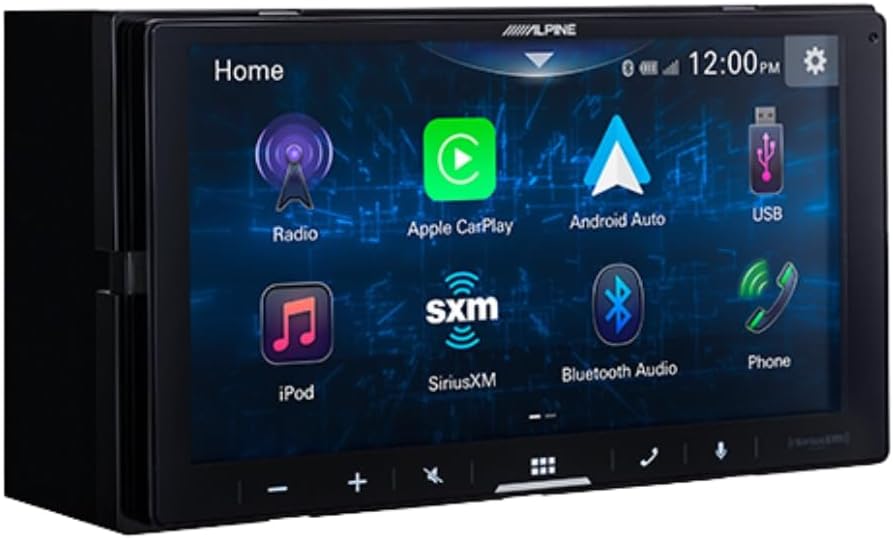
Figura 3: Alpine ILX-W670-S home screen displaying various application icons. This image shows the customizable interface with options for Radio, Apple CarPlay, Android Auto, USB, iPod, SiriusXM, Bluetooth Audio, and Phone.
Karatteristiċi Awdjo
- Equalizer: Utilize the 13-band graphic EQ to fine-tune audio frequencies to your preference.
- Korrezzjoni tal-Ħin: The 6-channel time correction feature allows for precise adjustment of sound delivery to each speaker, optimizing the sound stage.
- Crossovers: Adjust front, rear, and subwoofer crossovers to manage frequency distribution to your speakers.
- Menù tat-Tisħiħ tal-Ħoss: Access dedicated controls for bass, mid-bass, and subwoofer output.
- Formati Awdjo Appoġġjati: The unit supports AAC, FLAC, MP3, and WMA audio playback.
Konnettività
- Apple CarPlay u Android Auto: Connect your compatible smartphone via USB for wired access to navigation, music, messaging, and other apps directly on the receiver's screen.

Figura 4: Alpine ILX-W670-S display showing the Apple CarPlay interface. This image illustrates the integration of smartphone applications like Phone, Music, Maps, Messages, and Podcasts onto the receiver's screen.
- Bluetooth: Pair your smartphone for hands-free calling and wireless audio streaming.
- Lest għal SiriusXM: The unit is compatible with SiriusXM satellite radio (requires a separate SiriusXM Connect Vehicle Tuner and subscription).
- Input AUX: Connect external audio devices using the 3.5mm auxiliary input.
- Input USB: Use the USB port for media playback or smartphone connectivity.
- Kontroll tal-Istering Wheel (SWC): Integrate with your vehicle's factory steering wheel controls using a compatible adapter connected to the 3.5mm mini jack.
Daqq tal-Vidjo
The receiver supports various video formats including MP4, MKV, MOV, H.264, FLV, MPEG-4, and AVC. Video playback is typically restricted while the vehicle is in motion for safety reasons.
Operazzjoni tal-Kamera ta' Backup
When the vehicle is shifted into reverse, the display will automatically switch to the camera view, providing a 155-degree wide-angle perspective. The camera has a low light sensitivity of 0.5 lux, ensuring visibility in various lighting conditions.
Manutenzjoni
- Tindif tal-iskrin: Uża drapp artab u mingħajr suf biex timsaħ bil-mod it-touchscreen. Għal tbajja' persistenti, nixxef ftit.ampNaddaf id-drapp bl-ilma jew b'prodott tat-tindif li ma jagħmilx ħsara lill-iskrin. Evita materjali li joborxu jew kimiċi ħarxa.
- Kura Ġenerali: Keep the unit free from dust and debris. Ensure all connections remain secure.
- Tindif tal-Kamera: Periodically clean the camera lens with a soft cloth to ensure a clear view.
Issolvi l-problemi
| Problema | Kawża Possibbli | Soluzzjoni |
|---|---|---|
| Ebda enerġija għall-unità | Fjus maħruq; wajers mhux korretti; konnessjoni tal-enerġija maħlula. | Check vehicle fuses and the unit's fuse. Verify power and ground connections. Ensure the ignition is on. |
| Ebda output tal-ħoss | Volume too low; mute activated; speaker wires disconnected; incorrect audio source selected. | Increase volume. Check if mute is active. Verify speaker wiring. Select the correct audio source. |
| Apple CarPlay/Android Auto mhux qed jikkonnettja | Faulty USB cable; phone not compatible; software issue; phone settings. | Use a high-quality, certified USB cable. Ensure your phone's OS is updated. Check phone settings for CarPlay/Android Auto permissions. Restart phone and receiver. |
| Kamera ta' wara ma turiex | Camera power issue; video cable disconnected; vehicle not in reverse. | Ensure vehicle is in reverse. Check camera power connection (to reverse lights). Verify video cable connection to the receiver. |
| Touchscreen ma jirrispondix | Temporary software glitch; screen damage. | Restart the unit (turn vehicle off and on). If issue persists, contact support. |
Speċifikazzjonijiet
Alpine ILX-W670-S Digital Multimedia Receiver
- Wiri: 6.75-inch capacitive touchscreen (800 x 480 resolution)
- Illuminazzjoni ewlenija: 5-color customizable (red, green, blue, amber, white)
- Ampaktar ħaj: Built-in 16W RMS / 45W peak x 4 channels
- Ipproċessar Awdjo: 13-band graphic EQ, 6-channel time correction, Sound Boost menu, Front/Rear/Subwoofer crossovers
- Pre-outs: 3 pairs (Front, Rear, Subwoofer) at 4V
- Inputs: 1x AUX (3.5mm), 1x USB, 1x Camera, SWC adapter via 3.5mm mini jack
- Konnettività: Wired Apple CarPlay, Wired Android Auto, Bluetooth (hands-free calling & audio streaming), SiriusXM-ready
- Formati Awdjo Appoġġjati: AAC, FLAC, MP3, WMA
- Formati tal-Vidjo Sostenuti: MP4, MKV, MOV, H.264, FLV, MPEG-4, AVC
- Dimensjonijiet: 8.75 x 6 x 7 pulzieri (Prodott)
- Piż: 3.4 liri
BULCAMC-1 Backup Bullet Camera
- Sensor: CMOS
- Riżoluzzjoni: 420 linja
- Illuminazzjoni minima: 0.5 lux
- View Angolu: 155 grad
- Klassifikazzjoni li ma jgħaddix ilma minnha: IP67-68
- Temperatura operattiva: -30 sa 70 ℃ (-22 sa 158 ℉)
Informazzjoni dwar Garanzija
Alpine products are manufactured to high-quality standards. For specific warranty terms and conditions, please refer to the warranty card included with your product or visit the official Alpine websit. Żomm il-prova tax-xiri tiegħek għal talbiet ta' garanzija.
Appoġġ
For further assistance, technical support, or to download the latest firmware updates, please visit the official Alpine websit fuq www.alpine-usa.com. You may also contact Alpine customer service directly for personalized support.


