KTC H25Y7 24.5 Inch 300Hz FHD Gaming Monitor Instruction Manual
Model: H25Y7 | Brand: KTC
Introduzzjoni
This manual provides essential information for setting up, operating, and maintaining your KTC H25Y7 24.5-inch 300Hz Full HD Gaming Monitor. Please read this guide thoroughly before using the product to ensure optimal performance and safety.

Immaġni: Quddiem view of the KTC H25Y7 24.5-inch 300Hz FHD Gaming Monitor.
X'hemm fil-Kaxxa
Iċċekkja li l-oġġetti kollha li ġejjin huma inklużi fil-pakkett tiegħek:
- 24.5" FHD 300Hz Monitor (x1)
- Stand tal-Monitor (x1)
- Quick Setup Guide (QSG) (x1)
- Kejbil tad-DisplayPort (DP) (x1)
- Adapter tal-Enerġija (x1)
Setup
Monitor Stand Assembly
Follow these steps to assemble the monitor stand and attach it to the display panel:
- Neħħi bir-reqqa l-komponenti kollha mill-imballaġġ.
- Attach the stand base to the stand column using the provided screws. Ensure it is securely fastened.
- Align the stand's mounting plate with the VESA mounting holes on the back of the monitor panel.
- Secure the monitor panel to the stand using the appropriate screws.

Immaġni: Wara view of the KTC H25Y7 monitor showing dimensions and stand attachment points.
Konnessjoni ma' Apparat
Connect your monitor to a computer or other video source using the appropriate cables:
- DisplayPort (DP): For 300Hz refresh rate at 1920x1080 resolution, use the included DisplayPort 1.4 cable.
- HDMI: For up to 240Hz refresh rate at 1920x1080 resolution, use an HDMI 2.0 cable. Two HDMI 2.0 ports are available.
- Qawwa: Qabbad l-adapter tal-enerġija mad-dħul tad-DC tal-monitor u mbagħad ma' sokit tal-enerġija.

Image: Close-up of the KTC H25Y7 monitor's rear panel, highlighting the DC power input, two HDMI 2.0 ports, one DisplayPort 1.4, and one USB 2.0 port.
Istruzzjonijiet Operattivi
Qawwa mixgħul/mitfi
Agħfas il-buttuna tal-qawwa li tinsab fuq wara tal-monitor biex tixgħelu jew titfih.
Navigazzjoni tal-Menu OSD
The On-Screen Display (OSD) menu allows you to adjust various monitor settings. Use the joystick control located on the back of the monitor to navigate the menu:
- Push the joystick in to select an option.
- Move the joystick up/down/left/right to navigate through menu options and adjust values.
Karatteristiċi tal-Wiri
- High Refresh Rate & Fast Response Time: Experience smooth visuals with a 300Hz refresh rate (via DP 1.4) and 1ms response time, reducing motion blur and ghosting.
- Teknoloġija ta' Sinkronizzazzjoni Adattiva: This monitor supports Adaptive Sync to eliminate screen tearing and stuttering, providing a fluid gaming experience.
- Fast IPS Panel & Wide Color Gamut: The Fast IPS panel delivers realistic colors and clear details with 119% sRGB color gamut coverage. HDR support enhances immersion with improved contrast and color.
- Karatteristiċi tal-Kura tal-Għajnejn: The monitor includes Low Blue Light, Flicker-free, and Anti-glare technologies to reduce eye strain during extended use.

Image: Visual representation of 300Hz refresh rate compared to lower refresh rates, showing reduced motion blur.

Image: Split screen comparison demonstrating the effect of Adaptive Sync, showing a tear-free image on one side and a torn image on the other.

Image: Display showcasing vibrant colors and details, with icons indicating 99% sRGB, 16.7M colors, 350cd/m² brightness, and 1000:1 contrast.

Image: Visuals illustrating the benefits of Low Blue Light, Flicker-free, and Anti-glare features for eye comfort during gaming.
Aġġustamenti Ergonomiċi
The monitor stand offers multiple adjustment options for comfortable viewing:
- Mejjel: Adjust the screen angle from -5° to 20° (±3°).
- Pivot: Rotate the screen ±90° for portrait or landscape orientation.
- Għoli: Aġġusta l-għoli tal-iskrin b'110mm (±5mm).
- Muntatura VESA: Supports 100x100mm VESA mounting for wall or arm installation.
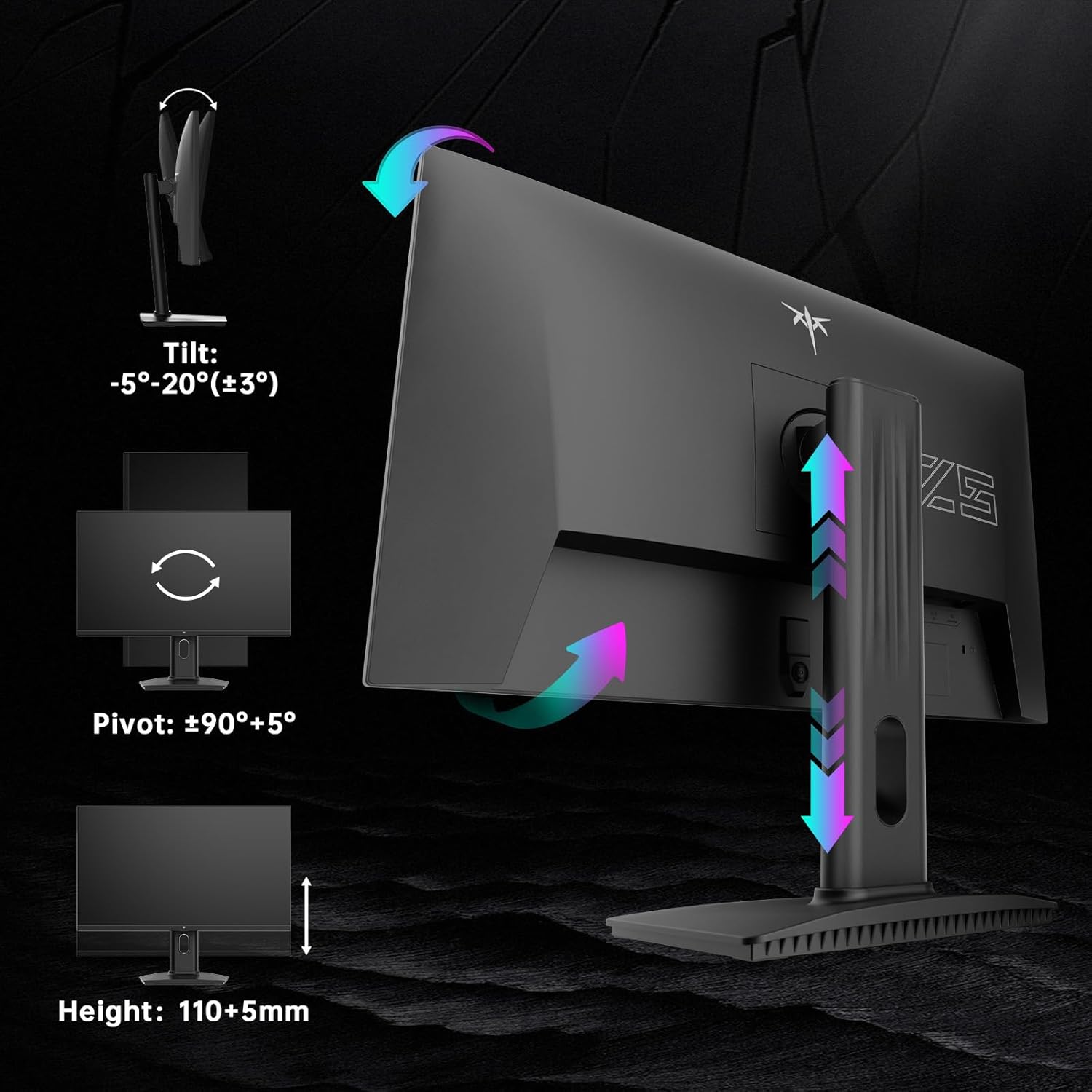
Image: Diagrams illustrating the tilt, pivot, and height adjustment capabilities of the KTC H25Y7 monitor stand.
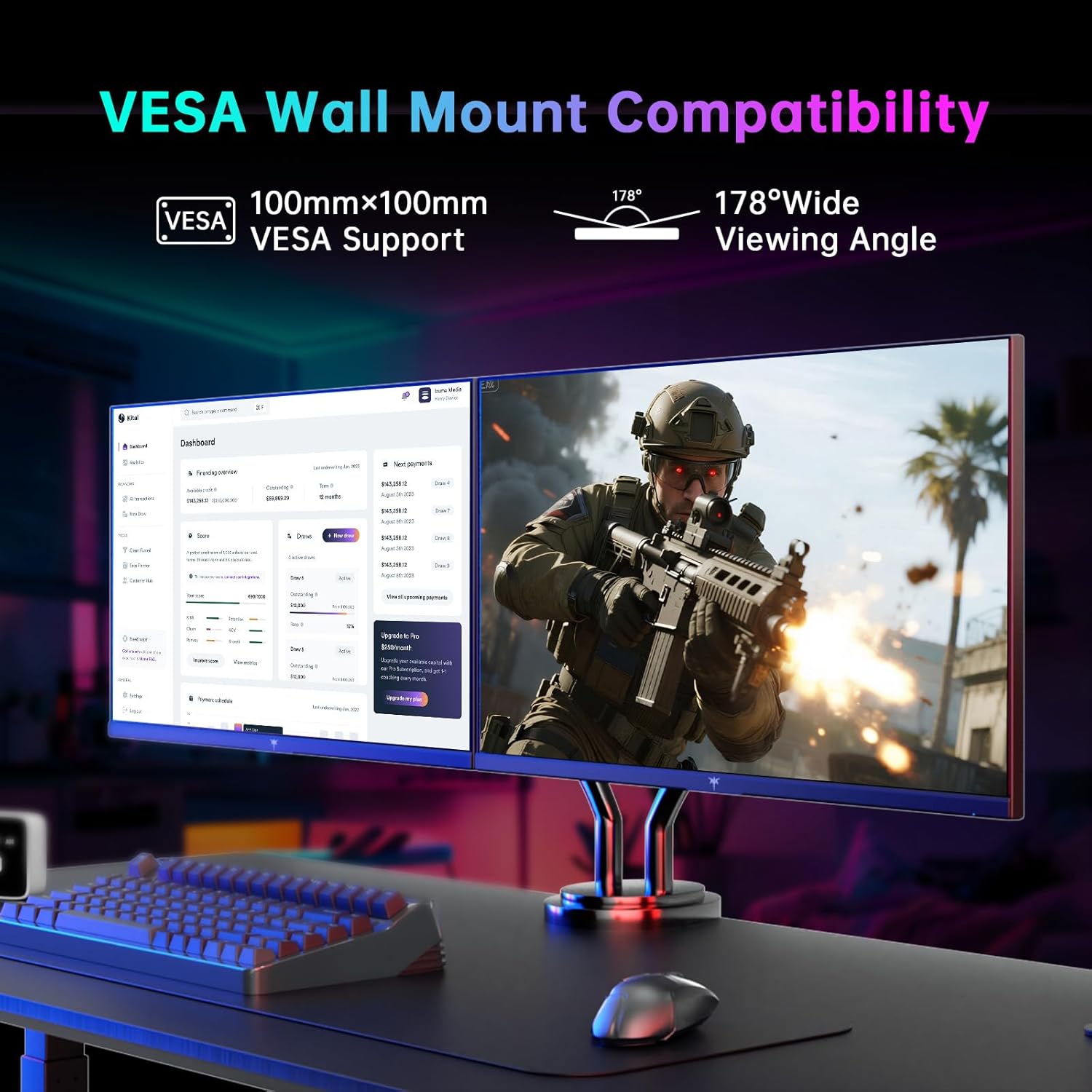
Image: Monitor mounted on a VESA-compatible arm, demonstrating VESA wall mount compatibility and wide viewangoli.
Manutenzjoni
Biex tiżgura l-lonġevità u l-prestazzjoni ottimali tal-monitor tiegħek, segwi dawn il-linji gwida ta' manutenzjoni:
- Tindif tal-Iskrin: Imsaħ l-iskrin bil-mod b'ċarruta ratba u mingħajr suf. Għal marki persistenti, nixxef bil-modampLaħlaħ id-drapp bl-ilma jew b'soluzzjoni għat-tindif tal-iskrin. Evita kimiċi ħarxa.
- Tindif tas-Casing: Uża drapp artab u niexef biex tnaddaf il-parti ta' fuq tal-monitor.asing.
- Immaniġġjar: Avoid pressing directly on the screen or placing heavy objects on the monitor.
- Ventilazzjoni: Ensure proper ventilation around the monitor to prevent overheating. Do not block the ventilation openings.
Issolvi l-problemi
Jekk tiltaqa' ma' xi problemi bil-monitor tiegħek, irreferi għas-soluzzjonijiet komuni li ġejjin:
- Ebda Qawwa: Kun żgur li l-adapter tal-enerġija huwa konness sew kemm mal-monitor kif ukoll ma' sokit tal-enerġija li jaħdem. Iċċekkja jekk id-dawl indikatur tal-enerġija hux mixgħul.
- Ebda Sinjal: Verify that the video cable (DP or HDMI) is correctly connected to both the monitor and your computer/device. Ensure the correct input source is selected in the OSD menu.
- Teptip/Tfixkil: Check your graphics card drivers are up to date. Ensure Adaptive Sync is enabled in both the monitor's OSD and your graphics card settings.
- Distorsjoni tal-Immaġni/Kuluri Mhux Korretti: Reset the monitor to factory settings via the OSD menu. Check the video cable for damage.
- Buttuni li ma jirrispondux: Power cycle the monitor. If the issue persists, contact customer support.
Speċifikazzjonijiet
| Karatteristika | Speċifikazzjoni |
|---|---|
| Brand | Estensjoni KTC |
| Numru tal-Mudell | H25Y7 |
| Daqs tal-Iskrin | 24.5 Pulzier |
| Riżoluzzjoni | 1920 x 1080 Pixel (FHD 1080p) |
| Riffriskar Rata | 300Hz (via DisplayPort 1.4), 240Hz (via HDMI 2.0) |
| Ħin ta' Rispons | 1ms |
| Tip ta' Panel | IPS veloċi |
| Proporzjon ta' l-aspett | 16:9 |
| Gamut tal-Kulur | 119% sRGB |
| Luminożità tal-Immaġni | 350 Kandela |
| Konnettività | 1x DisplayPort 1.4, 2x HDMI 2.0, 1x USB 2.0 |
| Ergonomija | Tilt (-5° to 20°), Pivot (±90°), Height (110+5mm) |
| Appoġġ VESA | 100x100mm |
| Dimensjonijiet tal-Prodott | 7.6 x 21.97 x 18.22 pulzieri |
| Piż tal-oġġett | 2.2 liri |
Garanzija u Appoġġ
For warranty information or technical support, please refer to the contact details provided in the Quick Setup Guide included with your monitor or visit the official KTC websit. Żomm l-irċevuta tax-xiri tiegħek bħala prova tax-xiri għal talbiet ta' garanzija.


