1. Introduzzjoni
The Arlo Essential Security Camera (3rd Gen) provides reliable home monitoring with crystal-clear 2K resolution. Designed for both indoor and outdoor use, this wireless, battery-powered camera offers advanced features such as person, vehicle, package, and animal detection, along with two-way audio and color night vision. This manual provides instructions for setting up, operating, and maintaining your Arlo Essential Security Camera system.
2. Kontenut tal-Pakkett
Ivverifika li l-komponenti kollha huma preżenti fil-pakkett tiegħek:
- Arlo Essential Security Camera (3rd Gen) x3
- Rechargeable Battery x3 (pre-installed)
- Wall Mount and Screw Kit x3
- Cable tal-iċċarġjar x1
- Gwida Quick Start (dan il-manwal)

Image: Three Arlo Essential Security Cameras (3rd Gen) in white, showcasing the product's appearance.
3. Karatteristiċi tal-prodott
The Arlo Essential Security Camera (3rd Gen) is equipped with several features to enhance your home security:
- Riżoluzzjoni tal-Vidjo 2K: Jaqbad ikel ċar u dettaljattage.
- Wi-Fi bi Faxxa Doppja: Connects to 2.4 GHz or 5 GHz Wi-Fi for optimal performance.
- Disinn Bla Wajer: Easy installation and flexible placement without power cables.
- Batterija rikarikabbli: Provides long-lasting power for continuous operation.
- Viżjoni bil-lejl bil-kulur: See full-color video even in low light conditions.
- Spotlight Integrat: Illuminates the area and deters intruders.
- Awdjo f'żewġ direzzjonijiet: Hear and speak with visitors or deter unwanted guests.
- Sirena integrata: Remotely activate a loud siren to scare off intruders.
- 130° Qasam ta View: Wide-angle lens provides extensive coverage.
- Reżistenti għat-temp: Durable design suitable for outdoor environments.

Image: An Arlo Essential Security Camera mounted outdoors, highlighting its key features.
4. Gwida ta' Setup
Follow these steps to set up your Arlo Essential Security Camera:
4.1 Iċċarġjar inizjali
Ensure your camera's battery is fully charged before installation. The battery is pre-installed.
- Connect the charging cable to the camera and a compatible USB power adapter (not included).
- Allow the camera to charge until the LED indicator turns solid blue, indicating a full charge.
4.2 Arlo App Installation and Account Creation
- Download the Arlo Secure App from your device's app store (iOS or Android).
- Open the app and follow the on-screen instructions to create a new Arlo account or log in to an existing one.
4.3 Adding Your Camera to the Arlo App
- In the Arlo app, tap the '+' icon to add a new device.
- Select 'Cameras' and then choose 'Essential Camera'.
- Follow the app's instructions to connect your camera to your Wi-Fi network. Ensure your camera is within range of your Wi-Fi router.
4.4 Mounting Your Camera
Choose a suitable location for your camera, considering its field of view and Wi-Fi signal strength.
- Secure the wall mount to a flat surface using the provided screws.
- Attach the camera to the wall mount. Adjust the camera angle for optimal coverage.
- Confirm the camera's view in the Arlo app to ensure desired monitoring area is covered.
5. Operating Your Camera
5.1 Ħaj View u Reġistrazzjoni
Access live video streams and recorded events through the Arlo app.
- Open the Arlo app and select your camera to view l-għalf ħaj.
- Recorded events are stored in the cloud (with an Arlo Secure Plan) and can be accessed from the Library tab.
5.2 Smart Detection and Notifications
The camera utilizes advanced algorithms to differentiate between various types of motion.
- Receive alerts for people, vehicles, packages, and animals directly on your smartphone.
- Animated Previews allow you to quickly see what triggered an alert without unlocking your phone.

Image: The Arlo app displaying smart detection notifications for different events.
5.3 Interactive Notifications
Respond directly from your lock screen to alerts.
- Options include sounding the siren, muting notifications, or calling a friend/emergency services (with Arlo Secure Plan).

Image: Interactive notification options on a smartphone lock screen.
5.4 Two-Way Audio and Siren
Use the built-in speaker and microphone for communication or deterrence.
- Tektek l-ikona tal-mikrofonu fil-live view biex titkellem permezz tal-kamera.
- Tap the siren icon to activate the integrated siren.
6. Ġestjoni tal-batterija
The Arlo Essential Security Camera is powered by a rechargeable battery.
6.1 Iċċarġjar mill-ġdid tal-batterija
When the battery level is low, you will receive a notification from the Arlo app. To recharge:
- Remove the camera from its mount.
- Connect the charging cable to the camera's charging port and a USB power source.
- The LED indicator will show charging status and turn solid blue when fully charged.

Image: Recharging the Arlo Essential Security Camera.
6.2 Modalità ta 'Enerġija Baxxa
To extend battery life, the camera can automatically switch to Snapshot Mode when the battery drops below a set threshold. Once recharged, it returns to Video Mode.

Image: Arlo app settings for Low Power Mode.
7. Arlo Secure Plan
A 1-month trial of the Arlo Secure Plan is included with your purchase. This plan unlocks advanced features:
- 60-Day Video History: Aċċess u riview recorded video clips for up to 60 days.
- Smart Detections: Enhanced recognition for people, vehicles, packages, and animals.
- Żoni ta' Attività: Define specific areas for motion detection to reduce unwanted alerts.
- Rispons ta' Emerġenza 24/7: Direct access to emergency services with a single tap.
- Interactive Notifications: Respond to alerts directly from your lock screen.
After the trial, a paid subscription is required to maintain these premium features. For more information on plans and pricing, visit www.arlo.com/arlo-secure-retail.

Image: Visual representation of key features included with the Arlo Secure Plan.
8. Smart Home Integrazzjoni
The Arlo Essential Security Camera integrates with popular smart home platforms:
- Amazon Alexa
- Google Home
- IFTTT
- Samsung SmartThings
These integrations allow for voice control, automated routines, and unified smart home management.
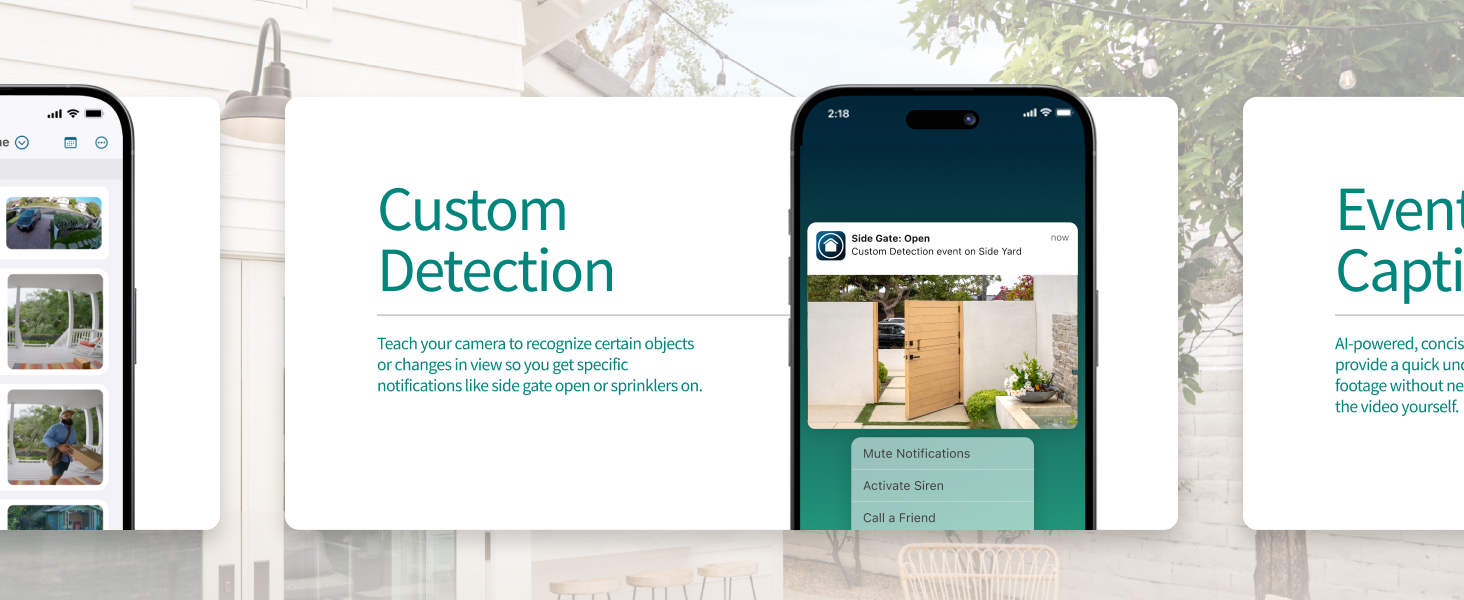
Image: Logos of compatible smart home platforms.
9. Manutenzjoni
Manutenzjoni regolari tiżgura prestazzjoni ottimali u lonġevità tal-kamera tiegħek.
- Tindif tal-Lenti: Gently wipe the camera lens with a soft, lint-free cloth to remove dust or smudges. Avoid abrasive materials.
- Kura tal-batterija: Recharge the battery as needed. Avoid fully depleting the battery frequently to prolong its lifespan.
- Aġġornamenti tal-Firmware: Ensure your camera's firmware is up to date through the Arlo app to benefit from the latest features and security enhancements.
- Protezzjoni Ambjentali: While weather-resistant, avoid prolonged exposure to extreme weather conditions if possible.
10 Issolvi l-problemi
If you encounter issues with your Arlo Essential Security Camera, refer to the following common solutions:
- Kamera Offline: Check Wi-Fi connectivity. Ensure the camera is within range of your router and has sufficient battery. Restart the camera and your router if necessary.
- Kwalità Fqira tal-Vidjo: Verify your Wi-Fi signal strength. Ensure the lens is clean and free from obstructions.
- L-ebda Sejbien ta' Mozzjoni: Check motion detection settings in the Arlo app. Ensure activity zones are correctly configured.
- Batterija Tixxotta malajr: Reduce video recording length, decrease motion sensitivity, or adjust activity zones. Ensure the camera is not in an area with constant motion.
- Notifiki Mhux Riċevuti: Check app notification settings on your phone and within the Arlo app. Ensure your phone has an active internet connection.
For further assistance, refer to the support section in the Arlo app or visit the Arlo support websit.
11. Speċifikazzjonijiet
| Karatteristika | Dettall |
|---|---|
| Numru tal-Mudell | VMC3080 |
| Riżoluzzjoni tal-vidjo | 2K (1440p) |
| Qasam ta View | 130 Grad |
| Zoom Diġitali | 12x |
| Viżjoni bil-lejl | Color Night Vision, 25 Feet Range |
| Awdjo | Awdjo 2-Way |
| Sors tal-Enerġija | Li jaħdem bil-batterija (jone tal-litju) |
| Konnettività | Wi-Fi b’Banda Doppja |
| Użu fuq ġewwa/barra | Ġewwa, Barra |
| Livell ta 'Reżistenza għall-Ilma | Reżistenti għall-Ilma |
| Dimensjonijiet (L x W x H) | 2.34 x 2.09 x 3.68 pulzieri |
| Piż | 3.3 pounds (for 3 cameras) |
| Apparati Kompatibbli | Desktop, Laptop, Smartphone, Tablet |
| Tip ta' Kontrollur | Amazon Alexa, Google Home, IFTTT |
12. Informazzjoni dwar il-Garanzija u l-Appoġġ
Arlo provides comprehensive support for its products.
- Garanzija: For detailed warranty information, please refer to the official Arlo webis-sit jew id-dokumentazzjoni tax-xiri tiegħek.
- Appoġġ għall-Klijent: Access 24/7 chat support through the Arlo app or the official Arlo websit.
- Użu tal-Prodott: This product is intended for use and support within the United States only. Functionality may be limited or unavailable in other regions.


