1. Introduzzjoni
Grazzi tax-xiriasing the WOLFANG Portable Projector WP05. This device is designed to provide a versatile and immersive viewing experience with its Android 11 operating system, high-definition resolution, and portable design. This manual provides essential information for setting up, operating, and maintaining your projector. Please read it thoroughly before use to ensure optimal performance and safety.
2. Informazzjoni dwar is-Sigurtà
Jekk jogħġbok osserva l-prekawzjonijiet ta' sigurtà li ġejjin biex tevita ħsara lill-proġettur u tiżgura s-sigurtà tal-utent:
- Tħarisx direttament fil-lenti tal-proġettazzjoni meta tkun qed taħdem.amp hija mixgħula.
- Żgura ventilazzjoni xierqa madwar il-proġekter biex tevita sħana żejda.
- Uża biss l-adapter tal-enerġija li jiġi mal-proġettur.
- Żomm il-proġettur 'il bogħod mill-ilma, l-umdità, u materjali fjammabbli.
- Tippruvax tiżżarma jew issewwi l-proġettur int stess. Ikkuntattja persunal tas-servizz kwalifikat għall-assistenza.
- Żomm fejn ma jintlaħaqx mit-tfal.
3. Kontenut tal-Pakkett
Ivverifika li l-oġġetti kollha huma preżenti fil-pakkett tiegħek:
- WOLFANG Portable Projector WP05
- Remote Control (with Air Mouse function)
- Adapter tal-Enerġija
- Manwal għall-Utent

Immaġni: Quddiem view of the WOLFANG Portable Projector WP05 retail box, showing the product name and a graphic of the projector.
4. Prodott Aktarview
Familiarize yourself with the components of your WOLFANG Portable Projector WP05.
Image: The WOLFANG Portable Projector WP05 shown from the front, highlighting its compact cylindrical design and lens.
Karatteristiċi ewlenin:
- HD 1080P Resolution: Supports 1920 x 1080P resolution for clear visuals.
- Android 11 OS: Built-in operating system with access to over 5,000 applications.
- Korrezzjoni Awtomatika Keystone: ±45° auto vertical keystone correction for image alignment.
- Stand li Jdur 180°: Flexible projection angle for walls, ceilings, or floors.
- Wi-Fi 6 b'medda doppja: Supports 2.4G and 5G networks for stable and fast streaming.
- Bluetooth 5.2: Għall-konnessjoni ta 'apparati awdjo esterni.
- Speaker Hi-Fi inkorporat: Integrated 3W speaker for audio output.
- Kompatt u portabbli: Weighs approximately 0.6KG for easy transport.

Image: The WOLFANG Portable Projector WP05 being placed into a backpack, illustrating its compact and portable design with dimensions of 6.14 inches in length and 3.74 inches in width.
5. Setup
5.1 Tqegħid
Position the projector on a stable, flat surface. The 180° rotatable stand allows for flexible projection angles, including walls, ceilings, or floors.

Image: The WOLFANG Portable Projector WP05 projecting onto a ceiling, demonstrating its 180-degree rotatable stand for versatile viewpożizzjonijiet.
5.2 Konnessjoni tal-Enerġija
- Qabbad l-adapter tal-enerġija mal-port tad-dħul tal-enerġija tal-proġettazzjoni.
- Ipplaggja l-adapter tal-enerġija f'iżbokk tal-ħajt.
- Agħfas il-buttuna tal-qawwa fuq il-proġettazzjoni jew fuq il-kontroll remot biex tixgħelu.
5.3 Korrezzjoni tal-Fokus u l-Keystone
The projector features automatic vertical keystone correction and manual focus adjustment.
- Keystone Vertikali Awtomatiku: The projector automatically adjusts vertical image distortion.
- Focus Manwal: Rotate the focus ring on the projector to achieve a clear image.
- Manual 4-Corner Correction: For more precise adjustments, navigate to the settings menu to manually adjust each corner of the projection.
- Funzjoni Żum: Adjust the projection size from 50% to 100% via the settings.

Image: A diagram illustrating the auto vertical keystone correction, manual 4-corner correction, and 50-100% zoom features of the WOLFANG Portable Projector WP05, along with a close-up of the manual focus ring.
6. Istruzzjonijiet Operattivi
6.1 Remote Control with Air Mouse
The included remote control features an Air Mouse function for easy navigation.
- Turn on the remote control's Air Mouse mode (refer to remote control instructions for specific button).
- Shake the remote control to activate the on-screen cursor.
- Use the directional buttons and OK button for menu navigation and selection.

Image: A hand holding the WOLFANG Portable Projector WP05 remote control, with an inset showing how to activate the Air Mouse function and use the OK and arrow buttons for navigation on a projected Netflix screen.
6.2 Android 11 OS and Built-in Apps
The projector runs on Android 11, providing access to a wide range of applications.
- Upon startup, you will see the Android home screen.
- Pre-installed apps include Netflix, YouTube, Prime Video, and access to the Google Play Store for additional downloads.
- Customize your desktop wallpaper and organize your apps as desired.

Image: The WOLFANG Portable Projector WP05 projecting a screen displaying various streaming service logos like Netflix, YouTube, Prime Video, HBO Max, and the Google Play Store icon, indicating built-in Android app functionality.
Image: A projected screen from the WOLFANG Portable Projector WP05 showing a customizable Android interface with icons for Netflix, YouTube, ScreenCast, File Manager, HDMI, Settings, App Store, Music, and Play Store, emphasizing its 'Customized Personal Cinema' capabilities.
6.3 Screen Mirroring
The projector supports fast screen mirroring via Wi-Fi 6 for iOS, Android, and Windows devices.
- Miracast: For Android and Windows devices.
- Airplay: Għal apparati iOS.
- Kun żgur li t-tagħmir tiegħek u l-proġettur huma konnessi mal-istess netwerk Wi-Fi.
- Select the appropriate screen mirroring option from the projector's menu.
- Initiate screen mirroring from your mobile device or computer.

Image: The WOLFANG Portable Projector WP05 projecting a dynamic image, with icons for Miracast and Airplay, and a smartphone displaying content being mirrored to the projector, highlighting its WiFi 6 fast screen mirroring capability.
7. Konnettività
7.1 Konnessjoni Wi-Fi
The projector supports dual-band Wi-Fi 6 (2.4G and 5G) for stable internet access and screen mirroring.
- Mur fuq Settings on the projector's home screen.
- Agħżel Netwerk u Internet.
- Ixgħel il-Wi-Fi u agħżel in-netwerk mixtieq tiegħek mil-lista.
- Daħħal il-password jekk tintalab u qabbad.
7.2 Konnessjoni Bluetooth
Qabbad kelliema jew headphones Bluetooth esterni għal awdjo mtejjeb.
- Mur fuq Settings on the projector's home screen.
- Agħżel Apparati Konnessi or Bluetooth.
- Ixgħel il-Bluetooth.
- Poġġi l-apparat Bluetooth tiegħek fil-modalità ta 'tqabbil.
- Agħżel it-tagħmir tiegħek mil-lista ta' tagħmir disponibbli biex tqabbad.
7.3 HDMI and USB Connections
The projector includes HDMI and USB ports for connecting various external devices.
- HDMI: Connect devices such as laptops, gaming consoles, TV sticks, or Blu-ray players. Select the HDMI input source from the projector's menu.
- USB: Qabbad id-drajvs USB biex tilgħab il-midja files direttament. Agħżel is-sors tad-dħul tal-USB mill-menù tal-proġettazzjoni.
8. Manutenzjoni
Regular maintenance helps prolong the life of your projector.
- Tindif tal-Lenti: Use a soft, lint-free cloth specifically designed for optical lenses to gently wipe the projector lens. Do not use abrasive cleaners.
- Tneħħija tat-Trab: Uża pinzell artab jew arja kkompressata biex tnaddaf it-trab mill-fetħiet tal-ventilazzjoni.
- Ħażna: Meta ma tkunx qed tuża l-proġettazzjoni, aħżenha f'post frisk u niexef, 'il bogħod mix-xemx diretta u minn temperaturi estremi.
9 Issolvi l-problemi
Jekk tiltaqa' ma' problemi, irreferi għall-problemi u s-soluzzjonijiet komuni li ġejjin:
| Problema | Soluzzjoni Possibbli |
|---|---|
| Ebda qawwa | Ensure the power adapter is securely connected to the projector and a working power outlet. |
| L-ebda immaġni | Check if the projector is powered on. Verify the input source (HDMI, USB, etc.) is correctly selected. |
| Immaġini mċajpra | Adjust the manual focus ring on the projector. Ensure the projection surface is flat. |
| Immaġni distorta | The projector has auto vertical keystone correction. For further adjustment, use manual 4-corner correction in settings. |
| L-ebda ħoss | Check the volume settings on the projector and the connected source device. Ensure external Bluetooth speakers are properly paired. |
| Il-kontroll mill-bogħod ma jaħdimx | Check the remote control batteries. Ensure there are no obstructions between the remote and the projector. |
10. Speċifikazzjonijiet
Technical specifications for the WOLFANG Portable Projector WP05:
| Karatteristika | Dettall |
|---|---|
| Brand | WOLFANG |
| Mudell | WP05 |
| Riżoluzzjoni tal-Wiri | 1920 x 1080 (Full HD) |
| Proporzjon ta' l-aspett | 16:9, 4:3 |
| Sistema Operattiva | Android 11 |
| Teknoloġija tal-Konnettività | Wi-Fi 6 (2.4G/5G), Bluetooth 5.2 |
| Interface tal-Ħardwer | HDMI, USB |
| Karatteristiċi Speċjali | Built-in Smart System, Auto Keystone Correction, 180° Rotation |
| Daqs Massimu tal-Immaġni | 300 Pulzier |
| Piż tal-oġġett | 635 Gramm |
| Dimensjonijiet tal-Pakkett | 17.8 x 16.4 x 11.3 ċm |
11. Garanzija u Appoġġ
11.1 Informazzjoni dwar Garanzija
The WOLFANG Portable Projector WP05 comes with a 24-il xahar garanzija from the date of purchase. Please retain your proof of purchase for warranty claims. The warranty covers manufacturing defects and malfunctions under normal use. It does not cover damage caused by misuse, accidents, unauthorized repairs, or natural disasters.
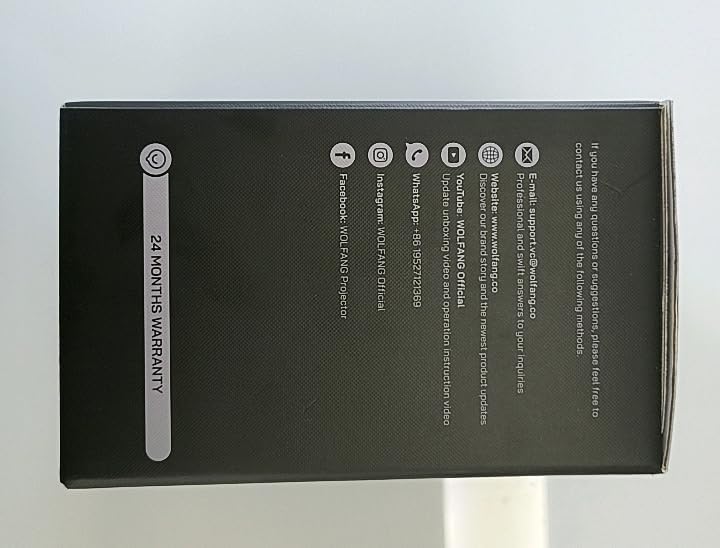
Immaġni: Ġenb view of the WOLFANG Portable Projector WP05 box, clearly displaying a '24 MONTHS WARRANTY' badge and contact information.
11.2 Appoġġ għall-Klijent
For any questions, suggestions, or support needs, please contact WOLFANG customer service using the following methods:
- E-mail: support.tvc@wolfang.co
- Websit: www.wolfang.co
- YouTube: WOLFANG Official (for instruction videos and product updates)
- WhatsApp: +86 19527121353
- Instagram: Uffiċjali WOLFANG
- Facebook: WOLFANG Projector


