1. Introduzzjoni
Thank you for choosing the MONODEAL CD401 Portable HiFi Stereo CD Player. This versatile device combines classic CD playback with modern connectivity options, including Bluetooth, FM radio, USB, and AUX input. Enjoy high-fidelity audio with built-in speakers, dynamic RGB lighting, and convenient remote control. This manual provides essential information for setup, operation, and maintenance to ensure optimal performance.
2. X'hemm fil-Kaxxa
- 1x MONODEAL CD401 CD Player
- 1x Manwal għall-Utent
- 1x Kontroll mill-bogħod
- 1x Audio Cable ta '3.5mm
- 1x Charging Cable and Plug
3. Prodott Aktarview
The MONODEAL CD401 is designed for both portability and desktop use, offering a blend of classic and contemporary audio features. Its compact design includes integrated speakers and a clear display for easy navigation.
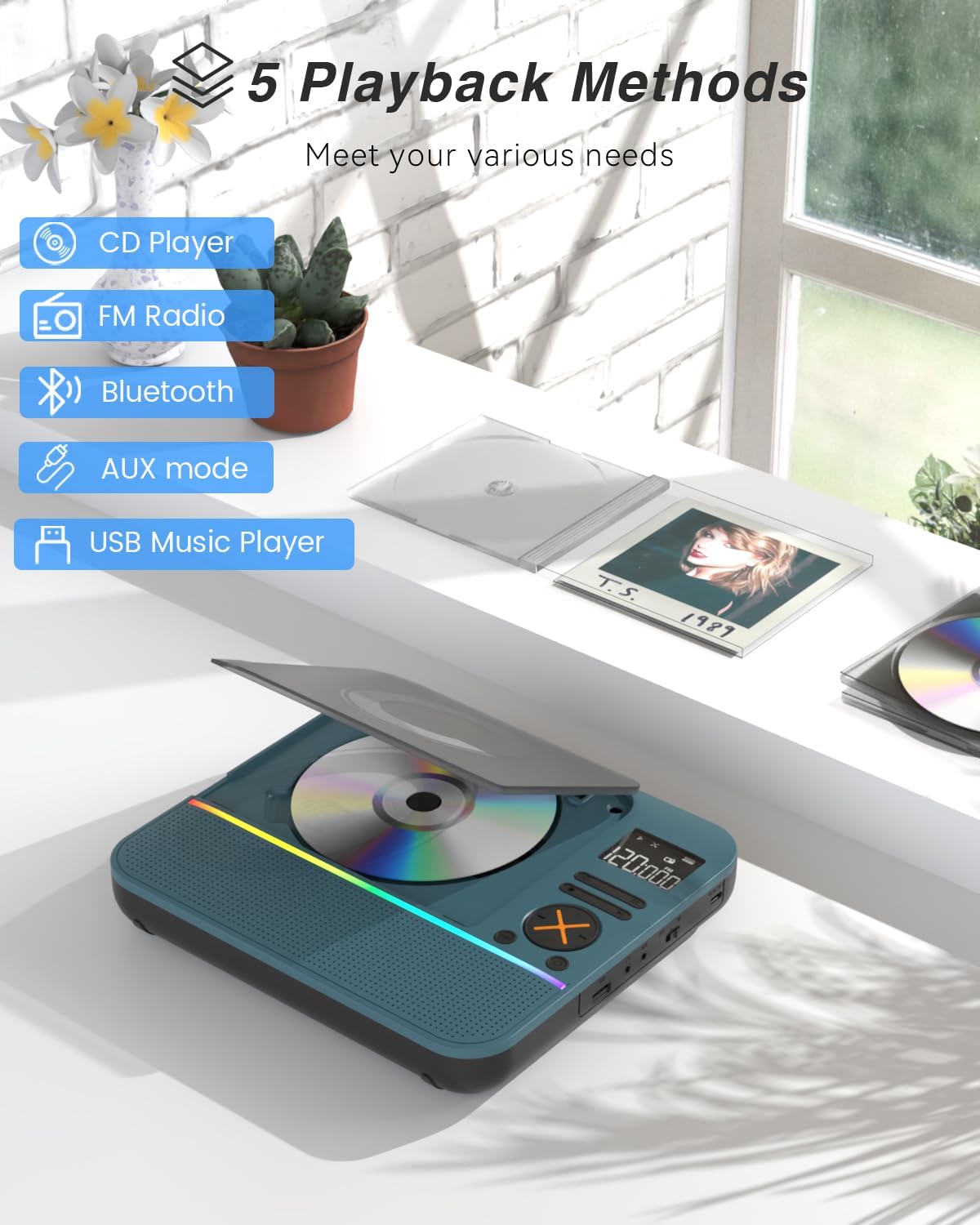
Figura 1: Quddiem view of the MONODEAL CD401 Portable CD Player, showcasing its compact design and central display.
Karatteristiċi ewlenin:
- Multi-Color RGB Lighting: Dynamic lighting effects that change color to the beat of the music, enhancing visual and auditory experience.
- Bluetooth 5.3: Functions as both a Bluetooth transmitter (to headphones/speakers) and receiver (from phones/tablets).
- Integrated 4*HIFI Speakers: Provides surround sound for an immersive listening experience.
- Modi ta' Daqq multipli: Easily switch between CD, Bluetooth, FM Radio, AUX, and USB modes via a large LCD screen.
- Wide CD Compatibility: Supports CD, CD-R, CD-RW, MP3, and WMA formats.
- Effetti tal-Ħsejjes: Choose from five equalizer presets: Flat, Rock, Pop, Jazz, and Classic.
- Radju FM: Access FM frequencies from 76MHz to 108MHz.
- USB & AUX Connectivity: Play music from a USB flash drive or connect external devices via the 3.5mm AUX cable.
- Batterija rikarikabbli: Built-in 3000mAh battery offers up to 8 hours of continuous playback.
- Timer ta 'l-Irqad: Customizable sleep timer from 10 to 90 minutes.

Figure 2: The MONODEAL CD401 displaying its multi-color RGB lighting effects, which synchronize with the music.
Kontrolli u Portijiet:
The device features intuitive controls on its top panel and essential ports on the side for easy access.

Figure 3: Top panel of the CD player showing playback controls, mode selection, and display.

Figure 4: The side panel of the CD player, illustrating the AUX input, USB port, and charging port.
Vidjo Uffiċjali tal-Prodott:
Video 1: Official product video from MonoDeals showcasing the Desktop CD Player with Bluetooth and RGB Light features.
Video 2: Official product video from MonoDeals demonstrating the Desktop Player's Bluetooth functionality and colorful lighting effects.
4. Setup
4.1 Iċċarġjar tal-Apparat
- Connect the provided USB charging cable to the charging port on the side of the CD player.
- Plug the other end of the USB cable into a compatible USB power adapter (included) or a computer's USB port.
- The battery indicator on the LCD screen will show charging status. A full charge provides up to 8 hours of playback.
4.2 Daħħal CD
- Gently open the CD compartment cover.
- Place the CD with the label side facing up onto the spindle. Ensure it clicks into place.
- Agħlaq l-għatu tal-kompartiment tas-CD sew sakemm jissakkar.
4.3 Tixgħel/Jitfi
- To power on, slide the ON/OFF switch to the 'ON' position. The LCD screen will light up.
- Biex titfi, żżerżaq is-swiċċ ON/OFF għall-pożizzjoni 'OFF'.
5. Istruzzjonijiet Operattivi
5.1 Għażla tal-Modalità
Agħfas il- MODALITÀ button on the device or remote control to cycle through the available modes: CD, Bluetooth, FM, AUX, and USB.

Figure 5: The CD player's display indicating the five available playback methods: CD, FM Radio, Bluetooth, AUX mode, and USB Music Player.
5.2 Daqq ta' CD
- Insert a compatible CD (CD, CD-R, CD-RW, MP3, WMA).
- Select 'CD' mode. The player will automatically start reading the disc.
- Uża l- Play/Pawsa, Track li jmiss, u Track Preċedenti buttuni biex jikkontrollaw daqq.
- Agħfas il- IRREpeti button to cycle through repeat options (e.g., repeat one, repeat all).
- Agħfas il- EQ button to select desired sound effects (Flat, Rock, Pop, Jazz, Classic).
5.3 Modalità Bluetooth
The CD401 supports both Bluetooth transmission (BT TX) and reception (BT RX).
- Bluetooth Receiver (BT RX): Select 'Bluetooth' mode. The device will enter pairing mode. On your phone/tablet, search for 'CD401' and connect. Audio from your device will play through the CD player's speakers.
- Bluetooth Transmitter (BT TX): Select 'Bluetooth' mode. Press and hold the BT TX button. The CD player will search for nearby Bluetooth headphones or speakers. Once connected, CD audio will transmit to the external Bluetooth device.

Figure 6: Illustration of the CD player's dual Bluetooth functionality, allowing it to receive audio from a phone (RX) or transmit to headphones (TX).
5.4 Radju FM
- Agħżel il-modalità 'FM'.
- Uża l- Track li jmiss u Track Preċedenti buttons to scan for radio stations.
- The FM frequency range is 76MHz to 108MHz.
5.5 Input AUX
- Select 'AUX' mode.
- Connect an external audio device (e.g., smartphone, computer) to the AUX IN port using the provided 3.5mm audio cable.
- The CD player will now act as a wired speaker for the connected device.
- Note: Bluetooth connectivity is not supported in cars; use the 3.5mm AUX cable for car audio.
5.6 Daqq tal-USB
- Select 'USB' mode.
- Daħħal USB flash drive li jkun fih awdjo MP3 jew WMA files fil-port USB.
- The player will automatically detect and begin playing the audio files.
5.7 Kontroll tal-Volum
Adjust the volume using the dedicated volume buttons on the device or the remote control.
5.8 Sleep Timer
- Agħfas il- L-IRQAD buttuna fuq il-kontroll remot.
- Cycle through the available sleep timer durations (10, 20, 30, 40, 50, 60, 70, 80, 90 minutes).
- The device will automatically power off after the selected time.

Figure 7: The CD player featuring its sleep timer function, allowing users to set automatic shutdown after a specified duration.
6. Manutenzjoni
6.1 Tindif
- Imsaħ l-apparat b'ċarruta ratba u niexfa. Tużax prodotti tat-tindif likwidi jew materjali li joborxu.
- Keep the CD compartment clean and free of dust.
6.2 Ħażna
- Aħżen is-CD player f'post frisk u niexef 'il bogħod mix-xemx diretta u minn temperaturi estremi.
- Remove any CDs or USB drives before storing for extended periods.
7 Issolvi l-problemi
| Problema | Kawża Possibbli | Soluzzjoni |
|---|---|---|
| L-apparat ma jixgħelx | Batterija baxxa jew is-swiċċ tal-enerġija huwa mitfi. | Charge the device fully. Ensure the ON/OFF switch is in the 'ON' position. |
| L-ebda ħoss mill-kelliema | Il-volum huwa baxx wisq jew intgħażlet modalità mhux korretta. | Increase volume. Verify correct playback mode (CD, Bluetooth, FM, AUX, USB). |
| Is-CD mhux qed idoqq | Is-CD huwa maħmuġ, mibrux, jew imdaħħal ħażin. | Clean the CD. Check for scratches. Reinsert the CD correctly with the label side up. |
| Tqabbil Bluetooth falla | L-apparat mhux fil-modalità ta' tqabbil jew wisq 'il bogħod mis-sors. | Ensure the CD player is in Bluetooth pairing mode. Move devices closer. Disconnect from other Bluetooth devices. |
8. Speċifikazzjonijiet
| Karatteristika | Dettall |
|---|---|
| Numru tal-Mudell | CD401 |
| Brand | MONODEAL |
| Teknoloġija tal-Konnettività | Bluetooth 5.3 |
| Tip ta' Kelliem | 4*HIFI Stereo |
| Kapaċità tal-batterija | 3000mAh (Inkorporat) |
| Ħin tal-daqq | Sa 8 sigħat (b'ċarġ sħiħ) |
| Formati ta' Diska appoġġjati | CD, CD-R, CD-RW |
| Formati Awdjo Appoġġjati | MP3, WMA |
| Medda ta' Frekwenzi FM | 76MHz sa 108MHz |
| Dimensjonijiet tal-Pakkett | 10.83 x 9.13 x 1.93 pulzieri |
| Piż tal-oġġett | 2.48 liri |
9. Garanzija u Appoġġ
For warranty information, technical support, or customer service inquiries, please refer to the contact details provided in your product packaging or visit the official MONODEAL websit. Żomm l-irċevuta tax-xiri tiegħek għal pretensjonijiet ta' garanzija.


