Introduzzjoni
This manual provides detailed instructions for the proper use, setup, operation, and maintenance of your Pard Leopard LE256-11 Thermal Monocular. Designed for hunting, surveillance, and outdoor exploration, this device offers advanced thermal imaging capabilities. Please read this manual thoroughly before using the monocular to ensure optimal performance and safety.

Figura 1: Quddiem view of the Pard Leopard LE256-11 Thermal Monocular, showcasing id-disinn kompatt u l-lenti oġġettiva tiegħu.
Prodott Overview u Karatteristiċi Ewlenin
The Pard Leopard LE256-11 Thermal Monocular is equipped with several advanced features to enhance your viewesperjenza:
- High Sensitivity Thermal Sensor: Features a NETD ≤25mK sensor with 12µm pixel size, allowing detection of subtle temperature differences for clear object identification in various conditions.
- Qasam Wiesgħa ta View: Offers up to 15.9° (28m@100m) horizontal Field of View for efficient target location and tracking.
- Interface faċli għall-utent: Brand new UI icons for simultaneous observation and menu settings.
- Smart Screen Recording: Records home screen icons alongside photos and videos for richer information.
- Multiple Image Modes: Five distinct image modes (WT-HOT, BK-HOT, RD-HOT, IN-HOT, SKY) to highlight targets based on preference.
- Disinn kompatt u ħafif: Weighing only 300g with dimensions of 172*36*48mm, designed for comfortable prolonged use.
- Versatile Scene Modes: Three scene modes (City, Rain, Forest) for optimal adaptability across different environments.
- Hot Track Function: Enables swift detection and tracking of heat signatures.
- Kostruzzjoni Durabbli: IP67 rating ensures reliable performance in extreme weather.
- Konnettività: Built-in WiFi for connecting to a smartphone as an external viewfinder and easy firmware updates.
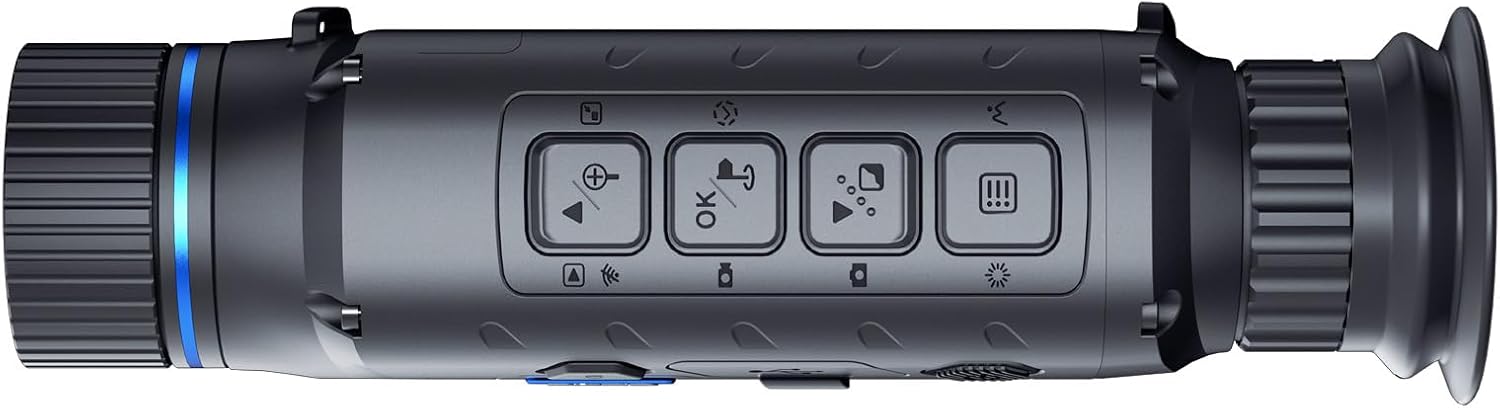
Figura 2: Fuq view of the monocular, highlighting the accessible control buttons for various functions.

Figure 3: Illustration of the NETD ≤25mK sensitivity, demonstrating the monocular's ability to detect subtle temperature differences.

Figure 4: The compact and lightweight design of the monocular, emphasizing its portability and ease of handling.

Figura 5: Dijagramma li turi l-qasam wiesa' ta' view, which aids in effortless scanning and target acquisition.

Figura 6: Aktarview of additional key features such as 3 scene modes, hot track, standby mode, IP67 rating, WiFi connectivity, and firmware update capability.
Setup
1. Unboxing u Spezzjoni Inizjali
Carefully remove the monocular and all accessories from the packaging. Inspect for any signs of damage. Retain the packaging for future storage or transport.
2. Installazzjoni tal-batterija
Locate the battery compartment. Insert the recommended battery type (not specified in product data, assume standard rechargeable monocular battery) according to the polarity indicators. Ensure the compartment cover is securely closed.
3. Tixgħil / Mitfi
Press and hold the power button (refer to Figure 2 for button layout) for a few seconds to power on the device. The display will illuminate. To power off, press and hold the power button again until the device shuts down.
4. Aġġustament tad-Djopter
If the image appears blurry, adjust the diopter ring on the eyepiece until the display text and icons are sharp and clear for your vision.
5. Konnessjoni permezz tal-WiFi
The monocular features built-in WiFi. To connect to a smartphone or tablet:
- Download the official Pard app (check manufacturer's website for app name and availability).
- Turn on the monocular's WiFi function via the device menu.
- On your smartphone, go to WiFi settings and select the monocular's network (e.g., "PARD_XXXX").
- Enter the default password (usually "12345678" or check the device manual/manufacturer's websit).
- Open the Pard app to use your phone as an external viewfinder, share content, or view reġistrazzjonijiet.
Istruzzjonijiet Operattivi
1. Aġġustament tal-Focus
Rotate the objective lens focus ring to achieve a clear image of your target at varying distances.
2. Changing Image Modes
The Leopard LE256-11 offers five image modes: WT-HOT, BK-HOT, RD-HOT, IN-HOT, and SKY. Navigate through the menu using the control buttons (refer to Figure 2) to select the desired mode. Each mode highlights thermal signatures differently, optimizing for various observation scenarios.

Figure 7: Visual representation of the five available image modes, each designed to optimize target visibility under different conditions.
3. Selecting Scene Modes
Choose from three scene modes: City, Rain, and Forest. These modes adjust image processing to provide optimal clarity and detail based on the environment. Access these settings through the device menu.
4. Smart Screen Recording and Photo Capture
To record video or capture photos, use the dedicated recording/capture button (refer to Figure 2). The Smart Screen Recording feature captures not only the thermal image but also the on-screen UI icons, providing comprehensive data. Recorded files are stored internally and can be accessed via WiFi connection or by connecting the device to a computer.

Figure 8: Depiction of the Smart Screen Recording feature, showing how on-screen information is captured along with the thermal image.
5. Using Hot Track
Activate the Hot Track function through the menu. This feature automatically identifies and tracks the hottest point in the field of view, making it easier to follow moving targets.
6. Modalità Standby
A single press of the power key can put the device into standby mode. This conserves battery power while allowing for quick reactivation when needed.
Manutenzjoni
1. Tindif tal-Apparat
- Lentijiet: Use a soft, lint-free cloth specifically designed for optical lenses. Gently wipe the lens surfaces. For stubborn smudges, use a small amount of lens cleaning solution applied to the cloth, not directly to the lens.
- Korp: Wipe the monocular body with a soft, damp cloth. Do not use abrasive cleaners, solvents, or strong chemicals, as these can damage the finish and internal components.
2. Ħażna
When not in use, store the monocular in a cool, dry place, away from direct sunlight and extreme temperatures. Use the provided protective case or a similar padded container to prevent physical damage.
3. Kura tal-batterija
- Ensure the battery is fully charged before extended storage to maintain battery health.
- If storing for long periods, remove the battery to prevent leakage.
- Use only the manufacturer-recommended charger and batteries.
4. Reżistenza għall-Ilma (IP67)
The device has an IP67 rating, meaning it is protected from dust ingress and can withstand immersion in water up to 1 meter for 30 minutes. While durable, avoid prolonged submersion and ensure all port covers are securely closed before exposure to water or dust.
Issolvi l-problemi
If you encounter issues with your Pard Leopard LE256-11, refer to the following common problems and solutions:
| Problema | Kawża Possibbli | Soluzzjoni |
|---|---|---|
| L-apparat ma jixgħelx. | Low or depleted battery; improperly installed battery. | Charge the battery. Ensure the battery is inserted correctly with proper polarity. |
| L-immaġni hija mċajpra jew mhux iffukata. | Improper focus adjustment; diopter not set correctly. | Adjust the objective lens focus ring. Adjust the diopter on the eyepiece. |
| Il-konnessjoni tal-WiFi tfalli. | Incorrect password; WiFi function not enabled; app issues. | Verify WiFi password. Ensure WiFi is enabled on the monocular. Restart the app and device. |
| L-apparat jiffriża jew ma jibqax jirrispondi. | Problema temporanju tas-softwer. | Perform a soft reset by holding the power button until the device shuts down, then restart. If persistent, consider a firmware update. |
| Poor thermal image quality. | Environmental conditions; lens dirty; incorrect scene/image mode. | Clean the lens. Adjust scene mode (City/Rain/Forest) or image mode (WT-HOT, BK-HOT, etc.) to suit conditions. |
If the problem persists after attempting these solutions, please contact Pard customer support for further assistance.
Speċifikazzjonijiet
| Karatteristika | Dettall |
|---|---|
| Isem tal-Mudell | LE256-11 |
| Thermal Sensor NETD | ≤25mK |
| Daqs tal-Pixel | 12µm |
| Dijametru Objettiv tal-Lenti | 11 mm |
| Qasam ta View (Orizzontali) | 15.9° (28m@100m) |
| Modi tal-Immaġni | WT-HOT, BK-HOT, RD-HOT, IN-HOT, SKY |
| Modi tax-Xena | City, Rain, Forest |
| Konnettività | WiFi |
| Klassifikazzjoni li ma jgħaddix ilma minnha | IP67 |
| Dimensjonijiet (LxWxH) | 172 x 36 x 48 mm (6.77 x 1.42 x 1.89 pulzieri) |
| Piż | 300 Gramm |
| Manifattur | PARD |
| ASIN | B0FJFWSHV5 |
Garanzija u Appoġġ
For detailed warranty information, please refer to the warranty card included with your product or visit the official Pard websit. It-termini u l-kundizzjonijiet tal-garanzija jistgħu jvarjaw skont ir-reġjun u l-bejjiegħ bl-imnut.
For technical support, service, or inquiries, please contact Pard customer service through their official channels. You can also visit the Pard Store on Amazon għal aktar informazzjoni dwar il-prodott u riżorsi ta' appoġġ.


