Introduzzjoni
This manual provides detailed instructions for the installation, operation, and maintenance of your Thermalright Stream Vision 360 Black CPU Liquid Cooler. Please read this manual thoroughly before installation and use to ensure proper function and longevity of the product.

Image: Thermalright Stream Vision 360 Black CPU Liquid Cooler installed in a PC case, highlighting the LCD screen and radiator.
Informazzjoni dwar is-Sigurtà
Always follow these safety guidelines to prevent damage to the product or injury:
- Kun żgur li s-sistema tal-kompjuter tiegħek tkun mitfija u skonnettjata mis-sokit tal-ħajt qabel l-installazzjoni.
- Immaniġġja l-komponenti b'attenzjoni biex tevita l-ħsara.
- Do not attempt to disassemble the cooler's pump or radiator.
- Żomm fejn ma jintlaħaqx mit-tfal.
- Refer to the installation video or manual for specific steps.
Kontenut tal-Pakkett
Ivverifika li l-komponenti kollha huma preżenti fil-pakkett:
- Thermalright Stream Vision 360 Black CPU Liquid Cooler (Radiator with pre-installed fans, pump/waterblock with LCD screen)
- Mounting fasteners for AMD (AM4/AM5) and Intel (LGA1150/1151/1155/1156/1200/2011/2066/1700/1851) platforms
- SS2 all-metal buckle
- Water guide clip
- USB-C to USB 2.0 connection cable (for LCD screen)
- Pejst termali

Image: Main components of the liquid cooler, showing the radiator, fans, and the waterblock with its detachable LCD module.
Setup u Installazzjoni
The Thermalright Stream Vision 360 Black CPU Liquid Cooler is designed for straightforward installation. Ensure you have the correct mounting hardware for your CPU socket type (AMD AM4/AM5 or Intel LGA1150/1151/1155/1156/1200/2011/2066/1700/1851).
Passi Ġenerali ta' Installazzjoni:
- Ipprepara s-CPU: Clean the CPU surface of any old thermal paste. Apply a thin, even layer of new thermal paste to the center of the CPU.
- Installa r-Radjatur u l-Fannijiet: Mount the radiator with its pre-installed fans to an available fan mounting location in your PC case (typically top or front). Ensure airflow direction is optimal for your case.
- Installa l-Bracket tal-Immuntar: Attach the appropriate mounting bracket (Intel or AMD) to the waterblock. The SS2 all-metal buckle provides secure compatibility.
- Mount Waterblock: Carefully place the waterblock onto the CPU, aligning the mounting holes. Secure it with the provided fasteners. For AMD platforms, use the original motherboard backplate.
- Qabbad Kejbils:
- Connect the pump's 4-PIN PWM cable to the CPU_FAN or AIO_PUMP header on your motherboard.
- Qabbad il-kejbils tal-fann mal-headers tal-fann xierqa fuq il-motherboard tiegħek jew ma' kontrollur tal-fann.
- Connect the LCD screen via the USB-C to USB 2.0 cable to an available USB 2.0 header on your motherboard.
- Manage Tubing: Use the included water guide clips to route the water tubes neatly and prevent them from interfering with other components or fans.

Image: The magnetic LCD display module detaching from the waterblock, illustrating easy installation.
Software Installation (TRCC):
To customize the LCD screen and monitor system parameters, download and install the TRCC software from the official Thermalright website. The software allows for custom themes, static/dynamic picture switching, and video playback on the 3.5-inch IPS LCD screen.
Referenza tal-Vidjo tal-Installazzjoni:
For a visual guide, refer to the official installation video. This video demonstrates the process for various CPU platforms.
Vidjo: Prodott lestview and installation guide for the Thermalright Stream Vision 360 Black CPU Liquid Cooler.
Istruzzjonijiet Operattivi
Personalizzazzjoni tal-Iskrin LCD:
The 3.5-inch IPS LCD screen offers a 640x480 resolution for clear display. Use the TRCC software to:
- Display real-time system monitoring data (CPU/GPU temperature, clock frequencies, usage).
- Switch between various static and dynamic pictures.
- Upload and play custom GIFs and videos.
- Apply custom themes.

Image: The LCD screen showcasing various live system monitoring displays and customizable visual themes.
Active Motherboard Cooling:
The magnetic cold head pump features an integrated 60mm fan. This fan provides direct airflow to the motherboard's core power supply module (VRM) and memory, contributing to lower component temperatures and stable CPU power delivery.
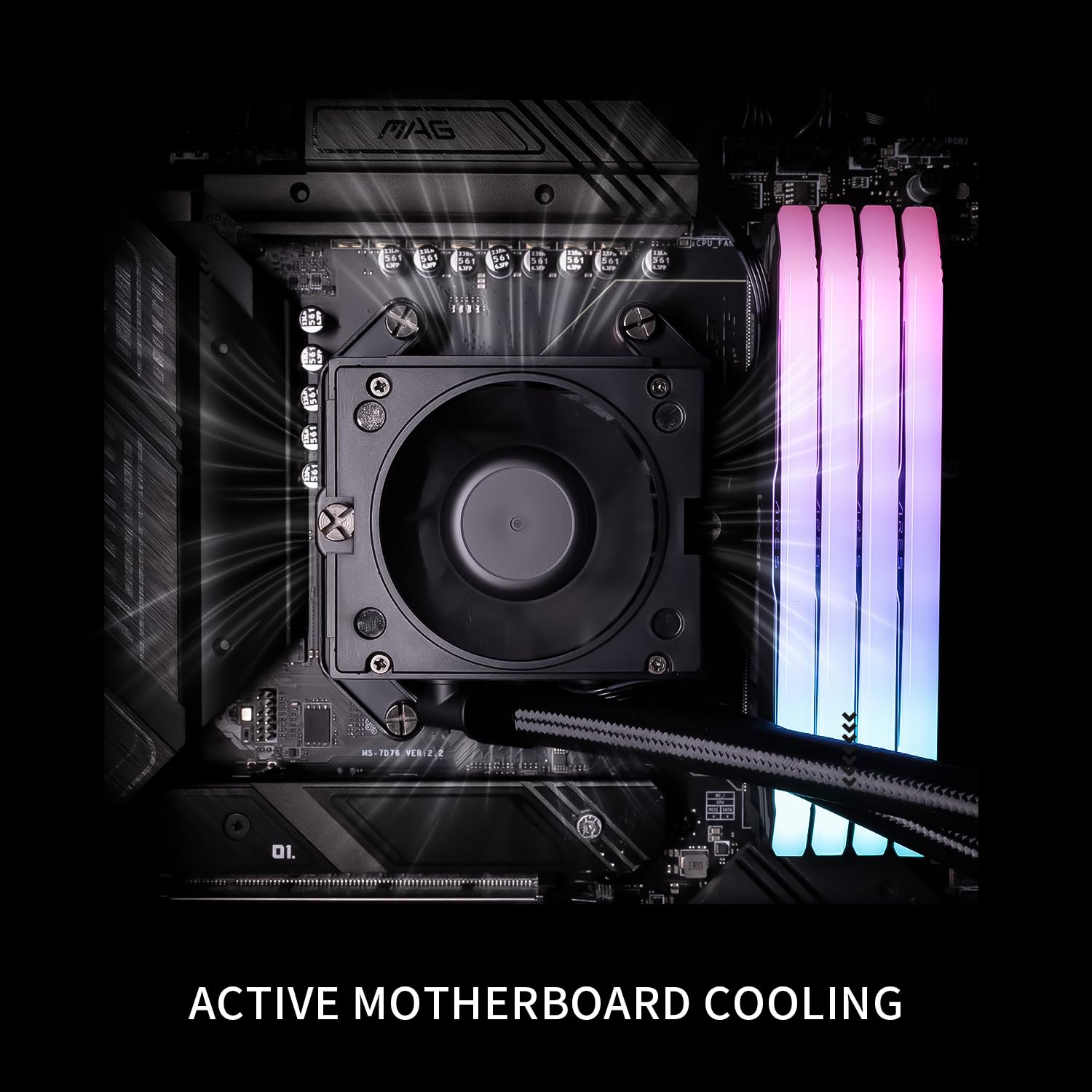
Image: The waterblock's integrated fan actively cooling the motherboard's voltage regulator modules (VRM) and RAM.
Manutenzjoni
- Tindif tat-Trab: Periodically clean the radiator fins and fan blades with compressed air to prevent dust buildup, which can impede cooling performance.
- Ġestjoni tal-Kejbil: Ensure all cables are securely connected and not obstructing airflow.
- Aġġornamenti tas-Software: Keep the TRCC software updated to access new features and performance improvements.
- Liquid Level Check: This is a closed-loop system and does not require regular liquid refills. However, monitor for any signs of leaks.
Issolvi l-problemi
| Problema | Kawża Possibbli | Soluzzjoni |
|---|---|---|
| Temperaturi Għolja tas-CPU |
|
|
| Skrin LCD Mhux Wiri |
|
|
| Unusual Noise from Cooler |
|
|
Speċifikazzjonijiet
| Komponent | Speċifikazzjoni |
|---|---|
| Mudell | Stream Vision 360 Black |
| Dimensjonijiet tar-Radjatur | 403mm x 120mm x 52mm |
| Waterblock Dimensions | 69mm x 76mm x 92mm (cold head) |
| Veloċità tal-Pompa | 6400 RPM ±10% |
| Pompa Voltage | DC 12V |
| Konnettur tal-Pompa | PWM 4-PIN |
| Mudell tal-fann | TL-H12-X28-R7 |
| Fannijiet Dimensjonijiet | 120mm x 120mm x 28mm |
| Veloċità tal-fann | 2400 RPM ±10% |
| Pressjoni tal-Arja tal-Fan | 2.78 MM H2O |
| Fan Air Volume | 95.4 CFM |
| Storbju Operattiv | ≤31.4 dBA |
| Tip ta 'Kuxxinett tal-Fann | S-FDB Bearing V2 |
| LCD Daqs tal-Iskrin | 3.5 pulzieri |
| Riżoluzzjoni LCD | 640x480 IPS |
| Kompatibilità | AMD: AM4/AM5, Intel: LGA1150/1151/1155/1156/1200/2011/2066/1700/1851 |
| Materjal | Aluminju |
| Piż tal-oġġett | 6.74 liri |

Image: Compatibility information for Intel and AMD platforms, alongside details of the radiator's internal water channels and polymer-sleeved tubes.

Image: Specifications and features of the TL-H12-X28-R7 fan, including its S-FDB V2 bearing and static pressure optimization.
Garanzija u Appoġġ
For warranty information, technical support, or further assistance, please visit the official Thermalright webis-sit jew ikkuntattja lid-dipartiment tas-servizz tal-konsumatur tagħhom. Żomm l-irċevuta tax-xiri tiegħek bħala prova tax-xiri.
Uffiċjali Websit: www.thermalright.com