1. Introduzzjoni
This manual provides detailed instructions for the installation, operation, and maintenance of your Thermalright TL-C12C-S X5 120mm ARGB CPU Air Fan 5-pack. These fans are designed to provide efficient and quiet cooling for computer cases and CPU coolers, featuring intelligent PWM speed control and customizable ARGB lighting.

Figure 1: Thermalright TL-C12C-S X5 120mm ARGB Fans (5-pack)
The TL-C12C-S X5 fans incorporate an S-FDB (Stably-FDB) bearing for stable, low-noise operation and a long service life. The high-brightness LED atomizing ARGB fan blades effectively reflect light, creating soft and vibrant lighting effects that can be synchronized with your motherboard.

Figure 2: Key Features of the TL-C12C-S X5 Fan
2. Setup u Installazzjoni
Follow these steps to properly install your Thermalright TL-C12C-S X5 fans into your computer system.
2.1 Installazzjoni Fiżika
- Ipprepara s-sistema tiegħek: Kun żgur li l-kompjuter tiegħek huwa mitfi u skonnettjat mill-plakka tal-ħajt. Iftaħ il-kaxxa tal-kompjuter tiegħek biex taċċessa l-postijiet tal-immuntar tal-fann.
- Mount the fans: Position the fan(s) in your desired location (e.g., chassis, CPU cooler, radiator). Use the included screws to secure each fan to the case or cooling component. Ensure the fan is oriented correctly for optimal airflow (intake or exhaust).

Figure 3: Fan Corner with Silicone Pad and S-FDB Bearing Detail
2.2 Konnessjonijiet tal-Wiring
- PWM Signal Sync Wiring: Connect the 4-pin PWM connectors of the fans in series. This allows multiple fans to be controlled by a single motherboard header, synchronizing their speed.
- Connect to Motherboard (PWM): Connect the final 4-pin PWM connector from the fan series to an available CHA_FAN header on your motherboard. This provides power and allows for intelligent speed control.
- ARGB Lighting Wiring: Remove the protective caps from the 3-pin ARGB connectors on each fan. Connect these connectors in series. Up to five fans can be connected to one motherboard ARGB lighting header. Ensure the arrows on the connectors align.
- Connect to Motherboard (ARGB): Connect the final 3-pin +5V ARGB lighting cable to an available ADD_GEN header on your motherboard. This enables customizable lighting effects.
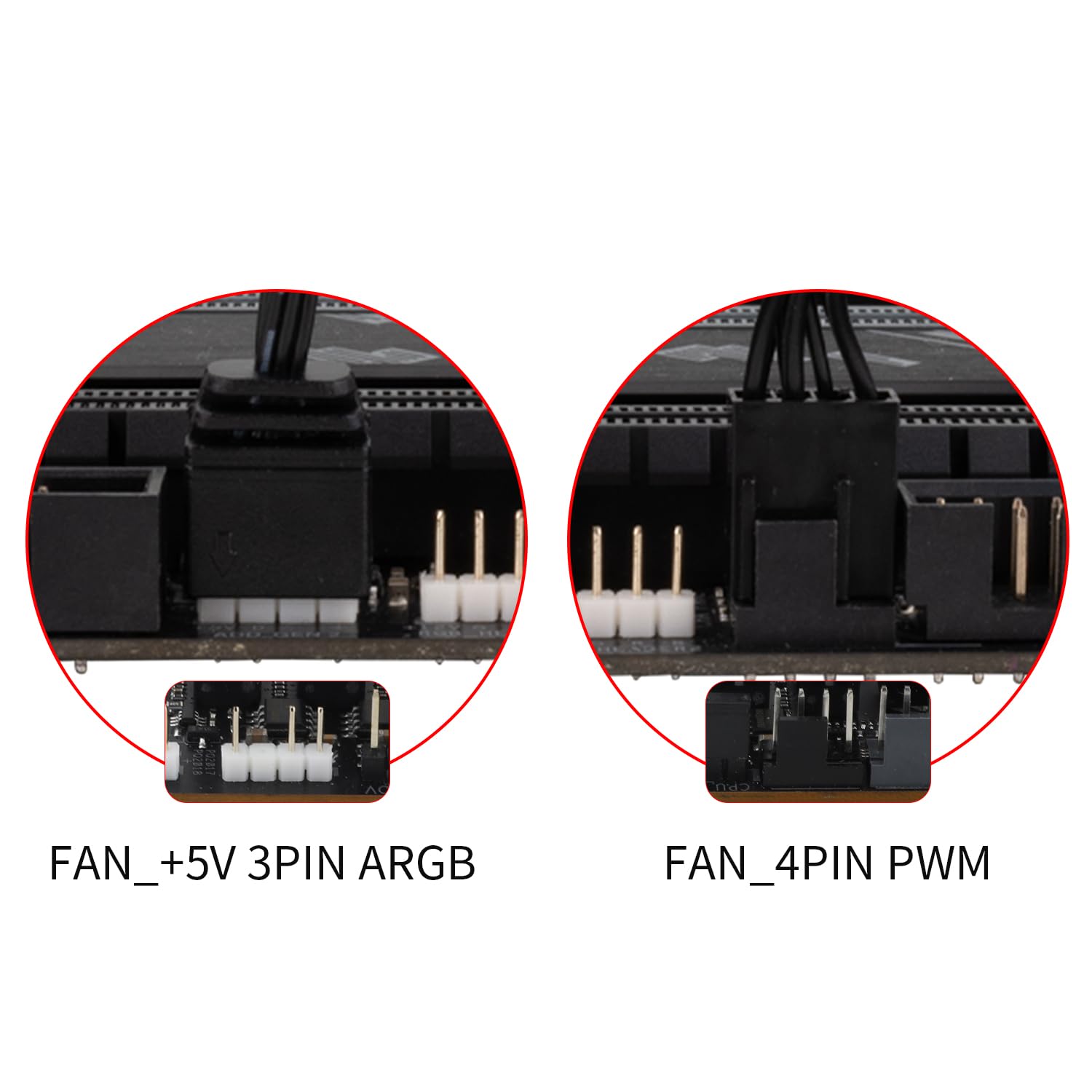
Figure 4: Motherboard Fan and ARGB Headers
2.3 Gwida bil-Vidjo għall-Installazzjoni
Għal gwida viżwali dwar il-proċess tal-installazzjoni, jekk jogħġbok irreferi għall-filmat uffiċjali hawn taħt:
Video 1: Thermalright TL-C12C-S X5 Series Fan Installation Guide. This video demonstrates the step-by-step process of installing the fans, including physical mounting and connecting the PWM and ARGB cables to the motherboard.
3. Istruzzjonijiet Operattivi
The Thermalright TL-C12C-S X5 fans are designed for efficient and user-friendly operation.
3.1 Intelligent Temperature Control (PWM)
Once connected to a 4-pin PWM header on your motherboard, the fans will automatically adjust their speed based on the motherboard's temperature readings. This ensures optimal cooling performance while minimizing noise. No manual speed adjustment is typically required. If a fixed speed is desired, you may be able to adjust the fan to DC mode via your motherboard's BIOS/UEFI settings or fan control software, if supported.
3.2 Kontroll tad-Dawl ARGB
The fans feature high-brightness ARGB lighting with up to 17 modes of light effects. When connected to a compatible 3-pin +5V ARGB header on your motherboard, the lighting can be managed and synchronized using your motherboard's ARGB control software (e.g., ASUS Aura Sync, MSI Mystic Light Sync, Gigabyte RGB Fusion, ASRock Polychrome Sync). Refer to your motherboard manual for specific software instructions.
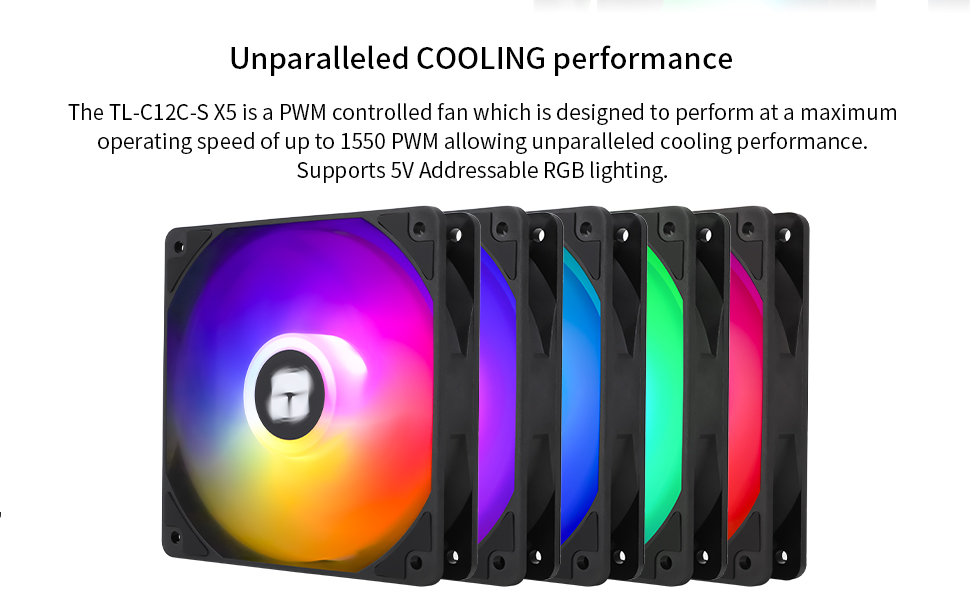
Figure 5: Customizable ARGB Lighting Effects
4. Manutenzjoni
The Thermalright TL-C12C-S X5 fans are designed for long-term, maintenance-free operation.
4.1 S-FDB Bearing
These fans are equipped with a high-durability S-FDB (Fluid Dynamic Bearing) which provides low-friction and low-noise operation. This bearing type is designed to be maintenance-free and does not require lubrication or disassembly. Please do not attempt to disassemble the fan as this may damage the unit and void any potential warranty.
4.2 Tindif
Periodically inspect the fan blades and frame for dust accumulation. To clean, ensure the computer is powered off and unplugged. Use compressed air or a soft, dry cloth to gently remove dust from the fan blades and housing. Avoid using liquid cleaners directly on the fan or its electrical components.

Figure 6: Long-Lasting S-FDB Bearing Design
5 Issolvi l-problemi
If you encounter issues with your Thermalright TL-C12C-S X5 fans, consider the following common solutions:
- Il-fannijiet ma jdurux:
- Ensure all 4-pin PWM connectors are securely seated in the motherboard headers and daisy-chained correctly.
- Check your motherboard's BIOS/UEFI settings to ensure fan headers are enabled and configured correctly (e.g., not set to 0 RPM at low temperatures).
- Verify that your power supply is providing adequate power to the motherboard and its fan headers.
- ARGB lighting not working or incorrect colors:
- Ensure all 3-pin +5V ARGB connectors are securely seated and daisy-chained correctly, paying attention to arrow alignment.
- Confirm that the ARGB cable is connected to a +5V ARGB header on your motherboard, not a +12V RGB header (which can damage the LEDs).
- Use your motherboard's ARGB control software to check and adjust lighting settings. Ensure the software is up-to-date.
- If only one fan's lighting is affected, check its individual ARGB connection within the daisy chain.
- Ħoss eċċessiv:
- Check for any cables or obstructions touching the fan blades.
- Ensure the fan is securely mounted and screws are tightened.
- Dust accumulation can cause imbalance and noise; clean the fans as described in the Maintenance section.
- Adjust fan speed settings in your motherboard's BIOS/UEFI or software to a lower RPM if noise is a concern and temperatures allow.
6. Speċifikazzjonijiet
| Karatteristika | Dettall |
|---|---|
| Numru tal-Mudell | TL-C12C-S X5 |
| Dimensjonijiet tal-Prodott | 4.72"T x 0.98"W x 4.72"Għ (120 x 25 x 120 mm) |
| Piż | 1.68 Liri (għal pakkett ta' 5) |
| Brand | Dritt termali |
| Tip ta 'Konnettur tal-Enerġija | 4-Pin PWM |
| Interface tad-Dawl | 5V 3-Pin ARGB |
| Voltage | 12 Volts (DC) |
| Kurrenti | 0.20A |
| Metodu tat-tkessiħ | Arja |
| Apparati Kompatibbli | Desktop |
| Livell ta' Storbju | ≤ 25.6 dBA |
| Materjal | Industrial Grade PBT+PC |
| Veloċità ta' Rotazzjoni Massima | 1550 RPM ±10% |
| Kapaċità tal-Fluss tal-Ajru | 66.17 CFM |
| Pressjoni tal-Arja | 1.53 mm H2O |
| Tip ta 'Bearing | S-FDB (Fluid Dynamic Bearing) |
| X'hemm fil-Kaxxa | CPU Fan (5-pack) |
7. Informazzjoni dwar is-Sigurtà
- Always disconnect power to your computer before installing, cleaning, or performing any maintenance on the fans.
- Avoid touching moving fan blades.
- Ensure proper cable management to prevent cables from interfering with fan operation.
- Do not expose the fans to moisture or extreme temperatures.
- Only connect the ARGB lighting to a +5V 3-pin ARGB header. Connecting to a +12V 4-pin RGB header will damage the LEDs.
8. Garanzija u Appoġġ
Specific warranty details and direct support contact information are not provided in the product description. For warranty claims or technical assistance, please refer to the official Thermalright webis-sit jew ikkuntattja lill-bejjiegħ bl-imnut minn fejn inxtara l-prodott.


