1. Introduzzjoni
The NZXT H2 Flow (CI-H21FB-01) is a compact vertical Mini-ITX PC case designed to maximize airflow and save space while accommodating high-performance components. It features smart cable management, tool-less access, and includes dual top fans and a premium PCIe 5.0 riser cable for a streamlined building experience.
Karatteristiċi ewlenin:
- Hybrid Glass-and-Mesh Side Panel: Showcases your build while supporting up to a 280 mm radiator for efficient cooling.
- Disinn kompatt: A 20.7 L volume fits most GPUs up to 331 mm, offering high-end power in a small footprint.
- High Airflow Panels: Ultra-fine mesh panels on multiple sides maximize fresh air intake and filter dust, keeping components cooler and cleaner.
- Effortless Building: Tool-less panels, integrated cable routing Velcro straps, and intuitive wire management channels simplify installation.
- Pre-Installed Performance: Includes a premium PCIe 5.0 riser cable for vertical GPU mounting and dual F120Q CV fans for immediate exhaust cooling.
2. Informazzjoni dwar is-Sigurtà
WARNING: Always disconnect power from your PC before performing any installation, maintenance, or troubleshooting. Failure to do so may result in personal injury or damage to components.
- Aqra l-istruzzjonijiet kollha bir-reqqa qabel l-installazzjoni.
- Ilbes ċinga tal-polz anti-statika jew tmiss ta' spiss oġġett tal-metall ertjat biex tevita ħsara lill-komponenti minn skarika elettrostatika (ESD).
- Handle components with care. Avoid touching pins or exposed circuitry.
- Żomm il-partijiet żgħar u l-materjali tal-ippakkjar 'il bogħod mit-tfal.
- Kun żgur li jkun hemm ventilazzjoni xierqa madwar il-kaxxa tal-PC biex tevita li tissaħħan iżżejjed.
3. Kontenut tal-Pakkett
Verify that all items are present in your NZXT H2 Flow package:
- NZXT H2 Flow Mini-ITX PC Case
- 2 x 120mm F120Q CV Top Fans (pre-installed)
- Premium PCIe 5.0 Riser Cable (pre-installed)
- Kaxxa tal-Aċċessorji (li fiha viti, rabtiet tal-kejbil, u partijiet żgħar oħra)
4. Kompatibilità tal-Komponenti
The NZXT H2 Flow case is designed to accommodate specific component sizes for optimal performance and fit:
- Motherboard: Mini ITX
- Karta tal-Grafika (GPU): Up to 331 mm in length
- Radjatur: Up to 280 mm (for liquid cooling solutions)
- Provvista tal-Enerġija (PSU): SFX/SFXL form factor is recommended for best compatibility and cable management.
- Fannijiet: Includes 2 x 120mm top fans. Additional fan mounting options may be available depending on other component choices.
5. Konfigurazzjoni u Installazzjoni
Follow these steps to assemble your PC within the NZXT H2 Flow case. Refer to your individual component manuals for specific installation details.
5.1. Kawża Magħluqaview u Dimensjonijiet
The NZXT H2 Flow is a compact vertical Mini-ITX case. Understanding its dimensions is crucial for planning your build.

5.2. Accessing the Case Interior
The H2 Flow features tool-less panels for easy access to the interior.

5.3. Motherboard and CPU Installation
Install your Mini-ITX motherboard and CPU (with cooler) before placing it into the chassis.
5.4. Installazzjoni tal-Unità tal-Provvista tal-Enerġija (PSU)
The case supports SFX/SFXL power supplies. Mount the PSU in its designated area, typically at the bottom of the case.

5.5. Ġestjoni tal-Kejbil
Utilize the integrated cable routing channels and Velcro straps for a clean and organized interior.
5.6. Installazzjoni tal-Karta tal-Grafika (GPU)
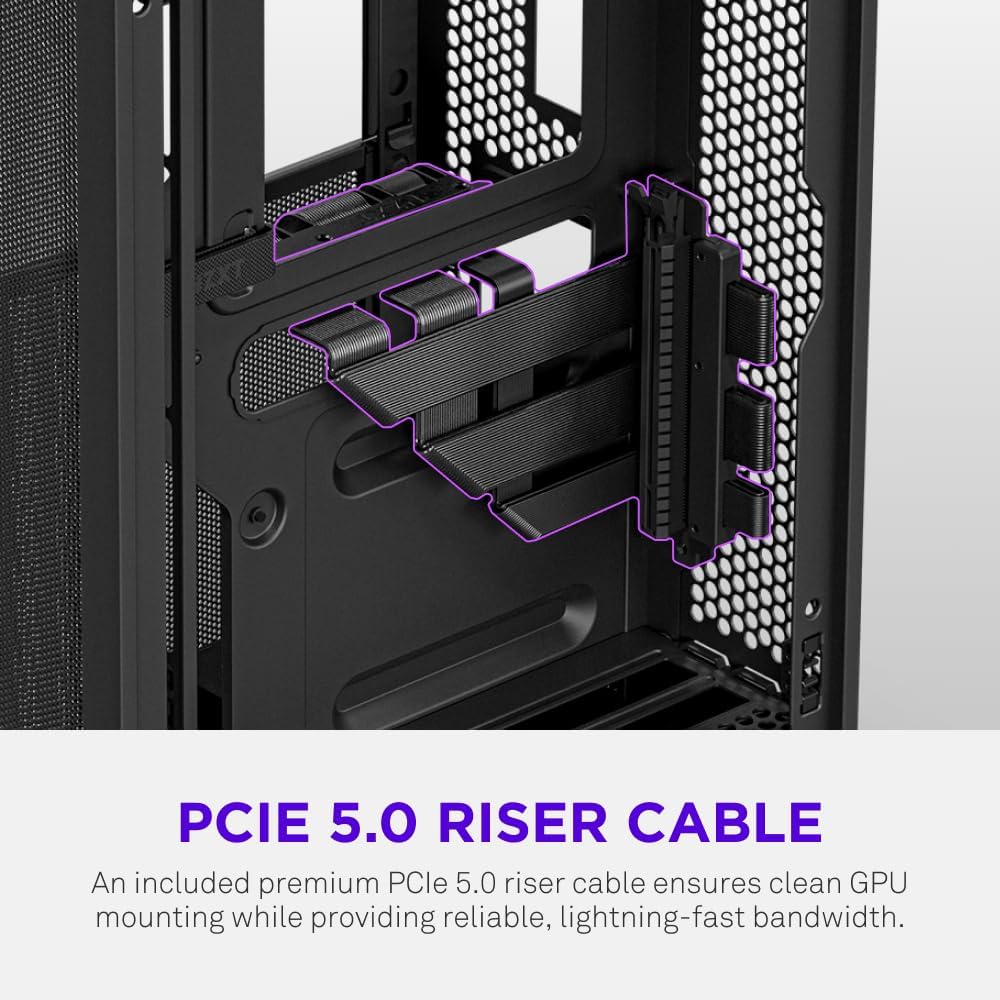
The H2 Flow supports GPUs up to 331 mm in length and includes a premium PCIe 5.0 riser cable for vertical mounting.

5.7. Sistema ta 'tkessiħ
The case comes with two pre-installed 120mm F120Q CV fans at the top for exhaust. It also supports up to a 280mm radiator for liquid cooling.


5.8. Prodott Aktarview Video
Ara dan il-filmat uffiċjali għal viżwal aktar 'il fuqview of the NZXT H2 Flow Mini-ITX PC Gaming Case.
6. Istruzzjonijiet Operattivi
6.1. Power On/Off
Press the power button located on the front I/O panel to turn your PC on or off.
6.2. Portijiet I/O ta' Quddiem
Il-pannell tal-I/O ta' quddiem jipprovdi aċċess konvenjenti għal:
- Portijiet USB 3.0
- Port USB-C
- Audio Jack (if applicable)
Connect your peripherals such as keyboards, mice, and headsets to these ports.
7. Manutenzjoni
7.1. Tindif tal-Filtri tat-Trab
The NZXT H2 Flow features ultra-fine mesh panels that act as dust filters. Regularly clean these panels to maintain optimal airflow and prevent dust buildup inside your PC.
- Gently remove the mesh panels from the case.
- Uża arja kkompressata jew pinzell artab biex tneħħi t-trab akkumulat.
- Reattach the panels securely.
7.2. Tindif Ġenerali
Uża artab, damp cloth to wipe down the exterior of the case. Avoid abrasive cleaners or solvents.
8 Issolvi l-problemi
Jekk tiltaqa' ma' problemi bil-bini tal-PC tiegħek, ikkunsidra l-passi komuni li ġejjin għas-soluzzjoni tal-problemi:
- Ebda Qawwa: Ensure all power cables (PSU to wall, PSU to motherboard, CPU, GPU) are securely connected. Check the power switch on the PSU.
- Ebda Display: Verify that your monitor is connected to the graphics card (not the motherboard I/O unless using integrated graphics) and that the GPU has proper power connections. Reseat the GPU and RAM.
- Is-sħana żejda: Check fan connections and orientation. Ensure mesh panels are clean and not obstructed. Verify CPU cooler installation and thermal paste application.
- Komponent Mhux Rilevat: Reseat the component (GPU, RAM, storage drives). Check power and data connections.
For more complex issues, consult your individual component manuals or NZXT customer support.
9. Speċifikazzjonijiet
| Karatteristika | Dettall |
|---|---|
| Brand | NZXT |
| Isem tal-Mudell | NZXT H2 Flow |
| Tip ta' Każ | Mini-Torri |
| Kompatibbiltà tal-motherboard | Mini ITX |
| Appoġġ għat-Tul tal-GPU | Sa 331 mm |
| Appoġġ tar-radjatur | Sa 280 mm |
| Fannijiet Inklużi | 2 x 120mm F120Q CV Top Fans |
| Included Riser Cable | Premium PCIe 5.0 |
| Tip ta' Immuntar tal-Provvista tal-Enerġija | Bottom Mount (SFX/SFXL recommended) |
| Metodu tat-tkessiħ | Air, Liquid |
| Kulur | Iswed |
| Materjal | Ħġieġ, metall |
| Piż tal-oġġett | 4.55 Kilogrammi |
| Total USB 3.0 Ports | 1 |
| Other Special Features | Tool-less Installation, Integrated Cable Management |
10. Garanzija u Appoġġ
10.1. Informazzjoni dwar Garanzija
The NZXT H2 Flow Mini-ITX PC Case comes with a Garanzija tal-Manifattur ta' 2 SninJekk jogħġbok żomm il-prova tax-xiri tiegħek għal talbiet ta' garanzija.
10.2. Appoġġ għall-Klijent
For technical assistance, troubleshooting, or warranty inquiries, please visit the official NZXT support websit jew ikkuntattja lit-tim tas-servizz tal-konsumatur tagħhom.
NZXT Store: Visit the NZXT Store on Amazon


