Introduzzjoni
This manual provides essential information for setting up, operating, maintaining, and troubleshooting your HP EliteDesk 705 G5 Mini PC. This compact desktop computer features an AMD Ryzen 5 Pro 3400G processor, 16GB DDR4 RAM, and a 256GB NVMe SSD, running on Windows 11 Pro. It is designed for efficient performance in various computing tasks.
Kontenut tal-Pakkett
Ivverifika li l-oġġetti kollha huma preżenti fil-pakkett:
- Mini PC HP EliteDesk 705 G5
- Tastiera bil-fili tal-USB
- USB Wired Mouse
- Korda tal-Enerġija
- USB Wireless Network Card (adapter)
- Adapter Bluetooth USB
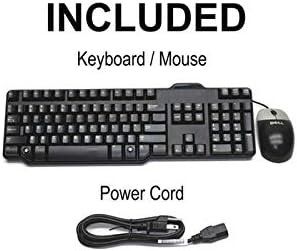
Image: Included accessories, showing a wired keyboard, a wired mouse, and a power cord.
Setup Istruzzjonijiet
1. Konnessjoni Periferali
Qabbad id-Displej: Use a DisplayPort cable to connect your monitor(s) to the DisplayPort 1.2 outputs on the rear of the Mini PC. This PC supports dual 4K displays.
Qabbad it-Tastiera u l-Maws: Ipplaggja t-tastiera u l-maws USB fi kwalunkwe port USB 3.0 disponibbli fuq quddiem jew wara tal-Mini PC.
Qabbad in-Netwerk: For wired internet, connect an Ethernet cable to the RJ45 Gigabit Ethernet port on the rear. For wireless connectivity, ensure the provided USB wireless network card is connected to a USB port.
Qabbad Awdjo: If using external speakers or a headset, connect them to the headphone/microphone combo jack on the front panel.
Qabbad l-Enerġija: Plug the power cord into the power input on the rear of the Mini PC, then into a wall outlet.

Immaġni: Quddiem view of the Mini PC, showing USB-C, USB 3.0 ports, headphone/microphone jacks, and the power button.
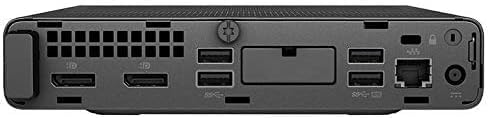
Immaġni: Wara view of the Mini PC, displaying DisplayPort outputs, USB 3.0 ports, RJ45 Ethernet port, and power input.
2. Tixgħel
Press the power button located on the front panel of the Mini PC. The system will boot up, and Windows 11 Pro will load.
Sistema Operattiva
Your HP EliteDesk 705 G5 Mini PC comes pre-installed with Windows 11 Pro. This operating system provides a secure and feature-rich environment for business and professional use, including BitLocker encryption and remote desktop capabilities. Follow the on-screen prompts for initial setup, user account creation, and network configuration.
Konnettività u Portijiet
Il-Mini PC joffri għażliet estensivi ta' konnettività:
- Portijiet USB 3.0: 6 ports (including 1 shutdown charging port) for high-speed data transfer and peripheral connections.
- Port USB-C: 1 port for modern devices and faster data transfer.
- DisplayPort 1.2: 2 ports supporting triple 4K output for multiple monitor setups.
- RJ45 Gigabit Ethernet: Għal konnessjonijiet stabbli tan-netwerk bil-fili.
- Jack tal-Headphone/Mikrofonu Combo: Għad-dħul u l-ħruġ tal-awdjo.
- Konnettività Wireless: Integrated WiFi (via USB adapter) and Bluetooth (via USB adapter) for wireless networking and peripheral connections.
Additionally, the system supports optional dual M.2 SSD slots for storage expansion up to 1TB.
Karatteristiċi tal-Prestazzjoni
The HP EliteDesk 705 G5 is engineered for robust performance:
- Proċessur: AMD Ryzen 5 Pro 3400G quad-core, eight-thread processor (3.7GHz base, up to 4.2GHz turbo) for efficient multitasking and demanding applications.
- Memorja: 16GB DDR4 RAM ensures smooth operation and quick application loading.
- Ħażna: 256GB NVMe SSD provides rapid boot times and fast data access.
- Grafika: Integrated graphics support 4K video decoding and dual display output (3840x2160 resolution).
- Disinn kompatt: With dimensions of 177×175×34mm and weighing 1.26kg, its small form factor allows for versatile placement, including behind a monitor.
Manutenzjoni
To ensure the longevity and optimal performance of your Mini PC:
- Tindif: Regularly clean the exterior with a soft, dry cloth. Use compressed air to clear dust from vents to prevent overheating.
- Aġġornamenti tas-Software: Keep your Windows 11 Pro operating system and drivers updated to ensure security and performance.
- Dejta tal-Backup: Agħmel backup tad-dejta importanti perjodikament fuq drajv estern jew ħażna fil-cloud.
- Ventilazzjoni: Ensure the Mini PC is placed in a well-ventilated area and that its vents are not obstructed.
Issolvi l-problemi
Jekk tiltaqa' ma' problemi, ipprova dawn il-passi komuni għas-soluzzjoni tal-problemi:
- Ebda Qawwa:
- Iċċekkja li l-korda tal-enerġija hija konnessa sew kemm mal-PC kif ukoll mas-sokit tal-ħajt.
- Ittestja l-iżbokk b'apparat ieħor.
- Ebda Display:
- Ensure the monitor is powered on and the display cable (DisplayPort) is securely connected at both ends.
- Ipprova qabbad ma' display port jew monitor differenti jekk disponibbli.
- Periferali Mhux Jirrispondu:
- Check USB connections for keyboard and mouse.
- Try connecting peripherals to different USB ports.
- Ensure USB wireless/Bluetooth adapters are properly inserted.
- Tnaqqis tas-Sistema:
- Agħlaq l-applikazzjonijiet bla bżonn.
- Iċċekkja u installa kwalunkwe aġġornament pendenti tal-Windows.
- Kun żgur li jkun hemm ventilazzjoni adegwata biex tevita t-tnaqqis tas-sħana.
Speċifikazzjonijiet
| Karatteristika | Speċifikazzjoni |
|---|---|
| Mudell | Mini PC HP EliteDesk 705 G5 |
| Proċessur | AMD Ryzen 5 Pro 3400G (Quad-Core, 8-Thread, 3.7GHz base, 4.2GHz turbo) |
| RAM | 16GB DDR4 SDRAM |
| Ħażna | 256GB NVMe SSD (supports dual M.2 SSD expansion up to 1TB) |
| Sistema Operattiva | Windows 11 Pro |
| Grafika | Integrated (supports 4K, 3840x2160 resolution) |
| Wiri Outputs | 2x DisplayPort 1.2 (supports dual 4K displays) |
| Portijiet USB | 6x USB 3.0 (1 with shutdown charging), 1x USB-C |
| Netwerk | RJ45 Gigabit Ethernet, 802.11ac Wireless (via USB adapter) |
| Awdjo | Headphone/Mikrofonu Combo Jack |
| Bluetooth | Yes (via USB adapter) |
| Dimensjonijiet (H x W x D) | 177 x 175 x 34 mm (madwar 6.97 x 6.89 x 1.34 pulzieri) |
| Piż | 1.26 kg (madwar 2.78 lbs) |
Garanzija u Appoġġ
This HP EliteDesk 705 G5 Mini PC (Renewed) is backed by a Garanzija ta 'Jum 90. For warranty claims or technical support, please refer to the documentation provided by your reseller or contact their customer service. Keep your purchase receipt for warranty validation.