1. Introduzzjoni
This manual provides essential information for the safe and efficient operation of your Sceptre E345W-QU120D 34-inch Ultrawide Monitor. Please read this manual thoroughly before using the product and retain it for future reference. This monitor features a 34-inch 3440x1440 display, up to 115Hz refresh rate, 103% sRGB color gamut, and multiple connectivity options including DisplayPort and HDMI, along with built-in speakers.
2. Informazzjoni dwar is-Sigurtà
Observe the following safety precautions to ensure proper operation and prevent damage to the monitor or injury to yourself.
- Tpoġġix il-monitor fuq karrettun, stand, jew mejda instabbli.
- Tesponix il-monitor għax-xita jew għall-umdità biex tevita perikli ta' nar jew xokk elettriku.
- Tiftaħx il-monitor casing. Ġewwa m'hemm l-ebda partijiet li jistgħu jiġu rranġati mill-utent. Irreferi għal kull manutenzjoni għand persunal tas-servizz kwalifikat.
- Aċċerta ruħek li jkun hemm ventilazzjoni xierqa. Timblokkax xi fetħiet tal-ventilazzjoni.
- Uża biss il-korda tal-enerġija u l-adapter li jiġu mal-monitor.
- Skonnettja l-plagg tal-enerġija mis-sokit jekk il-monitor ma se jintużax għal perjodu estiż.
3. Kontenut tal-Pakkett
Iċċekkja li l-oġġetti kollha huma preżenti u f'kundizzjoni tajba meta tiftaħ il-pakkett.
- Sceptre E345W-QU120D Ultrawide Monitor
- Stand tal-Monitor (Bażi u Għonq)
- Adapter tal-Enerġija u Korda tal-Enerġija
- DisplayPort Cable
- Screwdriver (for stand assembly)
- Manwal għall-Utent (dan id-dokument)
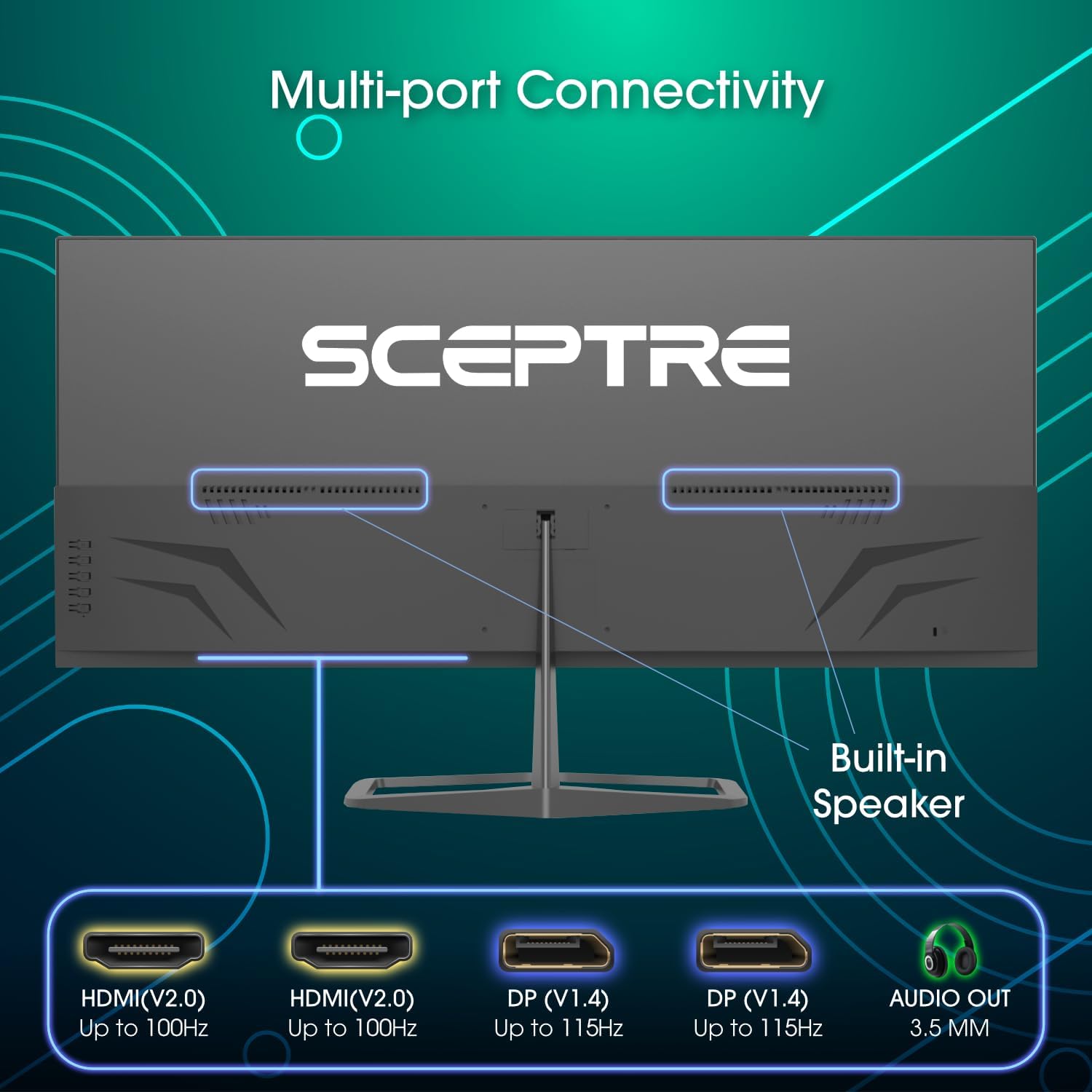
Image: Diagram illustrating the multi-port connectivity options on the Sceptre E345W-QU120D monitor, including HDMI, DisplayPort, and Audio Out. This image helps identify the various ports available on the monitor.
4. Setup
4.1 Armar tal-Istand
- Poġġi l-monitor b'wiċċu 'l isfel bir-reqqa fuq wiċċ artab u nadif biex tevita l-grif.
- Waħħal l-għonq tal-istand mal-monitor billi tuża l-viti pprovduti.
- Connect the stand base to the neck, securing it with the remaining screws. Use the included screwdriver for assembly.
- Kun żgur li l-viti kollha huma ssikkati sew qabel ma tpoġġi l-monitor wieqaf.
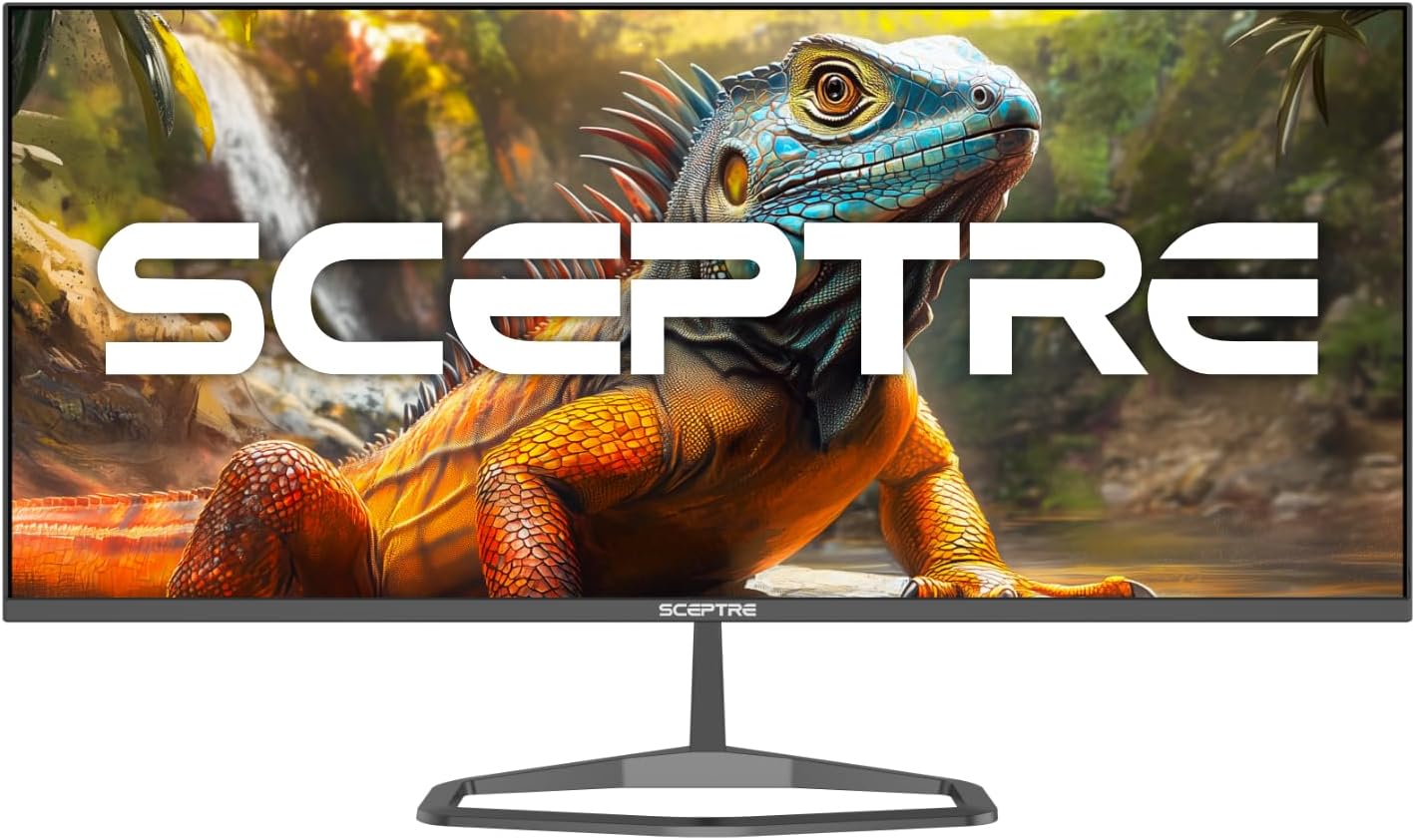
Image: The Sceptre E345W-QU120D Ultrawide Monitor displayed from the front, including its stable desktop stand. This image provides a visual reference for the assembled monitor.
4.2 Konnessjoni ma 'Kompjuter
- Kun żgur li kemm il-monitor kif ukoll il-kompjuter tiegħek huma mitfija.
- Connect one end of the DisplayPort cable (included) or an HDMI cable (not included) to the corresponding port on your computer's graphics card.
- Connect the other end of the cable to an available DisplayPort or HDMI input on the monitor. The monitor supports two DisplayPort (v1.4) inputs for up to 115Hz refresh rate and two HDMI (v2.0) inputs for up to 100Hz refresh rate.
- For audio output, you can use the 3.5mm Audio Out jack on the monitor to connect external speakers or headphones.
- Qabbad l-adapter tal-enerġija mad-dħul tal-enerġija tal-monitor, imbagħad daħħal il-korda tal-enerġija f'sokit tal-ħajt.
Immaġni: Wara view of the Sceptre E345W-QU120D Ultrawide Monitor, highlighting the input ports and VESA mount area. This image assists in locating the various connection points.
5. It-tħaddim tal-Monitor
5.1 Power On/Off
Press the power button, typically located on the back or bottom right side of the monitor, to turn the monitor on or off. The power indicator light will illuminate when the monitor is on.
5.2 Menù tal-Wiri fuq l-Iskrin (OSD)
The OSD menu allows you to adjust various monitor settings. Use the control buttons (usually located on the back or bottom of the monitor) to navigate the menu.
- Sors tad-dħul: Select between DisplayPort 1, DisplayPort 2, HDMI 1, or HDMI 2.
- Settings tal-Istampa: Aġġusta l-luminożità, il-kuntrast, in-nitidezza, u t-temperatura tal-kulur.
- Settings tal-Kulur: Fine-tune color balance and gamma. The monitor features 103% sRGB color gamut for accurate color reproduction.
- Settings tal-awdjo: Adjust volume for the built-in speakers or connected audio devices.
- Settings OSD: Ikkonfigura l-lingwa tal-OSD, it-trasparenza, u t-timeout.
- Settings Avvanzati: Enable or disable features like AMD FreeSync and Blue-Light Shift.

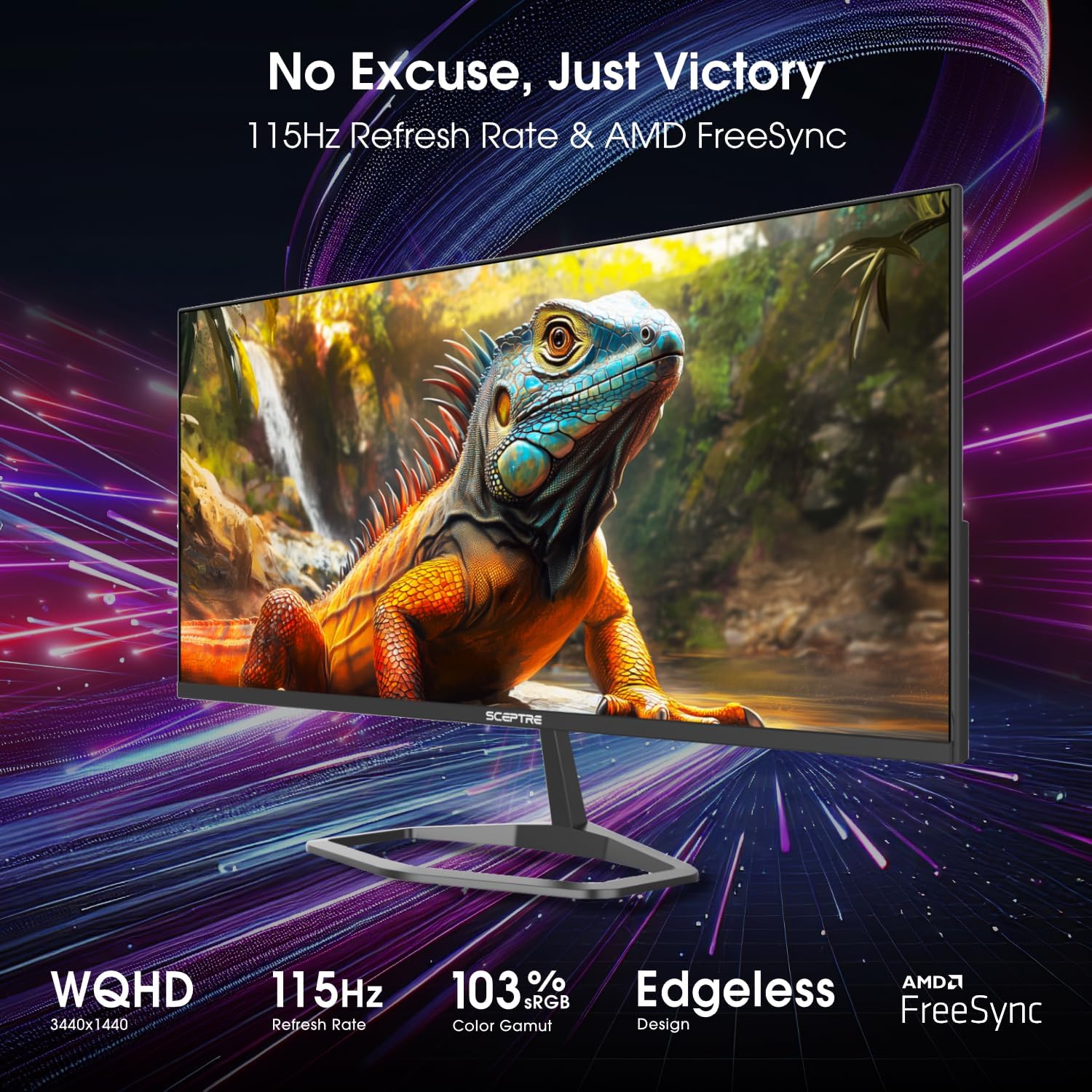
Immaġni: Quddiem view of the Sceptre E345W-QU120D 34-inch Ultrawide Monitor, showcasing its edgeless design and wide display. This image provides a general view of the monitor during operation.
5.3 Karatteristiċi ewlenin
- Rata Għolja ta' Aġġornar: Up to 115Hz via DisplayPort and 100Hz via HDMI for smoother visuals.
- AMD FreeSync: Synchronizes the monitor's refresh rate with your graphics card's frame rate to eliminate screen tearing and stuttering. Enable this feature in the OSD menu and your graphics card settings.
- Blue-Light Shift: Reduces harmful blue light emissions to alleviate eye strain during prolonged use. This can be adjusted or enabled/disabled via the OSD menu.
- Kelliema Integrati: Provides audio output without the need for external speakers.
6. Manutenzjoni
6.1 Tindif tal-Monitor
- Dejjem aqla’ l-monitor mill-plagg tal-elettriku qabel ma tnaddaf.
- Uża ċarruta ratba u mingħajr ħelu dampMaħsul bl-ilma jew b'tindif tal-iskrin li ma jobrox.
- Do not spray cleaner directly onto the screen or into any openings.
- Imsaħ l-iskrin bil-mod biex tneħħi t-trab u t-tbajja’.
- Għall-monitor ċasing, uża drapp artab u niexef.
6.2 Kura Ġenerali
- Evita li tpoġġi oġġetti tqal fuq il-monitor jew il-kejbils tiegħu.
- Żomm il-monitor 'il bogħod mix-xemx diretta, sorsi ta' sħana, u trab eċċessiv.
- Ensure adequate space around the monitor for proper ventilation.
7 Issolvi l-problemi
If you encounter issues with your monitor, refer to the following troubleshooting guide.
| Problema | Kawża Possibbli | Soluzzjoni |
|---|---|---|
| Ebda qawwa | Power cable not connected; Power outlet not working; Monitor power button off. | Ensure power cable is securely connected to monitor and outlet. Test outlet with another device. Press monitor power button. |
| L-ebda sinjal | Kejbil tal-vidjo mhux imqabbad; Sors ta' input mhux korrett magħżul; Il-kompjuter mhux qed joħroġ sinjal. | Check video cable connections (DisplayPort/HDMI) to both monitor and computer. Select correct input source via OSD menu. Restart computer. |
| Image flickering or distorted | Loose video cable; Incorrect resolution/refresh rate; Graphics card driver issues. | Secure video cable. Adjust resolution and refresh rate in computer display settings. Update graphics card drivers. |
| L-ebda awdjo mill-ispikers integrati | Volum baxx wisq; Sikketjat; Output awdjo mhux korrett magħżul fuq il-kompjuter. | Increase monitor volume via OSD. Check computer's audio settings to ensure monitor is selected as output device. |
| HDMI ports feel hot | Potential overheating; Cable issue. | Ensure proper ventilation around ports. Try a different HDMI cable. If problem persists, contact support. |
8. Speċifikazzjonijiet
| Karatteristika | Dettall |
|---|---|
| Numru tal-Mudell | E345W-QU120D |
| Daqs tal-Iskrin | 34 Pulzier |
| Riżoluzzjoni | 3440 x 1440 (WQHD) |
| Max Refresh Rate (DisplayPort) | 115Hz |
| Max Refresh Rate (HDMI) | 100Hz |
| Proporzjon ta' l-aspett | 21:9 |
| Gamut tal-Kulur | 103% sRGB |
| Konnettività | 2x HDMI (v2.0), 2x DisplayPort (v1.4), 1x Audio Out (3.5mm) |
| Kelliema Inkorporati | Iva |
| Kompatibbli VESA Mount | Iva |
| Piż tal-oġġett | 9.7 liri (madwar 4.4 kg) |
| Dimensjonijiet tal-Prodott (LxWxH) | 32 x 9 x 21 pulzieri (madwar 81.3 x 22.9 x 53.3 ċm) |
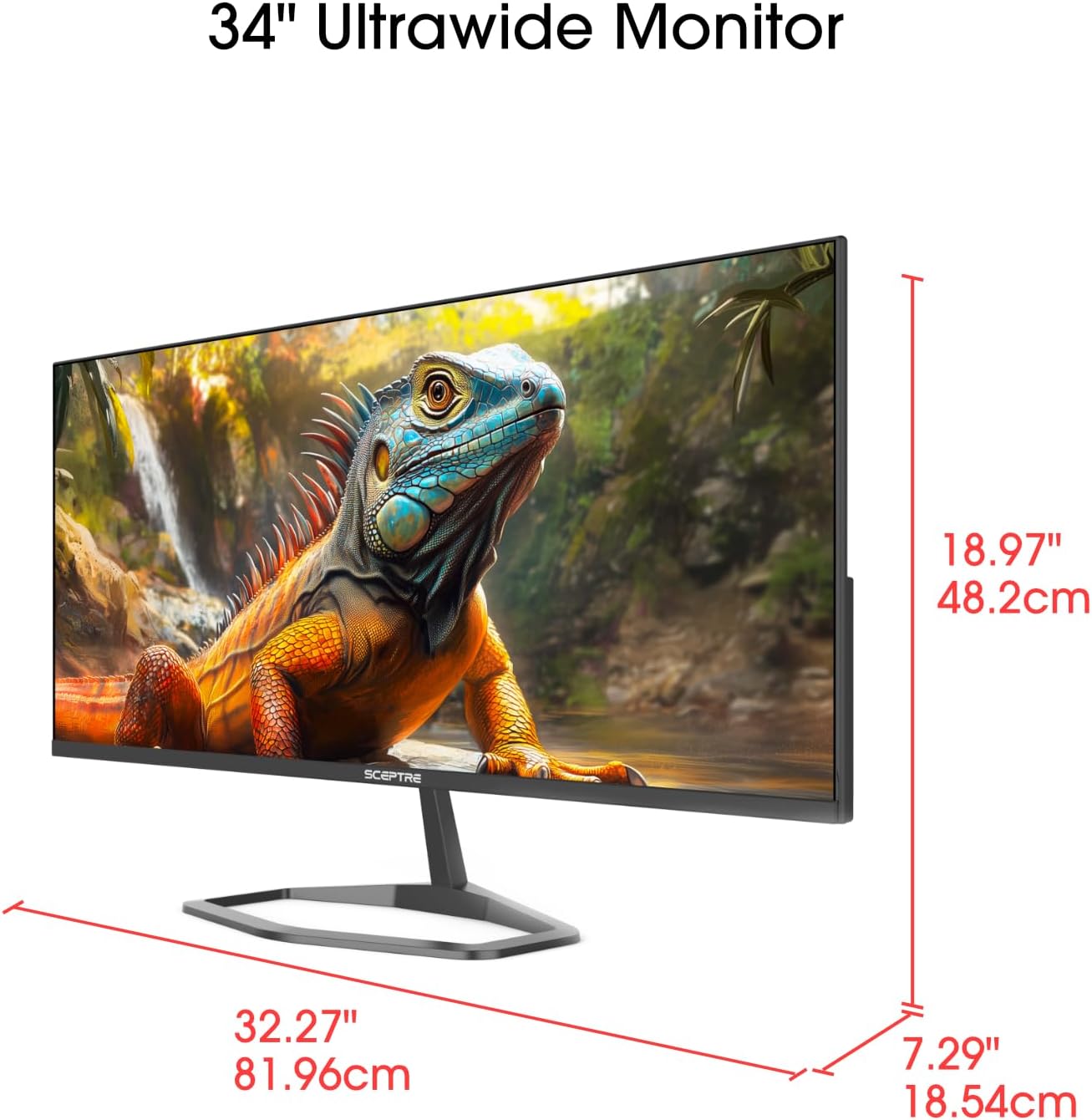
Image: This image displays the physical dimensions (height, width, and depth) of the Sceptre E345W-QU120D 34-inch Ultrawide Monitor, providing precise measurements for placement and setup.
9. Informazzjoni dwar Garanzija
Sceptre products are covered by a limited warranty. For detailed warranty terms, conditions, and registration information, please refer to the official Sceptre webis-sit jew il-karta tal-garanzija inkluża mal-prodott tiegħek. Żomm il-prova tax-xiri tiegħek għal talbiet ta' garanzija.
10. Appoġġ għall-Klijent
If you require further assistance or have questions not covered in this manual, please contact Sceptre customer support.
- Appoġġ onlajn: Visit the official Sceptre websit għal FAQs, downloads ta' sewwieqa, u riżorsi ta' appoġġ.
- Informazzjoni ta' Kuntatt: Refer to the Sceptre webis-sit jew l-imballaġġ tal-prodott tiegħek għad-dettalji ta' kuntatt l-aktar riċenti (telefon, email).
- Sceptre Store: Tista 'wkoll iżżur il- Sceptre Store on Amazon għal informazzjoni dwar il-prodott u aċċessorji.


