Introduzzjoni
This manual provides essential information for using your realme Note 70T Smartphone. It covers device setup, operation, maintenance, and troubleshooting to ensure optimal performance and user experience.
X'hemm fil-Kaxxa
Upon unboxing your realme Note 70T, verify that the following items are included:
- realme Note 70T Smartphone
- Kejbil USB (Tip-Ċ)
- Gwida Quick Start
- Informazzjoni dwar is-Sigurtà
Setup
- Daħħal SIM Card: Locate the SIM card tray on the side of the device. Use the provided SIM ejector tool to open the tray. Insert your Nano-SIM card(s) and an optional microSD card into the designated slots. Ensure the tray is fully reinserted.
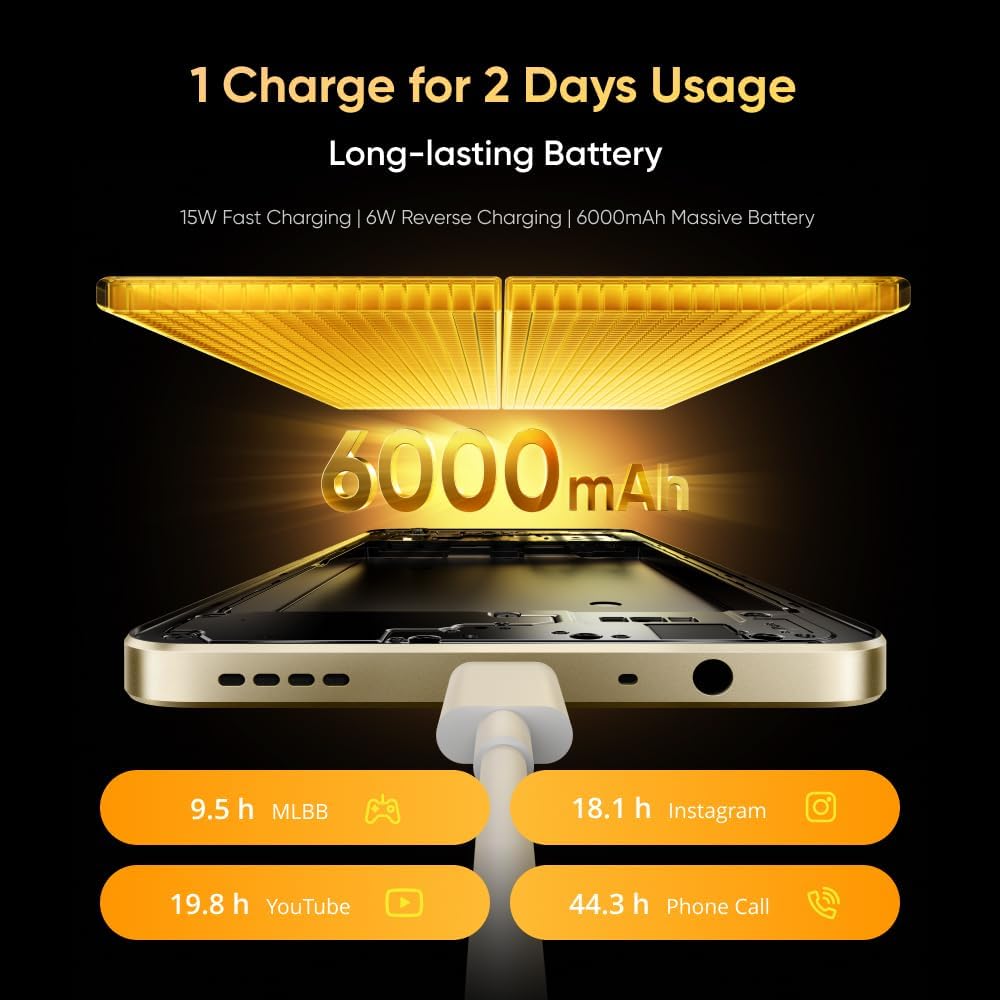
Image: The realme Note 70T smartphone, showing its sleek design and indicating the location for SIM card insertion.
- Qawwa Mixgħul: Press and hold the Power button located on the side of the device until the realme logo appears.
- Setup Inizjali: Segwi l-istruzzjonijiet fuq l-iskrin biex tagħżel il-lingwa tiegħek, tikkonnettja ma' netwerk Wi-Fi, u tissettja l-kont Google tiegħek.
Istruzzjonijiet Operattivi
Basic Device Functions
- Power On/Off: Agħfas u żomm il-buttuna tal-Power. Agħżel "Power off" jew "Restart" mill-menù.
- Kontroll tal-Volum: Uża l-buttuni Volume Up u Volume Down fuq il-ġenb biex taġġusta l-volumi tal-midja, tas-sejħiet, u tal-allarm.
- Navigazzjoni: Utilize on-screen gestures or navigation buttons (Home, Back, Recent Apps) as configured in settings.
Batterija u Iċċarġjar
The realme Note 70T is equipped with a 6000 mAh battery, designed for extended usage.
- Iċċarġjar: Connect the provided USB Type-C cable to the phone's charging port and a compatible 15W power adapter.
- Iċċarġjar veloċi: The device supports 15W fast charging for quicker power replenishment.
- Iċċarġjar b'lura: Use a compatible OTG cable to utilize your phone as a power bank to charge other devices (6W reverse charging).

Image: Illustration of the realme Note 70T connected to a charger, highlighting its 6000 mAh battery capacity and charging capabilities.
Karatteristiċi tal-Wiri
Experience smooth visuals on the 90Hz Eye Comfort Display.
- The 6.74-inch display offers a maximum brightness of 563 nits and up to 180Hz touch sampling rate for responsive interaction.
- Pulse Light: The device features a Pulse Light for immediate notifications and signals, with 9 optional colors and 5 brightness modes.

Image: The realme Note 70T display showcasing its 90Hz refresh rate for a smooth visual experience.
Użu tal-Kamera
The realme Note 70T features a 50 MP Main Camera, a 13 MP Ultra Wide Camera, and a 5 MP Front Camera.
- Titjib fl-AI: Utilize AI features like AI Clear Face for sharpening blurry portraits, AI Image Matting for easy subject extraction, and AI Eraser to remove unwanted elements.
- Modalità bil-lejl: Aqbad ritratti ċari u dettaljati f'kundizzjonijiet ta' dawl baxx.

Image: A close-up of the realme Note 70T camera module, highlighting its 13MP AI camera capabilities for capturing detailed moments.
AI and Performance Features
- AI Call Noise Reduction 2.0: Intelligent noise filtering for clear phone calls.
- AI Boost: Optimizes frequently used apps for superior smoothness and performance.
- Octa-core Chipset: Powered by an octa-core processor for efficient performance in gaming, streaming, and daily tasks.

Image: The realme Note 70T screen displaying the AI Boost feature, which optimizes app performance for a smoother user experience.
Durabilità u Disinn
- Military-Grade Shock Resistance: The ArmorShellTM Tough Build provides military-grade resistance to impacts, protecting against drops up to 1.8 meters.
- IP54 Reżistenza għat-Trab u l-Ilma: The device is protected against daily splashes, spills, and dust.
- SonicWave Ejection: The speaker vibrates to expel accumulated water.
- Disinn Ultra-Slim: With a thickness of 7.94 mm and a weight of 201g, the phone offers a comfortable grip.

Image: The realme Note 70T smartphone shown in a rugged environment, illustrating its military-grade shock resistance.
Manutenzjoni
- Tindif: Uża drapp artab u mingħajr suf biex tnaddaf l-iskrin u l-qafas. Evita materjali li joborxu jew kimiċi ħarxa.
- Aġġornamenti tas-Software: Regularly check for and install software updates to ensure optimal performance and security. Navigate to Settings > Dwar it-telefon > Aġġornament tas-softwer.
- Ġestjoni tal-Ħażna: Neħħi perjodikament bla bżonn files u apps biex iżommu biżżejjed spazju għall-ħażna u veloċità tal-apparat.
Issolvi l-problemi
- L-Apparat Mhux Jixgħel: Ensure the battery is charged. Connect the charger and wait a few minutes before attempting to power on again. If unresponsive, press and hold the Power button for 10-15 seconds.
- Kwistjonijiet ta' Iċċarġjar: Verify the charging cable and adapter are securely connected and undamaged. Try a different charger if available.
- Problemi ta' Konnettività tan-Netwerk: Check if Airplane Mode is off. Restart the device. Verify your SIM card is correctly inserted and your mobile data plan is active.
- Iffriżar/Ħabta tal-App: Agħlaq l-app u erġa' iftaħha. Jekk il-problema tippersisti, neħħi l-cache tal-app (Settings > Apps > [Isem tal-App] > Ħażna > Neħħi l-cache) jew erġa' installa l-app.
Speċifikazzjonijiet
| Karatteristika | Dettall |
|---|---|
| Brand | realme |
| Mudell | N70T |
| Sistema Operattiva | Android 14 |
| RAM | 24 GB (Dynamic RAM) |
| Ħażna Interna | 256 GB |
| Kapaċità tal-batterija | 6000 mAh |
| Iċċarġjar Mgħaġġel | 15W |
| Iċċarġjar Reverse | 6W |
| Tip ta 'Wiri | LCD |
| Daqs tal-Wiri | 6.74 pulzieri |
| Riffriskar Rata | 90Hz |
| Riżoluzzjoni tal-Wiri | 1080x2400 |
| Kamera Prinċipali | 50 MP |
| Ultra Wide Camera | 13 MP |
| Kamera ta' Quddiem | 5 MP |
| Proċessur | Octa-core |
| Konnettività | 4G |
| Reżistenza għat-Trab u l-Ilma | IP54 |
| Ħxuna | 7.94 mm |
| Piż | 201 g |
Garanzija u Appoġġ
Your realme Note 70T Smartphone comes with a standard manufacturer's warranty. For detailed warranty terms, conditions, and support, please refer to the warranty card included in the product packaging or visit the official realme support websit. Żomm il-prova tax-xiri tiegħek għal talbiet ta' garanzija.


