1. Introduzzjoni
This manual provides detailed instructions for the safe and efficient use of your boAt Rockerz Plus 550 Bluetooth Headphones. Please read this manual thoroughly before using the product and retain it for future reference.
2. X'hemm fil-Kaxxa
- boAt Rockerz Plus 550 Headphones
- Iċċarġjar Cable
- Cable AUX
- Manwal għall-Utent

Image: boAt Rockerz Plus 550 Bluetooth Headphones, showcasing the Blue Psyche color variant and customizable earcups.
3. Prodott Aktarview u Kontrolli
Familiarize yourself with the various parts and controls of your headphones.

Immaġni: Dettaljata view of the headphone's control buttons and ports, including the charging port and AUX input.
Kontrolli Ewlenin:
- Buttuna tal-Qawwa: Agħfas u żomm biex tixgħel/itfi.
- Volum Up / Track Li jmiss: Agħfas qasir biex tgħolli l-volum, agħfas twil għat-trakka li jmiss.
- Volume Down / Track Preċedenti: Agħfas qasir biex tnaqqas il-volum, agħfas twil għat-trakka ta' qabel.
- Buttuna b'ħafna funzjonijiet (MFB): Daqq/pawża, wieġeb/temm it-telefonati, attiva l-assistent tal-vuċi.
- Port AUX: Għal konnessjoni bil-fili.
- Port tal-Iċċarġjar: Għall-iċċarġjar tal-headphones.
4. Setup
4.1 Iċċarġjar tal-Headphones
- Qabbad il-kejbil tal-iċċarġjar mal-port tal-iċċarġjar fuq il-headphones.
- Qabbad it-tarf l-ieħor tal-kejbil ma' adapter tal-enerġija USB (mhux inkluż) jew mal-port USB tal-kompjuter.
- The LED indicator will show charging status. It will turn off or change color when fully charged.
Ċarġ sħiħ jipprovdi sa 100-il siegħa ta' ħin ta' daqq.

Image: The boAt Rockerz Plus 550 headphones highlighting their extended battery life of up to 100 hours.
4.2 Tqabbil tal-Bluetooth
- Kun żgur li l-headphones huma ċċarġjati kompletament.
- Agħfas u żomm il-buttuna tal-Power sakemm l-indikatur LED jteptep blu u aħmar, u dan jindika l-modalità ta' tqabbil.
- Fuq l-apparat tiegħek (smartphone, tablet, laptop), attiva l-Bluetooth u fittex apparati disponibbli.
- Select "boAt Rockerz Plus 550" from the list of devices.
- Ladarba konness, l-indikatur LED jteptep bil-mod bil-blu.
4.3 Tqabbil Doppju
The headphones support dual pairing, allowing connection to two devices simultaneously.
- Qabbad il-headphones mal-ewwel apparat kif deskritt fit-taqsima 4.2.
- Iddiżattiva l-Bluetooth fuq l-ewwel apparat. Il-headphones jerġgħu jidħlu fil-modalità ta' tqabbil.
- Agħlaq il-headphones mat-tieni apparat.
- Ippermetti l-Bluetooth fuq l-ewwel apparat. Il-headphones jikkonnettjaw awtomatikament maż-żewġ apparati.
You can now seamlessly switch between audio sources from both connected devices.
Image: Visual representation of the dual pairing functionality, showing a phone and a tablet simultaneously connected to the headphones.
4.4 Konnessjoni AUX
For a wired connection, use the provided AUX cable.
- Connect one end of the AUX cable to the headphone's AUX port.
- Qabbad it-tarf l-ieħor mal-jack tal-awdjo ta' 3.5mm tat-tagħmir awdjo tiegħek.
- Il-headphones jaqilbu awtomatikament għall-modalità AUX.
5. Istruzzjonijiet Operattivi
5.1 Daqq tal-Mużika
- Play/Pawsa: Agħfas l-MFB darba.
- Track li jmiss: Agħfas fit-tul il-buttuna Volume Up.
- Track preċedenti: Agħfas fit-tul il-buttuna Volum 'l isfel.
- Volum 'il fuq: Agħfas fil-qosor il-buttuna Volume Up.
- Volum 'l isfel: Agħfas fil-qosor il-buttuna Volum 'l isfel.
5.2 Ġestjoni tas-Sejħiet
- Tweġiba/Tmiem Sejħa: Agħfas l-MFB darba.
- Irrifjuta Sejħa: Agħfas u żomm l-MFB għal 2 sekondi.
5.3 Assistent tal-Vuċi
Activate your device's voice assistant (Siri, Google Assistant) directly from the headphones.
- Attiva l-Assistent tal-Vuċi: Agħfas darbtejn l-MFB.
5.4 Customizable Earcups
The boAt Rockerz Plus 550 features customizable earcups, allowing you to change their appearance.
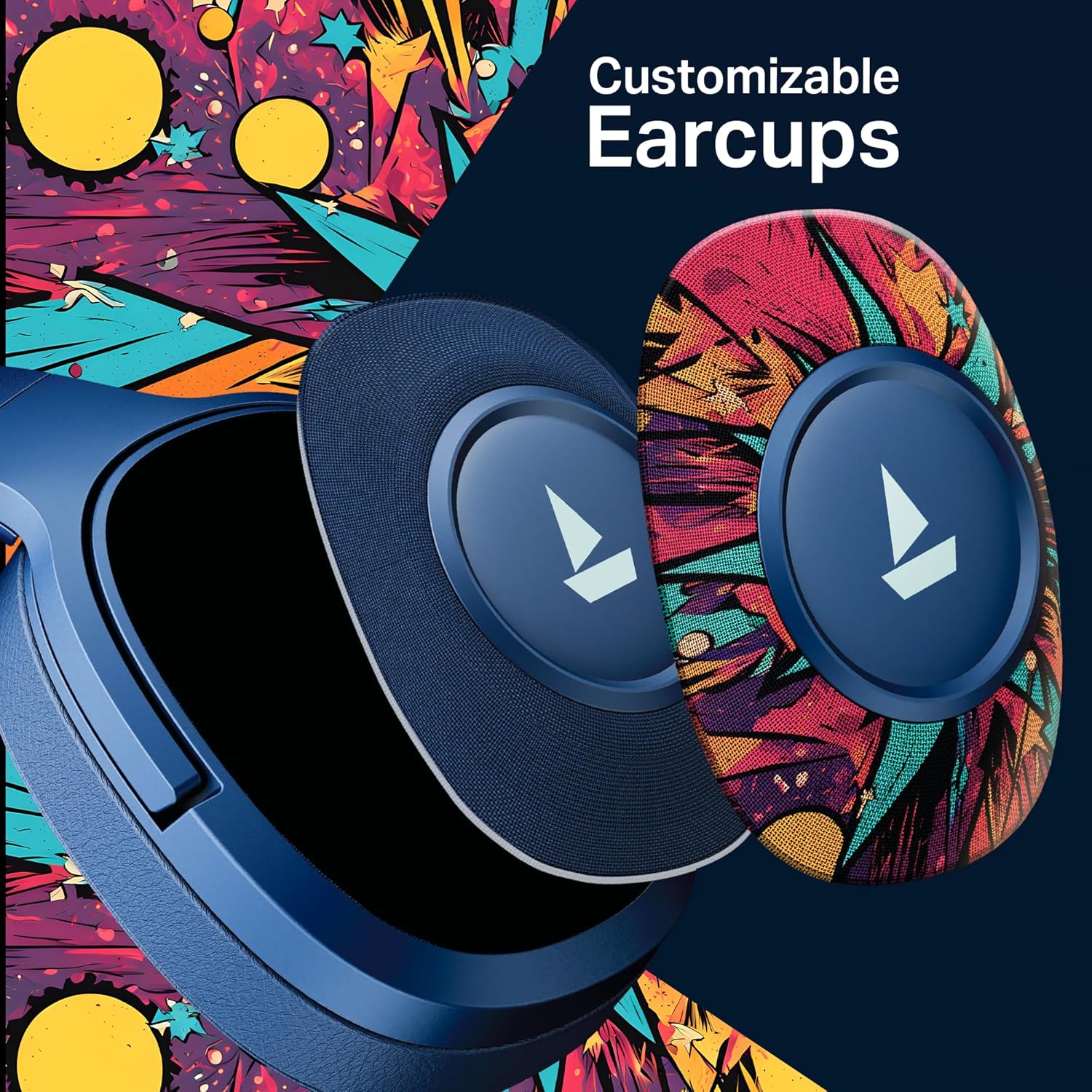
Immaġni: Dettaljata view demonstrating how the customizable earcups can be removed and replaced on the headphones.
5.5 boAt Hearables App Support
Enhance your experience by downloading the boAt Hearables App. The app provides additional features and user guides.

Image: A smartphone showing the boAt Hearables App interface, including a QR code for easy access. Scan the QR code or visit https://l.ead.me/bdAX6k biex tniżżel l-app.
6. Manutenzjoni
- Tindif: Imsaħ il-headphones b'ċarruta ratba u niexfa. Tużax prodotti tat-tindif jew solventi li joborxu.
- Ħażna: Aħżen il-headphones f'post frisk u niexef 'il bogħod mix-xemx diretta u minn temperaturi estremi.
- Kura tal-batterija: To prolong battery life, charge the headphones regularly, even if not in frequent use. Avoid fully discharging the battery for extended periods.
7 Issolvi l-problemi
| Problema | Kawża Possibbli | Soluzzjoni |
|---|---|---|
| Il-headphones ma jixegħlux. | Batterija baxxa. | Iċċarġja l-headphones bis-sħiħ. |
| Ma tistax tqabbad mat-tagħmir. | Bluetooth not enabled, headphones not in pairing mode, or device too far. | Ensure Bluetooth is on, headphones are in pairing mode (flashing red/blue), and within range (10 meters). Try restarting both devices. |
| L-ebda ħoss jew volum baxx. | Volume too low on headphones or device, incorrect audio output selected, or loose AUX cable. | Adjust volume on both devices. Check audio output settings. Ensure AUX cable is securely connected. |
| Konnessjoni intermittenti. | Interference, device too far, or low battery. | Move closer to the device, avoid obstacles, and ensure headphones are charged. Avoid environments with strong Wi-Fi or other Bluetooth signals. |
8. Speċifikazzjonijiet
| Karatteristika | Dettall |
|---|---|
| Isem tal-Mudell | 550. Rockerz |
| Teknoloġija tal-Konnettività | Bluetooth v5.4, 3.5 mm Jack |
| Tip ta' Sewwieq Awdjo | Sewwieq Dinamika |
| Daqs tas-Sewwieq | 50mm |
| Ħajja tal-batterija | Sa 100-il Siegħa |
| Forma tal-widna | Fuq il-widnejn |
| Kontroll tal-Ħoss | Iżolazzjoni tal-Ħoss Passiva |
| Metodu ta' Kontroll | Imbotta Buttuna |
| Piż tal-oġġett | 250 Gramm |
| Dimensjonijiet tal-Prodott | 17 x 9 x 20 ċm |
| Tip ta 'batterija | Lithium Ion (Rikarikabbli) |
| Manifattur | Immaġina Kummerċjalizzazzjoni Ltd |
| Pajjiż ta' Oriġini | Iċ-Ċina |

Immaġni: Interna view highlighting the 50mm audio drivers, responsible for the boAt Signature Sound.
9. Garanzija u Appoġġ
Your boAt Rockerz Plus 550 headphones come with a standard manufacturer's warranty. Please refer to the warranty card included in your package for specific terms and conditions.
Għal appoġġ tekniku, servizz, jew talbiet ta' garanzija, jekk jogħġbok ikkuntattja lis-servizz tal-klijenti ta' boAt:
- Manifattur: Immaġina Kummerċjalizzazzjoni Ltd
- Email: info@imaginemarketingindia.com
- Appoġġ onlajn: Visit the official boAt websit għal FAQs u riżorsi ta' appoġġ.


