Introduzzjoni
This manual provides essential information for the safe and efficient operation of your ZeroKor Portable Power Stations. This bundle includes a 120W portable battery with a 22W solar panel and a 65W outlet power bank, designed for versatile power needs both indoors and outdoors, supporting laptops, smart devices, and more.
Informazzjoni dwar is-Sigurtà
Jekk jogħġbok aqra t-twissijiet u l-istruzzjonijiet kollha tas-sigurtà qabel ma tuża dan il-prodott biex tevita korriment jew ħsara. Żomm dan il-manwal għal referenza futura.
- M'għandekx tiżżarma, tissewwa, jew timmodifika l-unità.
- Tesponix l-unità għan-nar jew għal temperaturi għoljin.
- Keep away from water, high humidity, and direct sunlight.
- Kun żgur li jkun hemm ventilazzjoni xierqa waqt l-użu u l-iċċarġjar.
- Do not use if the unit is damaged or has been dropped.
- Żomm fejn ma jintlaħaqx mit-tfal.
- Armi l-prodott skond ir-regolamenti lokali.
Kontenut tal-Pakkett
Iċċekkja li l-oġġetti kollha huma inklużi fil-pakkett tiegħek:
- ZeroKor 120W Portable Power Station
- ZeroKor 65W Portable Power Bank
- 22W Panel Solari jintwew
- AC Wall Adapter (for 120W unit)
- 12V Car Charging Cable (for 120W unit)
- 9V/3A Max USB-C Adapter (for 65W unit)
- Manwal għall-Utent (dan id-dokument)

Image: The ZeroKor Portable Power Station bundle, showing the 120W power station, the 65W power bank, and the foldable solar panel.
Prodott Overview
ZeroKor 120W Portable Power Station
This unit is designed for higher power demands and features multiple output options.

Immaġni: Fuq view of the 120W Portable Power Station, highlighting its various ports and digital display.
- Output AC: Two 110V/120W MAX AC outlets.
- Prodott DC: One 12V~16.8V/6A MAX DC output.
- Output USB-A: One USB1 (5V/2A) and one QC USB2 (5V/3A, 9V/2A MAX).
- Output USB-C: One USB-C (5V/3A, 9V/2A MAX).
- Input: Dedicated input port for charging.
- Flashlight LED: Features reading mode and SOS mode for emergencies.
- Wiri: Digital display showing battery level and output status.
ZeroKor 65W Portable Power Bank
This compact unit is ideal for smaller devices and on-the-go power.
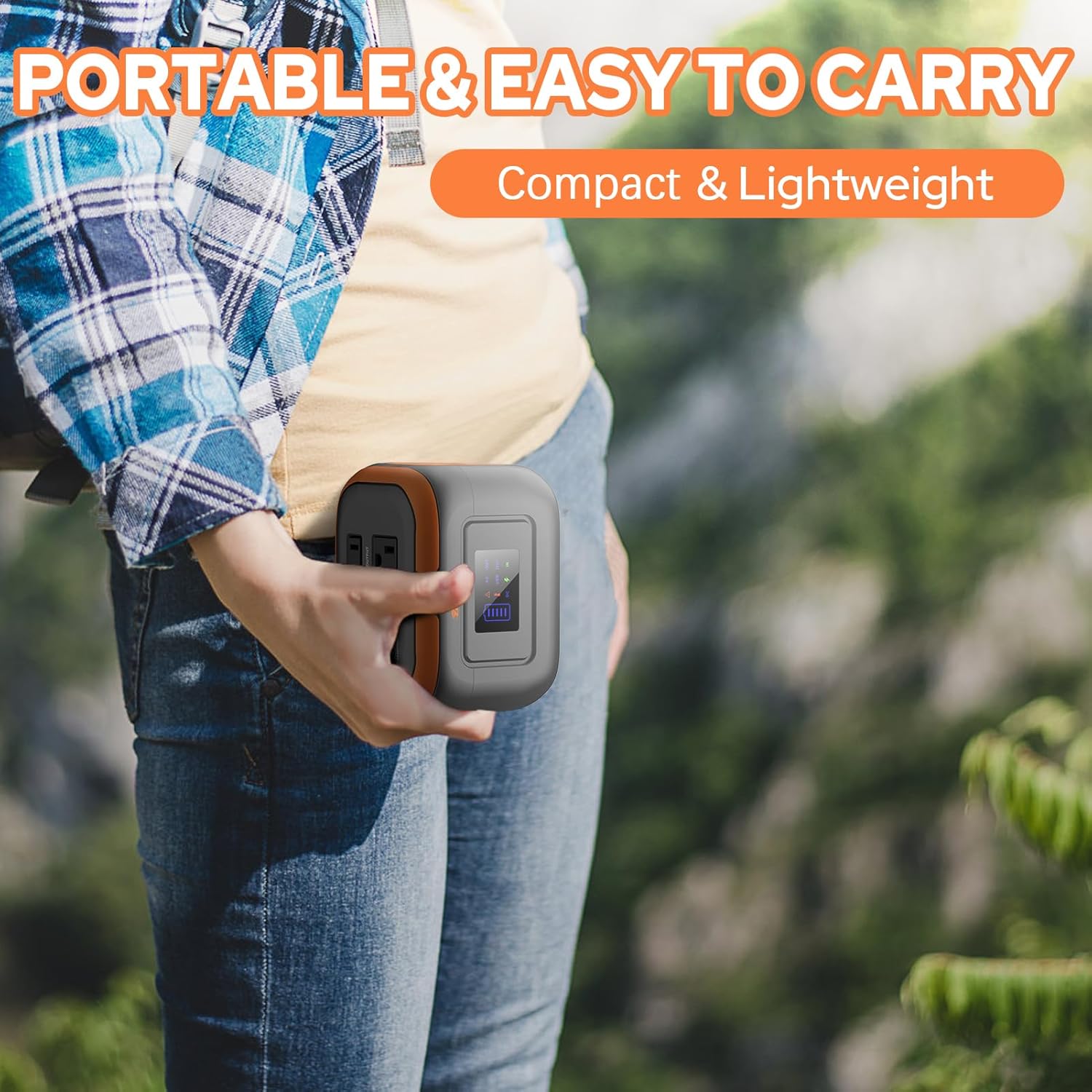
Image: A person holding the compact 65W Portable Power Bank, demonstrating its portability.
- Output AC: One 110V/65W MAX AC outlet.
- Prodott DC: One 9V~12.6V/10A MAX DC output.
- Output USB: One USB-2 port (5V/2.1A Max) and one quick charge USB-1 port (5V/3A, 9V/2A MAX).
- Flashlight: Features reading mode and SOS mode.
Built-in Battery Management System (BMS)
Both ZeroKor portable power units feature an advanced BMS for enhanced safety and battery longevity.

Image: A diagram showing the Battery Management System (BMS) and its protective features, including short circuit, over-current, over-voltage, overload, overheating, and overcharge protection.
- Protezzjoni ta 'ċirkwit qasir
- Protezzjoni ta 'kurrent żejjed
- Vol-żejjedtage protezzjoni
- Protezzjoni ta 'tagħbija żejda
- Protezzjoni ta 'sħana żejda
- Protezzjoni ta 'ħlas żejjed
Setup
Iċċarġjar Inizjali
Before first use, fully charge your power station. There are three primary ways to recharge the 120W unit:
- AC Wall Outlet: Connect the provided AC wall adapter to the input port of the 120W power station and plug it into a standard wall outlet.
- Panel Solari: Connect the 22W foldable solar panel to the input port of the 120W power station. Place the solar panel in direct sunlight for optimal charging.
- Port tal-Karozza: Use the included 12V car charging cable to charge the 120W power station from your vehicle's car port.
The 65W power bank can be recharged via its USB-C input using the provided 9V/3A Max USB-C adapter.

Image: Illustration of the three charging methods for the power station: solar panel, AC wall adapter, and 12V car charging cable.
Istruzzjonijiet Operattivi
Tixgħel/Jitfi
- To turn on the 120W power station, press and hold the main power button. The display will illuminate.
- To activate the AC output on the 120W unit, long press the DC button.
- To turn off, press and hold the main power button again.
L-Użu tal-Outputs
Connect your devices to the appropriate output ports (AC, DC, USB-A, USB-C). The power station is capable of powering various devices:

Image: A person charging a laptop with the 120W power station in an outdoor setting. Icons indicate the number of recharges for devices like laptops, cameras, smartphones, and drones.
Nota: If your devices need an air compressor to work, it is recommended to purchase a more powerful power station.
Iċċarġjar Pass-Through
Both power stations support pass-through charging, allowing you to charge the power station while simultaneously powering your devices.

Image: A visual representation of pass-through charging, showing the power station being recharged from a wall outlet while simultaneously providing power to a connected mobile device.
Uża l-LED Flashlight
The integrated LED flashlight on both units offers multiple modes:
- Modalità Qari: Provides a steady light for illumination.
- Modalità SOS: Joħroġ sinjal li jteptep għal sitwazzjonijiet ta' emerġenza.
Video: A demonstration of the ZeroKor Portable Power Station, showcasing its various ports, the functionality of the LED flashlight, and its ability to power a small fan. This video highlights the product's versatility for camping u użu barra.
Manutenzjoni
- Tindif: Uża drapp artab u niexef biex tnaddaf il-barra tal-unità. Tużax prodotti tat-tindif jew solventi li joborxu.
- Ħażna: Store the power station in a cool, dry place away from direct sunlight and extreme temperatures. For long-term storage, it is recommended to charge the unit to 50-80% every 3-6 months to maintain battery health.
- Kura tal-batterija: Evita li tiċċarġja l-batterija kompletament ta' spiss biex ittawwal il-ħajja tagħha.
Issolvi l-problemi
| Problema | Kawża Possibbli | Soluzzjoni |
|---|---|---|
| L-unità ma tixgħelx | Batterija baxxa; Il-buttuna tal-qawwa ma ġietx ippressata għal żmien twil biżżejjed. | Charge the unit fully. Press and hold the power button for 3 seconds. |
| L-ebda output mill-portijiet AC/DC/USB | Output not activated; Device draws too much power; Overload protection triggered. | Ensure the specific output (e.g., AC) is activated (long press DC button for 120W unit). Check device power requirements. Disconnect device, restart unit, try a lower-power device. |
| Iċċarġjar bil-mod | Bl-użu ta' ċarġer b'enerġija baxxa; Il-pannell solari mhux fid-dawl tax-xemx dirett. | Use the original AC adapter. Ensure solar panel is fully exposed to direct sunlight and clean. |
| Unit gets warm during use | Normal operation, especially under heavy load. | Ensure adequate ventilation. If overheating protection triggers, the unit will shut down automatically. Allow it to cool before resuming use. |
Restricted Devices
The ZeroKor Portable Power Stations are designed for specific power outputs. Do not attempt to power devices that exceed the maximum wattage (120W for the larger unit, 65W for the smaller unit). Attempting to power high-wattage appliances can trigger overload protection or damage the unit.

Image: An illustration indicating types of high-power devices (e.g., coffee makers, induction cookers, hair dryers) that are restricted and should not be used with this power station due to their wattage exceeding 120W.
Speċifikazzjonijiet
ZeroKor 120W Portable Power Station
- Kapaċità tal-batterija: 97Wh
- Output AC: 2 x 110V/120W MAX
- Prodott DC: 1 x 12V~16.8V/6A MAX
- Output USB-A: 1 x 5V/2A, 1 x QC (5V/3A, 9V/2A MAX)
- Output USB-C: 1 x 5V/3A, 9V/2A MAX
- Input tal-Iċċarġjar: AC wall adapter, 22W solar panel, 12V car port
- Karatteristiċi: LED Flashlight (reading, SOS modes), BMS protection
ZeroKor 65W Portable Power Bank
- Output AC: 1 x 110V/65W MAX
- Prodott DC: 1 x 9V~12.6V/10A MAX
- Output USB: 1 x 5V/2.1A Max, 1 x QC (5V/3A, 9V/2A MAX)
- Input tal-Iċċarġjar: USB-C (9V/3A Max adapter)
- Karatteristiċi: Flashlight (reading, SOS modes), BMS protection
Garanzija u Appoġġ
ZeroKor products are designed for reliability and performance. For detailed warranty information and customer support, please refer to the official ZeroKor webis-sit jew ikkuntattja lis-servizz tal-klijenti tagħhom direttament.
- Websit: Visit the ZeroKor Store on Amazon
- Servizz tal-Klijent: Refer to your purchase documentation or the ZeroKor websit għad-dettalji tal-kuntatt.
Jekk jogħġbok żomm il-prova tax-xiri tiegħek għal pretensjonijiet ta' garanzija.


