1. Introduzzjoni
This manual provides essential information for the safe and effective use of your FLEXISPOT V9-Max-AR Exercise Bike with 2D Desktop. Please read all instructions carefully before assembly and operation. Retain this manual for future reference.
Informazzjoni Importanti dwar is-Sigurtà
- Kun żgur li l-partijiet kollha huma mwaħħlin sew qabel kull użu.
- Teċċedix ir-rakkomandazzjoni tal-piż massimu ta' 300 libbra.
- Keep children and pets away from the exercise bike during operation.
- Ikkonsulta tabib qabel tibda xi programm ġdid ta' eżerċizzju.
- Use the product on a stable, level surface.
2. Prodott Aktarview u Komponenti
The FLEXISPOT V9-Max-AR is a versatile exercise bike designed for indoor use, featuring an integrated 2D adjustable desktop. It combines a stationary bike with a functional workspace, allowing for simultaneous exercise and productivity.

Figure 2.1: User operating the FLEXISPOT V9-Max-AR Exercise Bike with the desktop in use.
Key features include an 8-level quiet magnetic resistance system, an LCD display for tracking workout metrics, and a robust design supporting up to 300 lbs. The adjustable seat and desktop accommodate various user heights and preferences.
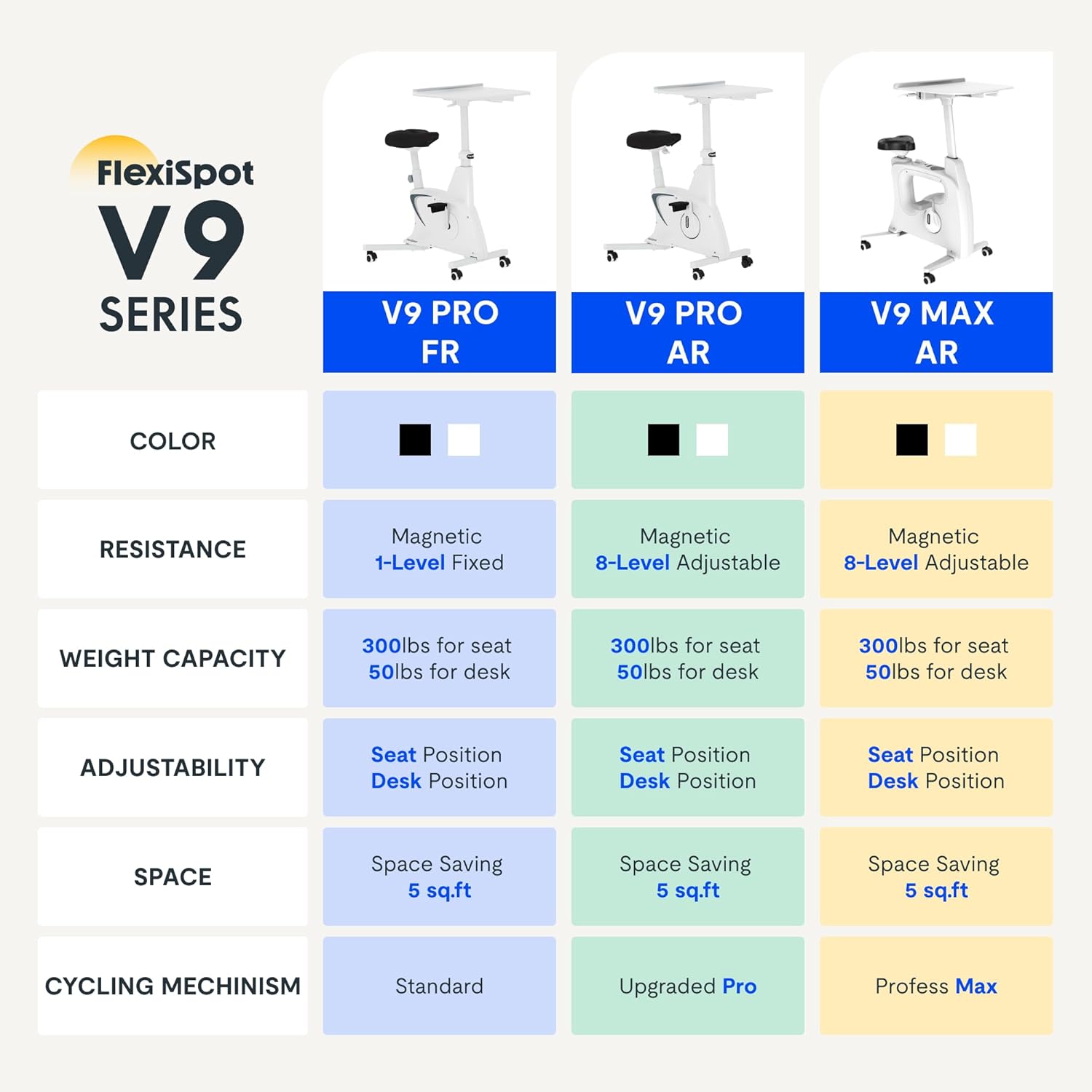
Figure 2.2: Comparison of FlexiSpot V9 series models, highlighting features like resistance and adjustability.
Komponenti ewlenin:
- Main Frame with Flywheel and Resistance Mechanism
- Sedil aġġustabbli
- Adjustable Desktop
- Pedali
- LCD Display Console
- Roti tat-Trasport
3. Setup u Assemblea
The FLEXISPOT V9-Max-AR is designed for quick and straightforward assembly, typically requiring about 10 minutes.
Passi tal-Assemblea:
- Iftaħ il-komponenti kollha mill-pakkett u vverifika mal-lista tal-ippakkjar.
- Attach the front and rear stabilizers to the main frame using the provided screws.
- Install the pedals, ensuring the left pedal is tightened counter-clockwise and the right pedal clockwise.
- Mount the seat post and seat onto the main frame, securing them firmly.
- Attach the desktop support column to the main frame.
- Secure the desktop to its support column.
- Insert batteries into the LCD display (batteries not included) and connect the sensor wire.
- Ensure all screws and connections are tightened before first use.

Figure 3.1: Illustration of adjustable components for personalized setup.
4. Istruzzjonijiet Operattivi
Adjusting Seat and Desktop:
- Għoli tas-Sedil: Use the quick-release lever located on the seat post to adjust the seat to a comfortable height. Ensure your leg has a slight bend at the knee when the pedal is at its lowest point.
- Desktop Height: The desktop can be adjusted vertically. Locate the adjustment lever beneath the desktop and raise or lower the desktop to your desired working height.
- Desktop Depth: The desktop can also be adjusted horizontally (forward/backward) to optimize your working posture.
Livelli ta' Reżistenza:
The V9-Max-AR features 8 levels of quiet magnetic resistance. Rotate the resistance knob, located below the desktop, clockwise to increase resistance and counter-clockwise to decrease it.

Figure 4.1: LCD display and resistance control knob.
Użu tad-Displej LCD:
The built-in LCD display monitors your workout statistics. It tracks:
- Ħin
- Veloċità
- Distanza
- Kaloriji maħruqa
- Total Distance Covered (Odometer)
- Veloċità ta 'Rotazzjoni
Press the button on the display to cycle through different metrics or hold it to reset values (refer to display specific instructions for exact operation).
Using the 2D Desktop:
The spacious desktop (20" x 22.8") is designed to hold a laptop, notebook, mobile phone, or water cup. It provides a stable surface for working or entertainment while exercising.

Figure 4.2: Desktop in use for studying or working.
Portabbiltà:
Equipped with movable silent wheels, the exercise bike can be easily relocated within your home or office. Simply tilt the bike and roll it to your desired position.
5. Manutenzjoni
Regular maintenance ensures the longevity and optimal performance of your FLEXISPOT V9-Max-AR Exercise Bike.
- Tindif: Imsaħ ir-rota regolarment b'reklamaramp drapp u deterġent ħafif. Evita prodotti tat-tindif jew solventi li joborxu.
- Spezzjoni: Periodically check all bolts, nuts, and moving parts for tightness. Tighten any loose components immediately.
- Lubrikazzjoni: Mhija meħtieġa l-ebda lubrikazzjoni speċifika għas-sistema ta' reżistenza manjetika.
- Ħażna: Aħżen ir-rota f'post niexef u frisk 'il bogħod mix-xemx diretta u minn temperaturi estremi.
6 Issolvi l-problemi
Din it-taqsima tindirizza kwistjonijiet komuni li tista’ tiltaqa’ magħhom bir-rota tal-eżerċizzju tiegħek.
| Problema | Kawża Possibbli | Soluzzjoni |
|---|---|---|
| Display LCD mhux qed jaħdem | Il-batteriji huma mejta jew installati ħażin. | Replace batteries (AAA, not included) or ensure correct polarity. |
| Rota instabbli jew imċaqalqa | Boltijiet maħlula jew wiċċ irregolari. | Check and tighten all assembly bolts. Ensure the bike is on a flat, stable surface. |
| Ir-reżistenza ma tinbidilx | Kwistjoni tal-mekkaniżmu tar-reżistenza. | Ensure the resistance knob is properly engaged. If the issue persists, contact customer support. |
| Squeaking or unusual noises | Loose components or friction. | Inspect all connections and tighten any loose parts. Ensure no foreign objects are interfering with moving parts. |
7. Speċifikazzjonijiet
Detailed specifications for the FLEXISPOT V9-Max-AR Exercise Bike:
- Mudell: V9-Max-AR (Exercise Bike with Desk)
- Ditta: FLEXISPOT
- Kulur: Iswed
- Mekkaniżmu ta' Reżistenza: Manjetiku
- Numru ta' Livelli ta' Reżistenza: 8
- Rakkomandazzjoni tal-Piż Massimu: 300 Liri
- Dimensjonijiet tal-Prodott (P x W x H): 37.6" x 23.2" x 47.2"
- Dimensjonijiet tad-Desktop: Approximately 20" x 22.8"
- Minimum Height (Seat): 29.6 Pulzier
- Maximum Height (Overall): 47.2 Inches (desktop height can go up to 47.2")
- Sors tal-Enerġija: Imħaddem bil-pedali (mhux elettriku)
- Sistema tas-sewqan: Ċinturin
- Karatteristika Speċjali: Adjustable Seat, Adjustable Desktop
- Użi Rakkomandati: Ġewwa
- Space Occupied: Madwar 5 pied kwadru

Figura 7.1: Dimensjonijiet tal-prodott.
8. Garanzija u Appoġġ
FLEXISPOT hija impenjata li tipprovdi prodotti ta' kwalità u sodisfazzjon tal-klijent.
- Ritorni: Dan il-prodott huwa eliġibbli għal ritorn faċli ta' 30 jum. Jekk jogħġbok irreferi għall-politika ta' ritorn tal-pjattaforma tax-xiri tiegħek għad-dettalji.
- Garanzija: For specific warranty terms and conditions, please refer to the official FLEXISPOT webis-sit jew ikkuntattja direttament lis-servizz tal-klijenti tagħhom.
- Appoġġ għall-Klijent: For any questions, assistance, or troubleshooting not covered in this manual, please contact FLEXISPOT customer support. Contact information can typically be found on the manufacturer's webis-sit jew id-dokumentazzjoni tax-xiri tiegħek.
9. Informazzjoni Addizzjonali
While no specific official product videos were provided in the product data, users may find helpful assembly or usage guides on the manufacturer's official website or their authorized channels. Always ensure the source is official for accurate information.


