1. Introduzzjoni
Thank you for choosing the LIGE FV21-D Women's Smartwatch. This device combines elegant design with advanced fitness and communication features to enhance your daily life. This manual provides detailed instructions for setup, operation, and maintenance to ensure optimal use of your smartwatch.
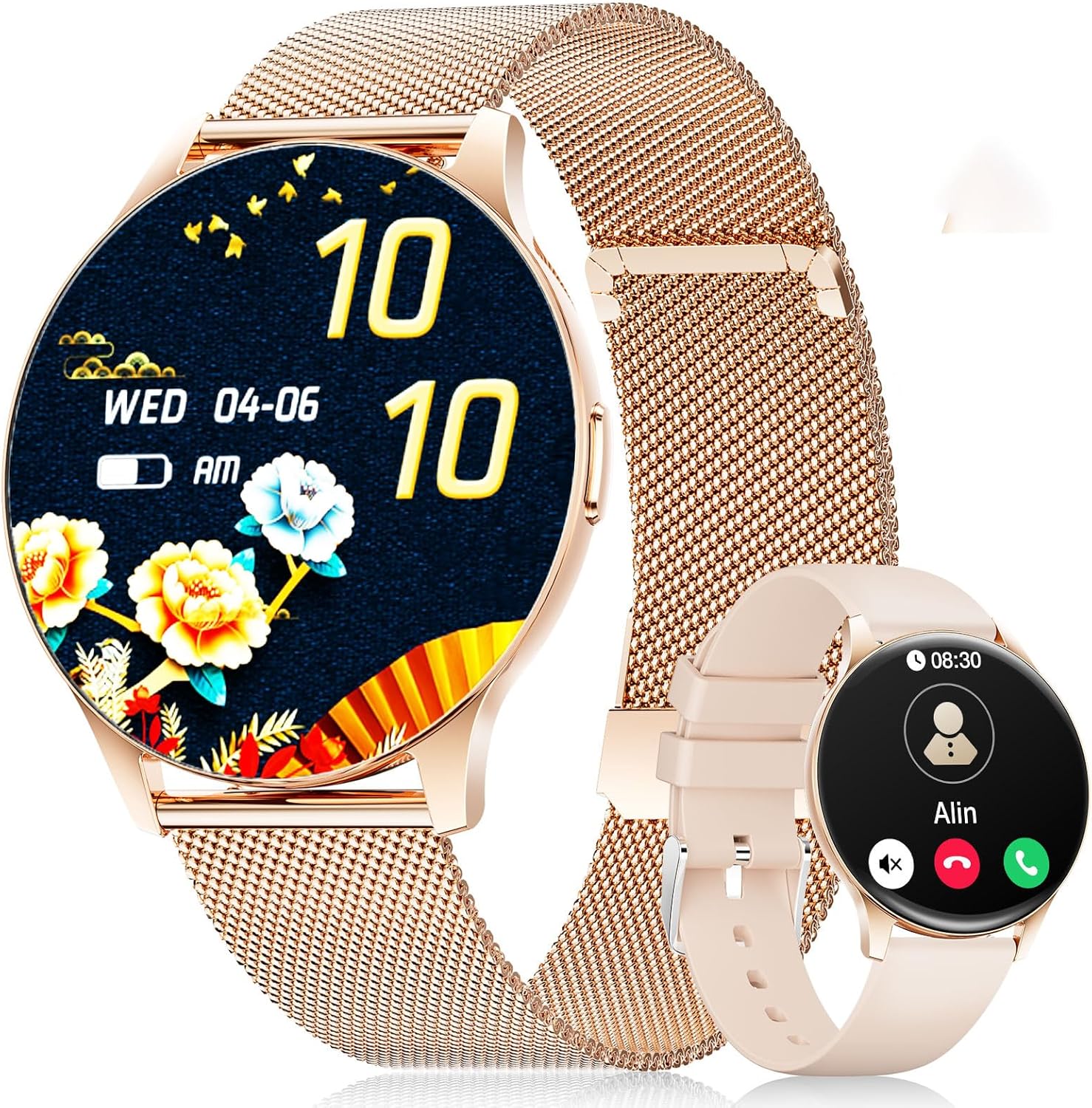
Image: The LIGE FV21-D Smartwatch, showcasing its rose gold casing with a mesh strap and an alternative beige silicone strap. The main display shows a floral watch face, while the smaller inset shows a call interface.
2. Kontenut tal-Pakkett
Jekk jogħġbok ivverifika li l-oġġetti kollha huma preżenti fil-pakkett tiegħek:
- LIGE FV21-D Smartwatch
- Metal Mesh Strap (Rose Gold)
- Silicone Strap (Beige)
- Iċċarġjar Cable
- Manwal għall-Utent (dan id-dokument)
3. Setup
3.1 Iċċarġjar tal-Ismartwatch
- Connect the charging cable to the charging port on the back of the smartwatch.
- Plug the USB end of the charging cable into a standard USB power adapter (not included) or a computer's USB port.
- The watch display will indicate charging status. Ensure the watch is fully charged before first use. A full charge typically takes approximately 2 hours.
3.2 Power On/Off
- Qawwa Mixgħul: Press and hold the side button for a few seconds until the LIGE logo appears.
- Itfi: Agħfas u żomm il-buttuna tal-ġenb, imbagħad agħżel l-għażla "Itfi" fuq l-iskrin.
3.3 Installazzjoni u Tqabbil tal-App
To unlock the full functionality of your smartwatch, you need to pair it with your smartphone using the dedicated application.
- Niżżel l-App: Fittex għal "FitCloudPro" in your smartphone's app store (Apple App Store for iOS or Google Play Store for Android) and install it.
- Ippermetti Bluetooth: Kun żgur li l-Bluetooth huwa attivat fuq l-ismartphone tiegħek.
- Iftaħ l-App: Iftaħ l-app FitCloudPro u segwi l-istruzzjonijiet fuq l-iskrin biex toħloq kont jew tidħol.
- Żid Apparat: Fl-app, mur fit-taqsima "Apparat" jew "Żid Apparat". L-app se tfittex l-ismartwatches disponibbli.
- Agħżel l-Arloġġ Tiegħek: Select "FV21-D" or the corresponding device name from the list.
- Ikkonferma l-Imqabbad: Talba ta' tqabbil tista' tidher kemm fuq it-telefon tiegħek kif ukoll fuq l-ismartwatch. Ikkonferma l-tqabbil fuq iż-żewġ apparati.
- Agħti Permessi: Grant necessary permissions (e.g., notifications, location, contacts) to the app for full functionality.
Note: The smartwatch supports Android 4.4+ and iOS 9.0+ operating systems.
4. Istruzzjonijiet Operattivi
4.1 Navigazzjoni Bażika
- Touch Screen: The 1.43-inch HD AMOLED touch display allows for intuitive interaction.
- Swipe 'l fuq/'l isfel: Skrollja fil-menus u n-notifiki.
- Swipe Xellug/Lemin: Aċċessa funzjonijiet rapidi jew widgets differenti.
- Tektek: Agħżel oġġett jew ikkonferma azzjoni.
- Buttuna tal-ġenb: Press to return to the home screen or wake the display. Long press for power options.
4.2 Il-Personalizzazzjoni tal-Uċuħ tal-Arloġġ
Your smartwatch offers over 200 customizable watch faces. You can change them directly on the watch or through the FitCloudPro app.
- Fuq l-Għassa: Long-press the home screen, then swipe left or right to browse available watch faces. Tap to select.
- Permezz tal-App: Open the FitCloudPro app, go to the "Watch Faces" section, and choose from the gallery. You can also upload your own photos to create custom watch faces.
4.3 Phone Function (Bluetooth Call)
Once paired, you can make and receive calls directly from your smartwatch.
- Tagħmel Sejħiet: Access the "Dialer" or "Contacts" function on the watch to initiate a call.
- Jirċievu Sejħiet: Meta tidħol telefonata, l-arloġġ juri l-ID ta’ min qed iċempel. Tista’ twieġeb jew tirrifjuta t-telefonata direttament mill-iskrin tal-arloġġ.
4.4 Modalità Sportiva
The smartwatch supports over 120 sports modes, including yoga, cycling, running, and more. To start a workout:
- Navigate to the "Sports" or "Workout" menu on your watch.
- Select your desired activity.
- Tap to start tracking. The watch will record data such as duration, calories burned, and heart rate.
- To end a workout, swipe or tap the screen and select the "End" option.
4.5 Monitoraġġ tas-Saħħa
The FV21-D smartwatch provides comprehensive health tracking features:
- Monitor tar-rata tal-qalb: Jimmonitorja kontinwament ir-rata tat-taħbit tal-qalb tiegħek matul il-ġurnata. View dejta f'ħin reali fuq l-arloġġ jew xejriet dettaljati fl-app.
- Sleep Tracker: Automatically monitors your sleep patterns, including deep sleep, light sleep, and wake times. Access sleep analysis in the FitCloudPro app.
- Pedometer: Tracks your daily steps taken.
- Calorie Measurement: Estimates calories burned based on activity and personal data.
- SpO2 (Blood Oxygen) Monitor: Ikejjel il-livelli ta' saturazzjoni tal-ossiġnu fid-demm tiegħek.
- Traċċar taċ-Ċiklu Menstruwali: For female users, the app can track and predict menstrual cycles.
Note: This device is not a medical device. Health data is for reference only and should not be used for medical diagnosis or treatment.
4.6 Notifications and Reminders
Receive notifications directly on your wrist:
- Calls and Messages: Get alerts for incoming calls, SMS, and messages from various apps (e.g., WhatsApp, Facebook). Configure app notifications in the FitCloudPro app.
- Arloġġ ta 'allarm: Set alarms through the app to vibrate on your wrist.
- Tifkira Sedentarja: The watch can remind you to move after periods of inactivity.
- Informazzjoni dwar it-Temp: View current weather conditions and forecasts (requires app synchronization).
- Assistent tal-Vuċi: Access your smartphone's voice assistant directly from the watch.
4.7 Reżistenza għall-Ilma (IP68)
The FV21-D smartwatch is IP68 waterproof, meaning it is resistant to dust and can withstand immersion in water up to 1.5 meters for 30 minutes. It is suitable for daily use, such as washing hands, rain, and sweating during exercise. However, it is not recommended for hot showers, saunas, or diving, as steam and hot water can damage the seals.
5. Manutenzjoni
5.1 Tindif tal-Ismartwatch
- Imsaħ l-iskrin u l-qafas tal-arloġġ b'ċarruta ratba u mingħajr suf.
- Jekk meħtieġ, ftit dampLaħlaħ id-drapp bl-ilma. Evita li tuża kimiċi ħarxa jew materjali li joborxu.
- Kun żgur li l-arloġġ ikun niexef għalkollox qabel ma tiċċarġjah.
5.2 Sostituzzjoni taċ-Ċinga
Your smartwatch comes with two interchangeable straps: a metal mesh strap and a silicone strap. To replace them:
- Sib il-labar li jinħallu malajr fuq in-naħa ta’ taħt taċ-ċinga fejn tikkonnettja mal-qafas tal-arloġġ.
- Żerżaq il-labra 'l ġewwa biex tneħħi ċ-ċinga.
- Align the new strap with the watch lugs and insert one end of the pin into the hole.
- Slide the quick-release pin inwards, position the strap, and release the pin to secure it. Ensure both ends of the pin are properly seated.
5.3 Kura tal-Batterija
- Evita li tiċċarġja l-batterija kompletament ta' spiss.
- Charge the watch regularly, even if not in use, to maintain battery health.
- Aħżen l-arloġġ f'post frisk u niexef meta ma jkunx qed jintuża għal perjodi twal.
6 Issolvi l-problemi
| Ħruġ | Soluzzjoni Possibbli |
|---|---|
| L-arloġġ ma jixgħelx. | Kun żgur li l-arloġġ ikun iċċarġjat kompletament. Qabbad mal-ċarġer għal mill-inqas 30 minuti. |
| Ma tistax tqabbad ma' smartphone. |
|
| Notifiki ma jaslux. |
|
| Dejta dwar is-saħħa mhux preċiża. |
|
| Ħajja qasira tal-batterija. |
|
If you encounter issues not listed here or require further assistance, please refer to the support section.
7. Speċifikazzjonijiet
| Karatteristika | Dettall |
|---|---|
| Numru tal-Mudell | FV21-D |
| Wiri | 1.43 Inch HD AMOLED (466 x 466) |
| Dimensjonijiet | 1.81 x 1.81 x 0.87 pulzieri |
| Piż tal-oġġett | 6.7 uqija |
| Konnettività | Bluetooth |
| Kompatibilità tas-Sistema Operattiva | Android 4.4+ u iOS 9.0+ |
| Reżistenza għall-Ilma | IP68 |
| Tip ta 'batterija | Polimeru tal-Litju (1 meħtieġ, inkluż) |
| Karatteristiċi Speċjali | Pedometer, Fitness Tracker, Multi-Sport Tracker, Heart Rate Monitor, Oximeter (SpO2), Sleep Tracker, Bluetooth Call, Music Player, Voice Assistant, Reminders, Alarm Clock, Text Messages, Notifications, Sedentary Reminder, Cycle Tracking. |
| Kapaċità tal-Ħżin tal-Memorja | 256 MB |
| GPS | GPS Via Smartphone |
8. Garanzija u Appoġġ
LIGE is committed to ensuring your satisfaction with the FV21-D Smartwatch. Should you have any questions, require technical support, or encounter any issues with your device, please do not hesitate to contact our customer service team.
Please refer to the contact information provided with your purchase documentation or visit the official LIGE websit għal dettalji ta 'appoġġ.


