1. Introduzzjoni
This manual provides comprehensive instructions for the Nokia G310 5G TA-1573 smartphone. It covers essential information for setup, operation, maintenance, and troubleshooting to ensure optimal use of your device. The Nokia G310 5G TA-1573 features a 6.6-inch HD+ 90 Hz IPS LCD display, a Snapdragon 480+ octa-core processor, 4 GB of RAM, and 5G connectivity, running on Android 13.
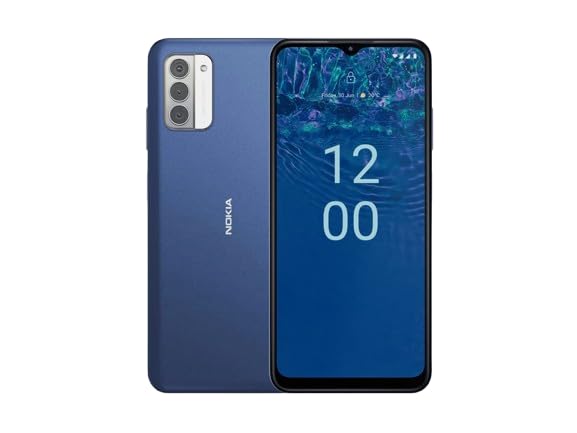
Figura 1.1: Nokia G310 5G TA-1573 Smartphone. This image displays the front view of the Nokia G310 5G smartphone, highlighting its display and general form factor.
2. X'hemm fil-Kaxxa
Upon unboxing your Nokia G310 5G TA-1573, please verify that all the following items are included:
- Nokia G310 5G TA-1573 Smartphone
- USB-C Cable
- Għodda Ejector SIM
3. Setup
3.1. Iċċarġjar tal-Apparat
Before initial use, fully charge your Nokia G310 5G. Connect the provided USB-C cable to the phone's USB-C port and the other end to a compatible power adapter (sold separately) or a computer's USB port. The battery indicator on the screen will show charging progress.
3.2. Daħħal is-SIM Card
- Sib it-trej tal-kard SIM fuq il-ġenb tat-telefon tiegħek.
- Daħħal l-għodda tal-ejecter tas-SIM fit-toqba ż-żgħira fuq it-trej biex tiftaħha.
- Poġġi l-kard Nano-SIM tiegħek fit-trej bil-kuntatti tad-deheb iħarsu 'l isfel, u kun żgur li tidħol sew.
- Imbotta t-trej lura fit-telefon bir-reqqa sakemm tikklikkja f'postu.
3.3. Tixgħel u Setup Inizjali
- Press and hold the Power button (usually on the right side) until the Nokia logo appears.
- Segwi l-istruzzjonijiet fuq l-iskrin biex tagħżel il-lingwa tiegħek, tikkonnettja ma' netwerk Wi-Fi, u tissettja l-kont Google tiegħek.
- Imla l-wizard tas-setup biex tippersonalizza s-settings tat-tagħmir tiegħek.
4. Tħaddim tat-Tagħmir Tiegħek
4.1. Navigazzjoni Bażika
- Ġesti tat-Touchscreen: Tektek biex tagħżel, skrolla biex tiskrollja, aqbad biex tagħmel zoom.
- Skrin tad-dar: Aċċessa l-apps, il-widgets, u n-notifiki.
- Bar tan-Navigazzjoni: Uża l-buttuni Lura, Dar, u Applikazzjonijiet Riċenti fil-qiegħ tal-iskrin.
4.2. Nagħmlu Telefonati u Nibagħtu Messaġġi
- Iftaħ il- Telefon app biex iċċempel numri jew tagħżel kuntatti.
- Iftaħ il- Messaġġi app biex tikteb u tibgħat messaġġi.
4.3. Konnessjoni man-Netwerks
- Wi-Fi: Mur fuq Settings > Netwerk u internet > Internet biex tikkonnettja man-netwerks Wi-Fi disponibbli.
- Bluetooth: Mur fuq Settings> Apparat konness> Preferenzi ta 'konnessjoni> Bluetooth biex tqabbad ma' apparati Bluetooth.
- Data mobbli: Kun żgur li d-dejta mobbli hija attivata f' Settings > Netwerk u internet > SIMs for internet access via your cellular network.
4.4. Uża l-Kamera
Iftaħ il- Kamera app to capture photos and videos. Tap the shutter button to take a picture or hold it to record a video. Explore different modes and settings within the app.
5. Manutenzjoni
5.1. Tindif tal-Apparat Tiegħek
Use a soft, lint-free cloth to clean the screen and body of your phone. Avoid using harsh chemicals or abrasive materials, which can damage the device's finish or screen coating.
5.2. Kura tal-batterija
- Evita li tesponi t-telefon għal temperaturi estremi.
- Tħallix il-batterija tixxotta kompletament regolarment.
- Uża biss ċarġers u kejbils approvati.
5.3. Aġġornamenti tas-Software
Iċċekkja u installa aġġornamenti tas-softwer regolarment biex tiżgura li t-tagħmir tiegħek ikollu l-aħħar karatteristiċi, irqajja tas-sigurtà, u titjib fil-prestazzjoni. Mur fuq Settings > Sistema > Aġġornament tas-sistema.
5.4. Ġestjoni tal-Ħażna
Biex tottimizza l-prestazzjoni, neħħi regolarment affarijiet żejda files, iddiżinstalla l-apps mhux użati, u ċċaqlaq il-midja kbira files to cloud storage or an external device. Check storage usage in Settings > Ħażna.
6 Issolvi l-problemi
6.1. Apparat Mhux Tixgħel
Ensure the battery is charged. Connect the phone to a charger and wait a few minutes before attempting to power it on again. If it still doesn't turn on, try holding the Power button for 10-15 seconds.
6.2. Kwistjonijiet ta' Konnettività tan-Netwerk
- Ebda Sinjal: Check if your SIM card is properly inserted. Try restarting the phone.
- Wi-Fi Mhux Konnessjoni: Ensure the Wi-Fi password is correct. Restart your router and phone.
- Kwistjonijiet ta' Tqabbil tal-Bluetooth: Ensure both devices are in pairing mode and within range.
6.3. L-Applikazzjonijiet Jiġġarraf jew Jiffriża
Try force-closing the app (Settings > Apps > See all apps > [App Name] > Force stop). Clear the app's cache and data (Settings > Apps > See all apps > [App Name] > Storage & cache > Clear cache / Clear storage). Jekk il-problema tippersisti, iddiżinstalla u erġa' installa l-app.
6.4. Irrisettja l-Fabbrika
As a last resort, if software issues persist, you may perform a factory reset. Warning: This will erase all data on your phone. Agħmel backup tad-dejta importanti qabel ma tipproċedi. Mur fuq Settings > Sistema > Irrisettja l-għażliet > Ħassar id-dejta kollha (reset tal-fabbrika).
7. Speċifikazzjonijiet
| Karatteristika | Dettall |
|---|---|
| Isem tal-Mudell | Nokia G310 5G TA-1573 |
| Sistema Operattiva | Android 13.0 |
| Daqs tal-Wiri | 6.6 Pulzier |
| Riżoluzzjoni | 720 x 1560 pixel |
| Riffriskar Rata | 90 Hz |
| Mudell tas-CPU | Qualcomm Snapdragon MSM8260A (Snapdragon 480+ equivalent) |
| Veloċità tas-CPU | 2 GHz |
| Daqs tal-Memorja RAM Installata | 4 GB |
| Kapaċità tal-Ħżin tal-Memorja | 128 GB (Intern) |
| Teknoloġiji tal-Konnettività | 5G |
| Klassifikazzjoni tal-Qawwa tal-Batterija | 3600 Milliamp Sigħat (Jone tal-Litju) |
| Awdjo Jack | USB-C |
| Piż tal-oġġett | 6.9 uqija |
| Kulur | Blu |
8. Garanzija u Appoġġ
8.1. Informazzjoni dwar Garanzija
For specific warranty details regarding your Nokia G310 5G TA-1573, please refer to the documentation provided by the seller at the time of purchase. As this is a renewed product, warranty terms may differ from new devices. It is recommended to contact the seller directly for precise warranty coverage and duration.
8.2. Appoġġ Tekniku
If you encounter issues that cannot be resolved using the troubleshooting steps in this manual, please contact:
- The seller from whom you purchased the device.
- Nokia's official support channels for general product inquiries.
Please have your device model number (TA-1573) and proof of purchase ready when contacting support.


