1. Introduzzjoni
Welcome to your new Kaidi KD-7019 TWS Bluetooth Earbuds. This manual provides instructions for the setup, operation, and maintenance of your device. Please read it carefully to ensure proper use and to maximize your listening experience.
Kontenut tal-Pakkett
- 1 Pair of Kaidi KD-7019 Earbuds
- 1 Charging Case with Touch Screen
- 1 Cable tal-Iċċarġjar USB-C
- 1 Manwal għall-Utent
- Parijiet multipli ta' ponot tal-widnejn tas-silikon (Żgħar, Medji, Kbar)
2. Prodott Aktarview
Komponenti tal-Earbuds
The Kaidi KD-7019 earbuds feature an ergonomic in-ear design for a comfortable and secure fit. Each earbud includes a touch-sensitive area for control functions.
Charging Case with Touch Screen
The charging case not only protects and charges your earbuds but also features an integrated touch screen display for advanced control and information.

Figure 2.1: The product packaging for the Kaidi KD-7019 TWS Bluetooth Earbuds, displaying the brand 'KRIDI' (Kaidi) and 'ANC TWS Tela Touch' (ANC TWS Touch Screen) along with the model number KD-7019.

Figure 2.2: An illustration of the Kaidi KD-7019 charging case's LCD touch screen, detailing various functions such as music control, volume control, sound equalizer, 'Find My Buds' locator, ambient sound modes (ANC), spatial sound, flashlight, and lock screen wallpaper.
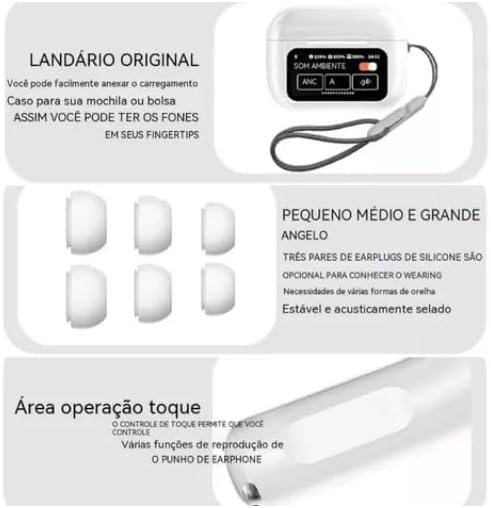
Figure 2.3: This image highlights key features: a lanyard attachment point on the charging case for portability, three pairs of silicone ear tips (small, medium, large) for a comfortable and secure fit, and the touch operation area on the earbuds for controlling playback and other functions.
3. Setup
3.1 Iċċarġjar tal-Earbuds u l-Kaxxa
- Connect the provided USB-C cable to the charging case and a compatible power source (e.g., USB wall adapter, computer USB port).
- The touch screen on the charging case will display the current charging status.
- Ensure both earbuds are correctly placed inside the charging case to charge them simultaneously.
- A full charge for both the earbuds and the case typically takes approximately 2 hours.
3.2 Tqabbil ma' Apparat Bluetooth
- Open the lid of the charging case. The earbuds will automatically power on and enter Bluetooth pairing mode.
- On your desired device (e.g., smartphone, tablet, laptop), navigate to the Bluetooth settings.
- Ippermetti Bluetooth u fittex tagħmir disponibbli.
- Select "Kaidi KD-7019" from the list of detected devices to initiate the connection.
- A voice prompt from the earbuds will confirm successful pairing.
4. Istruzzjonijiet Operattivi
4.1 Basic Earbud Controls (Touch)
The earbuds feature touch-sensitive areas for convenient control of audio playback and calls.
- Play/Pawsa: Tektek wieħed fuq kull earbud.
- Track li jmiss: Tektek darbtejn fuq il-earbud tal-lemin.
- Track preċedenti: Tektek darbtejn fuq il-earbud tax-xellug.
- Tweġiba/Tmiem Sejħa: Tektek wieħed fuq kull earbud.
- Irrifjuta Sejħa: Press and hold either earbud for approximately 2 seconds.
- Attiva l-Assistent tal-Vuċi: Tektek tliet darbiet fuq kull earbud.
4.2 Charging Case Touch Screen Functions
The integrated touch screen on the charging case provides additional control and information without needing to access your paired device.
- Kontroll tal-Mużika: Navigate through tracks, play, and pause directly from the screen.
- Kontroll tal-Volum: Adjust the audio playback volume.
- Ekwilizzatur tal-Ħoss: Select from various preset equalizer modes to customize your audio experience (e.g., Acid Rock, Pop, Classical).
- Modi ta' Ħoss Ambjentali: Toggle between Active Noise Cancellation (ANC), Transparency Mode, and Normal mode to suit your environment.
- "Find My Buds" Locator: Activate this function to emit a sound from misplaced earbuds, aiding in their retrieval.
- Ħoss Spazjali: Enable or disable spatial audio features for an immersive sound experience.
- Flashlight: Activate a small light feature on the charging case for convenience.
- Sfond tal-Iskrin tal-Imblukkar: Customize the display background of the touch screen.
- Wiri tad-Data u l-Ħin: View the current date and time directly on the case screen.
5. Manutenzjoni
5.1 Tindif
- Use a soft, dry, lint-free cloth to clean the earbuds and the charging case.
- Do not use abrasive cleaners, alcohol, or chemical solvents, as these can damage the device.
- If necessary, gently clean the silicone ear tips with a damp cloth and mild soap, then ensure they are completely dry before reattaching them to the earbuds.
5.2 Ħażna
- Always store the earbuds in their charging case when not in use. This protects them from damage and keeps them charged.
- Evita li tesponi l-apparat għal temperaturi estremi, dawl tax-xemx dirett, jew umdità għolja.
6 Issolvi l-problemi
Kwistjonijiet Komuni u Soluzzjonijiet
- Ebda Ħsejjes:
- Kun żgur li l-earbuds huma ċċarġjati biżżejjed.
- Ivverifika li l-konnessjoni Bluetooth hija attiva u stabbli.
- Adjust the volume on both your connected device and via the charging case touch screen.
- Ma tistax tqabbad:
- Confirm that the earbuds are in pairing mode (open case lid).
- Itfi u mbagħad ixgħel il-Bluetooth fuq l-apparat tiegħek.
- If previously paired, try forgetting "Kaidi KD-7019" from your device's Bluetooth list and attempt pairing again.
- Ensure no other devices are currently connected to the earbuds.
- Kwistjonijiet ta' Iċċarġjar:
- Check the USB-C cable and power adapter for damage and proper connection.
- Ensure both earbuds are correctly seated in their charging slots within the case.
- Clean the charging contacts on both the earbuds and the case if they appear dirty.
- Kontrolli tal-Mess Ma Jirrispondux:
- Ensure the touch areas on the earbuds are clean and dry.
- Poġġi l-earbuds lura fil-kaxxa tal-iċċarġjar, agħlaq l-għatu, u mbagħad erġa' iftaħha biex tirrisettjahom.
7. Speċifikazzjonijiet
Data Teknika
| Karatteristika | Dettall |
|---|---|
| Brand | Kaidi |
| Mudell | KD-7019 (also referred to as 3041) |
| Verżjoni Bluetooth | 5.3 |
| Protokolli Appoġġjati | HFP, HSP, A2DP, AVRCP |
| Unità tas-sewwieq | 13 mm |
| Distanza tat-Trażmissjoni | > 10 metru |
| Kapaċità tal-Batterija tal-Earbud | 30 mAh |
| Każ Kapaċità tal-Batterija | 360 mAh |
| Ħin ta 'Daqq tal-Mużika | Sa 5 sigħat (b'80% volum) |
| Ħin tal-Iċċarġjar (Earbuds & Case) | Madwar sagħtejn |
| Metodu ta' Kontroll | Mess |
| Apparati Kompatibbli | Mobile Phones, Tablets, Notebooks |
| Kontroll tal-Ħoss | Kanċellazzjoni tal-Istorbju Ambjentali (ENC) |
| Ċertifikazzjoni tal-ANATEL | 10545-23-12308 |
| Piż tal-Prodott | 190 g |
| Dimensjonijiet tal-Pakkett | 23 x 13 x 4 ċm |
8. Garanzija u Appoġġ
8.1 Informazzjoni dwar Garanzija
Based on the available product information, this product does not come with a manufacturer's warranty. Please refer to the return and warranty policies provided by your retailer or point of purchase for any potential coverage.
8.2 Appoġġ għall-Klijent
For further assistance, technical support, or inquiries regarding your Kaidi KD-7019 TWS Bluetooth Earbuds, please contact the retailer or seller from whom you purchased the product.


