1. Introduzzjoni
This manual provides essential information for the safe and efficient operation of your Lefant M2L Plus Robot Vacuum and Mop. Please read this manual thoroughly before using the product and retain it for future reference. The Lefant M2L Plus is designed to provide automated cleaning for various floor types, combining vacuuming and mopping functionalities with advanced navigation and smart features.
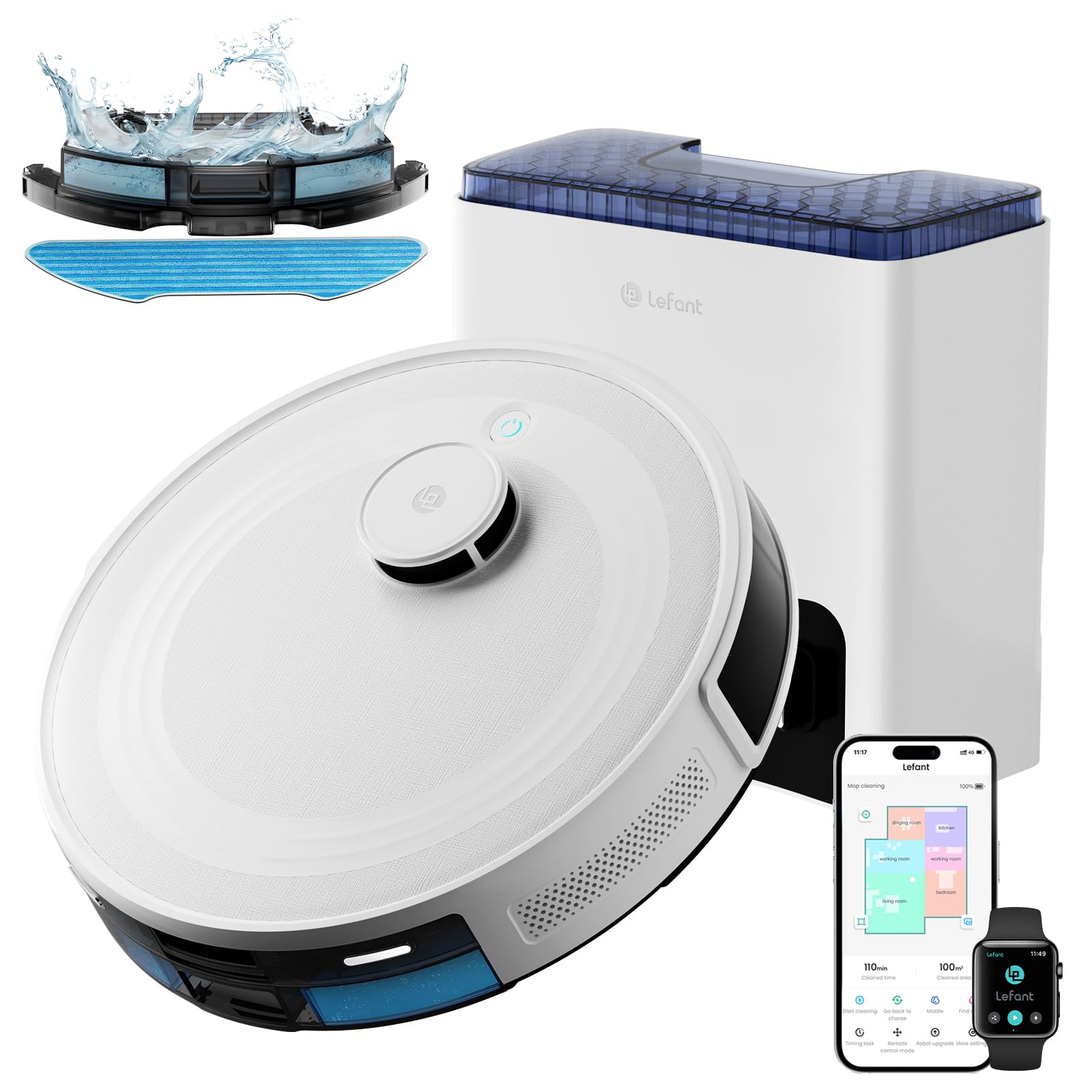
Image 1.1: Lefant M2L Plus Robot Vacuum and Mop with its self-empty station, mobile app interface, and mop accessories.
2. Prodott Aktarview
2.1 X'hemm fil-Kaxxa

Image 2.1: Contents of the Lefant M2L Plus package.
- Vacuum Robot x1
- Self-Emptying Station x1
- Detentur tal-Mopp x1
- Korda tal-Enerġija x1
- Manwal għall-Utent x1
- Borża tat-Trab x2
- Ċarruta tal-Mopp li Tinħasel x1
- Filtru HEPA x4
- Disposable Dry Mop x1
- Għodda tat-Tindif x1
- Pinzell tal-Ġenb x2
- Dustbin Filter Sponge x2
2.2 Karatteristiċi ewlenin
- LiDAR Navigation & Multi-Floor Mapping: Advanced 360° LiDAR navigation for efficient scanning, accurate mapping, and multi-level map creation.
- Precision Detection & Avoidance: 190° omnidirectional PSD obstacle avoidance for detecting and avoiding objects as close as 4 cm.
- 2-in-1 Vacuuming and Mopping: Combines powerful 6000Pa suction with a 300ml water tank for comprehensive cleaning.
- 40 Days of Hands-Free Cleaning: Self-emptying station with two 2.2L dust bags for extended maintenance-free operation.
- Customized Cleaning via App: Lefant APP allows setting cleaning modes, frequencies, selective area cleaning, and zone editing.
- Instant Connection & Voice Commands: Supports Dual-band WiFi (2.4GHz/5GHz) and integrates with Google Home and Alexa.
- Carpet Detection & Carpet Boost: Automatically avoids carpets when mopping and boosts suction on carpets when vacuuming.
3. Setup
3.1 Iċċarġjar tar-Robot
Place the self-emptying station against a wall in an open area with good Wi-Fi signal. Ensure there is at least 0.5 meters of clear space on both sides and 1.5 meters in front of the station. Connect the power cord to the station and plug it into a power outlet. Place the robot vacuum onto the charging contacts. The robot will automatically begin charging. Ensure the robot is fully charged before its first use.
3.2 Tniżżil u Konnessjoni tal-App
The Lefant app provides full control and customization options for your robot vacuum.

Image 3.1: Steps for connecting the Lefant Robot to the mobile application.
- Niżżel il- Lefant App mill-ħanut tal-apps tat-tagħmir tiegħek.
- Open the app and follow the instructions to add your M2L Plus robot vacuum.
- Kun żgur li l-apparat mobbli tiegħek huwa konness ma' 2.4GHz or 5GHz Wi-Fi network.
- Power on the robot vacuum by pressing the power button.
- Press and hold the start button on the robot for 6 sekonda biex tidħol fil-modalità ta 'tqabbil.
- Select the M2L Plus in the app and wait for the robot to pair successfully.
3.3 Voice Assistant Integration (Alexa/Google Home)
Integrate your robot vacuum with voice assistants for convenient control.

Image 3.2: Steps for connecting the Lefant Robot to Alexa.
- Iftaħ il- App Lefant, navigate to 'Mine' > 'Third-party services' to access the service.
- Register your voice account and password within the Lefant app.
- Iftaħ il- App Alexa, navigate to 'More' > 'Skills & Games'.
- Fittex għal the skill "Ħajja Intelliġenti".
- Ikklikkja fuq "Enable to Use".
- Select your region and enter the voice account and password registered in step 2.
- Wait for the connection to be successfully completed.
4. Istruzzjonijiet Operattivi
4.1 Initial Mapping and Navigation
The M2L Plus uses 360° LiDAR navigation to create an accurate map of your home. During its first cleaning cycle, allow the robot to fully explore all accessible areas to build a comprehensive map. This map will be used for efficient cleaning routes and multi-floor mapping.
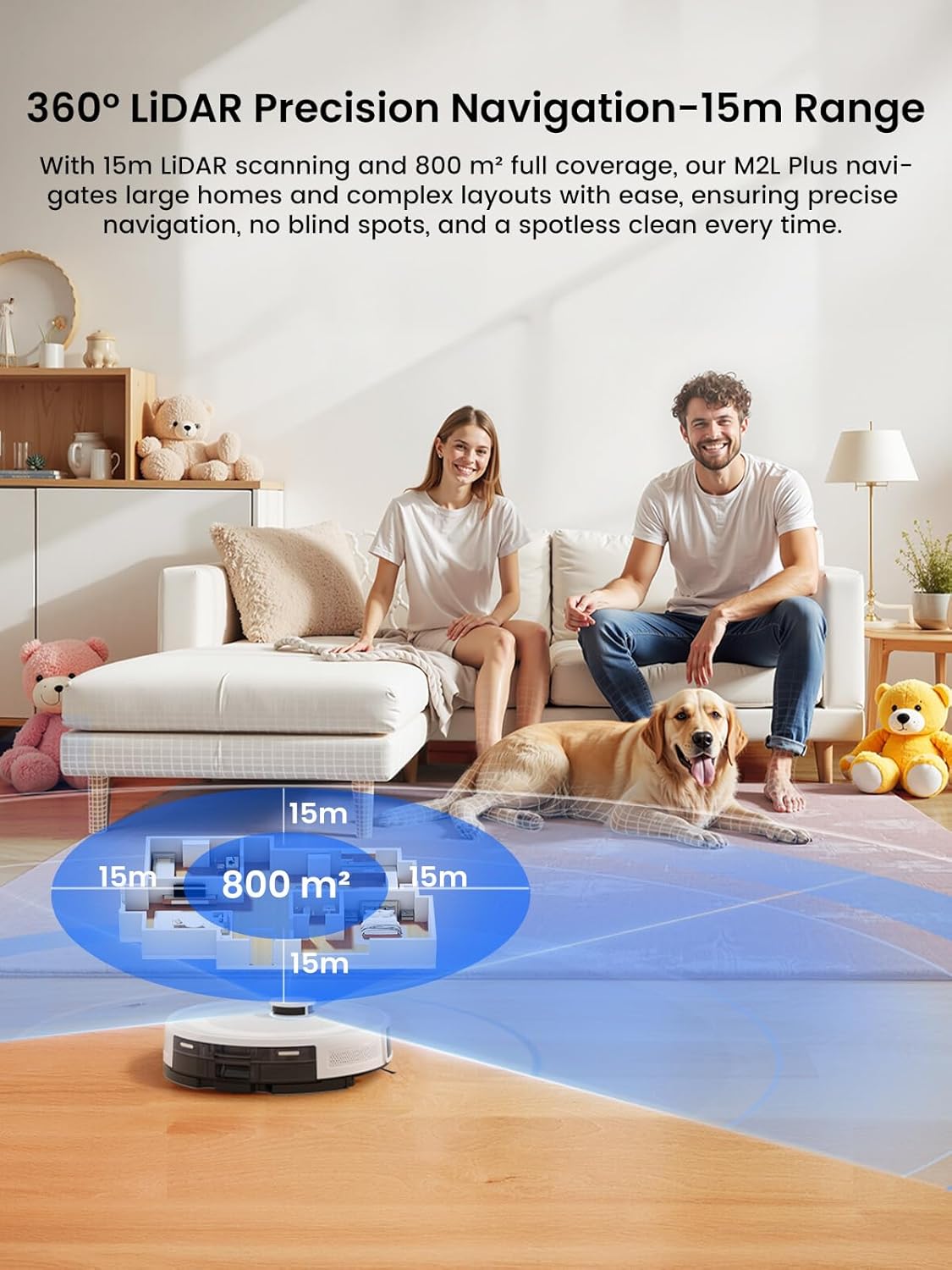
Image 4.1: The robot vacuum utilizing 360° LiDAR for precision navigation and mapping.

Image 4.2: The robot's ability to effectively navigate and automatically identify up to 3 floors for multi-level mapping.
4.2 Evitar ta' Ostakli
Equipped with 190° omnidirectional PSD obstacle avoidance, the robot accurately detects and avoids objects, minimizing collisions and ensuring thorough cleaning even in low-light conditions.

Image 4.3: The robot's 190° PSD obstacle detection system in action.

Image 4.4: Comparison of M2L Plus PSD obstacle avoidance with other robot vacuums.
4.3 Vacuum cleaner u mopping
The M2L Plus offers both vacuuming and mopping functions. The detachable mop holder allows for flexible cleaning. Adjust water flow via the app for different floor types and dirt levels.

Image 4.5: The robot vacuum performing 3-in-1 cleaning with 6000Pa suction.

Image 4.6: Dual carpet detection modes for vacuuming and mopping.
4.4 App Control and Customization
The Lefant app provides extensive control over your robot's cleaning tasks.

Immaġni 4.7: Fuqview of the Lefant App's control features.

Image 4.8: Customized cleaning options available through the app.
- Cleaning Customization: Set specific cleaning modes and frequencies for individual rooms.
- Tindif taż-Żona Selettiva: Choose particular rooms or zones for cleaning.
- Zone Editing: Split or merge rooms on the map for personalized cleaning schedules.
- Żoni No-Go: Iddefinixxi ż-żoni li r-robot għandu jevita.
- Water Flow & Suction Adjustment: Control these settings based on your cleaning needs.

Image 4.9: Setting a 'Pet Area No-Go Zone' in the app.

Immaġni 4.10: Eż.ample of advanced cleaning schedules set via the app.
4.5 Kontroll tal-Vuċi
Use voice commands with Amazon Alexa or Google Assistant for hands-free operation.

Image 4.11: Controlling the robot vacuum with voice commands.
5. Manutenzjoni
5.1 Self-Emptying Station and Dust Bags
The self-emptying station automatically transfers collected debris into a 2.2L dust bag, providing up to 40 days of hands-free cleaning. Replace the dust bag when full.

Image 5.1: The robot vacuum's self-emptying function.
5.2 Tindif tar-Robot
- Trab tat-trab: Empty the robot's internal dustbin regularly, especially if not using the self-emptying feature frequently.
- Filtri: Clean the HEPA filter and dustbin filter sponge weekly. Replace HEPA filters every 3-6 months, or as needed.
- Xkupilji tal-ġenb: Check and clean the side brushes weekly. Replace if worn or damaged.
- Pinzell Prinċipali: Remove and clean the main brush regularly, removing any tangled hair or debris using the provided cleaning tool.
- Mop Cloth & Water Tank: After mopping, remove and wash the mop cloth. Empty any remaining water from the tank and allow it to air dry.
- Sensers: Wipe all sensors (LiDAR, PSD, cliff sensors) with a clean, dry cloth to ensure optimal performance.
6 Issolvi l-problemi
If you encounter issues with your Lefant M2L Plus, refer to the following common solutions:
| Problema | Kawża Possibbli | Soluzzjoni |
|---|---|---|
| Ir-robot ma jixgħelx jew jiċċarġjax. | Low battery; improper contact with charging station; power cord disconnected. | Ensure the robot is correctly placed on the charging station. Check if the power cord is securely plugged in. |
| Ir-robot jeħel spiss. | Obstacles (cables, small objects); uneven surfaces; narrow spaces. | Clear the cleaning area of loose cables and small items. Use the app to set No-Go Zones for problematic areas. |
| Prestazzjoni fqira tat-tindif. | Full dustbin; clogged filters; worn brushes; low suction setting. | Empty the dustbin. Clean or replace filters and brushes. Increase suction power via the app. |
| Problemi bil-konnessjoni tal-app. | Incorrect Wi-Fi password; robot not in pairing mode; router issues. | Verify Wi-Fi password and network (2.4GHz/5GHz). Re-enter pairing mode on the robot. Restart your router. |
| Ir-robot ma jistax isib l-istazzjon tal-iċċarġjar. | Charging station moved; signal interference; station obstructed. | Ensure the charging station is in its original, unobstructed location. Clear any objects around the station. |
| Il-funzjoni tat-tindif tal-ħitan mhux qed taħdem. | Water tank empty; mop holder not attached; water flow setting too low. | Fill the water tank. Ensure the mop holder is correctly attached. Adjust water flow in the app. |
7. Speċifikazzjonijiet
| Karatteristika | Speċifikazzjoni |
|---|---|
| Brand | Lefant |
| Isem tal-Mudell | M2L Plus |
| Kulur | Abjad |
| Tip ta' Navigazzjoni | Navigazzjoni LiDAR |
| Karatteristiċi Speċjali | LiDAR Navigation, Multi-Floor Mapping, Room-By-Room Navigation, Self-Emptying, 190° PSD Obstacle Avoidance, Carpet Detection & Boost |
| Qawwa tal-ġbid | Sa 6000Pa |
| Runtime | Sa 130 minuta |
| Kapaċità tat-Tank tal-Ilma | 300ml |
| Kapaċità tal-Borża tat-Trab (Stazzjon) | 2.2L (sa 40 jum) |
| Konnettività | Dual-band Wi-Fi (2.4GHz/5GHz), App Control, Voice Control (Alexa, Google Home) |
| Rakkomandazzjoni tal-wiċċ | Carpet and hard flooring |
| Dimensjonijiet tal-Prodott | 32L x 32W x 9.5H Ċentimetri |
| Piż tal-oġġett | 6.26 kg |
8. Garanzija u Appoġġ
Lefant products are covered by a limited warranty. For detailed warranty information, product support, or technical assistance, please refer to the official Lefant webis-sit jew ikkuntattja lis-servizz tal-konsumatur tagħhom direttament. Żomm l-irċevuta tax-xiri tiegħek bħala prova tax-xiri għal talbiet ta' garanzija.
Għal aktar għajnuna, żur il- Lefant Store on Amazon.


