1. Introduzzjoni
Thank you for choosing the Inateck Nomad Ergo N0131 Foldable Ergonomic Wireless Keyboard. This manual provides detailed instructions for setting up, operating, maintaining, and troubleshooting your device. Please read this manual thoroughly before use to ensure optimal performance and longevity of your keyboard.
2. Kontenut tal-Pakkett
Malli tiftaħ il-pakkett, jekk jogħġbok ivverifika li l-oġġetti kollha elenkati hawn taħt huma preżenti u f'kundizzjoni tajba:
- Inateck Nomad Ergo N0131 Foldable Ergonomic Wireless Keyboard
- Cable tal-Iċċarġjar tal-USB-C
- Adjustable Device Stand
- Soft Protective Pouch
- Manwal għall-Utent

Stampa 2.1: The Inateck Nomad Ergo N0131 keyboard, accompanied by its USB-C charging cable, an adjustable stand for mobile devices, and a soft protective pouch.
3. Prodott Aktarview
The Inateck Nomad Ergo N0131 is a dual-fold, ergonomic wireless keyboard designed for portability and comfortable typing across multiple devices. It features a QWERTZ layout and connects via Bluetooth.
3.1 Karatteristiċi ewlenin
- Dual-Fold Magnetic Design: Folds compactly for easy transport and secures with a magnetic closure.
- Ergonomic V-shaped Layout: Positions wrists at a 15° angle to reduce fatigue during extended typing.
- Konnettività Multi-Apparat: Supports up to three Bluetooth devices with quick switching.
- Ħajja twila tal-batterija: Integrated 140mAh lithium battery provides approximately 45 hours of continuous typing and up to 150 days of standby time.
- Kostruzzjoni Durabbli: Skin-friendly PU layer resists fingerprints, and keys are rated for 5 million strokes.
- Ċwievet tas-Swiċċ tal-Imqass: Provides a comfortable and precise typing experience with 1mm key travel.

Stampa 3.1: The dual-fold magnetic design of the keyboard, illustrating its compact folding capability.

Stampa 3.2: A dettaljata view of the magnetic closure, which ensures stability when the keyboard is unfolded for use.

Stampa 3.3: An sploda view illustrating the scissor-switch structure beneath a keycap, designed for comfortable and accurate typing.

Stampa 3.4: The keyboard's exterior, highlighting the skin-friendly PU leather material that is resistant to fingerprints and scratches.
4. Setup
4.1 Iċċarġjar tat-Tastiera
- Sib il-port tal-iċċarġjar USB-C fuq it-tastiera.
- Connect the provided USB-C cable to the keyboard's charging port.
- Connect the other end of the USB-C cable to a USB power source (e.g., computer USB port, USB wall adapter).
- The charging indicator light will illuminate. A full charge typically takes approximately 2 hours.

Stampa 4.1: The USB-C charging port on the keyboard, indicating charging status and battery life details.
4.2 Tqabbil tal-Bluetooth
It-tastiera tista 'tiġi abbinata ma' sa tliet apparati simultanjament.
- Qawwa Mixgħul: Unfold the keyboard to automatically power it on.
- Agħżel il-Kanal: Agħfas il- Fn key simultaneously with BT1, BT2, jew BT3 to select a Bluetooth channel. The corresponding indicator light will flash slowly.
- Daħħal il-Mod tat-Tqabbil: Agħfas u żomm Fn + C (or the dedicated Bluetooth pairing key if available) until the selected channel indicator light flashes rapidly. This indicates the keyboard is in pairing mode.
- Ippermetti l-Bluetooth fuq l-Apparat Tiegħek: On your computer, tablet, or smartphone, go to Bluetooth settings and turn on Bluetooth.
- Qabbad: Fittex għal available devices and select "Inateck N0131" (or similar name) from the list. Follow any on-screen prompts to complete the pairing.
- Konferma: Once successfully paired, the indicator light on the keyboard will stop flashing and remain solid for a few seconds before turning off.

Stampa 4.2: The keyboard demonstrating multi-device connectivity, showing it paired with a tablet, a desktop computer, and a smartphone.
4.3 Switching Between Paired Devices
To switch between previously paired devices, simply press Fn + BT1, BT2, jew BT3 corresponding to the desired device. The keyboard will automatically connect to the selected device.
5. Istruzzjonijiet Operattivi
5.1 Tiwi u Tiżvolġi
The keyboard features a dual-fold design. To unfold, gently open the two halves until they lie flat and the magnetic mechanism engages, securing the keyboard in its typing position. To fold, disengage the magnetic lock and fold the halves inwards until they meet, forming a compact unit.
5.2 Ergonomic Typing
The V-shaped layout and split design are engineered to promote a natural wrist and forearm posture. When typing, ensure your wrists are relaxed and positioned comfortably at the keyboard's 15° angle to minimize strain.

Stampa 5.1: A user demonstrating the ergonomic V-shaped layout, which helps maintain a natural and relaxed wrist posture during typing.
5.3 Using Multimedia Hotkeys
The keyboard includes dedicated multimedia hotkeys for increased productivity. These keys are typically accessed by pressing the Fn key in combination with the corresponding function key (e.g., volume control, screenshot). Refer to the keycap legends for specific functions.
5.4 Adjustable Device Stand
The included adjustable stand can be used to position your smartphone or tablet at an optimal viewing angle, reducing neck strain during use with the keyboard.
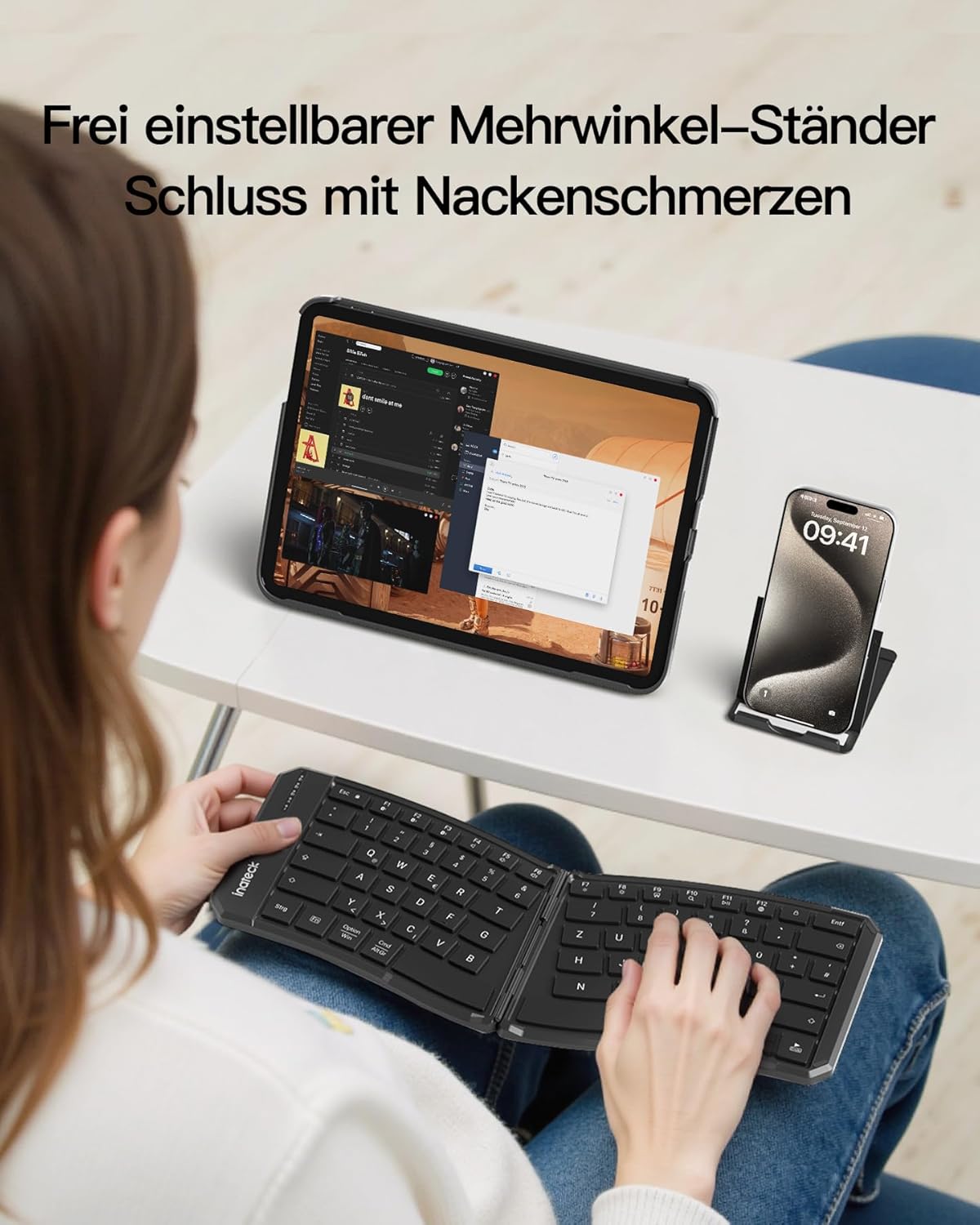
Stampa 5.2: The adjustable stand in use, supporting a tablet and smartphone, allowing for comfortable viewing angles while typing on the keyboard.
6. Manutenzjoni
6.1 Tindif
- Kun żgur li t-tastiera tkun mitfija qabel ma tnaddafha.
- Uża drapp ratba u mingħajr ħelu ftit dampImlaħlaħ bl-ilma jew b'soluzzjoni ħafifa tat-tindif biex timsaħ il-wiċċ.
- Evita li tuża kimiċi ħarxa, prodotti tat-tindif li joborxu, jew umdità eċċessiva, għax dawn jistgħu jagħmlu ħsara lit-tastiera.
- For cleaning between keys, use compressed air or a small brush.
6.2 Ħażna
- When not in use, fold the keyboard and store it in the provided soft protective pouch to guard against dust and scratches.
- Aħżen f'post frisk u niexef 'il bogħod mix-xemx diretta u temperaturi estremi.
7 Issolvi l-problemi
7.1 It-Tastiera Mhux Qed Tikkonnettja permezz tal-Bluetooth
- Iċċekkja l-Enerġija: Ensure the keyboard is unfolded and powered on, and that the battery has sufficient charge.
- Erġa' daħħal il-Modalità ta' Tqabbil: Follow the steps in Section 4.2 to put the keyboard back into pairing mode.
- Apparat Bluetooth: Verify that Bluetooth is enabled on your device (computer, tablet, smartphone).
- Tinsa l-Apparat: On your device, try forgetting or removing the keyboard from the list of paired Bluetooth devices, then attempt to pair again.
- Irristartja l-Apparati: Restart both the keyboard (by folding and unfolding) and your host device.
- Interferenza: Tbiegħed minn apparati bla fili oħra li jistgħu jikkawżaw interferenza.
7.2 Iċ-Ċwievet Ma Jirrispondux
- Livell tal-batterija: Check if the keyboard battery is low. Charge the keyboard if necessary.
- Konnessjoni: Ensure the keyboard is properly connected to your device via Bluetooth.
- Ibda mill-ġdid: Power off and on the keyboard, and restart your host device.
- Ċwievet Nodfa: Check for any debris under the keys that might be preventing them from functioning correctly.
7.3 Keyboard Unstable When Unfolded
- Ensure the keyboard is fully unfolded and the internal magnetic closure mechanism has engaged properly.
- Place the keyboard on a flat, stable surface.
8. Speċifikazzjonijiet
| Brand | Inateck |
| Numru tal-Mudell | Nomad Ergo N0131 |
| Teknoloġija tal-Konnettività | Bluetooth |
| Layout tat-Tastiera | QWERTZ |
| Karatteristiċi Speċjali | Dual-Fold Magnetic, Ergonomic Design, Multi-Device Support |
| Apparati Kompatibbli | Laptop, PC, Smartphone, Tablet (iPad, iPhone, Mac, Android, Windows) |
| Kapaċità tal-batterija | Batterija tal-litju 140mAh |
| Continuous Typing Time | ≥45 sigħat |
| Ħin ta' Standby | Sa 150 jum |
| Ħin tal-Iċċarġjar | Madwar 2 sigħat (permezz ta' USB-C) |
| Tip ta 'Swiċċ taċ-Ċavetta | Swiċċ tal-imqass |
| Ivvjaġġar Ewlenin | 1mm |
| Dimensjonijiet tal-Prodott (Miftuħ) | 35.72 x 14.48 x 0.93 ċm |
| Piż tal-Prodott | 262 g |
9. Garanzija u Appoġġ
Inateck products are designed and manufactured to the highest quality standards. For warranty information and technical support, please refer to the warranty card included in your package or visit the official Inateck websit. Jekk jogħġbok żomm il-prova tax-xiri tiegħek għal talbiet ta' garanzija.


