1. Introduzzjoni
Grazzi tax-xiriasing the ZEBRONICS Zeb Paradise Neo Wireless Headphones. This manual provides detailed instructions for setup, operation, and maintenance of your device. Please read this manual carefully before use to ensure proper functionality and to maximize your listening experience.
Key features of your Zeb Paradise Neo headphones include 40mm drivers for clear audio, up to 50 hours of playback, rapid charging, a dedicated gaming mode with low latency, three EQ modes, Environmental Noise Cancellation (ENC), and dual pairing capability.

Image 1.1: ZEBRONICS Zeb Paradise Neo Wireless Headphones. This image shows a front-side view of the black ZEBRONICS Zeb Paradise Neo wireless headphones, highlighting their sleek design and on-ear form factor.
2. Kontenut tal-Pakkett
Kun żgur li l-oġġetti kollha huma preżenti fil-pakkett:
- ZEBRONICS Zeb Paradise Neo Wireless Headphones (1 Unit)
- USB Type-C Charging Cable (1 Unit)
- AUX Cable (1 Unit)
- QR Code Guide (1 Unit)
3. Prodott Aktarview
Familiarize yourself with the headphone components:
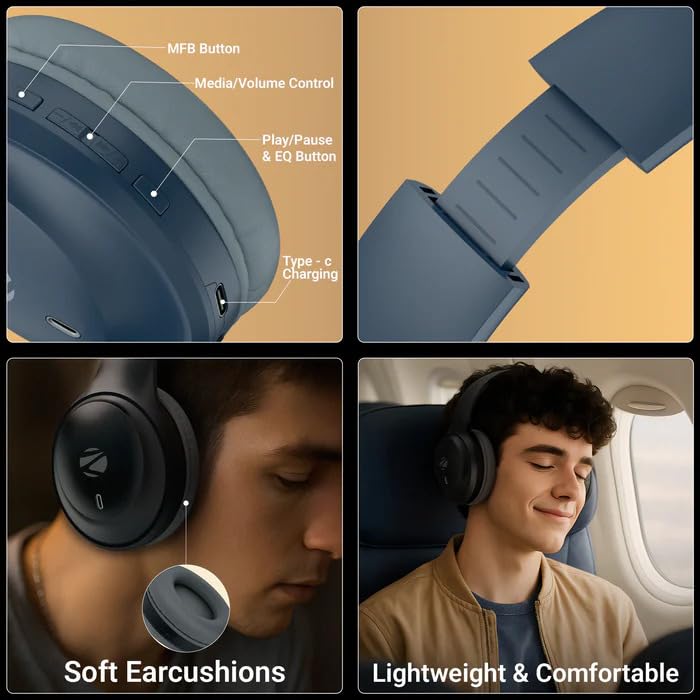
Image 3.1: Headphone Controls and Features. This image displays the various control buttons and features on the ZEBRONICS Zeb Paradise Neo headphones. It highlights the MFB (Multi-Function Button), Media/Volume Control buttons, Play/Pause & EQ Button, and the Type-C Charging port. It also shows the soft ear cushions and the lightweight, comfortable design.
- Buttuna MFB: Multi-Function Button for power, pairing, and call management.
- Media/Volume Control: Buttons for adjusting volume and navigating tracks.
- Play/Pause & EQ Button: Controls playback and switches between EQ modes.
- Port tal-Iċċarġjar tat-Tip C: Għall-konnessjoni tal-kejbil tal-iċċarġjar.
- Port AUX: Għal konnessjoni awdjo bil-fili.
- Mikrofonu: For call function and voice assistant.
4. Setup u Iċċarġjar
4.1 Iċċarġjar inizjali
Before first use, fully charge the headphones. Connect the supplied USB Type-C charging cable to the headphone's charging port and the other end to a USB power adapter (not included) or a computer's USB port.
- A red LED indicator will illuminate during charging.
- The LED indicator will turn off once charging is complete.
- Il-ħin tal-iċċarġjar huwa madwar sagħtejn.
- Rapid charging provides approximately 7 hours of use from a 10-minute charge.
4.2 Tixgħel/Jitfi
- Qawwa Mixgħul: Press and hold the MFB button for approximately 3 seconds until the LED indicator flashes blue.
- Itfi: Press and hold the MFB button for approximately 5 seconds until the LED indicator flashes red and then turns off.
5. Istruzzjonijiet Operattivi
5.1 Tqabbil tal-Bluetooth
- Kun żgur li l-headphones huma ċċarġjati kompletament u mitfija.
- Press and hold the MFB button for approximately 5-7 seconds until the LED indicator flashes red and blue alternately. This indicates pairing mode.
- Fuq it-tagħmir mobbli tiegħek, ippermetti l-Bluetooth u fittex tagħmir disponibbli.
- Select "ZEB-PARADISE NEO" from the list of found devices.
- Once paired, the LED indicator will flash blue intermittently.
The headphones will automatically attempt to connect to the last paired device when powered on.
5.2 Tqabbil Doppju
The Zeb Paradise Neo supports dual pairing, allowing connection to two Bluetooth devices simultaneously.
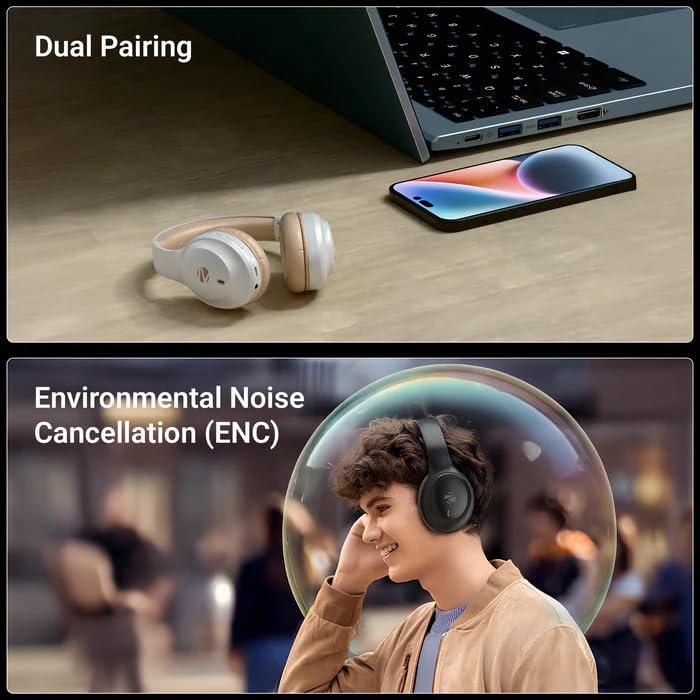
Image 5.1: Dual Pairing Capability. This image illustrates the dual pairing feature of the ZEBRONICS Zeb Paradise Neo headphones, showing them connected to both a laptop and a smartphone simultaneously. This allows seamless switching between audio sources.
- Pair the headphones with the first device (e.g., smartphone) as described in Section 5.1.
- Iddiżattiva l-Bluetooth fuq l-ewwel apparat. Il-headphones jerġgħu jidħlu fil-modalità ta' tqabbil.
- Pair the headphones with the second device (e.g., laptop).
- Erġa' attiva l-Bluetooth fuq l-ewwel apparat. Il-headphones issa għandhom ikunu konnessi maż-żewġ apparati.
Audio will play from the device that is actively transmitting sound. You may need to manually select the headphones as the output device on one of the connected sources.
5.3 Funzjoni tas-Sejħa
- Tweġiba/Tmiem Sejħa: Agħfas il-buttuna MFB darba.
- Irrifjuta Sejħa: Agħfas u żomm il-buttuna MFB għal madwar 2 sekondi.
- Isemmi mill-ġdid l-Aħħar Numru: Double-press the MFB button.
5.4 Modi EQ
The headphones feature 3 Equalizer (EQ) modes to customize your audio experience. Press the Play/Pause & EQ button to cycle through the available modes (e.g., Bass Boost, Balanced, Treble Boost).
5.5 Modalità tal-Logħob (Latenza Baxxa)
Activate Gaming Mode for reduced audio latency, ideal for gaming. Refer to the QR code guide for specific instructions on activating and deactivating Gaming Mode, as this may vary.
5.6 AUX Mode (Wired Connection)
To use the headphones with a wired connection, connect the supplied 3.5mm AUX cable to the headphone's AUX port and the other end to your audio source's 3.5mm audio jack. The headphones will automatically switch to AUX mode.
6. Manutenzjoni
- Tindif: Uża drapp artab u niexef biex tnaddaf il-headphones. Tużax kimiċi ħarxa jew materjali li joborxu.
- Ħażna: Aħżen il-headphones f'post frisk u niexef 'il bogħod mix-xemx diretta u minn temperaturi estremi.
- Kura tal-batterija: Biex ittawwal il-ħajja tal-batterija, evita li tiċċarġja l-headphones għalkollox ta’ spiss. Iċċarġjahom regolarment, anke jekk ma tkunx qed tużahom għal perjodi twal.
- Espożizzjoni għall-Ilma: These headphones are not waterproof. Avoid exposure to water or moisture.
7 Issolvi l-problemi
| Problema | Soluzzjoni Possibbli |
|---|---|
| Il-headphones mhux qed jixegħlu. | Kun żgur li l-headphones huma ċċarġjati. Qabbadhom ma' sors ta' enerġija u erġa' pprova. |
| Ma tistax tqabbad mat-tagħmir. |
|
| L-ebda ħoss jew volum baxx. |
|
| Konnessjoni intermittenti. |
|
8. Speċifikazzjonijiet
| Isem tal-Mudell | Paradise Neo (ZEB-WHP 11) |
| Verżjoni Bluetooth | 5.4 |
| Firxa Wireless | 10 metri (mingħajr ostakli) |
| Daqs tas-Sewwieq | 40mm |
| Impedenza tal-Ispeaker | 32Ω |
| Rispons ta' Frekwenza | 20Hz - 20kHz |
| Sensittività | 99dB±3dB |
| Impedenza tal-mikrofonu | 2.2kΩ |
| Sensittività tal-mikrofonu | -38dB±3dB |
| Ħin tal-Iċċarġjar | 1.5 sigħat |
| Ħin tal-daqq | Up to 50 hours* (at 50% volume) |
| Ħin tat-Tkellem | Sa 40 siegħa* |
| Piż Nett | 161g |
| Dimensjonijiet tal-Prodott (W x D x H) | 18.8 x 8.4 x 21.5 cm (Package dimension) |
*Battery life may vary based on usage, volume levels, and environmental factors.
9. Garanzija u Appoġġ
For warranty information and customer support, please refer to the QR code guide included in your package or visit the official ZEBRONICS websit. Żomm l-irċevuta tax-xiri tiegħek għal pretensjonijiet ta' garanzija.
Manufacturer: Zebronics India Pvt Ltd.
Country of Origin: India.


