1. Introduzzjoni
Thank you for choosing the ELECCTV W1-B-2PC 2K Dual-Band WiFi Security Camera. This manual provides essential information for the proper installation, operation, and maintenance of your security camera system. The W1-B-2PC camera features advanced 2.4GHz and 5GHz dual-band wireless connectivity, 2K QHD video resolution, color night vision, AI motion detection with spotlight and siren, two-way audio communication, and an IP65 weather-resistant design for reliable outdoor use. Please read this manual thoroughly before use to ensure optimal performance and safety.
2. Informazzjoni dwar is-Sigurtà
- Ensure the camera is installed in a location where it is protected from direct impact or vandalism.
- Use only the provided charging cable and adapter to charge the camera's battery.
- Tesponix il-kamera għal temperaturi estremi barra mill-medda operattiva tagħha (-4°F sa 113°F / -20°C sa 45°C).
- Żomm il-kamera u l-aċċessorji tagħha fejn ma jintlaħqux mit-tfal.
- Evita li tipponta l-kamera direttament lejn sorsi ta’ dawl qawwija, għax dan jista’ jaffettwa l-kwalità tal-immaġni.
- Regularly check the mounting to ensure the camera remains securely attached.
3. Kontenut tal-Pakkett
Ivverifika li l-oġġetti kollha huma preżenti fil-pakkett tiegħek:
- ELECCTV W1-B-2PC Security Camera (2 units)
- Mounting Bracket (2 units)
- Kejbil tal-Iċċarġjar USB (2 unitajiet)
- Mounting Screw Kit (2 sets)
- Manwal għall-Utent
4. Prodott Aktarview
Familiarize yourself with the components of your ELECCTV W1-B-2PC camera:
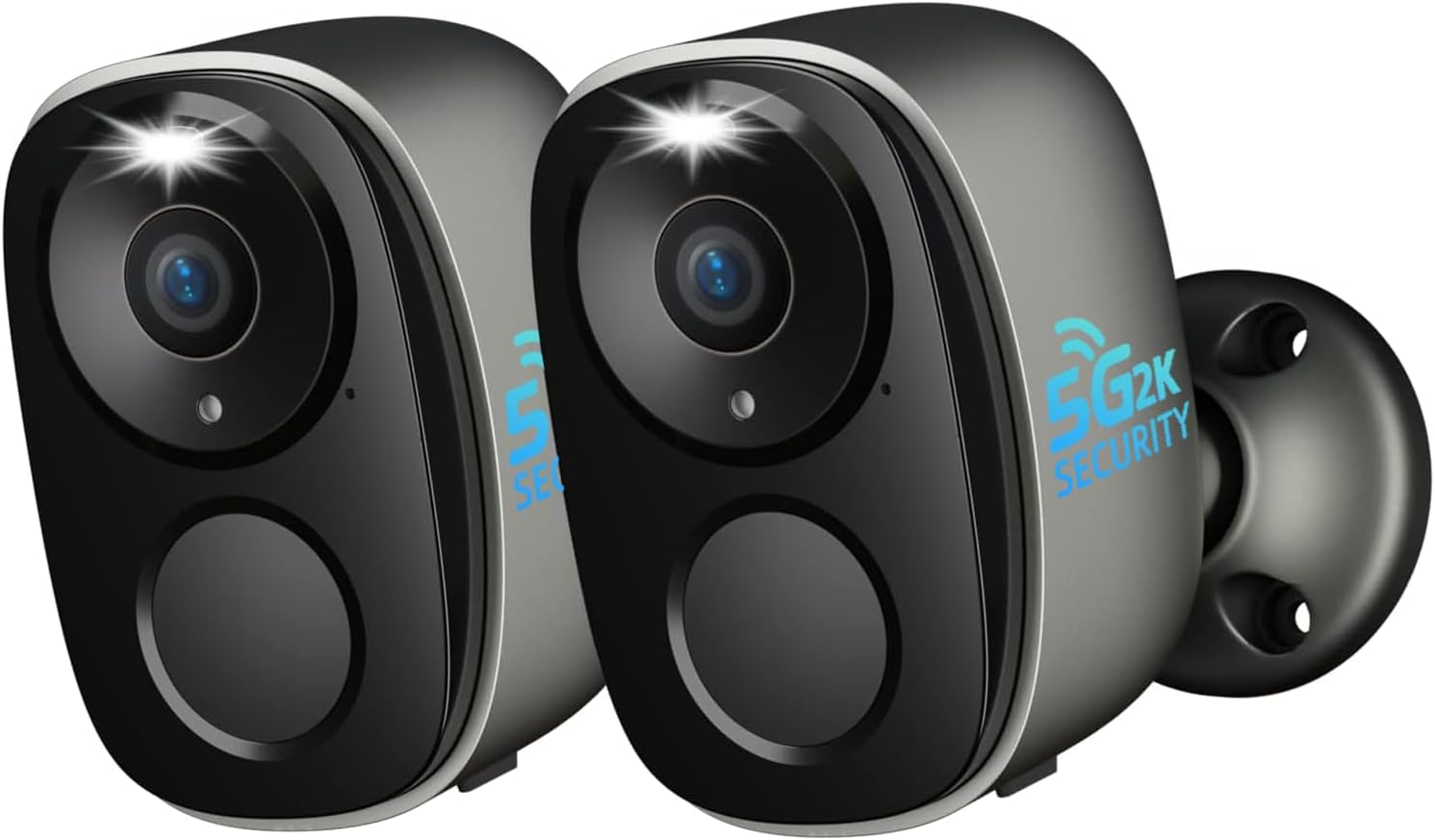
Immaġni: Quddiem view of two ELECCTV W1-B-2PC cameras.
- Lenti: Jaqbad vidjow 2K QHDtage.
- Spotlight: Jipprovdi dawl għall-viżjoni bil-kulur bil-lejl u jaġixxi bħala deterrent.
- Sensor tal-Moviment PIR: Jidentifika sinjali tas-sħana għal skoperta preċiża tal-moviment.
- Mikrofonu: Captures audio for two-way talk and recording.
- Kelliem: Enables two-way audio communication and siren activation.
- Bażi tal-Immuntar: Allows for secure wall or ceiling installation.
- Port tal-Iċċarġjar tal-USB: Għall-iċċarġjar mill-ġdid tal-batterija interna.
- Buttuna Irrisettja: Użat biex jirrisettja l-kamera għas-settings tal-fabbrika.
- Slott tal-Karta Mikro SD: Supports local storage up to 256GB (card not included).
5. Gwida ta' Setup
5.1. Iċċarġjar tal-Kamera
Before initial use, fully charge the camera's built-in rechargeable battery. Connect the provided USB charging cable to the camera's charging port and a standard 5V/2A USB power adapter (not included). The charging indicator light will show the charging status. A full charge can last 1-3 months depending on usage and power-saving settings.
5.2. Installazzjoni tal-App
Niżżel u installa l- O-KAM Pro app fuq l-ismartphone tiegħek. L-app hija disponibbli kemm għal apparati iOS kif ukoll Android. Fittex għal "O-KAM Pro" in your device's app store or scan the QR code provided in the quick start guide (if applicable).

Image: O-KAM Pro app interface for easy setup and WiFi connection.
5.3. Tqabbil tal-Apparat
Follow these steps to connect your camera to your Wi-Fi network:
- Open the O-KAM Pro app and create an account or log in.
- Tektek l-ikona "+" biex iżżid apparat ġdid.
- Agħżel il-mudell tal-kamera tiegħek mil-lista.
- Power on the camera. If the indicator light is not flashing, press and hold the reset button for 5 seconds until it flashes.
- Follow the in-app instructions to connect the camera to your 2.4GHz or 5GHz Wi-Fi network. The camera supports dual-band connectivity for a stable connection.
- Skennja l-kodiċi QR muri fuq it-telefon tiegħek bil-lenti tal-kamera.
- Ladarba tkun konnessa, agħti isem lill-kamera tiegħek u kompli s-setup.

Image: Dual-band WiFi 6 connectivity and key features.
5.4. Immuntar tal-kamera
The ELECCTV W1-B-2PC camera is 100% wire-free and IP65 waterproof, allowing for flexible installation both indoors and outdoors. Choose a location with a strong Wi-Fi signal and a clear view taż-żona li tixtieq tissorvelja.
- Mark the desired drilling spots using the mounting bracket as a template.
- Drill holes and insert wall anchors if mounting on a masonry surface.
- Waħħal il-parentesi tal-immuntar mal-ħajt jew is-saqaf billi tuża l-viti pprovduti.
- Attach the camera to the mounting bracket and adjust the angle for optimal coverage.

Image: Camera demonstrating IP65 waterproof rating in rain.

Image: Flexible mounting options for the camera.
6. Istruzzjonijiet Operattivi
6.1. Ħaj View u Daqq
Access the O-KAM Pro app to view live 2K QHD video from your camera. You can also review recorded events by date and time. The app supports simultaneous live streaming from up to four cameras for comprehensive coverage.

Image: Reviewing recorded events in the app.

Image: Quad-view live streaming in the app.
6.2. Awdjo b'żewġ direzzjonijiet
The camera features a built-in microphone and speaker. In the live view interface of the O-KAM Pro app, tap the microphone icon to speak through the camera and the speaker icon to listen to audio from the camera's location.
6.3. Sejbien tal-Mozzjoni u Twissijiet
The camera utilizes AI motion detection to identify human movement. When motion is detected, the camera can activate its spotlight, trigger a 120dB siren, and send instant notifications to your smartphone. You can customize detection zones and sensitivity settings within the app to reduce false alerts.

Image: Night guard security with spotlight and siren activation.

Image: AI precision detection for persons and birds.
6.4. Modi ta' Viżjoni bil-Lejl
The camera offers both infrared and full-color night vision. With its 2K QHD resolution and integrated spotlights, you can achieve clear, detailed color images even in low-light conditions. The 130° wide-angle lens provides extensive coverage.

Image: 2K QHD Color Night Vision in action.

Image: Day and night security with color night vision and digital zoom capabilities.
6.5. Għażliet ta 'Ħażna
Your camera supports two storage methods:
- Karta Micro SD: Daħħal kard Micro SD (sa 256GB, mhux inkluża) fl-islott apposta għall-ħażna lokali tar-reġistrazzjonijiet.
- Ħażna Cloud: The camera offers free 1-day rolling cloud storage for life, with no subscription required for this basic service. Extended cloud storage plans may be available through the app.

Image: SD Card and Cloud storage options.
6.6. Smart Home Integration (Alexa)
The ELECCTV W1-B-2PC camera is compatible with Amazon Alexa. Follow the instructions in the O-KAM Pro app or your Alexa app to link your camera and enable voice commands for live viewing on compatible Alexa-enabled devices.
6.7. Sharing Access
You can share access to your camera's live feed and recordings with family members through the O-KAM Pro app. This allows multiple users to monitor the property simultaneously.

Image: Sharing camera access with family for enhanced security.
6.8. Bird Identification Feature
The camera includes an advanced bird identification feature that can distinguish different bird species. Note that this feature requires a separate subscription within the O-KAM Pro app.
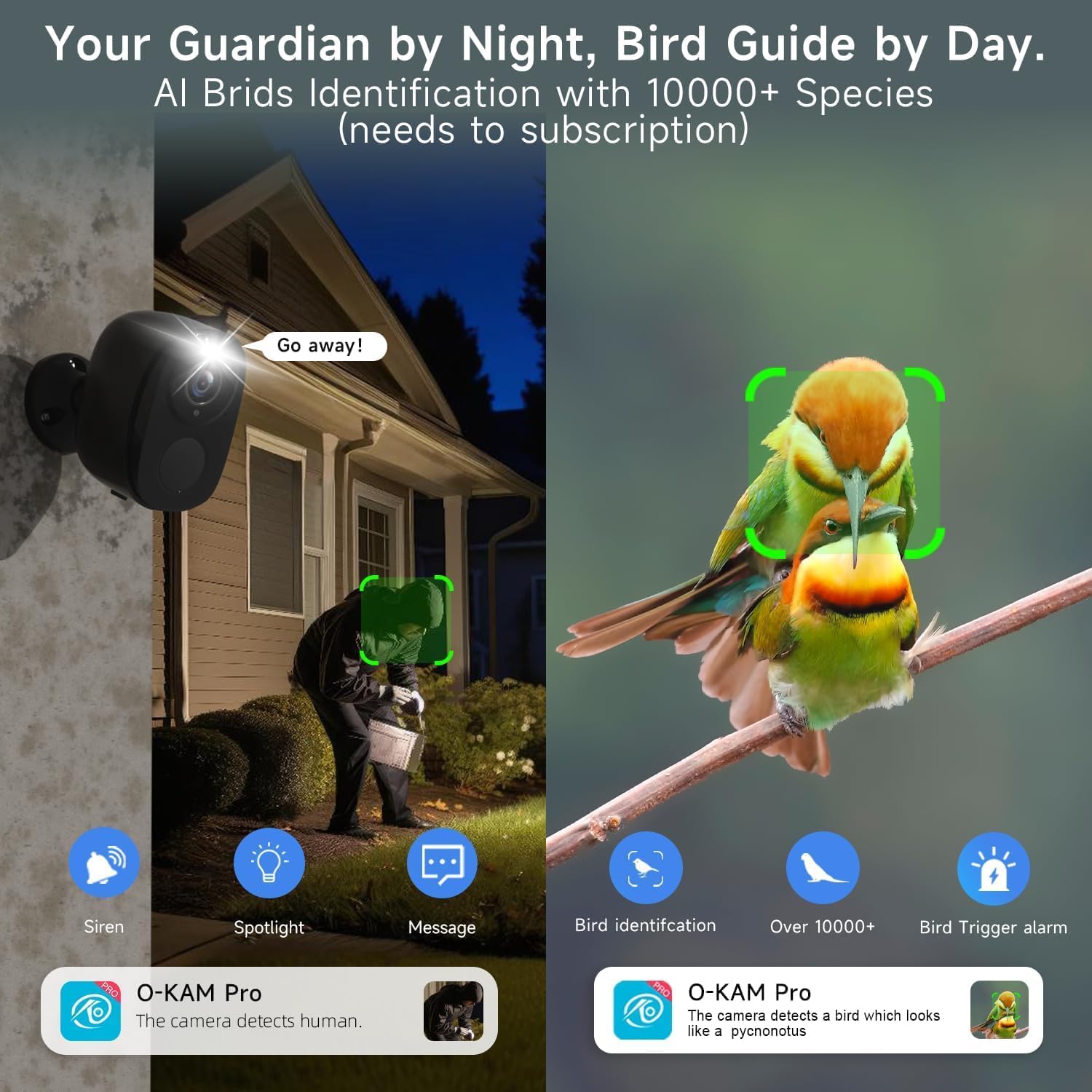
Image: Bird identification and night security features.

Image: New bird identification feature in the app.
7. Manutenzjoni
- Iċċarġjar tal-batterija: Recharge the camera battery as needed. The app will notify you when the battery level is low.
- Tindif: Periodically clean the camera lens and body with a soft, dry cloth to ensure clear image quality and proper sensor function. Do not use harsh chemicals.
- Aġġornamenti tal-Firmware: Keep the camera's firmware updated through the O-KAM Pro app to ensure optimal performance, security, and access to new features.
8 Issolvi l-problemi
| Ħruġ | Soluzzjoni Possibbli |
|---|---|
| Il-kamera ma tikkonnettjax mal-Wi-Fi | Ensure your Wi-Fi network is 2.4GHz or 5GHz. Check Wi-Fi signal strength at the camera's location. Reset the camera and try pairing again. Verify correct Wi-Fi password entry. |
| Kwalità ta 'immaġni fqira | Naddaf il-lenti tal-kamera. Kun żgur li m'hemm l-ebda ostaklu fil-kamp tal-kamera. view. Check Wi-Fi signal strength for stable streaming. |
| Id-detezzjoni tal-moviment mhux qed taħdem jew hija sensittiva wisq | Adjust motion detection sensitivity and customize detection zones in the O-KAM Pro app. Ensure the PIR sensor is not blocked. |
| Il-batterija tiskula malajr | Reduce motion detection frequency or sensitivity. Adjust power-saving modes in the app. Ensure the camera is not in an area with constant motion. |
| Awdjo bidirezzjonali mhux qed jaħdem | Check microphone and speaker permissions for the O-KAM Pro app on your smartphone. Ensure camera's microphone and speaker are not obstructed. |
9. Speċifikazzjonijiet
| Karatteristika | Speċifikazzjoni |
|---|---|
| Isem tal-Mudell | W1 |
| Riżoluzzjoni tal-Qbid tal-Vidjo | 2K QHD (1920p) |
| Teknoloġija tal-Konnettività | Wi-Fi (2.4GHz & 5GHz Dual-Band) |
| Sors tal-Enerġija | Li jaħdem bil-batterija (rikarikabbli) |
| Użu fuq ġewwa/barra | Barra |
| Livell ta 'Reżistenza għall-Ilma | IP65 |
| Karatteristiċi Speċjali | Wireless, AI Motion Detection, Spotlight, Siren, Color Night Vision, 2-Way Talk |
| Apparati Kompatibbli | Smartphone (via O-KAM Pro App), Amazon Alexa |
| Għażliet ta' Ħażna | Karta Mikro SD (sa 256GB), Ħażna fis-Sħab |
| Apertura tal-Lenti | f/2.0 |
| Zoom Diġitali | 5X |
| Qasam ta View | 130° Angolu wiesa' |
| Dimensjonijiet tal-Prodott | 8 x 2 x 2.7 pulzieri |
| Piż tal-oġġett | 1.39 libbra (0.63 Kilogrammi) |
| UPC | 765150757364 |
10. Garanzija u Appoġġ
ELECCTV products are designed for reliability and performance. For specific warranty details, please refer to the warranty card included with your product or visit the official ELECCTV website. If you encounter any issues or require technical assistance, please contact ELECCTV customer support through the O-KAM Pro app or the contact information provided on the ELECCTV websit.


