Prodott Overview
The ECHTPower PC Controller is a versatile wireless gaming controller designed for PC, Switch, iOS, and Android platforms. It features Hall Effect joysticks and triggers for precise control, a 1000Hz polling rate for instant response, and an intelligent TFT display for on-screen adjustments of settings like vibration intensity, RGB lighting, and button mapping. The controller is equipped with a 1000mAh battery for extended gameplay.
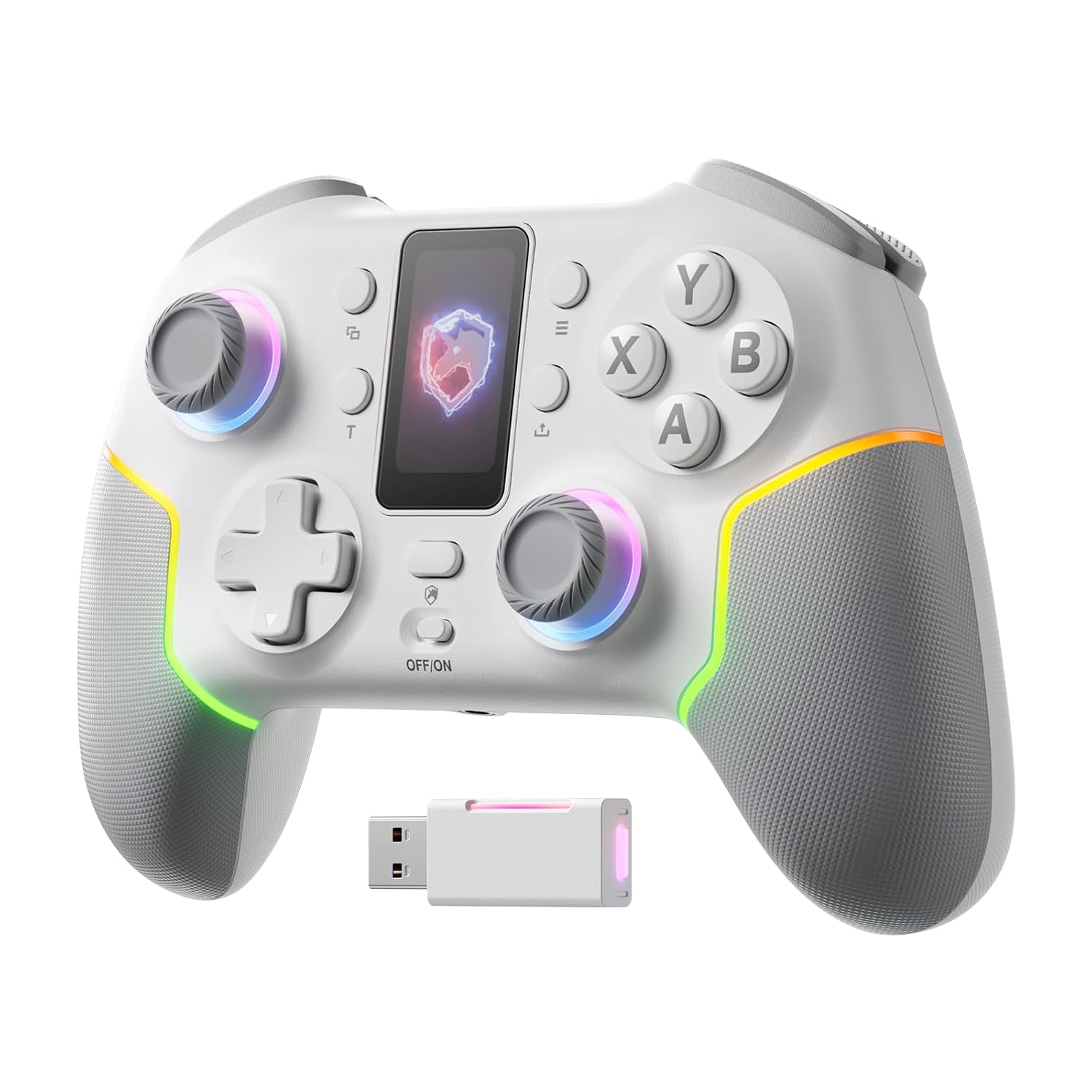
Immaġni: Quddiem view of the ECHTPower PC Controller, showcasing its intelligent screen, joysticks, and face buttons.
Kontenut tal-Pakkett
- ECHTPower PC Controller (White)
- Cable tal-Iċċarġjar tal-USB-C
- Dongle bla fili 2.4G
- Manwal għall-Utent
Setup
Iċċarġjar tal-Kontrollur
Before first use, fully charge the controller using the provided USB-C cable. Connect the USB-C end to the controller and the USB-A end to a power source (e.g., PC USB port, USB wall adapter). The intelligent screen will indicate charging status.
Konnessjoni ma 'Tagħmir
The ECHTPower PC Controller supports three connection modes: Bluetooth, 2.4G Wireless, and USB-C Wired.
- Bluetooth Connection (iOS/Android/Switch):
- Ensure the mode switch on the back of the controller is set to the appropriate platform (e.g., Switch, iOS, Android).
- Agħfas u żomm il-buttuna tat-tqabbil fuq il-kontrollur sakemm id-dwal indikatur jteptep malajr.
- On your device, go to Bluetooth settings and select "ECHTPower Controller" to pair.
- 2.4G Wireless Connection (PC/Switch):
- Plug the 2.4G wireless dongle into an available USB port on your PC or Switch dock.
- Ensure the mode switch on the back of the controller is set to PC or Switch.
- The controller should automatically connect to the dongle. If not, press the pairing button on the controller.
Image: The ECHTPower PC Controller shown alongside its 2.4G wireless USB dongle, illustrating the wireless connection method.
- USB-C Wired Connection (PC/Switch):
- Qabbad il-kontrollur mal-PC jew mad-dock tas-Switch tiegħek billi tuża l-kejbil USB-C.
- The controller will be recognized automatically as a wired device.
Note: This controller is not compatible with Xbox or PlayStation consoles.
Istruzzjonijiet Operattivi
Intelligent Screen Functions
The integrated TFT display allows for direct adjustment of various controller settings without external software.

Image: Close-up of the controller's intelligent screen, displaying various menu options for settings like pairing, mode, language, and macro.
- Swiċċ tal-Modalità: Change between PC, Switch, iOS, and Android modes.
- Intensità tal-Vibrazzjoni: Adjust the haptic feedback level (four settings: 0%, 30%, 60%, 100%).
- Dawl RGB: Customize the 10 dynamic RGB lighting modes and brightness.
- Immappjar tal-buttuni: Remap buttons directly on the screen.
- Issettjar tal-makro: Program complex button sequences.
- Lingwa: Agħżel il-lingwa tal-wiri.
Hall Effect Joysticks and Triggers
The controller features Hall Effect joysticks and dual Hall Effect triggers for enhanced precision and durability, eliminating drift issues.
- Joysticks: Provide smooth, accurate 360-degree movement with no dead zones.
- Triggers: Offer a one-click switch between long (6mm) and short (2mm) travel distances. The 2mm short travel is ideal for rapid firing in FPS games, while the 6mm long travel provides smoother, more precise control for racing games.
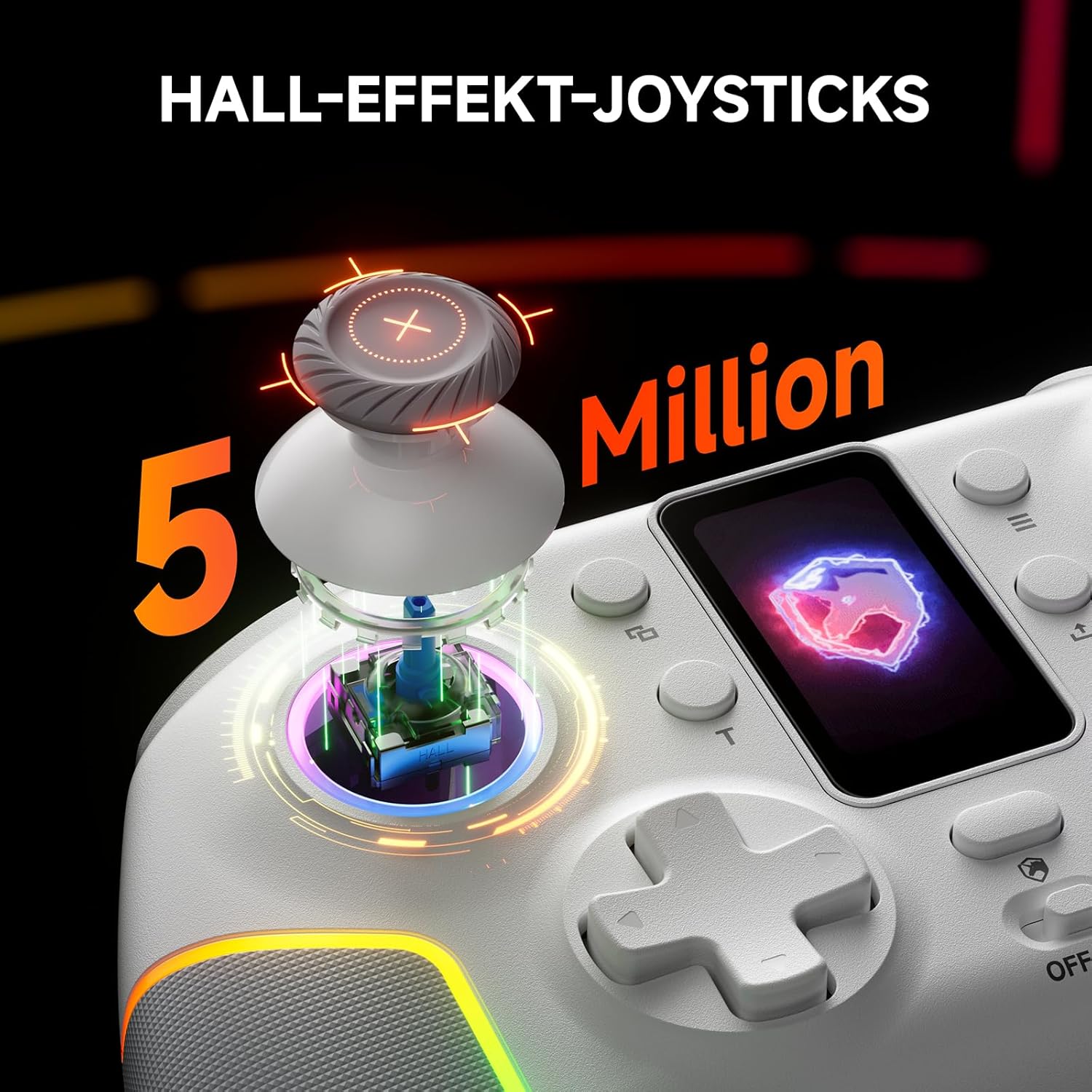
Immaġni: Sploda view of the controller's Hall Effect joystick, highlighting its internal components and precision.

Immaġni: Dettaljata view of the controller's dual Hall Effect triggers, showing the 2mm and 6mm travel options for different gaming scenarios.
Funzjoni Turbo
The controller supports three adjustable turbo levels for rapid button presses. Activate and adjust the turbo speed via the intelligent screen or dedicated buttons.
Buttuni ta' wara li jistgħu jiġu mmappjati
Two mappable back buttons provide additional customization options for competitive gameplay. These can be assigned to various functions or macros.

Immaġni: Taħt view of the ECHTPower PC Controller, highlighting the location of the two mappable back buttons.
Manutenzjoni
- Żomm il-kontrollur nadif billi timsaħ b'ċarruta ratba u niexfa.
- Evita li tesponi l-kontrollur għal temperaturi estremi, umdità, jew dawl tax-xemx dirett.
- Do not disassemble the controller, as this may void the warranty.
- Aħżen il-kontrollur f'post sigur meta ma jkunx qed jintuża biex tevita l-ħsara.
Issolvi l-problemi
| Problema | Kawża Possibbli | Soluzzjoni |
|---|---|---|
| Il-kontrollur ma jixgħelx. | Batterija baxxa. | Charge the controller fully using the USB-C cable. |
| Il-kontrollur mhux qed jikkonnettja mingħajr fili. | Incorrect mode selected; pairing issue; dongle not properly inserted. | Ensure the mode switch is set correctly. Re-initiate pairing. Re-insert the 2.4G dongle. |
| Drift tal-joystick jew input mhux preċiż. | Software calibration needed (unlikely with Hall Effect, but possible); minor interference. | Check for firmware updates. If issues persist, contact customer support. |
| Il-vibrazzjoni ma taħdimx. | Vibration intensity set to 0%; game does not support vibration. | Adjust vibration intensity via the intelligent screen. Verify game compatibility. |
Speċifikazzjonijiet
- Mudell: EP05WH
- Konnettività: Bluetooth, 2.4G bla fili, USB-C bil-fili
- Kompatibilità: PC, Nintendo Switch, iOS, Android (Not compatible with Xbox, PlayStation)
- Joysticks: Effett Sala
- Triggers: Dual Hall Effect (2mm/6mm adjustable travel)
- Rata tal-votazzjoni: 1000Hz (2.4GHz/Wired)
- Batterija: 1000mAh (Rikarikabbli)
- Buttuni: Conductive Gel Buttons (3 Million Clicks lifespan), Mappable Back Buttons
- Dawl: Dynamic RGB (10 modes)
- Vibrazzjoni: 4-livelli aġġustabbli
- Dimensjonijiet: 6.3 x 4.61 x 2.64 pulzieri
- Piż: 11.7 uqija
Vidjo Uffiċjali tal-Prodott
Vidjo: Wirja uffiċjali tal-vidjo tal-prodottasing the key features and functionalities of the ECHTPower PC Controller, including its intelligent screen, Hall Effect components, and multi-platform compatibility.
Garanzija u Appoġġ
For warranty information and technical support, please refer to the official ECHTPower webis-sit jew ikkuntattja lis-servizz tal-konsumatur tagħhom direttament. Żomm l-irċevuta tax-xiri tiegħek bħala prova tax-xiri.
Manifattur: ECHTPOWER
Kuntatt: Visit the ECHTPower Store on Amazon


