Introduzzjoni
Grazzi tax-xiriasing the Dierya DK68 Wireless Mechanical Gaming Keyboard. This manual provides detailed instructions on how to set up, operate, and maintain your keyboard. Please read this manual thoroughly before use to ensure optimal performance and longevity of your device.

Image: The Dierya DK68 wireless mechanical gaming keyboard, showcasing its compact 60% layout and RGB backlighting.
Karatteristiċi Ewlenin
- Tqassim Kompatt ta' 60%: 68-key design for space efficiency, with all functions accessible via FN key combinations. Ideal for portability and maximizing desk space.
- Tri-Mode Seamless Connectivity: Supports USB-C wired, Bluetooth, and 2.4GHz wireless receiver connections. Easily switch between up to 3 devices (PC, Mac, smartphone/tablet).
- Customizable 16.8 Million Color RGB Backlight: Features 21 dynamic lighting effects. Adjust effects and colors using FN key combinations.
- Long-Lasting Battery & Standby: Equipped with a 3000mAh battery, providing approximately 8 hours of continuous use with backlight on, or up to 90 hours with backlight off. Standby time up to 360 hours (approx. 15 days).
- Swiċċijiet Mekkaniċi Durabbli: Utilizes Dierya's proprietary mechanical switches with a 60 million keystroke lifespan. Red switches (linear, silent) are suitable for gaming and office work.
- Rollover tal-N-Key (NKRO): Ensures all key presses are registered accurately, even during simultaneous inputs, for competitive gaming.
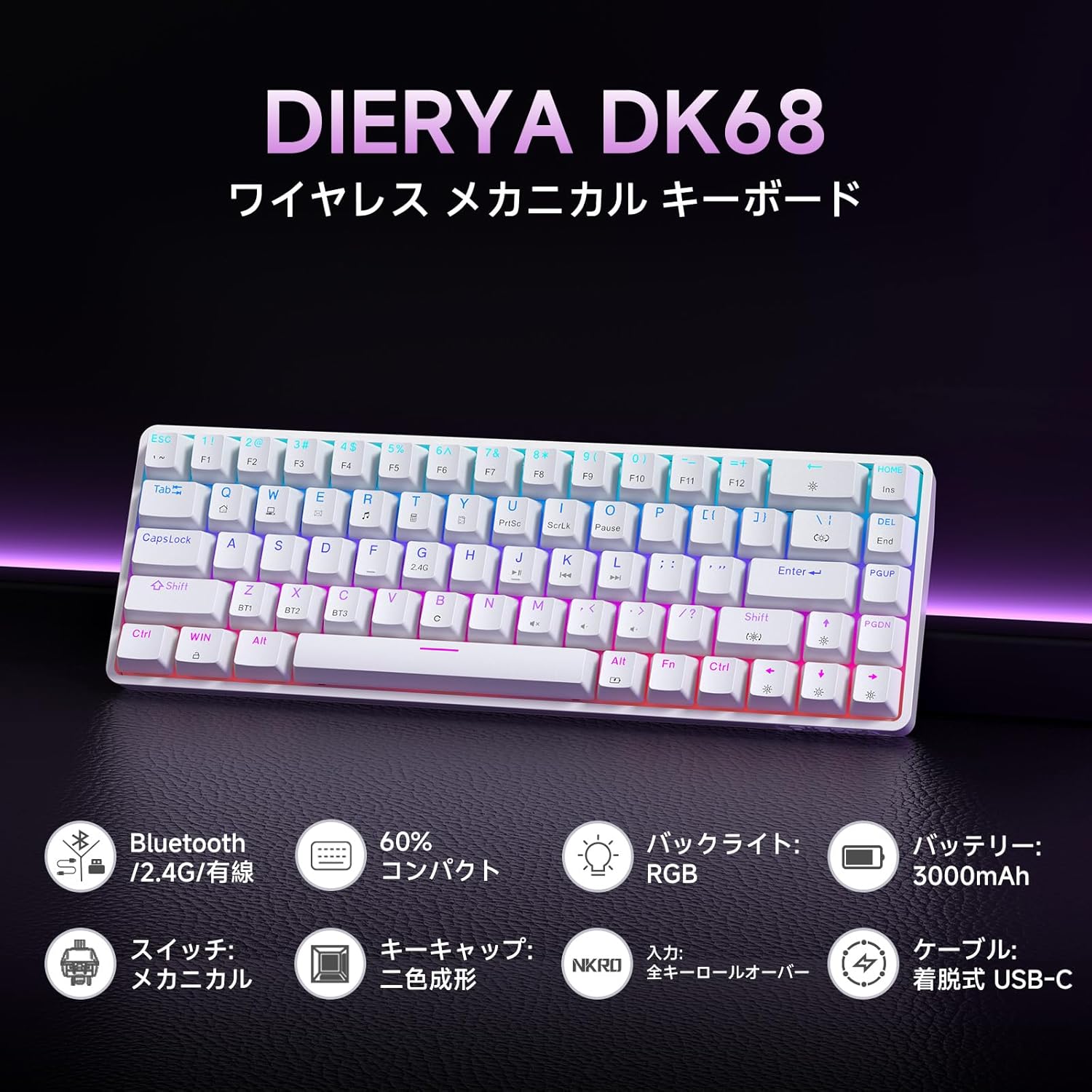
Immaġni: Aktar minnview of the Dierya DK68 keyboard's main features, including Bluetooth/2.4G/Wired connectivity, 60% compact design, RGB backlight, 3000mAh battery, mechanical switches, double-shot keycaps, N-Key Rollover, and a detachable USB-C cable.
Setup
1. Iċċarġjar tat-Tastiera
Before first use, fully charge the keyboard using the provided USB-C cable. Connect the cable to the keyboard's USB-C port and to a power source (e.g., computer USB port, USB wall adapter).
- Id-dawl indikatur tal-iċċarġjar se juri l-istatus tal-iċċarġjar.
- Ċarġ sħiħ tipikament jieħu ftit sigħat.
2. Tqabbad it-Tastiera
The DK68 supports three connection modes: USB-C wired, 2.4GHz wireless, and Bluetooth.
Konnessjoni bil-Wired USB-C
- Qabbad il-kejbil USB-C provdut mal-port USB-C tat-tastiera.
- Qabbad it-tarf l-ieħor tal-kejbil ma 'port USB disponibbli fuq il-kompjuter tiegħek.
- It-tastiera tiġi rikonoxxuta awtomatikament u tkun lesta għall-użu.
Konnessjoni Wireless 2.4GHz
- Locate the 2.4GHz USB receiver (usually stored in a compartment on the keyboard or packaging).
- Ipplaggja r-riċevitur USB f'port USB disponibbli fuq il-kompjuter tiegħek.
- Turn on the keyboard. The keyboard should automatically connect to the receiver.
- If connection is not established, press FN + R to switch to 2.4GHz mode.
Konnessjoni Bluetooth
The keyboard can store up to three Bluetooth device pairings.
- Ixgħel it-tastiera.
- Agħfas u żomm FN + Z, FN + X, jew FN + C for 3-5 seconds to enter pairing mode for BT1, BT2, or BT3 respectively. The indicator light will flash rapidly.
- On your device (PC, Mac, smartphone, tablet), enable Bluetooth and search for new devices.
- Select "Dierya DK68" from the list of available devices.
- Ladarba jkun imqabbad, id-dawl indikatur se jieqaf jteptep u jibqa 'solidu.
- To switch between paired Bluetooth devices, press FN + Z, FN + X, jew FN + C fil-qosor.

Image: Diagram illustrating the three connection modes: USB-C wired, Bluetooth, and 2.4GHz wireless, along with compatibility icons for Windows, Mac, iOS, Android, Xbox, PC, Laptop, and Tablet.
Istruzzjonijiet Operattivi
1. Kombinazzjonijiet taċ-Ċwievet FN
Due to the compact 60% layout, many functions are accessed using the FN ċavetta flimkien ma' ċwievet oħra.
| Kombinazzjoni | Funzjoni |
|---|---|
| FN + 1-0 (top row) | F1-F10 |
| FN + - = | F11, F12 |
| FN + Backspace | Ixgħel/Itfi d-Dawl ta' Wara |
| FN + Shift | Bidla Backlight Kulur |
| FN + | | Ibdel il-Modalità Backlight |
| FN + Vleġġa 'l fuq | Żid il-luminożità tad-dawl ta 'wara |
| FN + Vleġġa 'l isfel | Naqqas il-luminożità tad-dawl ta' wara |
| FN + Left Arrow | Naqqas il-Veloċità tal-Backlight |
| FN + Right Arrow | Żid il-Veloċità tal-Backlight |
| FN + Z/X/C | Switch Bluetooth Device (BT1/BT2/BT3) |
| FN + R | Switch to 2.4GHz Wireless Mode |
| FN + T | Switch to USB-C Wired Mode |
| FN + WIN | Lock/Nisfruttaw Windows Key |

Image: A visual guide to customizing the RGB backlight on the Dierya DK68 keyboard using FN key combinations for turning the light on/off, changing colors, modes, brightness, and speed.
2. Personalizzazzjoni tad-Dawl ta' Wara RGB
The keyboard features over 20 dynamic RGB lighting effects. Use the FN key combinations listed above to personalize your lighting experience.
- Agħfas FN + Backspace to toggle the backlight on or off.
- Agħfas FN + Shift to cycle through different backlight colors.
- Agħfas FN + | to switch between various lighting effects.
- Użu FN + Vleġġa 'l fuq/'l isfel to adjust brightness and FN + Vleġġa tax-Xellug/Lemin to adjust effect speed.
3. Modalità Iffrankar tal-Enerġija
To conserve battery life, the keyboard will automatically enter sleep mode after approximately 3 minutes of inactivity. Press any key to wake it up.
Manutenzjoni
- Tindif: Use a soft, dry cloth to wipe the keyboard surface. For deeper cleaning, you may use a can of compressed air to remove dust and debris from between the keycaps. Avoid using harsh chemicals or abrasive materials.
- Ħażna: Aħżen it-tastiera f'post frisk u niexef 'il bogħod mix-xemx diretta u minn temperaturi estremi.
- Kura tal-batterija: To prolong battery life, avoid fully discharging the battery frequently. Charge the keyboard regularly, especially if it will be stored for an extended period.
- Tneħħija tal-Għatu taċ-Ċwievet: If you need to remove keycaps for cleaning or switch replacement, use a keycap puller to avoid damage. Pull straight up with gentle force.
Issolvi l-problemi
- It-tastiera ma tirrispondix:
- Kun żgur li t-tastiera tkun mixgħula.
- Iċċekkja l-livell tal-batterija u ċċarġjaha jekk meħtieġ.
- Verify the correct connection mode (USB-C, 2.4GHz, or Bluetooth) is selected.
- For 2.4GHz, ensure the receiver is properly plugged in.
- For Bluetooth, re-pair the device if connection is lost.
- Ipprova tikkonnettja permezz ta' kejbil USB-C biex teskludi problemi mingħajr fili.
- Ċwievet mhux qed jirreġistraw jew qed jittajpjaw darbtejn:
- Clean under the keycaps to remove any debris.
- Ensure the switches are properly seated.
- RGB backlight not working:
- Ensure the backlight is turned on (FN + Backspace).
- Check battery level; low battery might disable backlighting.
- Bluetooth connection unstable:
- Ensure the keyboard is within range of the device.
- Imminimizza l-interferenza minn apparati oħra mingħajr fili.
- Ipprova erġa' qabbad it-tastiera mat-tagħmir tiegħek.
Speċifikazzjonijiet
| Karatteristika | Dettall |
|---|---|
| Brand | DIERYA |
| Numru tal-Mudell | DK68 |
| Tqassim | 60% (68 Ċwievet) |
| Konnettività | 2.4GHz Wireless, Bluetooth, USB-C Wired |
| Tip ta' Swiċċ | Mechanical Red Switches (Linear, Silent) |
| Forza ta' Attwazzjoni | 45gf (±15gf) |
| Vjaġġar tal-Attwazzjoni | 2.0mm (±0.6mm) |
| Tul tal-Ħajja tat-Tastiera | Appross. 60 miljun |
| Dawl ta' wara | RGB (16.8 million colors, 21+ effects) |
| Kapaċità tal-batterija | Batterija tal-litju 3000mAh |
| Battery Life (Backlight ON) | Appross. 8 sigħat |
| Battery Life (Backlight OFF) | Appross. 90 sigħat |
| Ħin ta' Standby | Appross. 360 siegħa (15 ijiem) |
| Kompatibilità | Windows, Mac, iOS, Android, Xbox, PC, Laptop, Tablet |
| Dimensjonijiet (L x W x H) | 372 x 115 x 51 mm |
| Piż | 830 g |
| Tappijiet ewlenin | Double-shot (OFS height) |
| Kontra l-Ghosting | Full N-Key Rollover (NKRO) |

Image: A diagram showing the compact 60% layout of the Dierya DK68 keyboard with its dimensions: 372mm length, 115mm width, and 51mm height, highlighting its 68-key configuration.

Immaġni: Close-up view of the Dierya DK68's mechanical red switches, detailing their linear and silent operation, 45gf actuation force, 2.0mm travel, and pre-lubricated design for smooth keystrokes.

Image: An exploded diagram of the Dierya DK68 keyboard, showing its internal layers including ABS keycaps, mechanical switches, positioning plate, EVA mat, PCB, high-density sound-absorbing foam, and bottom case, highlighting its robust construction.
Garanzija u Appoġġ
DIERYA products are designed for durability and performance. For warranty information or technical support, please refer to the official DIERYA webis-sit jew ikkuntattja lis-servizz tal-konsumatur tagħhom direttament. Żomm l-irċevuta tax-xiri tiegħek bħala prova tax-xiri għal talbiet ta' garanzija.


