1. Introduzzjoni
Thank you for choosing the Pamray S15 58-Inch Computer Desk. This desk is designed to provide a functional and organized workspace for various uses, including gaming, studying, and office tasks. It features integrated LED lighting, convenient power outlets, a monitor stand, and ample storage solutions. Please read this manual thoroughly before assembly and use to ensure proper setup and safe operation.
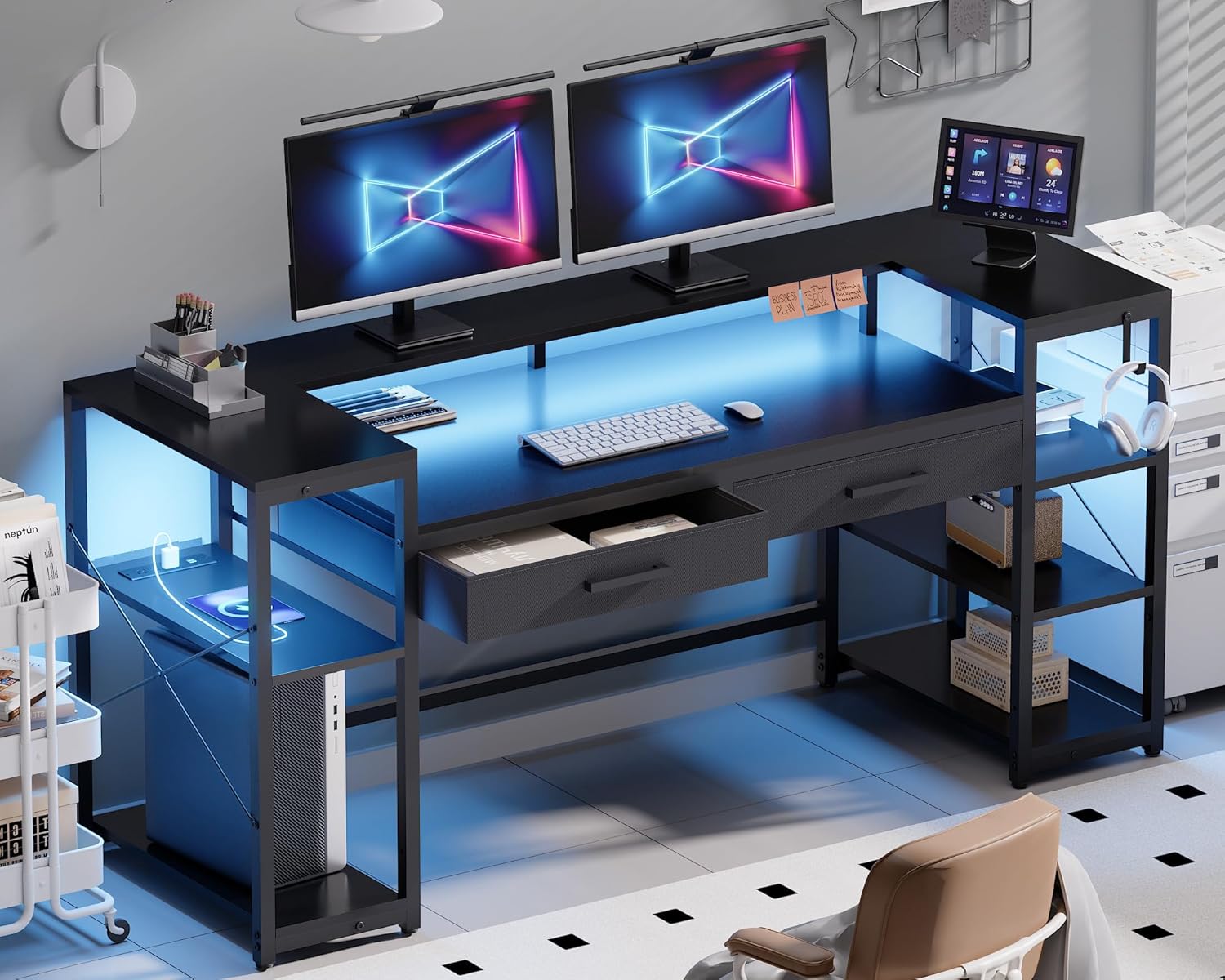
Image 1.1: The Pamray S15 58-Inch Computer Desk in a modern setup, showcasing its LED lighting, monitor stand, and storage.
2. Informazzjoni dwar is-Sigurtà
- Dejjem arma l-iskrivanija fuq wiċċ artab u nadif biex tevita l-grif.
- Kun żgur li l-viti u l-qafliet kollha jkunu ssikkati sew qabel l-użu. Iċċekkja perjodikament u erġa' ssikka kif meħtieġ.
- Do not exceed the maximum weight capacity of 200 pounds for the tabletop and 10 pounds for each drawer.
- Żomm il-partijiet żgħar u l-materjali tal-ippakkjar 'il bogħod mit-tfal u l-annimali domestiċi.
- Evita li tpoġġi oġġetti sħan direttament fuq il-wiċċ tal-iskrivanija mingħajr protezzjoni.
- Toqgħodx bilwieqfa jew bilqiegħda fuq l-iskrivanija.
- Ensure the power cord for the outlets and LED lights is not pinched or damaged.
3. Kontenut tal-Pakkett
Qabel tibda l-assemblaġġ, ivverifika li l-komponenti kollha elenkati hawn taħt huma preżenti u mhux imħassra. Jekk xi partijiet huma nieqsa jew imħassra, jekk jogħġbok ikkuntattja l-appoġġ għall-klijenti.
- Desk Panels (Tabletop, Monitor Stand, Shelf Boards)
- Metal Frame Components (Legs, Support Bars, 'X'-shaped Braces)
- 2 Non-Woven Fabric Drawers
- Strixxa tad-Dawl LED bil-Kontrollur
- Built-in Power Outlet Unit (3 AC outlets, 2 USB ports)
- Pads tar-riġlejn aġġustabbli
- Assembly Hardware (Screws, Allen Key, etc.)
- Manwal ta' Istruzzjoni
4. Istruzzjonijiet tal-Immuntar (Setup)
Clear installation instructions and all necessary tools are included in the accessory box. For visual guidance, comprehensive installation videos are accessible by scanning the Transparency QR code on the packaging.
4.1. Passi tal-Assemblea Ġenerali
- Iftaħ u Identifika l-Partijiet: Carefully remove all components from the packaging. Lay them out and compare them against the parts list in the included manual.
- Arma l-qafas tal-metall: Begin by connecting the main metal frame components using the provided screws and Allen key. Ensure all connections are snug but do not overtighten until the frame is fully assembled.
- Waħħal il-Panels tal-Iskrivanija: Secure the tabletop, monitor stand, and shelf boards to the assembled metal frame. Pay attention to the orientation of each panel.
- Installa l-Kxaxen: Insert the two non-woven fabric drawers into their designated slots.
- Installa l-Istrixxa tad-Dawl LED: Adhere the LED light strip to the underside of the monitor stand or desired location. Connect it to the controller.
- Integrate Power Outlet Unit: Place the power outlet unit into its designated cutout on the desk surface.
- Attach Adjustable Leg Pads: Screw the adjustable leg pads into the bottom of the desk legs.
- Issikkar finali: Once all components are in place, go back and securely tighten all screws.

Image 4.1: An illustration detailing the assembly process for the desk frame and panel components.
4.2. Reversible Shelves
The side shelves are designed to be reversible, allowing you to configure them on either the left or right side of the desk to suit your space and preferences. Refer to the detailed assembly instructions for specific steps on how to achieve your desired configuration.

Image 4.2: The desk featuring open storage shelves and a dedicated PC space, illustrating the reversible shelf design.
5. Istruzzjonijiet Operattivi
5.1. Tħaddim tad-Dwal LED
The integrated LED light strip can be controlled via a remote control or a dedicated smartphone application. The lights offer 213 dynamic modes and over 10,000 color options. You can adjust brightness, color, and mode to create your desired ambiance.
- Power On/Off: Use the remote or app to turn the LED lights on or off.
- Għażla tal-Kulur: Choose from a wide spectrum of colors to match your mood or decor.
- Għażla tal-Modalità: Select from various dynamic lighting effects.
- Aġġustament tal-luminożità: Żid jew naqqas l-intensità tad-dawl.
- Sinkronizzazzjoni tal-Mużika: The LED lights can synchronize with music, reacting to audio input.

Image 5.1: The RGB LED light strip in operation, demonstrating its various color options and app control capabilities.
5.2. Power Outlets and USB Ports
The desk is equipped with a built-in power outlet unit for convenient charging and powering of your devices.
- Ħwienet AC: Features 3 standard AC outlets (125V/12A) for laptops, monitors, and other electronics.
- Portijiet USB: Includes 2 USB ports (5V/2A) for charging smartphones, tablets, and other USB-powered devices.
- Korda tal-Enerġija: The unit comes with a 4.92ft power cord.
- Qawwa Rated: The total rated power for the unit is 1500W.
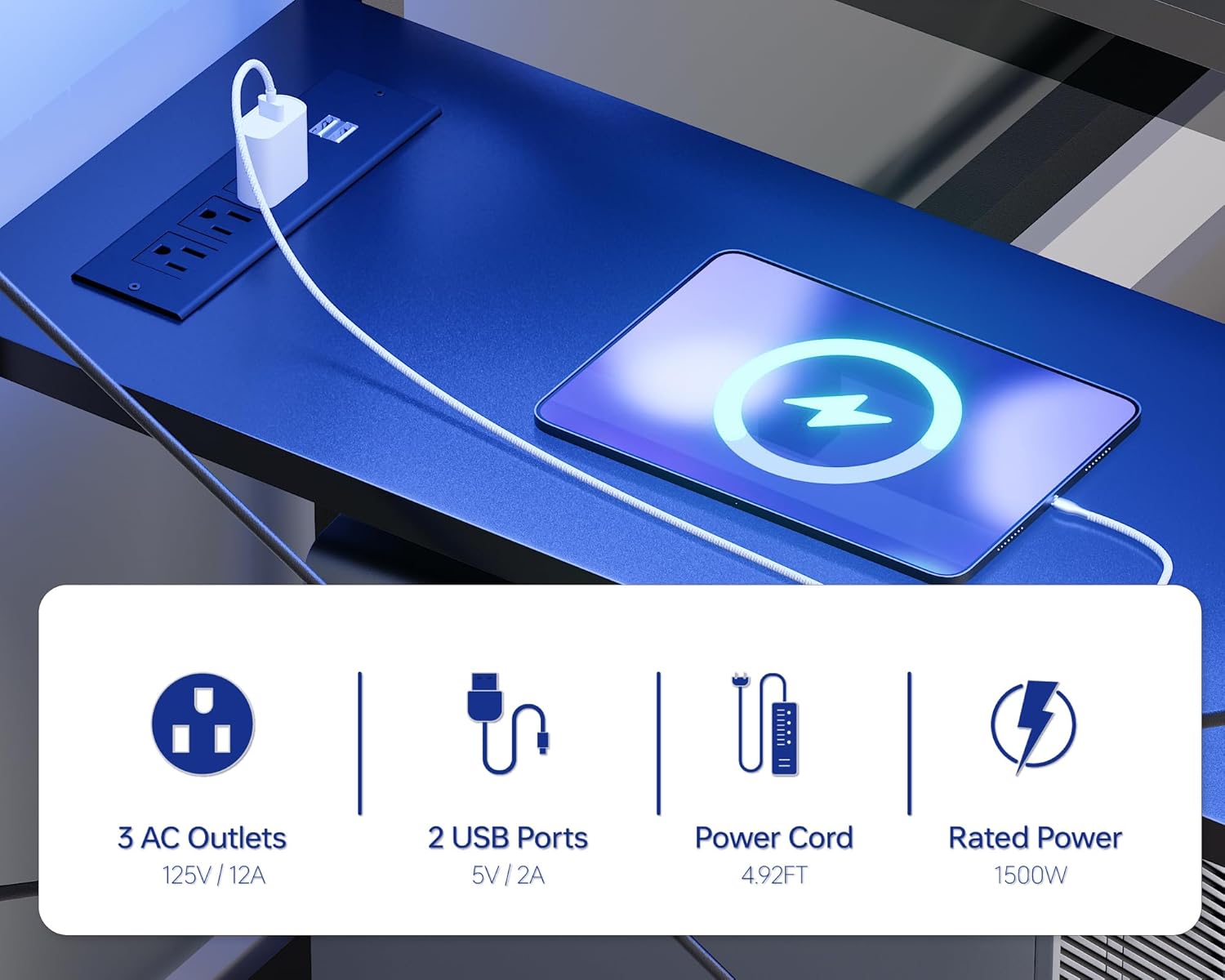
Immaġni 5.2: Stampa dettaljata view of the integrated power outlet unit, showing the AC outlets and USB charging ports.
5.3. Storage and Monitor Stand
- Monitor Stand: The sturdy U-shaped monitor stand can accommodate two monitors or laptops, elevating them to an ergonomic viewing height and freeing up desktop space.
- Kxaxen: Two non-woven fabric drawers provide concealed storage for office supplies, gaming accessories, or personal items.
- Xkafef Miftuħa: Two open side shelves offer additional storage and display space for books, decor, or a PC tower.

Image 5.3: The desk featuring its U-shaped monitor stand, designed to optimize screen height and desktop space.

Image 5.4: A close-up of one of the desk's non-woven fabric drawers, illustrating its capacity for storing various items.
6. Manutenzjoni
- Tindif: Imsaħ il-wiċċ tal-iskrivanija b'artab, damp drapp. Evita kimiċi ħarxa jew prodotti tat-tindif li joborxu li jistgħu jagħmlu ħsara lill-finitura.
- Tixrid: Immediately wipe up any spills to prevent water damage to the tabletop. The tabletop is designed to be water-resistant.
- Ħardwer: Iċċekkja u ssikka l-viti u l-qafliet kollha perjodikament biex iżżomm l-istabbiltà.
- Dwal LED: Ensure the LED strip and controller are kept dry and free from dust.
- Ħwienet tal-enerġija: Keep the power outlets clean and free from debris. Do not insert foreign objects into the outlets.
Image 6.1: Water droplets on the desk surface, illustrating its water-resistant properties.
7 Issolvi l-problemi
- Desk is Unstable/Wobbly:
a. Ensure all assembly screws are fully tightened.
b. Adjust the leg pads on the bottom of the desk legs to level the desk on uneven floors. - Dwal LED ma Jaħdmux:
a. Check if the power cord for the LED strip is securely plugged into a working outlet.
b. Ensure the LED controller is properly connected to the light strip.
c. Replace the remote control battery if applicable. - Sokits tal-Enerġija Mhux Jaħdmu:
a. Verify that the desk's main power cord is securely plugged into a working wall outlet.
b. Check if the power switch on the outlet unit (if present) is in the 'On' position.
c. Ensure the total power draw of connected devices does not exceed the 1500W rated power. - Il-kxaxen ma jiżżerżqux bla xkiel:
a. Ensure the drawer fabric is not caught or misaligned.
b. Check for any obstructions within the drawer slots.
Immaġni 7.1: Close-up view of the adjustable leg pads, which help stabilize the desk on uneven surfaces.
8. Speċifikazzjonijiet
| Karatteristika | Dettall |
|---|---|
| Brand | Pamray |
| Numru tal-Mudell | S15 |
| Dimensjonijiet tal-Prodott (P x W x H) | 18.9" x 58.27" x 36.38" (48ċm x 148ċm x 92.4ċm) |
| Kulur | Iswed |
| Materjal tal-mejda | Injam Ċertifikat mill-FSC |
| Materjal Bażi | Metall (Miksi bit-Trab) |
| Maximum Tabletop Weight Capacity | 200 lbs |
| Drawer Weight Capacity (Each) | 10 lbs |
| Ħwienet tal-Enerġija | 3 AC (125V/12A), 2 USBs (5V/2A) |
| Tul tal-Kunda tal-Enerġija | 4.92 pied |
| Qawwa Rated | 1500W |
| Dwal LED | RGB, 213 modes, 10,000+ colors, App/Remote Control, Music Sync |
| Karatteristiċi Speċjali | Monitor Stand, 2 Drawers, 2 Open Shelves, Reversible Shelves, Adjustable Leg Pads, 'X'-shaped Braces |
| Assemblea Meħtieġa | Iva (Għodda Inklużi) |

Image 8.1: A diagram illustrating the detailed dimensions of the Pamray S15 Computer Desk.
9. Garanzija u Appoġġ
For warranty information, product support, or to report missing/damaged parts, please refer to the contact information provided in your product packaging or visit the official Pamray websit. Żomm l-irċevuta tax-xiri tiegħek għal pretensjonijiet ta' garanzija.


