Introduzzjoni
This manual provides essential information for setting up, operating, maintaining, and troubleshooting your NIMO 15.6" FHD IPS Student-Laptop-Computer. Please read this guide thoroughly to ensure optimal performance and longevity of your device.

The NIMO 15.6" FHD IPS Student-Laptop-Computer, featuring a vibrant display and sleek design.
X'inhu Inkluż
Iċċekkja li l-oġġetti kollha huma preżenti fl-imballaġġ:
- 1 x Laptop Nimo N157
- 1 x Ċarġer Veloċi tat-Tip Ċ 65W GaN PD
- 1 x Manwal għall-Utent
- Windows 11 Home (Installat minn qabel)
- 2 Years Warranty, 90 Days Return Information
Karatteristiċi Ewlenin
Your NIMO laptop is equipped with advanced features designed for productivity and convenience:
Vibrant FHD IPS Display
Experience stunning visuals on the 15.6" FHD IPS (1920x1080) Anti-Glare Display. With an 85% screen-to-body ratio and 16:9 aspect ratio, enjoy precise color accuracy and sharp detail for all your tasks.

The 15.6-inch FHD IPS display provides a bright and clear visual experience.
Prestazzjoni qawwija
Equipped with a 13th Gen Intel N150 processor (up to 3.6GHz), 16GB DDR4 RAM, and a 512GB PCIe SSD, this laptop delivers lightning-fast performance, rapid startup times, and accelerated data transfer for seamless multitasking and storage.
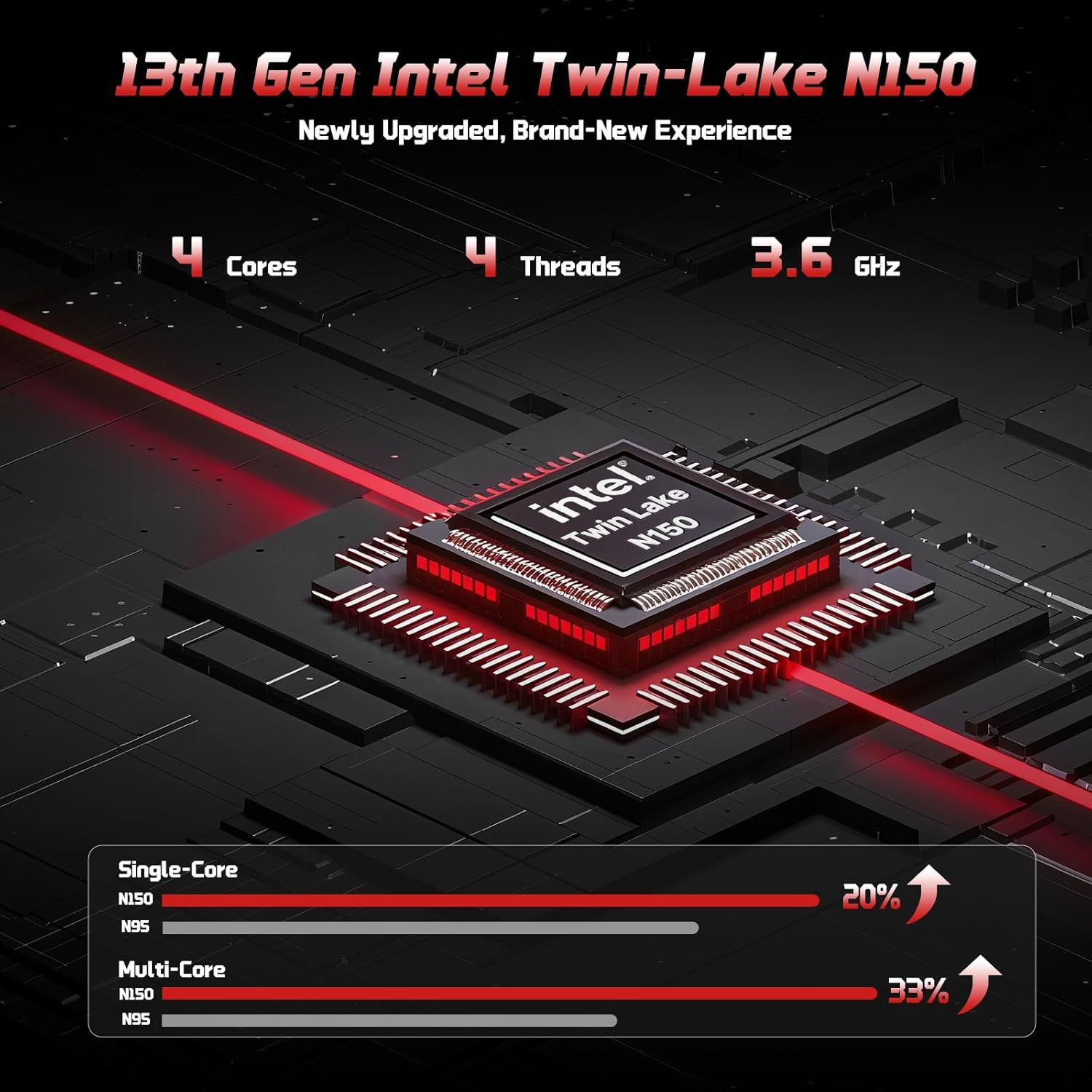
The 13th Gen Intel Twin-Lake N150 processor ensures efficient performance.

The laptop supports user-upgradable RAM and SSD for future expansion.
Fast Charging with GaN PD Charger
The included 65W GaN PD fast charger and 6.56ft USB-C to USB-C cable allow for quick power-ups. Charge for 15 minutes to get 2 hours of standby time. This versatile charger can also power your iPad, phone, and other compatible devices.

The 65W GaN PD charger provides fast and convenient charging for multiple devices.
Humanized Design & Security
Features a built-in fingerprint reader on the touchpad for secure, one-touch login. The backlit keyboard allows for easy typing in dim or dark environments, with adjustable brightness. The touchpad supports scroll and multi-touch gestures.

Secure fingerprint login and a comfortable backlit keyboard enhance usability.
Konnettività Komprensiva
The laptop includes a variety of ports for all your peripheral needs, including USB 3.0, USB 2.0, HDMI, and multiple Type-C ports (one for PD Charge Only, one for Multifunction). It also features Wi-Fi 6 and Bluetooth 5.2 for robust wireless connections.

Dettaljati view tal-laptop ample ports for various connections.
Privatezza Webcam
A 720p HD camera with a physical privacy switch ensures your personal space is always secure. Easily slide the switch to cover the camera when not in use.

The physical privacy switch on the webcam provides enhanced security.
Gwida ta' Setup
1. L-Ewwel Tixgħil
- Unpack your NIMO laptop and all accessories.
- Connect the Type-C 65W GaN PD Fast Charger to the laptop's Type-C PD Charge Only port and plug it into a power outlet.
- Iftaħ l-għatu tal-laptop. Il-laptop jista’ jixgħel awtomatikament, jew jista’ jkollok bżonn tagħfas il-buttuna tal-qawwa (li tinsab fin-naħa ta’ fuq tal-lemin tat-tastiera).
- Segwi l-istruzzjonijiet fuq l-iskrin biex tlesti s-setup tal-Windows 11 Home, inkluż il-lingwa, ir-reġjun, il-konnessjoni tan-netwerk, u l-ħolqien tal-kont tal-utent.
2. Konnessjoni Periferali
Uża l-portijiet disponibbli biex tikkonnettja apparati esterni:
- Apparat USB: Connect USB drives, external keyboards, or mice to the USB 3.0 or USB 2.0 ports.
- Display Estern: Use an HDMI cable to connect to an external monitor or projector via the HDMI port.
- Apparat Awdjo: Plug in headphones or external speakers into the 3.5mm headphone jack.
- Karta MicroSD: Insert a MicroSD card into the dedicated slot for expanded storage.
Istruzzjonijiet Operattivi
Uża t-Tastiera u l-Touchpad
- Tastiera backlit: Agħfas Fn + F10 (or the key with the keyboard backlight icon) to cycle through backlight brightness levels or turn it off.
- Tastiera numerika: The integrated numeric keypad provides convenient data entry.
- Touchpad: Supports standard Windows gestures, including two-finger scroll, pinch-to-zoom, and multi-finger taps for various functions.
Login tal-marki tas-swaba'
To set up fingerprint login for enhanced security:
- Mur fis-Settings tal-Windows > Kontijiet > Għażliet tad-dħul.
- Select "Fingerprint Recognition (Windows Hello)" and follow the on-screen prompts to register your fingerprint.
- Once registered, you can simply touch the fingerprint sensor on the touchpad to log in.
Display Settings
Aġġusta s-settings tal-wiri għall-aħjar viewing:
- Riżoluzzjoni: Right-click on the desktop, select "Display settings", and choose "1920 x 1080" for the best resolution.
- Luminożità: Aġġusta l-luminożità tal-iskrin billi tuża ċ-ċwievet tal-funzjoni (Fn + F5/F6) or through Display settings.
Awdjo u Vidjo
- Kontroll tal-Volum: Use the function keys (Fn + F2/F3/F4) or the Windows volume mixer to adjust audio levels.
- WebPrivatezza tal-kamera: Slide the physical switch next to the webkamera biex tgħatti jew tikxef il-lenti tal-kamera għall-privatezza.
Manutenzjoni
Tindif tal-Laptop Tiegħek
- Uża drapp ratba u mingħajr ħelu ftit dampNaddaf bl-ilma jew b'tindif tal-iskrin biex timsaħ id-displej.
- Għat-tastiera u x-chassis, uża drapp artab u niexef. Evita kimiċi ħarxa jew materjali li joborxu.
- Periodically use compressed air to clear dust from the vents to ensure proper heat dissipation.
Kura tal-batterija
To maximize your laptop's battery life and health:
- Evita li tiċċarġja l-batterija kompletament ta' spiss.
- Aħżen il-laptop f'post frisk u niexef meta ma jkunx qed jintuża għal perjodi twal.
- Use the provided NIMO 65W GaN PD Fast Charger for optimal charging performance.

The laptop features smart battery optimization for extended lifespan and safe charging.
RAM and SSD Upgrades
Your NIMO laptop supports detachable RAM and SSD, allowing for user upgrades. Consult a qualified technician or refer to detailed upgrade guides on the NIMO support website before attempting any internal component changes.
Issolvi Problemi Kwistjonijiet Komuni
If you encounter problems with your laptop, try the following solutions:
- Ebda Qawwa: Ensure the charger is securely connected to both the laptop and a working power outlet. Try a different outlet. If the battery is completely drained, allow it to charge for at least 30 minutes before attempting to power on.
- Kwistjonijiet tal-Wiri: Jekk l-iskrin ikun vojt, ipprova agħfas Fn + F7 (or the display toggle key) to switch display outputs. Check external monitor connections if applicable.
- Prestazzjoni bil-mod: Close unnecessary applications. Check for Windows updates. Ensure sufficient free space on the SSD. Restarting the laptop can often resolve temporary slowdowns.
- Konnettività Wi-Fi/Bluetooth: Ensure Wi-Fi and Bluetooth are enabled in Windows settings. Restart your router/modem. Update network drivers if necessary.
- It-Tastiera/Touchpad Ma Jirrispondix: Erġa' ibda l-laptop. Iċċekkja għal aġġornamenti tas-sewwieqa fil-Maniġer tal-Apparat.
If problems persist, please contact NIMO customer support for further assistance.
Speċifikazzjonijiet Tekniċi
| Karatteristika | Speċifikazzjoni |
|---|---|
| Brand | NIMO |
| Isem tal-Mudell | Nimo N157 |
| Daqs tal-Iskrin | 15.6 Pulzier |
| Riżoluzzjoni tal-Iskrin | 1920 x 1080 pixel (FHD IPS) |
| Proċessur | 13th Gen Intel N150 (up to 3.6 GHz) |
| RAM | 16 GB DDR4 (3200 MHz) |
| Hard Drive | 512 GB PCIe SSD |
| Koproċessur tal-Grafika | Grafika Integrata (Intel) |
| Sistema Operattiva | Windows 11 Home |
| Tip bla fili | 802.11a/b/g/n/ac (Wi-Fi 6), Bluetooth 5.2 |
| Portijiet USB | 3 x USB 3.0, 1 x USB 2.0, 2 x Type-C (1 PD Charge Only, 1 Multifunction) |
| Port HDMI | Iva |
| Ħajja Medja tal-Batterija | 5 Sigħat |
| Piż tal-oġġett | 3.8 liri |
| Dimensjonijiet tal-Prodott | 14.07 x 8.98 x 0.76 pulzieri |
| Karatteristiċi Speċjali | Backlit Keyboard, Fingerprint Reader, HD Audio, Numeric Keypad, Privacy Webcam |
Garanzija u Appoġġ
NIMO is committed to providing excellent customer service and support for your product.
Garanzija tal-Manifattur
Your NIMO laptop is covered by a comprehensive Garanzija ta' 2 snin mill-manifattur. This warranty ensures that your device is free from defects in materials and workmanship under normal use.

NIMO products are covered by a 2-year support period.
90-Day Hassle-Free Returns
NIMO joffri 90-day hassle-free return and exchange service. If you have any concerns or are not satisfied with your product within 90 days of purchase, you may return it for any reason.

Tista' tirritorna kwalunkwe prodott NIMO għal kwalunkwe raġuni fi żmien 90 jum mix-xiri.
Ikkuntattja l-Appoġġ
Our dedicated support team is ready to assist you. If any concerns arise or you have product-related questions, you can contact us through our official website, email, or telephone. We strive to swiftly resolve issues or facilitate replacements.

Ikkuntattja lit-tim professjonali tagħna ta' wara l-bejgħ permezz tat-telefon u chat diretta.
NIMO Direct Inc. is a family-owned small business founded in New Castle DE. We are committed to providing affordable, high-quality, and innovative products, while also supporting US manufacturing and local employment.


