Introduzzjoni
The Razer BlackShark V3 X HyperSpeed is a wireless esports gaming headset designed for high-performance audio and clear communication across multiple platforms. This manual provides essential information for setting up, operating, maintaining, and troubleshooting your headset.
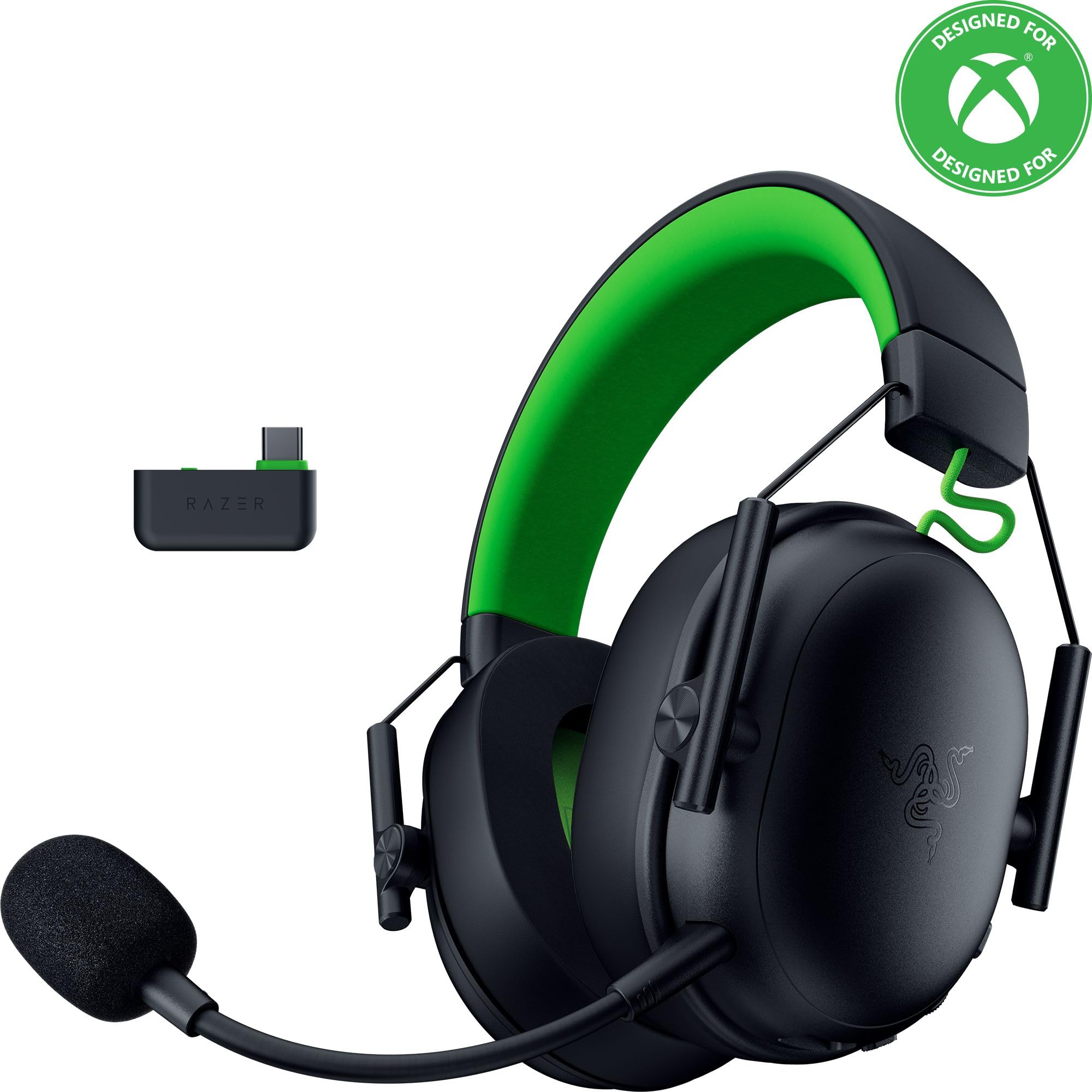
Image: The Razer BlackShark V3 X HyperSpeed Wireless Gaming Headset, showcasing id-disinn tiegħu u l-mikrofonu li jista' jinqala'.
X'hemm fil-Kaxxa
Kun żgur li l-komponenti kollha li ġejjin huma preżenti fil-pakkett tiegħek:
- Razer BlackShark V3 X HyperSpeed Wireless Gaming Headset
- USB Type C Razer HyperSpeed Wireless Dongle
- Detachable Razer HyperClear Cardioid 9.9mm Mic
- USB Type A to Type C Cable (for charging and wired connection)
- USB Type A to Type C Adapter Cable
- Manwal għall-Utent (dan id-dokument)

Image: The Razer BlackShark V3 X HyperSpeed headset on a stand next to its retail packaging, illustrating the product and its box.
Setup
1. Iċċarġjar tal-Headset
Before initial use, fully charge your headset using the provided USB Type A to Type C cable. Connect the USB-C end to the headset's charging port and the USB-A end to a powered USB port.
2. It-twaħħil tal-Mikrofonu
Insert the detachable Razer HyperClear Cardioid 9.9mm Mic into the microphone port located on the left earcup. Ensure it is securely connected.

Image: Close-up of the Razer BlackShark V3 X HyperSpeed headset showing the detachable HyperClear Cardioid microphone attached.
3. Għażliet ta' Konnettività
The headset supports three modes of connectivity: 2.4 GHz HyperSpeed Wireless, Bluetooth, and wired USB-C.
- 2.4 GHz HyperSpeed Wireless (PC, Mac, PS5, Nintendo Switch, Xbox Series X|S, Xbox One):
Insert the USB Type C Razer HyperSpeed Wireless Dongle into an available USB-C port on your device. If your device only has USB-A ports, use the provided USB Type A to Type C Adapter Cable. Ensure the switch on the dongle is set to 'USB' for PC/Mac/PS5/Switch or 'XBOX' for Xbox consoles. The headset will automatically connect. - Bluetooth (Smartphones, Tablets, Handheld Gaming Devices):
With the headset powered on, press and hold the power button until the LED indicator blinks blue, indicating pairing mode. On your device, search for and select "Razer BlackShark V3 X HyperSpeed" from the list of available Bluetooth devices. - Wired USB-C:
Connect the headset directly to your device using the USB Type A to Type C Cable. This mode provides audio and microphone functionality without relying on battery power.

Image: The Razer BlackShark V3 X HyperSpeed headset alongside its USB-C wireless dongle, illustrating the wireless connectivity component.

Image: A visual representation of the headset's three connectivity modes: 2.4 GHz Wireless, Bluetooth, and USB, highlighting its versatility.
It-tħaddim tal-Headset
1. Kontrolli Fuqview
Il-headset għandu kontrolli intuwittivi li jinsabu fuq il-earcups:
- Buttuna tal-Qawwa: Press and hold to power on/off. Single press to switch between 2.4 GHz HyperSpeed Wireless and Bluetooth modes.
- Buttuna Mute tal-Mic: Agħfas biex tismut jew tneħħi l-mikrofonu.
- Rota tal-Volum: Adjusts the overall audio volume.
- Mic Monitoring Wheel: Adjusts the volume of your own voice heard through the headset (sidetone).

Immaġni: Ġenb view of the Razer BlackShark V3 X HyperSpeed headset, highlighting the location of the power button, volume wheel, and mic mute button.
2. Audio Quality and Features
- Razer TriForce 50mm Drivers Gen-2: Experience powerful, clear audio with enhanced positional accuracy for competitive gaming.
- Razer HyperClear Cardioid 9.9mm Mic: The detachable microphone features a unidirectional pickup pattern to focus on your voice and minimize background noise.
- Ħoss Surround: Enjoy immersive surround sound with Windows Sonic on Xbox and 7.1 Surround Sound on PC for precise audio cues.

Immaġni: Sploda view of the Razer TriForce 50mm Drivers Gen-2, illustrating their internal components for powerful and clear audio.

Image: The Razer BlackShark V3 X HyperSpeed headset surrounded by sound waves, representing its advanced surround sound capabilities for Xbox and PC.
3. Kumdità u Disinn
Weighing just 270g, the headset is designed for extended gaming sessions with plush memory foam cushions and a fatigue-free design.

Image: The Razer BlackShark V3 X HyperSpeed headset with an icon representing its ultra-lightweight design, emphasizing comfort for long gaming sessions.
4. Vidjo Uffiċjali tal-Prodott
Video: An official product video from Razer showcasing the BlackShark V3 headset line, highlighting its features and design for esports performance.
Manutenzjoni
1. Tindif
- Uża drapp artab u niexef biex tnaddaf l-uċuħ tal-headset.
- Għall-earcups, imsaħ bil-mod b'adamp drapp u sapun ħafif jekk meħtieġ, imbagħad nixxef sew. Evita umdità eċċessiva.
- Tużax kimiċi ħarxa jew materjali li joborxu.
2. Ħażna
- Aħżen il-headset f'post frisk u niexef 'il bogħod mix-xemx diretta u minn temperaturi estremi.
- When not in use, consider placing it on a headset stand to maintain its shape and prevent damage.
Issolvi l-problemi
Ebda Awdjo/Kwalità tal-Awdjo Fqira
- Iċċekkja Volum: Ensure the volume wheel on the headset is turned up.
- Konnettività: Verify the headset is correctly connected via 2.4 GHz dongle, Bluetooth, or USB-C. For 2.4 GHz, ensure the dongle switch is set to the correct platform (USB/XBOX).
- Settings tal-Apparat: Confirm the headset is selected as the default audio output device in your computer's or console's sound settings.
- Erġa 'par: For wireless connections, try re-pairing the headset with your device.
Mikrofonu Mhux Taħdim
- Iċċekkja l-Mute: Kun żgur li l-buttuna tal-mute tal-mikrofonu fuq il-headset mhix attivata.
- Mic Connection: Verify the detachable microphone is securely inserted into the port.
- Settings tal-Apparat: Confirm the headset microphone is selected as the default input device in your computer's or console's sound settings.
- Monitoraġġ tal-Mic: Adjust the mic monitoring wheel to hear your own voice, confirming mic functionality.
Kwistjonijiet ta' Konnettività
- Interferenza: Tbiegħed minn apparati bla fili oħra li jistgħu jikkawżaw interferenza.
- Firxa: Ensure you are within the effective range of the wireless dongle or Bluetooth connection.
- Dongle Switch: Double-check that the switch on the USB-C dongle is set to the correct position (USB for PC/Mac/PS5/Switch, XBOX for Xbox).
Ħajja tal-Batterija Iqsar Milli Mistenni
- Iċċarġjar: Kun żgur li l-headset huwa kompletament iċċarġjat qabel l-użu.
- Użu: High volume levels or continuous use of certain features can reduce battery life.
Speċifikazzjonijiet
| Isem tal-Mudell | BlackShark V3 X HyperSpeed |
| Numru tal-Mudell | RZ04-05420200-R3U1 |
| Teknoloġija tal-Konnettività | Bluetooth, USB, 2.4 GHz Wireless |
| Tip ta' Sewwieq Awdjo | Dynamic Driver (Razer TriForce 50mm Drivers Gen-2) |
| Rispons ta' Frekwenza | 12 Hz - 28 KHz |
| Sensittività | 106 dB |
| Mikrofonu | Detachable Razer HyperClear Cardioid 9.9mm Mic |
| Kontroll tal-Ħoss | Iżolament tal-Ħoss |
| Apparati Kompatibbli | Xbox Series X|S, Xbox One, PS5, PS4, PC, Mac, Nintendo Switch, Smartphones, Tablets |
| Piż tal-oġġett | 270 grams (without mic) |
| Batteriji | 1 batterija tal-jone tal-litju (inkluża) |
| Verżjoni Bluetooth | 5.3 |
Garanzija u Appoġġ
Għal informazzjoni dwar il-garanzija, appoġġ tekniku, jew aktar assistenza, jekk jogħġbok żur is-sit uffiċjali tal-appoġġ ta' Razer. websit. Żomm il-prova tax-xiri tiegħek għal talbiet ta' garanzija.
Appoġġ onlajn: www.razer.com/support


