1. Introduzzjoni
This manual provides detailed instructions for the setup, operation, and maintenance of your Dierya M1 Wireless Gaming Mouse. Please read this manual thoroughly before using the product to ensure proper functionality and to maximize your user experience.

Figure 1: Dierya M1 Wireless Gaming Mouse and 2.4G USB Receiver.
2. Karatteristiċi tal-prodott
- 24,000 DPI Optical Sensor: Adjustable DPI range from 200 to 24,000, with 6 preset levels (400-6400 DPI). Features a 125-1000 Hz polling rate, 300 IPS tracking speed, and 35G acceleration.
- Konnettività Tri-Modalità: Supports ultra-fast 2.4 GHz wireless (1000 Hz polling rate), energy-efficient Bluetooth 5.2 (125 Hz polling rate), and stable USB-C wired connection (1000 Hz polling rate).
- Ħajja Estiża tal-Batterija: Equipped with a 1000 mAh battery, providing up to 180 hours of use in ECO mode or 48 hours with RGB lighting enabled. Fully recharges in approximately 1 hour via USB-C. Includes an automatic power-saving mode after 1-5 minutes of inactivity.
- Lightweight & Ergonomic Design: Weighs 90g with a breathable honeycomb shell. Symmetrical design (125x63x41 mm) suitable for various grip styles.
- Komponenti Durabbli: Features Huano switches rated for 20 million clicks and 100% PTFE feet for smooth gliding.
- Buttuni programmabbli: Six customizable buttons for macros and reassignments.
- Dawl RGB Dinamiku: 13 integrated dynamic RGB lighting effects with 16.8 million customizable colors.
- Kompatibilità tas-Sistema: Compatible with Windows, macOS, Linux, and Chrome OS.
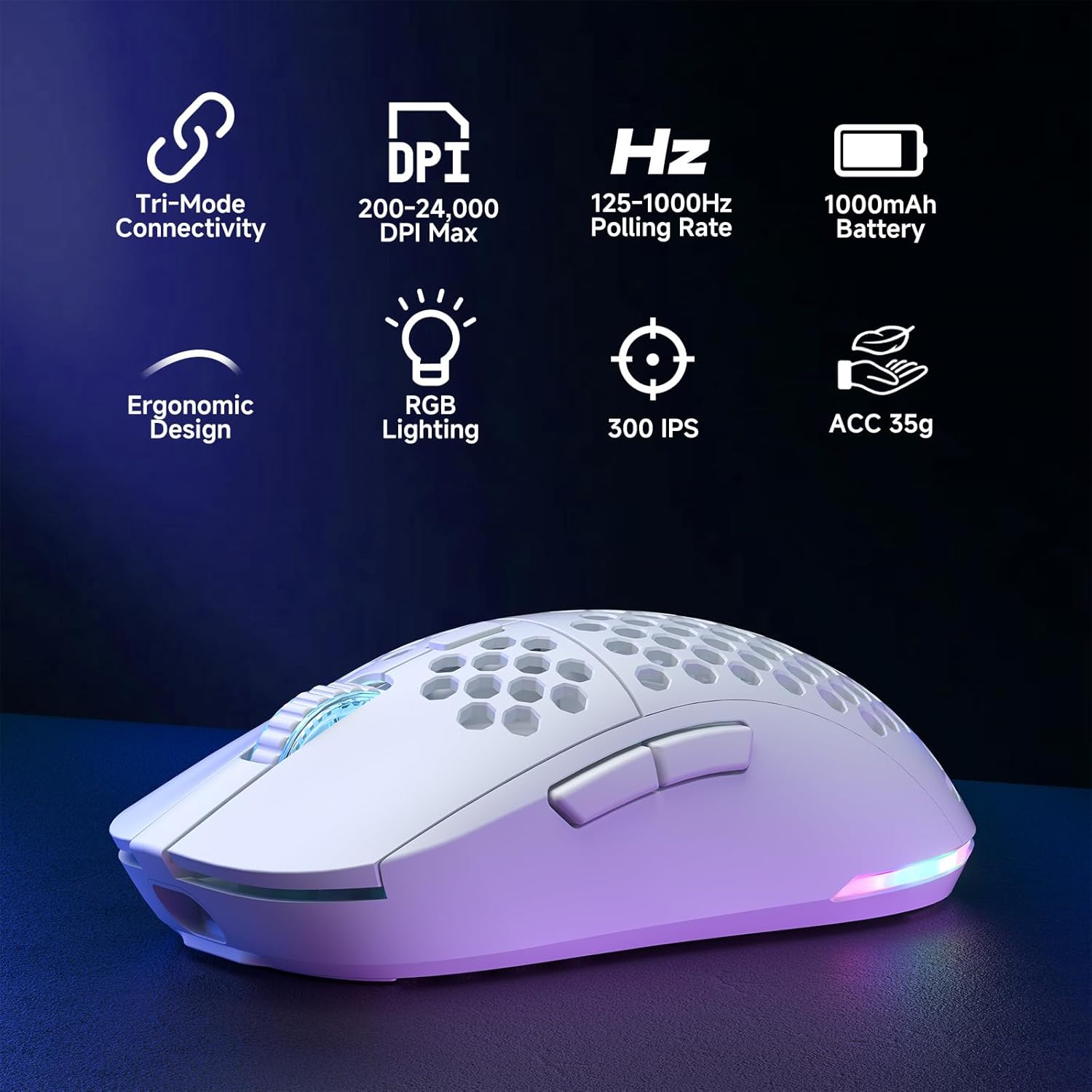
Figure 2: Key features of the Dierya M1 Wireless Gaming Mouse.
3. Dijagramma tal-Prodott u Komponenti
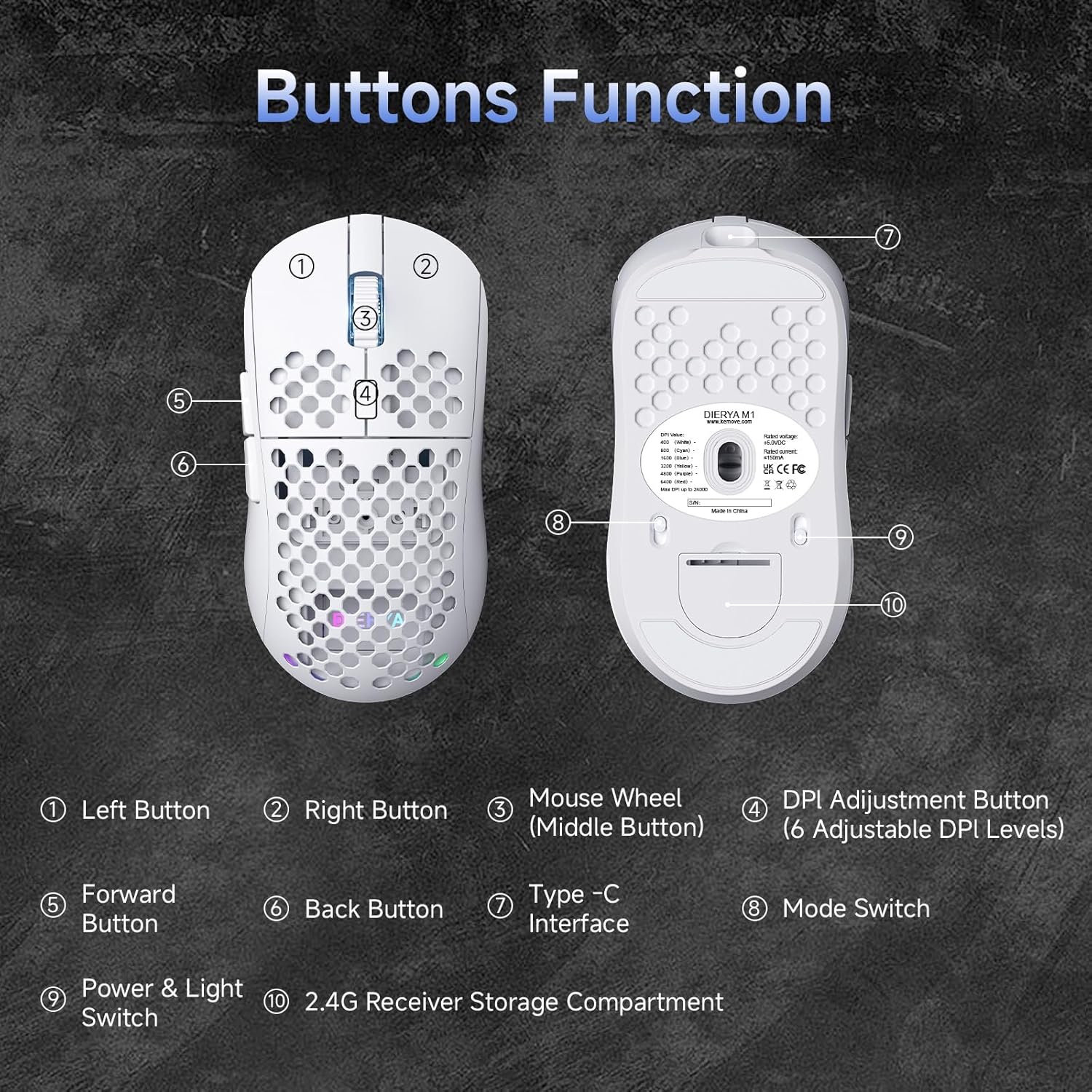
Figura 3: Fuq u t'isfel view of the Dierya M1 mouse with labeled components.
- Buttuna tax-Xellug
- Buttuna Dritt
- Mouse Wheel (Middle Button)
- DPI Adjustment Button (6 Adjustable DPI Levels)
- Buttuna 'l quddiem
- Buttuna Lura
- Interface tat-Tip C
- Mode Switch (2.4G / Bluetooth / Wired)
- Power & Light Switch
- 2.4G Receiver Storage Compartment
4. Setup u Konnessjoni
The Dierya M1 mouse offers three connection modes: 2.4 GHz Wireless, Bluetooth 5.2, and USB-C Wired.

Figura 4: Aktarview tat-tliet modi ta' konnessjoni.
4.1. Konnessjoni bla fili ta' 2.4 GHz
- Locate the 2.4G USB receiver in the storage compartment on the bottom of the mouse.
- Ipplaggja r-riċevitur USB f'port USB disponibbli fuq il-kompjuter tiegħek.
- Set the mode switch on the bottom of the mouse to the '2.4G' position.
- Il-maws għandu jikkonnettja awtomatikament.
4.2. Konnessjoni Bluetooth 5.2
- Set the mode switch on the bottom of the mouse to the 'Bluetooth' position.
- Fuq il-kompjuter jew l-apparat tiegħek, iftaħ is-settings tal-Bluetooth.
- Fittex għal new devices and select 'Dierya M1' from the list.
- Segwi kwalunkwe prompts fuq l-iskrin biex tlesti l-proċess ta 'tqabbil.
4.3. Konnessjoni bil-Wajer USB-C
- Connect the provided USB-C cable to the Type-C interface on the front of the mouse.
- Qabbad it-tarf l-ieħor tal-kejbil USB-C ma' port USB disponibbli fuq il-kompjuter tiegħek.
- Set the mode switch on the bottom of the mouse to the 'Wired' position.
- Il-maws se jiffunzjona bħala maws bil-fili u jiċċarġja simultanjament.
5. Istruzzjonijiet Operattivi
5.1. Aġġustament tad-DPI
The DPI Adjustment Button (4) on the top of the mouse allows you to cycle through preset DPI levels. Each DPI level is indicated by a specific color on the scroll wheel LED for a few seconds after adjustment.
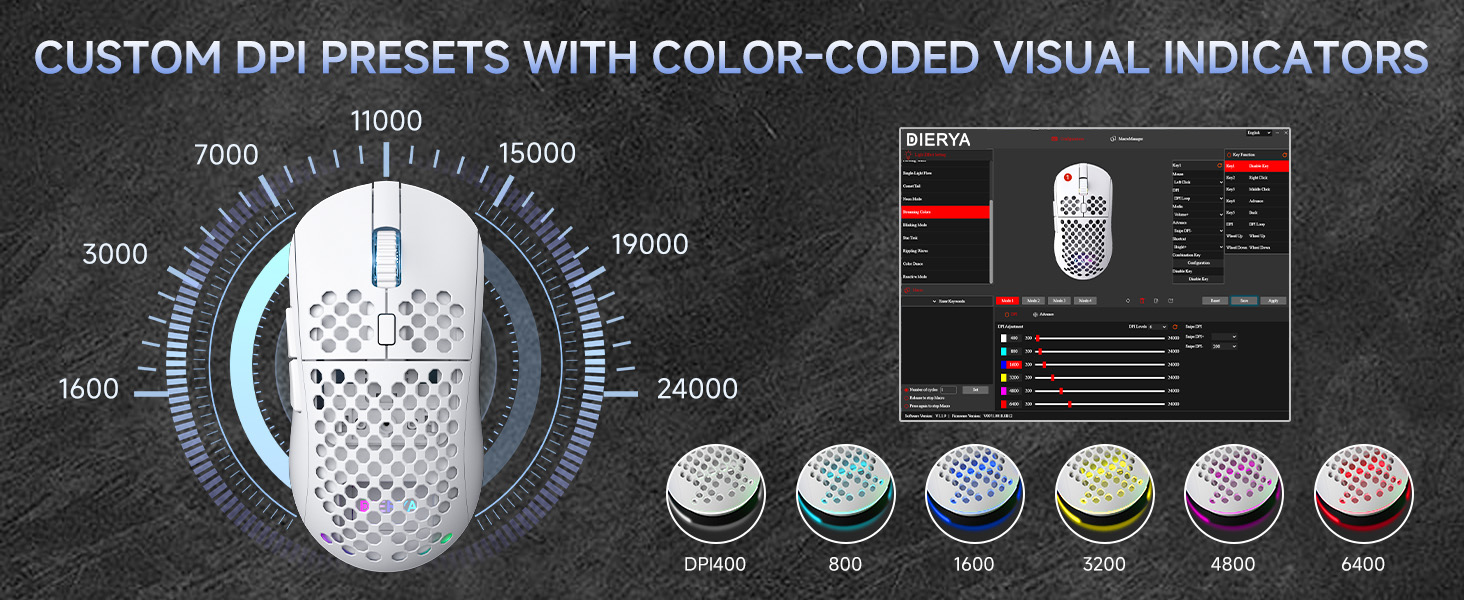
Figure 5: DPI levels and their corresponding scroll wheel LED colors.
- Press the DPI button to switch between 6 preset DPI levels.
- Default presets: 400 DPI (Red), 800 DPI (Green), 1600 DPI (Blue), 3200 DPI (Yellow), 4800 DPI (Purple), 6400 DPI (Cyan).
- For custom DPI settings and a wider range (200-24,000 DPI), use the M1 Driver Software (Windows only).
5.2. Kontroll tad-Dawl RGB
The mouse features 13 dynamic RGB lighting effects. You can control the lighting directly on the mouse or customize it further with the software.
- To cycle through RGB effects: Press and hold the DPI Adjustment Button (4) for 3 seconds.
- To turn RGB lighting On/Off: Use the Power & Light Switch (9) on the bottom of the mouse.
- For advanced customization of colors and effects, use the M1 Driver Software (Windows only).
5.3. Buttuni Programmabbli
The Dierya M1 has 6 programmable buttons (Left, Right, Middle, DPI, Forward, Back). These buttons can be customized for various functions, macros, or key reassignments using the M1 Driver Software.
6. Iċċarġjar u Ġestjoni tal-Batterija
The Dierya M1 mouse is equipped with a 1000 mAh rechargeable battery.

Figure 6: Charging the Dierya M1 mouse and battery life indicators.
- Iċċarġjar: Connect the mouse to your computer using the provided USB-C cable. The mouse will charge while in wired mode or when connected to a power source. A full charge takes approximately 1 hour.
- Ħajja tal-batterija: Expect up to 180 hours of use in ECO mode (RGB off) and up to 48 hours with RGB lighting enabled.
- Iffrankar tal-Enerġija: The mouse automatically enters a power-saving sleep mode after 1-5 minutes of inactivity. This duration can be adjusted via the M1 Driver Software.
- Indikatur tal-Batterija Baxxa: The RGB lighting or a specific LED will indicate when the battery is low. Charge the mouse promptly to avoid interruption.
7. M1 Driver Software (Windows Only)
The M1 Driver Software allows for advanced customization of your mouse settings. This software is currently available for Windows operating systems only.

Figure 7: M1 Driver Software interface.
7.1. Karatteristiċi tas-softwer
- Assenjament ewlieni: Customize the function of all 6 buttons.
- Editur Makro: Oħloq u assenja makros kumplessi.
- Aġġustament DPI: Fine-tune DPI settings from 200 to 24,000 in increments.
- Rata tal-votazzjoni: Adjust the polling rate (125-1000 Hz).
- Personalizzazzjoni RGB: Personalize lighting effects, colors, and brightness.
- Ħin tal-irqad: Configure the automatic power-saving sleep mode duration.
- Profile Ġestjoni: Save and load different profiles għal diversi applikazzjonijiet jew logħob.
7.2. Installazzjoni
Download the latest M1 Driver Software from the official Dierya website. Follow the on-screen instructions to install the software on your Windows computer.
8. Manutenzjoni
- Tindif: Uża drapp artab u niexef biex tnaddaf il-maws. Għal ħmieġ iebes, neħħi ftit drapp.amp Jista' jintuża drapp, u jiżgura li ma jidħol l-ebda likwidu fil-maws.
- Ħażna: Aħżen il-maws f'post frisk u niexef 'il bogħod mix-xemx diretta u minn temperaturi estremi.
- Kura tal-batterija: Evita li tiċċarġja l-batterija kompletament ta' spiss. Għal ħażna fit-tul, iċċarġja l-maws sa madwar 50% u aħżnu f'post frisk u niexef.
9 Issolvi l-problemi
- Il-maws ma jirrispondix:
- Kun żgur li l-maws ikun mixgħul.
- Check the connection mode switch (2.4G, Bluetooth, Wired) is set correctly.
- Għal 2.4G, kun żgur li r-riċevitur USB huwa mdaħħal sew.
- For Bluetooth, re-pair the device.
- Try connecting via USB-C cable to check if it works in wired mode.
- Charge the mouse; the battery might be depleted.
- Konnessjoni b'dewmien jew intermittenti:
- Ensure the mouse is within range of the receiver/device (for wireless connections).
- Naqqas l-interferenza minn apparati oħra mingħajr fili.
- Kun żgur li l-batterija tkun iċċarġjata biżżejjed.
- Update mouse drivers if available (Windows only).
- Id-dawl RGB mhux qed jaħdem:
- Check the Power & Light Switch (9) on the bottom of the mouse.
- Ensure the mouse is not in ECO mode or a low-power state.
- If using the software, verify RGB settings.
- DPI adjustment not working:
- Ensure you are pressing the correct DPI Adjustment Button (4).
- If using custom settings, check the M1 Driver Software.
10. Speċifikazzjonijiet
| Karatteristika | Speċifikazzjoni |
|---|---|
| Brand | Dierya |
| Isem tal-Mudell | M1 |
| Kulur | Abjad |
| Teknoloġija tal-Konnettività | 2.4GHz bla fili, Bluetooth 5.2, USB-C bil-fili |
| Teknoloġija tas-Sensers | Ottiċi |
| Firxa tad-DPI | 200 - 24,000 DPI |
| Ir-Rata tal-Votazzjoni | 125-1000 Hz |
| Veloċità tat-Traċċar | 300 FPS |
| Aċċelerazzjoni | 35G |
| Numru ta' Buttuni | 6 (Programmabbli) |
| Swiċċijiet | Huano (20 Miljun Klikk) |
| Feet Material | 100% PTFE |
| Kapaċità tal-batterija | 1000 mAh (jone tal-litju) |
| Battery Life (ECO Mode) | Sa 180 sigħat |
| Battery Life (RGB Mode) | Sa 48 sigħat |
| Ħin tal-Iċċarġjar | Appross. 1 siegħa |
| Piż | 90 Gramm |
| Dimensjonijiet | 125 x 63 x 41 mm |
| Kompatibilità tas-Sistema Operattiva | Windows, macOS, Linux, Chrome OS |
11. Garanzija u Appoġġ
The Dierya M1 Wireless Gaming Mouse comes with a Garanzija tal-manifattur ta 'sena. Din il-garanzija tkopri difetti fil-materjali u l-abbilità taħt użu normali.
For warranty claims, technical support, or further inquiries, please contact Dierya customer service through the official website or your point of purchase. Please have your product model number (M1) and proof of purchase ready when contacting support.


