1. Introduzzjoni
This manual provides detailed instructions for the setup, operation, and maintenance of your boAt Aavante 5.2.4 Prime 6250DA Dolby Atmos Soundbar. This system is designed to deliver an immersive audio experience with its 5.2.4 channel configuration, dual subwoofers, wireless satellite speakers, and Dolby Atmos technology.
2. Kontenut tal-Pakkett
Iċċekkja li l-oġġetti kollha elenkati hawn taħt huma preżenti fil-pakkett tiegħek:
- Soundbar
- Subwoofer (x2)
- Satellite Speakers (x2)
- Kejbil tal-Enerġija
- Kontroll mill-bogħod
- AA Batteries (x2) for Remote
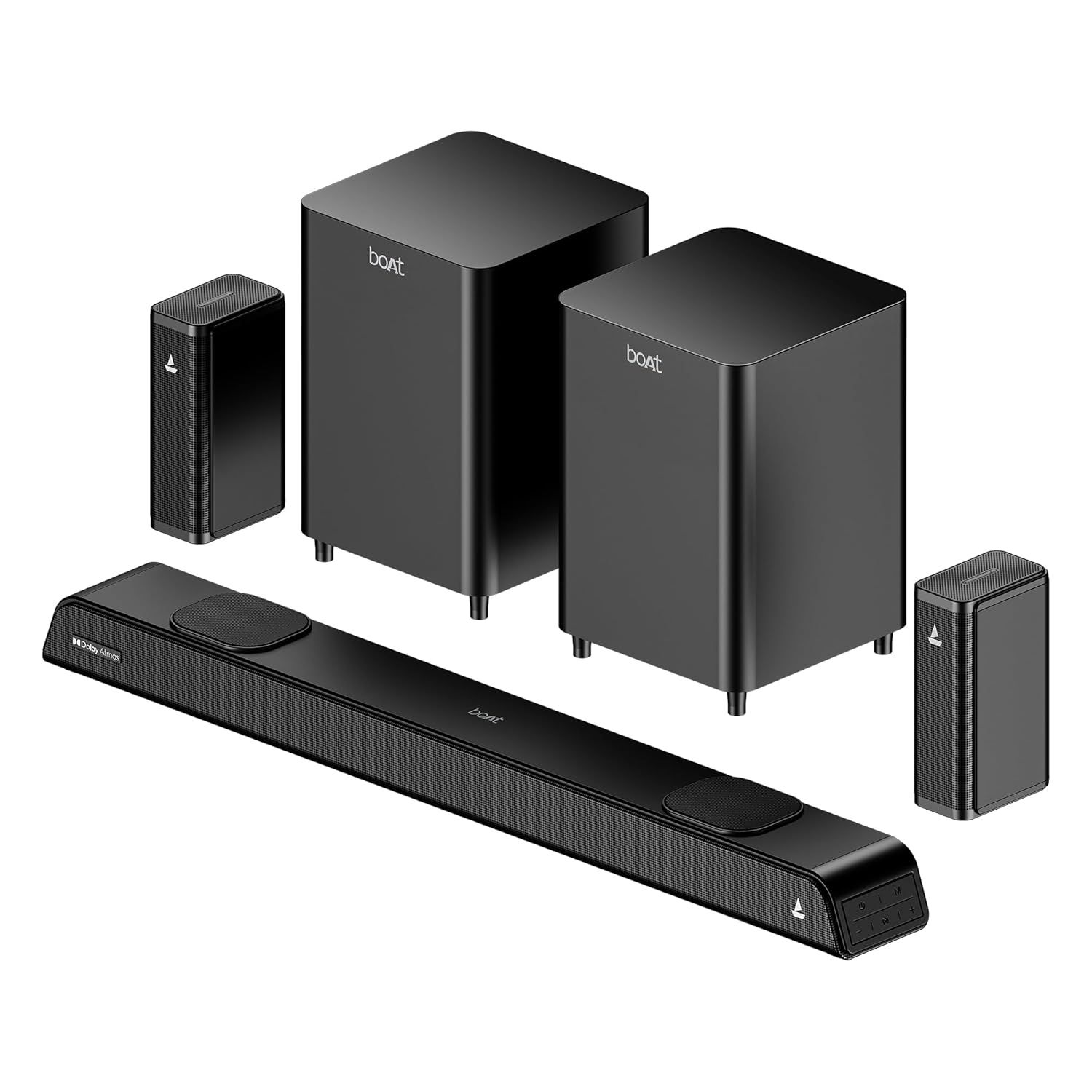
Image: The complete boAt Aavante 5.2.4 Prime 6250DA soundbar system, including the main soundbar unit, two subwoofers, and two satellite speakers, all in a premium black finish.
3. Prodott Aktarview
3.1 Komponenti tas-Sistema
The boAt Aavante 5.2.4 Prime 6250DA system consists of the following main components:
- Soundbar: The central unit housing multiple speakers for front and height channels.
- Dual Wired Subwoofers: Two dedicated units for powerful bass reproduction.
- Wireless Rear Satellite Speakers: Two compact speakers that connect wirelessly to the main system for surround sound.
3.2 Kontrolli u Indikaturi
The soundbar features onboard controls and an LED display. A master remote control is included for comprehensive system management.

Image: The master remote control for the boAt Aavante 5.2.4 Prime 6250DA, showing buttons for power, volume, mode selection, EQ settings, Bluetooth, bass, and treble adjustments.
4. Setup
4.1 Poġġiment ta' Speaker
Optimal placement is crucial for achieving the best sound experience:
- Soundbar: Poġġi s-soundbar ċentralment taħt it-televiżjoni tiegħek. Kun żgur li ma tkunx imblukkata.
- Subwoofers: Position the two subwoofers on the floor, ideally near the front of the room. Experiment with placement to find the best bass response for your listening area.
- Kelliema tas-Satellita: Place the wireless satellite speakers behind your primary listening position, to the left and right. Ensure they have a clear line of sight to the soundbar for stable wireless connection.

Image: Diagram illustrating the recommended placement for the 5.2.4 channel soundbar system, showing the soundbar in front of the TV, two subwoofers near the front, and two satellite speakers positioned behind the listener for immersive surround sound.

Image: A visual representation of a 360-degree surround sound setup, highlighting the effect of multiple phantom speakers creating an immersive audio environment around the listener.
4.2 Konnessjoni tas-Sistema
Connect the soundbar to your audio sources using the available ports. Ensure all power cables are securely connected to the soundbar, subwoofers, and satellite speakers, then plug them into a power outlet.

Image: Icons representing the various connectivity options available on the boAt Aavante 5.2.4 Prime 6250DA soundbar: Optical, Bluetooth v5.3, AUX IN, HDMI e-ARC, and USB.
HDMI (eARC) Connection:
- Connect an HDMI cable (not included) from the HDMI eARC port on the soundbar to the HDMI eARC/ARC port on your television.
- On your TV, navigate to the audio settings and set the sound output to 'Auto' or 'Passthrough' to ensure proper transmission of Dolby Atmos or 5.1 content. If set to 'PCM' or 'Stereo', the soundbar will default to 2.0 stereo output.
Konnessjoni ottika:
- Connect an optical cable (not included) from the OPTICAL OUT port on your TV or audio source to the OPTICAL IN port on the soundbar.
- Select 'Optical' as the input source on the soundbar.
Konnessjoni AUX:
- Connect a 3.5mm AUX cable (not included) from the audio output of your device to the AUX IN port on the soundbar.
- Select 'AUX' as the input source on the soundbar.
Konnessjoni USB:
- Daħħal USB drive li fih l-awdjo files fil-port USB fuq il-soundbar.
- Select 'USB' as the input source on the soundbar. The soundbar will automatically begin playing compatible audio files.
5. Istruzzjonijiet Operattivi
5.1 Power On/Off
Agħfas il- Qawwa button on the remote control or the soundbar to turn the system on or off.
5.2 Għażla tas-Sors tal-Input
Agħfas il- MODALITÀ button on the remote control or the soundbar to cycle through available input sources: HDMI (eARC), Optical, AUX, USB, and Bluetooth.
5.3 Tqabbil tal-Bluetooth
- Turn on the soundbar and select 'Bluetooth' mode. The LED display will indicate 'BT'.
- Enable Bluetooth on your mobile device and search for 'boAt Aavante 6250DA'.
- Select the device to pair. Once connected, the soundbar will indicate successful pairing.
5.4 Modi EQ
The soundbar offers various Equalizer (EQ) modes to optimize audio for different content types. Press the EQ button on the remote to switch between modes:
- Film: Enhances dialogue clarity and cinematic effects.
- Mużika: Jipprovdi ħoss bilanċjat profile għall-daqq tal-mużika.
- Sports: Optimizes audio for sports broadcasts, emphasizing commentary and crowd sounds.
- Aħbarijiet: Focuses on vocal clarity for news and talk shows.

Image: A graphical representation of the EQ modes interface, showing options for Movie, Music, Sports, and News, allowing users to personalize sound settings.
5.5 Kontroll tal-Volum, il-Bass, u t-Treble
Uża l- VOL+ / VOL- buttons on the remote to adjust the overall volume. Dedicated BASS + / BAŻI- u TREBLE + / TREBLE- buttons allow for fine-tuning of low and high frequencies.
6. Manutenzjoni
Biex tiżgura l-lonġevità u l-prestazzjoni ottimali tas-sistema tas-soundbar tiegħek:
- Tindif: Use a soft, dry cloth to clean the surfaces of the soundbar, subwoofers, and satellite speakers. Avoid using liquid cleaners or abrasive materials.
- Ventilazzjoni: Aċċerta ruħek li jkun hemm fluss tal-arja adegwat madwar il-komponenti kollha biex tevita li jisħnu żżejjed. Timblokkax il-fetħiet tal-ventilazzjoni.
- Ambjent: Keep the system away from direct sunlight, heat sources, and excessive moisture.
7 Issolvi l-problemi
If you encounter issues with your boAt Aavante 5.2.4 Prime 6250DA, refer to the following common solutions:
| Problema | Kawża Possibbli | Soluzzjoni |
|---|---|---|
| Ebda qawwa | Il-kejbil tal-enerġija mhux imqabbad; is-sokket tal-enerġija mhux attiv. | Iċċekkja l-konnessjonijiet tal-enerġija; ipprova sokit differenti. |
| L-ebda ħoss | Incorrect input source selected; volume too low; cables loose. | Select correct input; increase volume; check all audio cables. |
| No sound from satellite speakers | Wireless connection issue; speakers not powered. | Ensure satellite speakers are powered on and paired with the soundbar. |
| Dolby Atmos not working | TV audio output not set to 'Auto' or 'Passthrough'; content is not Dolby Atmos. | Set TV sound output to 'Auto' or 'Passthrough'. Ensure playing Dolby Atmos compatible content. |
| Kwistjonijiet ta 'tqabbil tal-Bluetooth | Device too far; soundbar not in pairing mode; interference. | Ensure soundbar is in BT mode; move device closer; restart both devices. |

Image: A visual representation of how Dolby Atmos creates an immersive sound field, with sound waves emanating from various points around the listener, including overhead, for a multi-dimensional audio experience.

Image: A comparison graphic showing the difference between regular audio and Dolby Atmos audio waveforms, illustrating the enhanced detail and dynamic range provided by Dolby Atmos.
8. Speċifikazzjonijiet
| Karatteristika | Dettall |
|---|---|
| Isem tal-Mudell | Aavante 5.2.4 Prime 6250DA |
| Numru tal-Mudell | HA0079 |
| Output Awdjo | 625W RMS |
| Konfigurazzjoni tal-Kanal | 5.2.4 Channel (Soundbar, Dual Subwoofers, Wireless Satellites) |
| Teknoloġija Awdjo | Dolby Atmos |
| Konnettività | Bluetooth v5.3, HDMI (eARC), USB, AUX, Optical, Coaxial |
| Metodu ta' Kontroll | Kontroll mill-bogħod |
| Dimensjonijiet tal-Prodott | 90D x 7.4W x 11H Centimeters (Soundbar) |
| Piż tal-oġġett | 7 kg (Sistema Totali) |
| Komponenti Inklużi | Soundbar, 2x Subwoofers, 2x Satellites, Cable, Remote |
| Sors tal-Enerġija | Bil-fili |
| Batteriji għal Remote | 2 batteriji AA (inklużi) |

Immaġni: Interna view of the soundbar highlighting its components and the powerful 625W output, indicating boAt Signature Sound technology.

Image: Two boAt subwoofers, emphasizing their role in delivering powerful and deep bass for the audio system.
9. Garanzija u Appoġġ
Your boAt Aavante 5.2.4 Prime 6250DA soundbar system comes with a Garanzija Limitata. For detailed warranty terms and conditions, please refer to the warranty card included in your package or visit the official boAt websit.
For technical assistance, troubleshooting not covered in this manual, or warranty claims, please contact boAt customer support through their official channels. Keep your purchase receipt and product serial number handy when contacting support.


