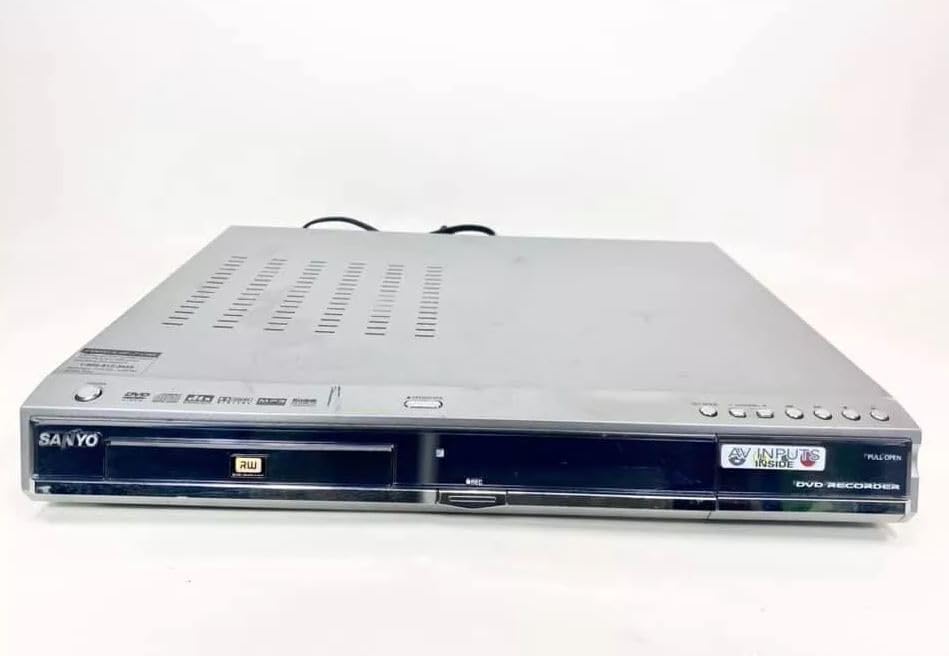
Sanyo DRW-500 DVD Recorder/Player Instruction Manual
Model: DRW-500
Introduzzjoni
This manual provides comprehensive instructions for the safe and efficient operation of your Sanyo DRW-500 DVD Recorder/Player. Please read this manual thoroughly before using the device and retain it for future reference. The Sanyo DRW-500 allows you to record television programs and home videos onto DVD-R/RW discs, as well as play back DVD-Video and Audio CD discs.
Informazzjoni Importanti dwar is-Sigurtà
TWISSIJA: BIEX TNAQQAS IR-RISKJU TAN-NAR JEW XOKK ELETTRIKU, TESPONIX DAN L-APPARAT GĦAT-XITA JEW L-UMDITÀ.
Dejjem segwi l-prekawzjonijiet bażiċi ta' sigurtà meta tuża dan il-prodott biex tnaqqas ir-riskju ta' nar, xokk elettriku, u korriment lil persuni.
Timblokkax il-fetħiet tal-ventilazzjoni. Installa skont l-istruzzjonijiet tal-manifattur.
Tinstallax ħdejn xi sorsi tas-sħana bħal radjaturi, reġistri tas-sħana, stufi, jew apparat ieħor (inkluż amplifiers) li jipproduċu sħana.
Ipproteġi l-korda tad-dawl milli timxi fuqha jew maqrusa, partikolarment fil-plakek, ir-reċipjenti tal-konvenjenza, u l-punt fejn joħorġu mill-apparat.
Uża biss aċċessorji/aċċessorji speċifikati mill-manifattur.
Irreferi l-manutenzjoni kollha lil persunal tas-servizz kwalifikat. Il-manutenzjoni hija meħtieġa meta l-apparat ikun sar xi ħsara.
Kontenut tal-Pakkett
Jekk jogħġbok iċċekkja li l-oġġetti kollha huma preżenti fil-kaxxa:
Sanyo DRW-500 DVD Recorder/Player Unit
Kontroll mill-bogħod
Kejbil tal-Awdjo/Vidjo RCA
Korda tal-Enerġija
Manwal ta 'Istruzzjoni (dan id-dokument)
Prodott Overview
Familiarize yourself with the front and rear panels of your Sanyo DRW-500.
Figura 1: Front Panel of Sanyo DRW-500. Shows the disc tray, power button, play/pause, stop, record buttons, and the display screen.
Kontrolli tal-Panew ta' Quddiem:
Buttuna POWER: Ixgħel jew jitfi l-unità.
Buttuna MIFTUĦ/GĦELUQ: Jiftaħ u jagħlaq it-trej tad-diska.
Buttuna PLAY: Jibda d-daqq tad-diska.
Buttuna STOP: Stops disc playback or recording.
Buttuna REKORD: Jibda r-reġistrazzjoni.
DISPLAY: Juri l-istatus attwali, il-ħin, u informazzjoni dwar it-trakka.
Konnessjonijiet tal-Panew ta' wara:
AUDIO/VIDEO OUT (RCA): Connects to your TV's audio/video input.
S-VIDEO OUT: Provides higher quality video output to compatible TVs.
AUDIO/VIDEO IN (RCA): Connects to external devices like VCRs or camcorders for recording.
QAWWA FI: Tqabbad il-korda tad-dawl.
Setup
1. Konnessjoni ma' Televiżjoni
There are two primary ways to connect your Sanyo DRW-500 to a television:
Option A: RCA (Composite Video) Connection
Connect one end of the RCA audio/video cable (red, white, yellow) to the AUDIO/VIDEO OUT jacks on the rear of the DRW-500.
Connect the other end of the RCA cable to the corresponding AUDIO/VIDEO IN jacks on your television. Ensure colors match (yellow to yellow for video, red to red for right audio, white to white for left audio).
Select the correct input channel on your TV (e.g., Video 1, AV1, Input 1).
Connect an S-Video cable (not included) from the S-VIDEO OUT jack on the DRW-500 to the S-Video input on your television.
Connect a separate RCA audio cable (red, white) from the Ħruġ tal-Awdjo jacks on the DRW-500 to the corresponding audio input jacks on your television. S-Video only carries video, not audio.
Select the correct input channel on your TV (e.g., S-Video, Input 2).
2. Konnessjoni tal-Enerġija
Qabbad il-korda tal-enerġija fornuta mal- QAWWA FIL port on the rear of the DRW-500.
Plug the other end of the power cord into a standard AC wall outlet.
3. Initial Setup and Clock Setting
Upon first power-on, the unit may prompt you to set the clock and other basic settings. Follow the on-screen instructions using the remote control.
Istruzzjonijiet Operattivi
Daqq ta' DVD jew CD
Agħfas il- QAWWA buttuna biex tixgħel l-unità.
Agħfas il- FTUĦ/MAGĦLUQ buttuna biex tiftaħ it-trej tad-diska.
Place a DVD or CD disc onto the tray with the label side facing up.
Agħfas il- FTUĦ/MAGĦLUQ buttuna mill-ġdid biex tagħlaq it-trej.
Id-daqq għandu jibda awtomatikament. Jekk le, agħfas il-buttuna PLAY buttuna.
Use the remote control for functions like Pause, Stop, Fast Forward, Rewind, and Chapter Skip.
Recording to DVD-R/RW
The Sanyo DRW-500 can record from various external sources connected to its AUDIO/VIDEO IN ġakkijiet.
Recording from a TV/Cable Box:
Connect the audio/video output of your TV or cable box to the AUDIO/VIDEO IN jacks on the rear of the DRW-500.
Insert a blank recordable DVD (DVD-R or DVD-RW) into the disc tray.
Select the correct input source on the DRW-500 using the GĦAŻLA INPUT button on the remote control (e.g., L1, L2).
Tune your TV/cable box to the desired program.
Agħfas il- REKORD button on the DRW-500 or its remote control to start recording.
Agħfas il- STOP buttuna biex ittemm ir-reġistrazzjoni.
Recording from a VCR or Camcorder:
Connect the audio/video output of your VCR or camcorder to the AUDIO/VIDEO IN jacks on the rear of the DRW-500.
Insert a blank recordable DVD into the disc tray.
Select the correct input source on the DRW-500 using the GĦAŻLA INPUT buttuna fuq il-kontroll remot.
Start playback on your VCR or camcorder.
Agħfas il- REKORD button on the DRW-500 or its remote control to start recording.
Agħfas il- STOP buttuna biex ittemm ir-reġistrazzjoni.
Finalizzazzjoni ta' Diska
For recorded DVD-R/RW discs to be playable on other DVD players, they must be "finalized."
Insert the recorded DVD-R/RW disc into the DRW-500.
Aċċess għall- MENU fuq il-kontroll mill-bogħod.
Navigate to the "Disc Settings" or "Setup" menu.
Select the "Finalize Disc" option.
Confirm the action. The finalization process may take several minutes. Do not interrupt power during this process.
Note: DVD-RW discs can be unfinalized and re-recorded multiple times. DVD-R discs, once finalized, cannot be recorded on again.
Manutenzjoni
Tindif tal-Unità
Dejjem aqla 'l-unità mill-iżbokk tad-dawl qabel it-tindif.
Uża drapp ratba u niexfa biex timsaħ in-naħa ta 'barra tal-unità.
Do not use liquid cleaners, aerosol cleaners, or strong chemical solvents, as these may damage the finish.
Kura tad-Diska
Handle discs by their edges to avoid fingerprints on the recording surface.
Aħżen id-diski fil-kaxxi tagħhom meta ma tkunx qed tużahom biex tevita l-grif u l-akkumulazzjoni tat-trab.
Naddaf id-diski maħmuġin b'ċarruta ratba u mingħajr suf, billi timsaħ bil-mod miċ-ċentru 'l barra.
Issolvi l-problemi
Problema
Kawża Possibbli
Soluzzjoni
Ebda qawwa
Il-korda tal-enerġija mhux imqabbda sew.
Iċċekkja l-konnessjoni tal-korda tal-enerġija mal-unità u mas-sokit tal-ħajt.
L-ebda stampa jew ħoss
Incorrect TV input selected. A/V cables not connected properly.
Select the correct input on your TV. Ensure A/V cables are securely connected to the correct input/output jacks.
Id-diska ma tilgħabx
Disc is dirty or scratched. Disc is inserted incorrectly. Incompatible disc format.
Clean the disc. Insert the disc with the label side up. Ensure the disc is a compatible format (DVD-Video, Audio CD, recorded DVD-R/RW).
Ma tistax tirrekordja
No blank recordable disc inserted. Disc is full or protected. Incorrect input source selected.
Insert a blank DVD-R or DVD-RW. Use a new disc or erase a DVD-RW. Select the correct input source (e.g., L1, L2).
Recorded disc won't play on other players
Disc not finalized.
Finalize the disc using the "Finalize Disc" option in the unit's menu.
Speċifikazzjonijiet
Karatteristika
Dettall
Mudell
DRW-500
Manifattur
Sanyo
Compatible Disc Formats (Playback)
DVD-Video, CD-Audio, DVD-R, DVD-RW (finalized)
Recordable Disc Formats
DVD-R, DVD-RW
Output tal-vidjo
Vidjo Kompost (RCA), S-Vidjo
Output Awdjo
Stereo RCA
Kompatibilità tal-Input tal-Vidjo
NTSC
Teknoloġija tal-Konnettività
AUX (RCA)
Karatteristika Speċjali
Disinn kompatt
Provvista tal-Enerġija
AC 120V, 60Hz (typical for US models)
Garanzija u Appoġġ
This product is covered by a limited manufacturer's warranty. Please refer to the warranty card included with your purchase for specific terms and conditions. For technical support or service inquiries, please contact Sanyo customer service through their official webis-sit jew l-informazzjoni ta' kuntatt ipprovduta fid-dokumentazzjoni tal-garanzija tiegħek.
Please note that warranty terms may vary by region and retailer. Keep your proof of purchase for warranty claims.
SANYO FWBP505F Blu-ray Disc™ / DVD Player Owner's Manual This owner's manual provides comprehensive instructions for the SANYO FWBP505F Blu-ray Disc™ and DVD Player, covering setup, features, playback, connections, troubleshooting, and maintenance. Visit www.sanyo-av.com for more support.
Manwal tas-Servizz tar-Reġistratur tal-Kassetti tar-Radju CD Portabbli SANYO MCD-Z120/MCD-Z120F Dan il-manwal komprensiv tas-servizz jipprovdi speċifikazzjonijiet tekniċi dettaljati, proċeduri ta' aġġustament, splużjoni views, u listi tal-partijiet għas-sistemi portabbli ta' reġistrazzjoni tal-cassette bir-radju u s-CD SANYO MCD-Z120 u MCD-Z120F. Essenzjali għat-tekniċi u l-professjonisti tat-tiswija.
Manwal tal-Istruzzjonijiet tas-Sistema tal-Komponenti Mini SANYO DC-F210 Manwal ta' struzzjoni għas-Sistema ta' Komponenti Mini SANYO DC-F210, li jkopri s-setup, it-tħaddim tas-CD player, it-tuner, amplifer, u cassette deck, reġistrazzjoni, dubbing, funzjonijiet tat-tajmer, manutenzjoni, u speċifikazzjonijiet tekniċi. Jinkludi prekawzjonijiet importanti ta' sigurtà u informazzjoni dwar il-garanzija.