1. Introduzzjoni
This manual provides essential information for setting up, operating, maintaining, and troubleshooting your Alienware Aurora R16 Gaming Desktop. Please read this manual thoroughly before using your system to ensure optimal performance and longevity.

Figure 1.1: Alienware Aurora R16 Gaming Desktop with included keyboard and mouse.
The Alienware Aurora R16 features the new Legend 3 design, focusing on minimalism and functionality while optimizing for any desktop gaming setup.

Figure 1.2: The Alienware Aurora R16's Legend 3 design emphasizes a minimalist and functional aesthetic.
2. X'hemm fil-Kaxxa
Ivverifika li l-komponenti kollha huma preżenti fl-imballaġġ:
- Desktop tal-logħob Alienware Aurora R16
- Kejbil tal-Enerġija
- Tastiera
- Ġurdien
- Dokumentazzjoni (Gwida ta' Bidu Mgħaġġel, Informazzjoni dwar is-Sigurtà)
If any items are missing or damaged, contact Alienware support immediately.
3. Setup Inizjali
Follow these steps to set up your Alienware Aurora R16 Desktop:
- Iftaħ is-Sistema: Neħħi d-desktop bir-reqqa mill-imballaġġ tiegħu.
- Ikkonnettja l-Periferali:
- Connect your monitor(s) to the appropriate display ports (DisplayPort, HDMI) on the graphics card.
- Connect the keyboard and mouse to available USB ports.
- Qabbad kwalunkwe periferali ieħor bħal kelliema, headphones, jew drives esterni.

Figure 3.1: Rear I/O ports for connecting display, USB devices, and audio.

Figure 3.2: Front I/O ports including USB 3.2 Gen 1, USB 3.2 Gen 2 Type-C, and headphone/line out.
- Qabbad mal-Enerġija: Plug the power cable into the power supply unit on the back of the desktop, then plug the other end into a wall outlet or surge protector.
- Qawwa Mixgħul: Press the power button located on the front of the desktop. The system will boot up and guide you through the Windows 11 Pro initial setup.
4. It-Tħaddim tad-Desktop Tiegħek
4.1 L-Ewwel Boot u s-Setup tal-Windows
Upon first power-on, the system will guide you through the Windows 11 Pro setup process. Follow the on-screen instructions to configure your region, language, network settings, and user account.
4.2 Alienware Command Center
The Alienware Command Center software allows you to customize your system's performance profiles, monitor thermals, and manage lighting effects. This software is pre-installed and can be accessed from the Windows Start Menu.

Figure 4.1: Alienware Command Center interface for system customization.
4.3 Prestazzjoni u Logħob
Your Alienware Aurora R16 is equipped with a 14th Gen Intel Core i9-14900KF processor and NVIDIA GeForce RTX 4080 SUPER graphics, designed for high-performance gaming and demanding applications. Ensure your graphics drivers are up to date for optimal performance.

Figure 4.2: The Alienware Aurora R16 is designed for immersive gaming experiences.

Figura 4.3: Eżample of a complete gaming setup featuring the Alienware Aurora R16.
5. Manutenzjoni
5.1 Tindif
Regular cleaning helps maintain system performance and longevity:
- Use a soft, lint-free cloth to wipe down the exterior of the desktop.
- For dust accumulation in vents, use compressed air. Ensure the system is powered off and unplugged before cleaning.
- Evita li tuża prodotti tat-tindif likwidi direttament fuq il-komponenti.
5.2 Fluss tal-Arja u Tkessiħ
The Aurora R16 features an optimized airflow design and a 240mm liquid CPU cooler to ensure efficient thermal management. Ensure the desktop is placed in a well-ventilated area and that air vents are not obstructed.

Figure 5.1: Optimized internal design for efficient airflow and cable management.
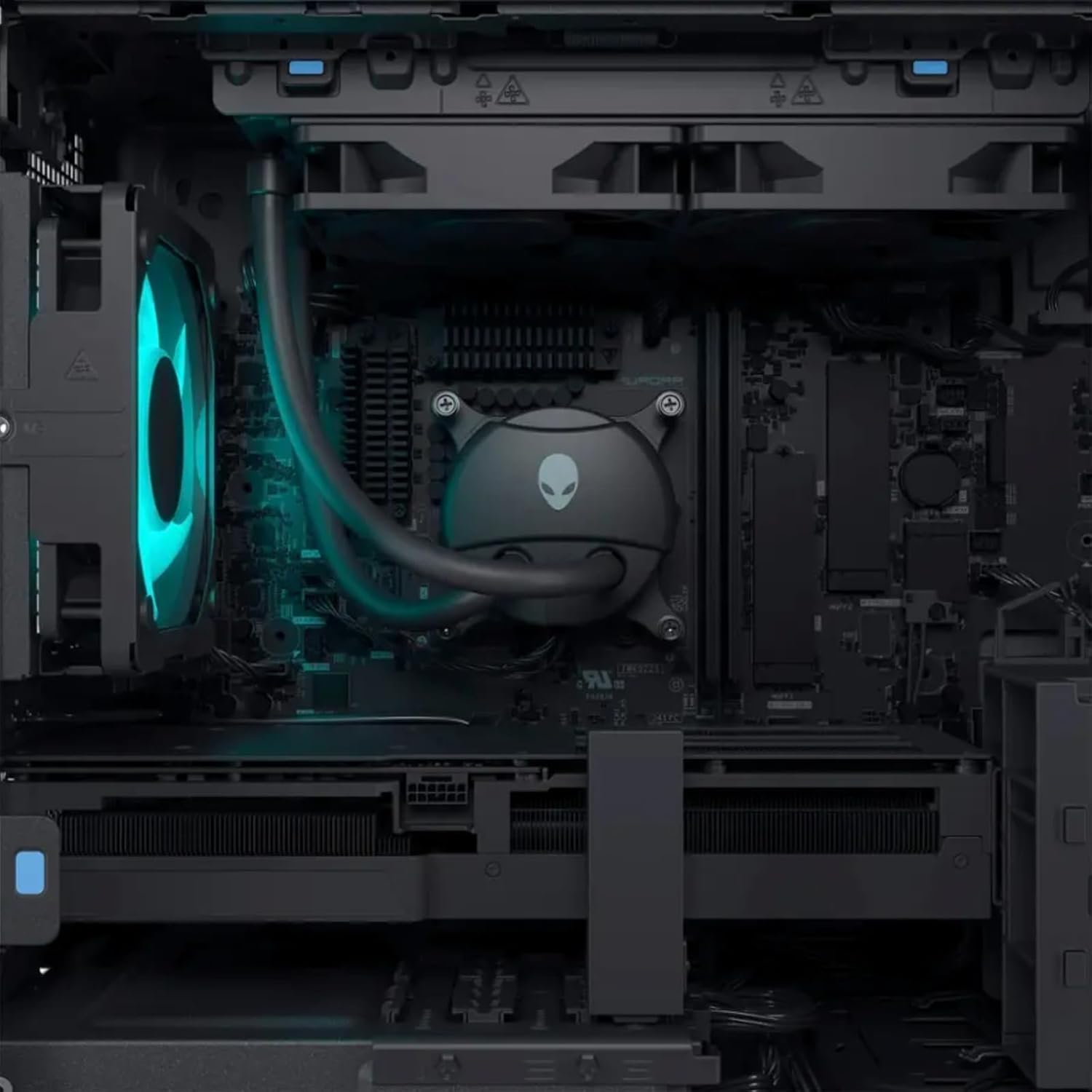
Figura 5.2: Intern view highlighting the liquid CPU cooling system and other components.

Figura 5.3: Minn fuq għal isfel view of the internal layout, showing components and fan.

Figure 5.4: Angled internal view, providing a clearer look at the internal structure.
6 Issolvi l-problemi
This section provides solutions to common issues. For more complex problems, refer to the Alienware support websit jew ikkuntattja l-appoġġ tekniku.
| Problema | Soluzzjoni Possibbli |
|---|---|
| Is-sistema ma tixgħel. |
|
| L-ebda wiri fuq il-monitor. |
|
| System is running slow or freezing. |
|
| Peripheral (keyboard/mouse) not responding. |
|
7. Speċifikazzjonijiet
Detailed technical specifications for the Alienware Aurora R16 Gaming Desktop:
| Komponent | Speċifikazzjoni |
|---|---|
| Proċessur | 14th Gen Intel Core i9-14900KF (24 Cores, 32 Threads, up to 6 GHz) |
| Karta Grafika | NVIDIA GeForce RTX 4080 SUPER 16GB GDDR6X |
| RAM | Up to 64GB DDR5 RAM (5600MHz) |
| Ħażna | Up to 8TB SSD + 2TB HDD |
| Sistema Operattiva | Windows 11 Pro |
| Konnettività bla fili | Wi-Fi 6E (802.11ax), Bluetooth |
| CPU Cooling System | Liquid Cooling (240mm) |
| GPU Cooling System | Tkessiħ bl-Arja |
| Portijiet tal-Wiri | 4 x DisplayPort 1.4, 1 x Mini DisplayPort (Total 5 DisplayPort Outputs) |
| Portijiet USB | 3 x USB-C 3.2, 5 x USB-A 3.2, 4 x USB-A 2.0 (Total 12 USB Ports) |
| Dimensjonijiet (HxWxD) | 7.76 x 18.05 x 16.5 pulzieri |
| Piż | 33.89 liri |
8. Garanzija u Appoġġ
8.1 Informazzjoni dwar Garanzija
Your Alienware Aurora R16 Gaming Desktop comes with a standard manufacturer's warranty. For detailed terms and conditions, including warranty duration and coverage, please refer to the warranty documentation included with your product or visit the official Alienware support websit.
8.2 Appoġġ Tekniku
For technical assistance, driver downloads, or further troubleshooting, please visit the official Alienware support website or contact their customer service. Have your product's serial number ready when contacting support.
Appoġġ ta' Alienware Websit: support.dell.com/alienware


