Introduzzjoni
Thank you for choosing the Yaheetech Ergonomic Gaming Chair. This manual provides essential information for the safe assembly, operation, and maintenance of your new chair. Designed for comfort during extended periods of use, this chair features adjustable height, recline, a retractable footrest, and a massage lumbar support pillow.
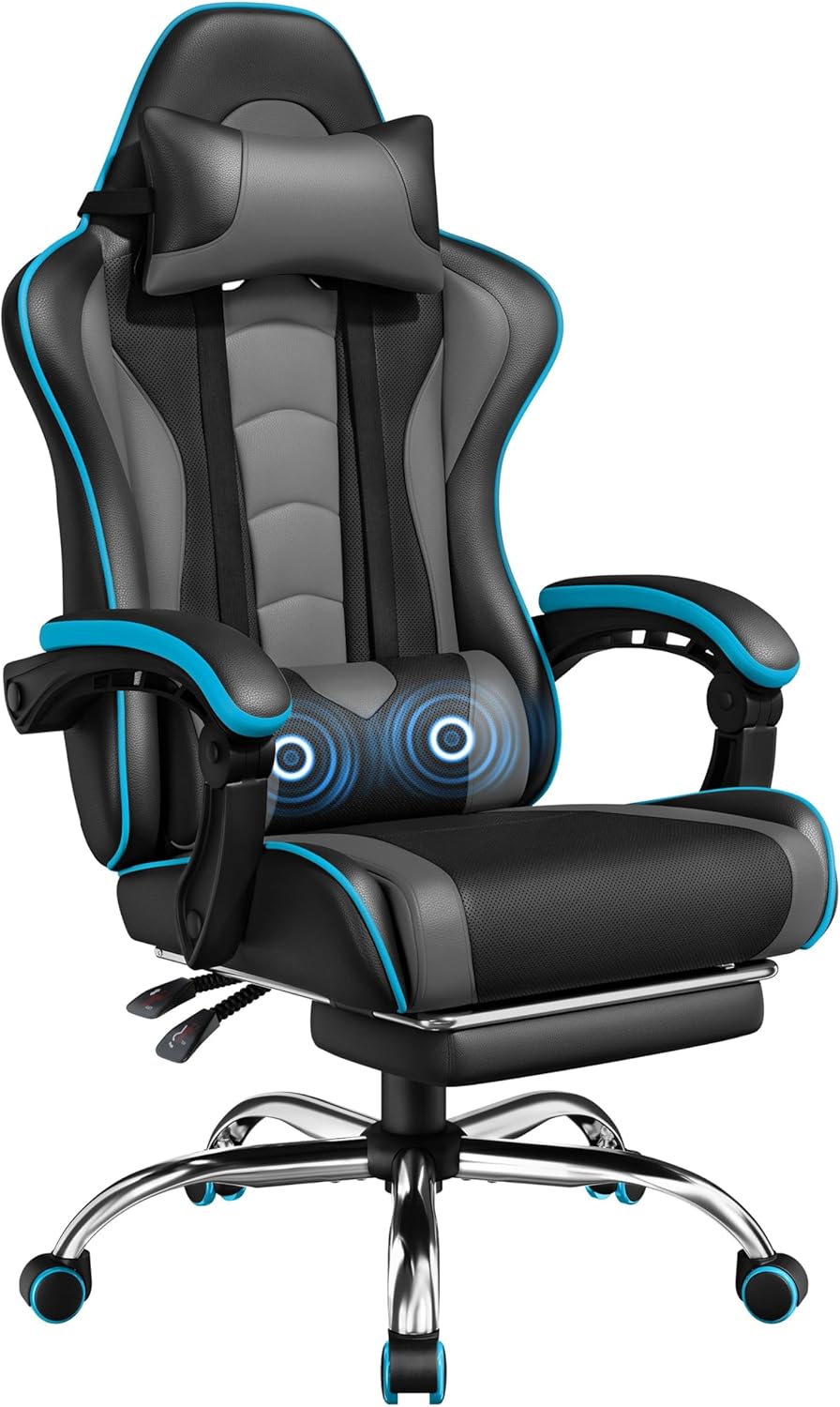
Image: The Yaheetech Ergonomic Gaming Chair in Black/Gray, showcasinid-disinn u l-karatteristiċi tiegħu.
Informazzjoni dwar is-Sigurtà
- Kapaċità massima tal-piż: This chair is designed to support a maximum weight of 300 lbs (136 kg). Do not exceed this limit.
- Assemblea: Ensure all parts are correctly assembled and all screws are tightened before use. Refer to the assembly instructions carefully.
- Stabbiltà: Do not stand on the chair. Avoid leaning excessively to one side or backward when the chair is fully reclined without the footrest extended, as this may cause instability.
- Tfal: Keep children away from moving parts during assembly and operation.
- Moviment: Use caution when moving the chair, especially on uneven surfaces.
Kontenut tal-Pakkett
Qabel tibda l-assemblaġġ, ivverifika li l-komponenti kollha elenkati hawn taħt huma preżenti u mhux imħassra:
- Dahar tas-siġġu
- Seat Base with Mechanism
- Armrests (2)
- Bażi ta’ Ħames Stilel
- Xandara (5)
- Ċilindru tal-Irfigħ tal-Gass b'Għatu
- Massage Lumbar Pillow (USB-powered)
- Headrest Pillow
- Retractable Footrest Assembly
- Ħardwer tal-Assemblaġġ (viti, woxers, ċavetta Allen)

Image: All chair components, including the seat, backrest, base, and accessories, laid out before assembly.
Setup u Assemblea
Follow these steps to assemble your Yaheetech Gaming Chair. It is recommended to have two people for certain steps, especially when attaching the backrest.
- Assemble the Five-Star Base: Insert the five caster wheels into the holes at the end of each leg of the five-star base. Ensure they are securely fitted.
- Install the Gas Lift: Place the gas lift cylinder into the central hole of the assembled five-star base. Cover it with the telescopic plastic cover.
- Attach the Seat Mechanism: Secure the seat mechanism to the underside of the seat base using the provided screws. Ensure the front of the mechanism aligns with the front of the seat.
- Qabbad is-Sedil mal-Lift tal-Gass: Carefully place the assembled seat onto the gas lift cylinder, ensuring the central hole of the seat mechanism aligns with the top of the gas lift.
- Waħħal id-Dahar: Align the metal brackets on the backrest with the corresponding attachment points on the seat mechanism. Secure with the provided screws. This step may require two people.
- Installa l-Armrests: Attach the armrests to the sides of the seat and backrest using the designated screws. Cover the screw holes with the provided caps for a neat finish.
- Waħħal is-Serħan tas-Saqajn: Slide the retractable footrest assembly into the guides located under the seat.
- Position Pillows: Attach the headrest pillow and massage lumbar pillow using their elastic straps. The lumbar pillow's height can be adjusted by sliding it along the straps.
Video tal-Assemblea
Vidjo: Reviżjoni dettaljataview of the Yaheetech Gaming Chair, including assembly steps and feature demonstrations.
Vidjo: Riżultat mill-ġdidview highlighting the assembly process and massage lumbar support feature of the Yaheetech Gaming Chair.
Video: A demonstration of the ergonomic design and footrest of the Yaheetech Gaming Chair, including assembly.
Istruzzjonijiet Operattivi
Aġġustament Għoli
To adjust the chair's height, locate the lever on the right side under the seat. Pull the lever upwards while lifting your weight off the seat to raise it. To lower the seat, pull the lever upwards while remaining seated.
Reclin Funzjoni
The chair offers a recline range of 90° to 135°. To recline, pull the lever on the left side under the seat upwards and lean back to your desired angle. Release the lever to lock the backrest in place. To return to an upright position, pull the lever and lean forward slightly.
Serħan tas-saqajn li jinġibed lura
To use the footrest, pull it out from underneath the seat. Flip the padded section upwards for comfortable leg support. To store, flip the padded section down and slide the footrest back under the seat.

Image: Visual guide to the chair's adjustable features: 135° reclining angle, adjustable seat height, lockable backrest, foldable footrest, and smooth 360° swivel.
Massage Lumbar Support
The lumbar pillow provides a soothing vibration massage. Connect the USB cable from the lumbar pillow to any standard USB power source (e.g., computer, power bank). Use the inline switch on the cable to turn the massage function on or off.

Image: Detail of the USB-powered massage lumbar support pillow, illustrating its connection and function.
Armrests aġġustabbli
The linkage armrests automatically adjust with the chair's recline angle, providing continuous support for your elbows and arms.

Image: Diagram showing how the linkage armrests move in conjunction with the chair's recline.
Manutenzjoni
- Tindif: The chair's faux leather upholstery is designed for easy cleaning. Wipe down surfaces with a damp drapp u sapun ħafif. Evita kimiċi ħarxa jew prodotti tat-tindif li joborxu.
- Iċċekkja tal-Hardware: Iċċekkja l-viti u l-boltijiet kollha perjodikament biex tiżgura li huma ssikkati. Erġa' ssikkahom kif meħtieġ biex iżżomm l-istabbiltà u s-sigurtà.
- Kura tal-Caster: Keep the caster wheels free of debris (hair, dust, etc.) to ensure smooth and quiet movement.
Issolvi l-problemi
- Ħoss tas-Siġġu: If the chair squeaks, check all bolted connections and tighten them. Applying a small amount of silicone lubricant to moving parts may also help.
- Diffikultà fl-Aġġustament tal-Għoli: Kun żgur li l-lieva tal-gass lift hija kompletament attivata. Jekk il-problema tippersisti, iċ-ċilindru tal-gass lift jista' jkollu bżonn jiġi mibdul.
- Footrest Sticks: If the footrest is difficult to extend or retract, check for any obstructions in its tracks. A small amount of dry lubricant can improve movement.
- Massage Not Working: Verify the USB cable is securely connected to a powered USB port and the inline switch is in the 'on' position.
Speċifikazzjonijiet
| Karatteristika | Dettall |
|---|---|
| Brand | Yaheetech |
| Isem tal-Mudell | President tal-Video Gaming |
| Numru tal-Mudell | YTwnf00001001 |
| Kulur | Iswed/Griż |
| Dimensjonijiet tal-Prodott | 28.5"D x 28.5"W x 28.5"H |
| Rakkomandazzjoni tal-Piż Massimu | 300 Liri |
| Karatteristika Speċjali | Massage Lumbar Pillow, Removable Head Pillow |
| Għadd tal-Pożizzjoni Mimduda | 2 (90°-135°) |
| Imla Materjal | Fowm |
| Piż tal-oġġett | 40.2 liri |

Image: Detailed dimensions of the gaming chair, including height, width, and depth measurements.
Garanzija u Appoġġ
For warranty information, technical support, or to order replacement parts, please contact Yaheetech customer service through their official website or the retailer where the product was purchased. Please have your model number (YTwnf00001001) and purchase date available.


