1. Introduzzjoni u Fuqview
The VENTION Powerhive Laptop Power Bank is a high-capacity, fast-charging portable power solution designed to keep your devices powered on the go. With a 20000mAh battery and up to 165W total output, it can charge laptops, smartphones, tablets, and other USB-powered devices efficiently. Its intelligent digital display provides real-time information, and integrated cables enhance convenience.

Image 1.1: VENTION Powerhive Laptop Power Bank with integrated strap.
2. Karatteristiċi tal-prodott
- Iċċarġjar Mgħaġġel Universali: Supports fast charging for a wide range of devices including MacBook, iPhone 16 Pro, iPad Pro, Galaxy S25 Ultra, Dell, and HP laptops. Features USB-C1 (up to 100W), USB-C2 (up to 65W), and USB-A (up to 60W) ports for simultaneous charging.
- Kapaċità Għolja: 20000mAh battery capacity, capable of charging a MacBook Air 13 approximately 1.3 times or an iPhone 16 up to 4 times. Designed for long-term durability with over 80% battery health remaining after 1000 charging cycles.
- Riżultat b'saħħtu: Total maximum output of 165W, allowing two laptops to be charged simultaneously.
- Kejbils Integrati: Includes two built-in USB-C cables. One functions as a reinforced carrying strap, tested for durability, and the other provides 240W high-speed charging.
- Protezzjoni Avvanzata tas-Sigurtà: Monitors temperature 200 times per second and incorporates 9 layers of protection including over-discharge, overheat, overcurrent, short-circuit, overcharge, overvoltage, recovery, overpower, and flame-retardant casing.
- Smart TFT Color Display: Displays detailed information such as battery level, voltage, current, temperature, and charging cycles.
- Interactive Emoji Indicators: Features animated emojis that reflect real-time status like battery level, standby, overheating, or fast charging.

Immaġni 2.1: Interna view illustrating the 20000mAh high-capacity battery cells.
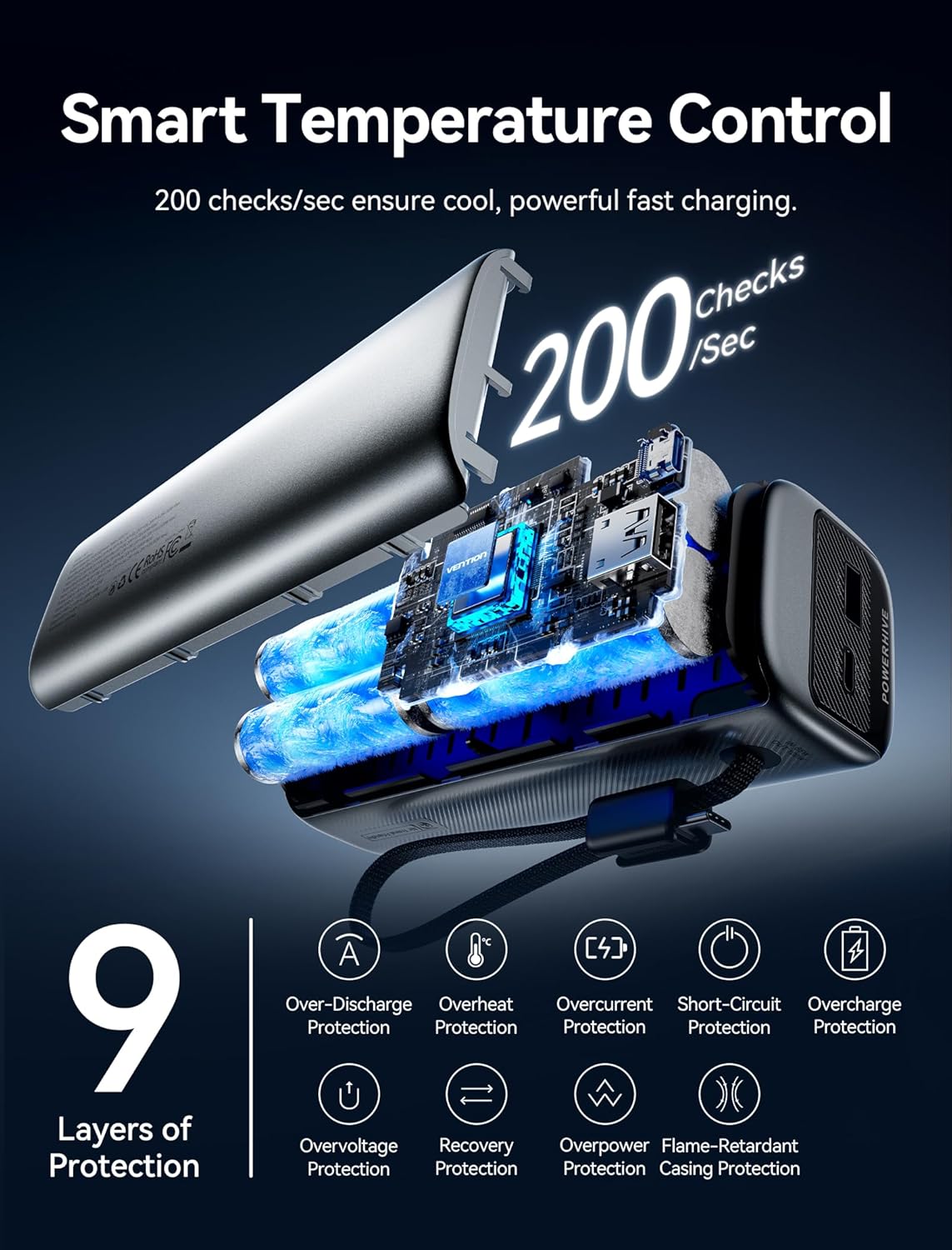
Image 2.2: Diagram showing smart temperature control and the 9 layers of protection for safe charging.
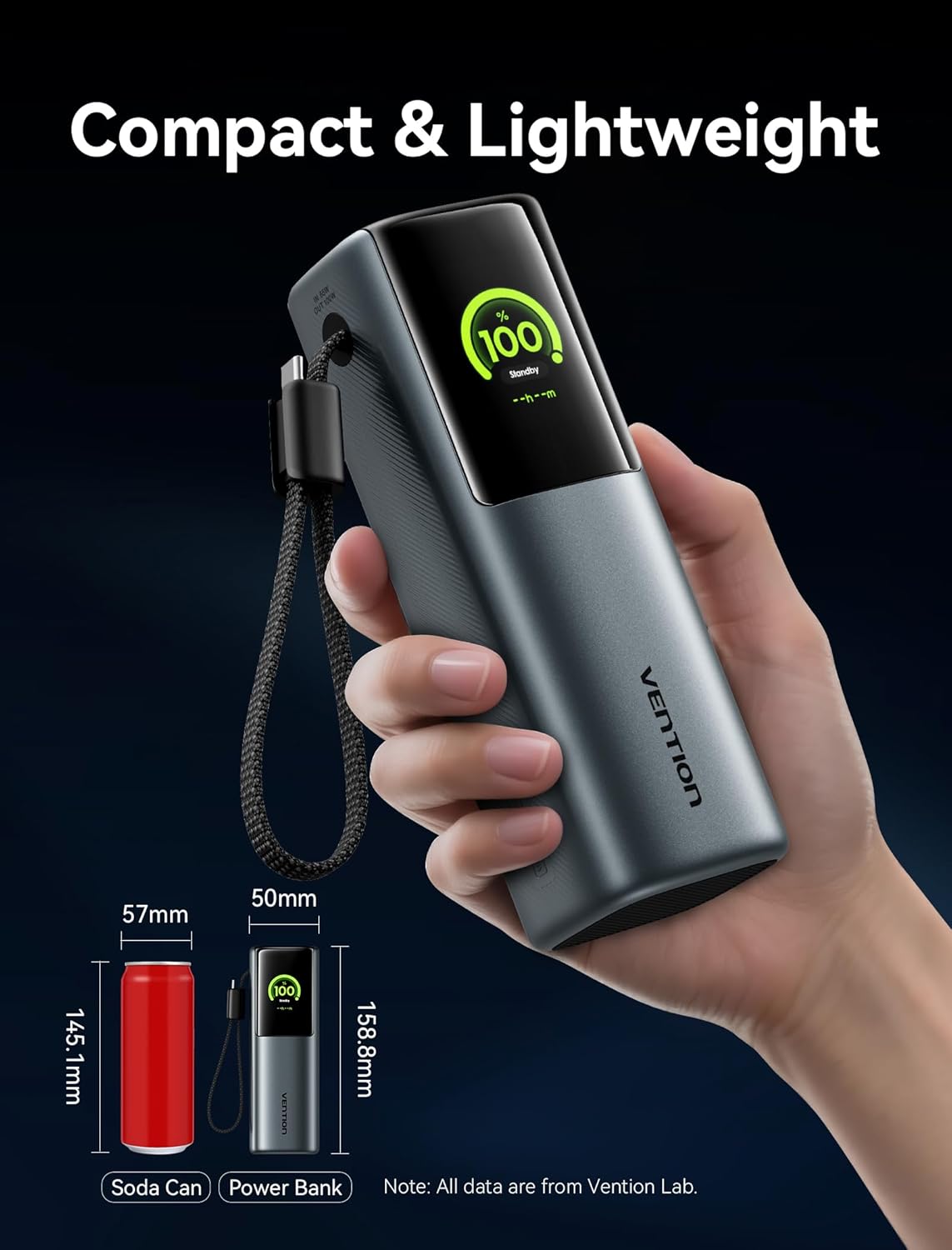
Image 2.3: The power bank's compact size, comparable to a soda can, demonstrating its portability.

Immaġni 2.4: Fuqview of device compatibility, including laptops, phones, game consoles, and low-current devices.
3. Kontenut tal-Pakkett
Jekk jogħġbok iċċekkja l-pakkett għall-oġġetti li ġejjin:
- VENTION Powerhive Laptop Power Bank (FKFH0)
- Integrated USB-C cables (2)
- Flannel storage pouch
- Manwal għall-Utent (dan id-dokument)
4. Setup
4.1 L-Iċċarġjar Inizjali tal-Power Bank
Before first use, fully charge your VENTION Powerhive power bank. Connect the power bank to a suitable power adapter (not included) using one of the integrated USB-C cables or an external USB-C cable. The digital display will show the charging progress.
4.2 Apparat li jgħaqqad
To charge your devices, simply connect them to the appropriate output port (USB-C1, USB-C2, or USB-A) on the power bank using their respective charging cables. The power bank will automatically detect the connected device and begin charging.
5. Istruzzjonijiet Operattivi
5.1 Iċċarġjar tat-Tagħmir Tiegħek
The VENTION Powerhive power bank supports charging up to three devices simultaneously. For optimal fast charging, ensure your device and cable support the power bank's output capabilities.
- Iċċarġjar ta' Apparat Uniku: Connect your device to any available USB-C or USB-A port. The power bank will deliver the maximum compatible power.
- Iċċarġjar ta' Apparat Multipli: Connect up to three devices to the USB-C1, USB-C2, and USB-A ports. The power bank will intelligently distribute the total 165W output.

Image 5.1: Charging a MacBook Pro using the power bank's high-speed USB-C output.

Image 5.2: Illustrates the capability to charge two laptops concurrently with distributed power.
5.2 Nifhmu d-Displej Diġitali
The TFT color display provides comprehensive real-time information:
- Livell tal-batterija: Juri l-bqija tal-batterija perċentwalitage.
- Status tal-iċċarġjar: Indicates input/output wattage, voltage, u kurrenti.
- Temperatura: Displays the internal temperature of the power bank.
- Ċikli tal-Iċċarġjar: Tracks the number of charging cycles the battery has undergone.
- Ħin Stima: Shows estimated time to full charge or discharge.

Image 5.3: Various display modes of the Smart TFT screen, showing battery, charging, and temperature data.

Immaġni 5.4: Eż.amples of interactive emoji indicators on the display, reflecting different operational states.
5.3 Linji Gwida dwar is-Sigurtà
The power bank is equipped with multiple safety protections. To ensure safe operation:
- Evita temperaturi estremi.
- Do not expose to water or excessive humidity.
- Żarmax jew tipprova ssewwi l-apparat.
- Uża biss kejbils tal-iċċarġjar u adapters kompatibbli.
- Żomm fejn ma jintlaħaqx mit-tfal.
5.4 Vidjo Uffiċjali tal-Prodott
Video 5.5: An official product video from Vention Official Store showcasing the Powerhive 20000mAh 165W Power Bank's features and design.
6. Manutenzjoni
To ensure the longevity and optimal performance of your power bank:
- Ħażna: Aħżen il-power bank f'post frisk u niexef 'il bogħod mix-xemx diretta u minn temperaturi estremi.
- Tindif: Use a soft, dry cloth to clean the exterior. Do not use liquid cleaners or aerosols.
- Kura tal-batterija: For best battery health, avoid completely draining the power bank frequently. Recharge it regularly, especially if it will be stored for an extended period.
- Borża Protettiva: Utilize the included flannel storage pouch to protect the power bank from scratches and minor impacts during travel.
7 Issolvi l-problemi
If you encounter issues with your VENTION Powerhive power bank, please refer to the following common solutions:
| Problema | Kawża Possibbli | Soluzzjoni |
|---|---|---|
| Il-bank tal-enerġija mhux qed jiċċarġja | Charging cable or adapter faulty; power bank fully charged; connection issue. | Try a different cable and adapter. Ensure connections are secure. Check display for charge status. |
| Apparat mhux jiċċarġja mill-bank tal-enerġija | Power bank battery low; device cable faulty; incompatible device; power bank in standby mode. | Recharge the power bank. Use a different device cable. Ensure device is compatible. Check power bank display for output. |
| Iċċarġjar bil-mod | Cable or adapter not supporting fast charging; multiple devices connected; device not supporting fast charging. | Use a compatible 5A/100W PD cable and adapter. Disconnect other devices. Verify device fast charging capability. |
| Display not working or showing errors | Software glitch; overheating; internal issue. | Disconnect all devices and cables, then reconnect. Allow power bank to cool down if hot. If issue persists, contact support. |
If the problem persists after attempting these solutions, please contact VENTION customer support for further assistance.
8. Speċifikazzjonijiet
| Karatteristika | Dettall |
|---|---|
| Dimensjonijiet tal-Prodott | 6.5 x 2.2 x 2 pulzieri |
| Piż tal-oġġett | 1.39 liri |
| Numru tal-Mudell | FKFH0 |
| Tip ta 'batterija | 4 batteriji ta' 9V (inklużi) |
| Kapaċità tal-batterija | 20000 mAh |
| Voltage | 3.7 Volts |
| Tip ta' Konnettur | USB Tip A, USB Tip C |
| Karatteristiċi Speċjali | Fast Charging, Digital Display, Emoji Animation, Integrated USB-C Cables |
| Manifattur | VENZZJONI |
| Data L-Ewwel Disponibbli | 13 ta’ Ġunju 2025 |
9. Garanzija u Appoġġ
For warranty information and customer support, please refer to the official VENTION webis-sit jew ikkuntattja lis-servizz tal-konsumatur tagħhom direttament. Żomm l-irċevuta tax-xiri tiegħek bħala prova tax-xiri għal kwalunkwe talba ta' garanzija.
VENTION Official Store: Visit VENTION Store on Amazon


