VENTION 27000 mAh Laptop Power Bank User Manual
Model: FKGH0
1. Introduzzjoni
Thank you for choosing the VENTION 27000 mAh Laptop Power Bank. This high-performance power bank is designed to provide reliable and fast charging for a wide range of devices, including laptops, smartphones, and other portable electronics. With its large capacity, multiple output ports, and smart TFT display, it is an ideal companion for business travel, commuting, and outdoor activities.
2. Informazzjoni dwar is-Sigurtà
Jekk jogħġbok aqra l-istruzzjonijiet kollha tas-sigurtà bir-reqqa qabel ma tuża dan il-prodott. Jekk ma ssegwix dawn l-istruzzjonijiet, dan jista' jirriżulta f'xokk elettriku, nar, jew korriment serju.
- Tesponix il-power bank għal temperaturi estremi ('il fuq minn 60°C/140°F jew taħt 0°C/32°F).
- Tiżżarmax, timmodifikax, jew issewwiex l-apparat int stess.
- Żomm 'il bogħod mill-ilma, l-umdità, u materjali fjammabbli.
- Twaqqax, tħallix impatt fuq, jew tissottomettix il-power bank għal vibrazzjonijiet qawwija.
- Armi l-power bank skont ir-regolamenti lokali. Tarmihx mal-iskart domestiku.
- Żomm fejn ma jintlaħaqx mit-tfal.
- Kun żgur li jkun hemm ventilazzjoni xierqa waqt l-iċċarġjar u l-ħatt.
3. Kontenut tal-Pakkett
Ivverifika li l-oġġetti kollha huma preżenti fil-pakkett tiegħek:
- VENTION 27000 mAh Laptop Power Bank (Model: FKGH0)
- USB-C to USB-C Charging Cable (external)
- Manwal għall-Utent
- Borża tal-bellus
4. Prodott Aktarview
Familiarize yourself with the components of your VENTION Power Bank:

Figure 4.1: VENTION 27000 mAh Laptop Power Bank. Shows the main unit with its digital display, integrated USB-C cable, and an additional USB-C to USB-C cable.
- Kejbil USB-C Integrat: Supports up to 140W output/input. Designed for durability with over 10,000 bend tests, also functions as a lanyard.
- Port USB-C2: Supports up to 100W output/input.
- Port USB-A: Jappoġġja output sa 60W.
- Wiri TFT Intelliġenti: Real-time monitoring of battery level, voltage, current, temperature, and charging cycles. Features interactive emoji animations.
- Buttuna tal-Qawwa: Jattiva d-displej u jibda l-iċċarġjar.
5. Setup
5.1 L-Iċċarġjar Inizjali tal-Power Bank
Before first use, fully charge your VENTION Power Bank. For optimal charging speed, use a power adapter that supports 100W or higher power delivery.
- Connect the integrated USB-C cable or the provided USB-C to USB-C cable to the power bank's USB-C port.
- Connect the other end of the cable to a compatible wall charger.
- The TFT display will show the charging status, including estimated time to full charge. A full charge with a 100W adapter takes approximately 2 hours.

Figure 5.1: Power Bank charging a MacBook Pro. Illustrates the power bank connected to a laptop, demonstrating its high-speed charging capability of up to 140W via the USB-C1 port.
6. Istruzzjonijiet Operattivi
6.1 Iċċarġjar tat-Tagħmir Tiegħek
The VENTION Power Bank supports charging up to three devices simultaneously.
- Iċċarġjar ta' Apparat Uniku:
- For maximum speed (up to 140W), use the integrated USB-C cable (USB-C1 port) to charge compatible laptops like MacBook Pro 16".
- The USB-C2 port provides up to 100W, suitable for laptops, tablets, and smartphones.
- The USB-A port provides up to 60W, ideal for smartphones and other USB-A compatible devices.
- Iċċarġjar ta' Apparat Multipli:
- Two Devices:
- USB-C1 + USB-C2: Up to 100W + 100W (200W total). Ideal for charging two laptops simultaneously.
- USB-C1 + USB-A: Up to 100W + 60W.
- USB-C2 + USB-A: Up to 24W total.
- Three Devices:
- USB-C1 + (USB-C2 + USB-A): Up to 100W + 24W total.
- Two Devices:
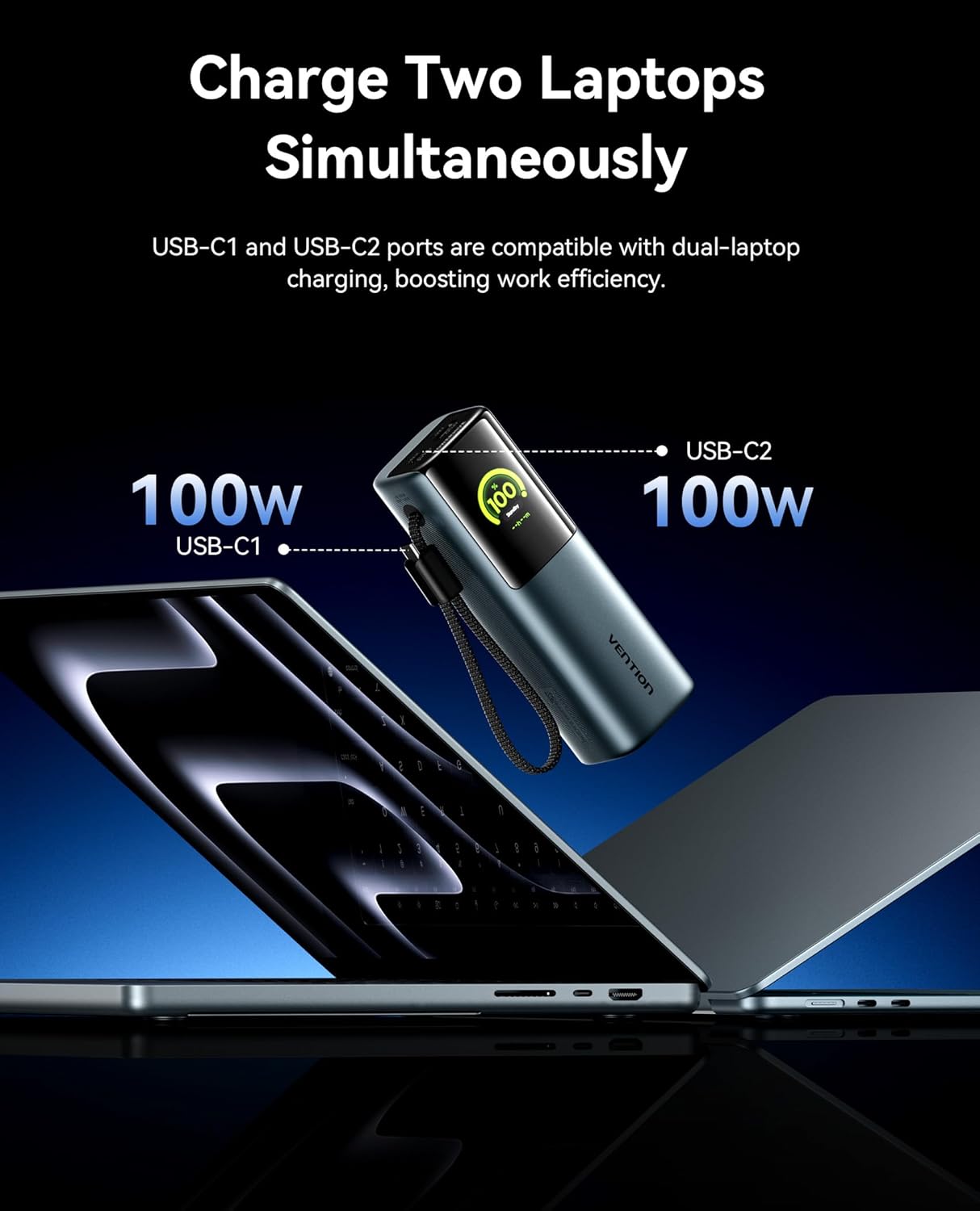
Figure 6.1: Charging two laptops simultaneously. This image demonstrates the power bank's capability to charge two laptops at 100W each using both USB-C ports, maximizing efficiency.

Figure 6.2: Charging three devices at once. The image shows the power bank connected to a laptop, a smartphone, and earbuds, illustrating its multi-device charging capability.
6.2 Smart TFT Display
The integrated TFT display provides comprehensive real-time information about the power bank's status.

Figure 6.3: Smart TFT Display. This image details the various data points shown on the display, including battery percentage, output power, estimated time to full charge, real-time power output, temperature monitoring, and battery cycle count.
- Livell tal-batterija: Juri l-bqija tal-batterija perċentwalitage.
- Voltage & Ampetà: Shows the real-time output voltage u kurrenti.
- Temperatura: Monitors the internal temperature of the power bank.
- Ċikli tal-Iċċarġjar: Tracks the number of charge/discharge cycles, indicating battery health.
- Ħin Stima: Provides an estimate of the time remaining for charging or discharging.
6.3 Interactive Emoji Animations
The power bank features unique emoji animations that provide visual cues for different operational states.

Figure 6.4: Interactive Emoji Animations. This image illustrates various emoji expressions displayed on the power bank, corresponding to different battery levels (low, medium, high), standby mode, and high-power charging/discharging.
- Wiri tal-Livell tal-Batterija: Emojis change based on battery percentage (e.g., sad for low, happy for high).
- Sleep/Standby Mode: Indicates the device is in a low-power state.
- Modalità ta' Protezzjoni tal-Batterija: Alerts to potential issues like overheating or over-discharge.
- High-Power Charging/Discharging: Indicates when the power bank is operating at over 90W.
6.4 Integrated Cable and Lanyard Functionality
The built-in USB-C cable serves a dual purpose as a convenient charging cable and a durable lanyard for easy portability.

Figure 6.5: Integrated Cable as Lanyard. This image shows a person holding the power bank by its integrated USB-C cable, demonstrating its use as a convenient carry strap.
- Pull out the integrated cable for instant fast charging.
- Use the cable as a lanyard to comfortably carry the power bank.
- The high-density braided jacket ensures durability, tested for over 10,000 bends.
7. Manutenzjoni
To ensure the longevity and optimal performance of your VENTION Power Bank, follow these maintenance guidelines:
- Naddaf il-barra b'ċarruta ratba u niexfa. Tużax kimiċi ħarxa jew materjali li joborxu.
- Aħżen il-power bank f'post frisk u niexef 'il bogħod mix-xemx diretta u minn temperaturi estremi.
- If storing for extended periods, charge the power bank to approximately 50-70% capacity every 3 months to preserve battery health.
- Evita li tiċċarġja l-batterija kompletament ta' spiss, għax dan jista' jnaqqas il-ħajja tagħha.
- Żomm il-portijiet ħielsa mit-trab u l-fdalijiet.
8 Issolvi l-problemi
If you encounter issues with your VENTION Power Bank, refer to the following common problems and solutions:
| Problema | Kawża Possibbli | Soluzzjoni |
|---|---|---|
| Il-bank tal-enerġija mhux qed jiċċarġja | Charging cable faulty; Wall adapter insufficient; Power bank fully charged. | Try a different USB-C cable and wall adapter. Ensure the adapter meets power requirements. Check the display for charge status. |
| Apparat mhux jiċċarġja mill-bank tal-enerġija | Power bank low on battery; Cable faulty; Device incompatible; Power bank in protection mode. | Recharge the power bank. Try a different charging cable. Ensure your device is compatible with the power bank's output. Check the display for error emojis. |
| Veloċità tal-iċċarġjar bil-mod | Cable not supporting fast charging; Device not supporting fast charging; Multiple devices connected. | Use the integrated USB-C cable or a high-quality PD-compatible cable. Ensure your device supports fast charging. Disconnect other devices for maximum speed to a single device. |
| Il-wiri ma jixgħelx | Power bank fully discharged; Power button not pressed correctly. | Connect the power bank to a charger. Press the power button briefly to activate the display. |
| Il-power bank iħoss sħun waqt l-użu | Normal operation during high-power charging/discharging; Overheating. | Slight warmth is normal. If it becomes excessively hot or displays an overheating emoji, disconnect devices and allow it to cool down in a well-ventilated area. |
9. Speċifikazzjonijiet
| Karatteristika | Dettall |
|---|---|
| Numru tal-Mudell | FKGH0 |
| Kapaċità tal-batterija | 27000 mAh |
| Tip ta 'batterija | Lithium-ion |
| Max Output Power | 200W (Totali) |
| USB-C1 Output (Integrated Cable) | Sa 140W |
| Output USB-C2 | Sa 100W |
| Output USB-A | Sa 60W |
| Tip ta 'Wiri | Smart TFT Display with Emoji Animation |
| Dimensjonijiet (L x W x H) | 21.8 x 6.2 x 11.2 ċm (madwar 8.58 x 2.44 x 4.41 pulzieri) |
| Piż | 900 gramma (madwar 1.98 libbra) |
| Karatteristiċi Speċjali | Fast Charging, Integrated USB-C Cable/Lanyard, Real-time Display, Emoji Animations |
10. Garanzija u Appoġġ
VENTION products are designed and manufactured to the highest quality standards. For information regarding warranty coverage, technical support, or service inquiries, please contact VENTION customer support through the retailer where you purchased the product or visit the official VENTION websit.
Jekk jogħġbok żomm il-prova tax-xiri tiegħek għal pretensjonijiet ta' garanzija.


