Introduzzjoni
This manual provides essential information for setting up, operating, and maintaining your Thunderobot Zero 18 Pro 5090 Gaming Laptop. Designed for high-performance gaming and demanding creative tasks, this laptop features an Intel Core Ultra 9 275HX processor, NVIDIA GeForce RTX 5090 graphics, and an 18-inch QHD+ 240Hz display. Please read this manual thoroughly to ensure optimal performance and longevity of your device.
X'hemm fil-Kaxxa
- THUNDEROBOT Zero 18 Laptop
- Adapter tal-Enerġija (270W)
- Manwal għall-Utent (dan id-dokument)
Setup
Power-Up Inizjali
Before first use, connect the provided 270W power adapter to the laptop's power input port and a wall outlet. Press the power button to start the laptop. The system will guide you through the initial Windows 11 Home setup process.
Konnessjoni Periferali
Uża l-portijiet varji għal apparati esterni:
- USB Tip A: For mice, keyboards, and other USB accessories.
- USB Type-C (Thunderbolt 5): For high-speed data transfer, external displays, and power delivery.
- HDMI: Qabbad ma' monitors jew televiżjonijiet esterni.
- RJ-45: Għal konnessjoni tal-internet bil-fili.
- Port tal-awdjo: Għal headphones jew kelliema esterni.
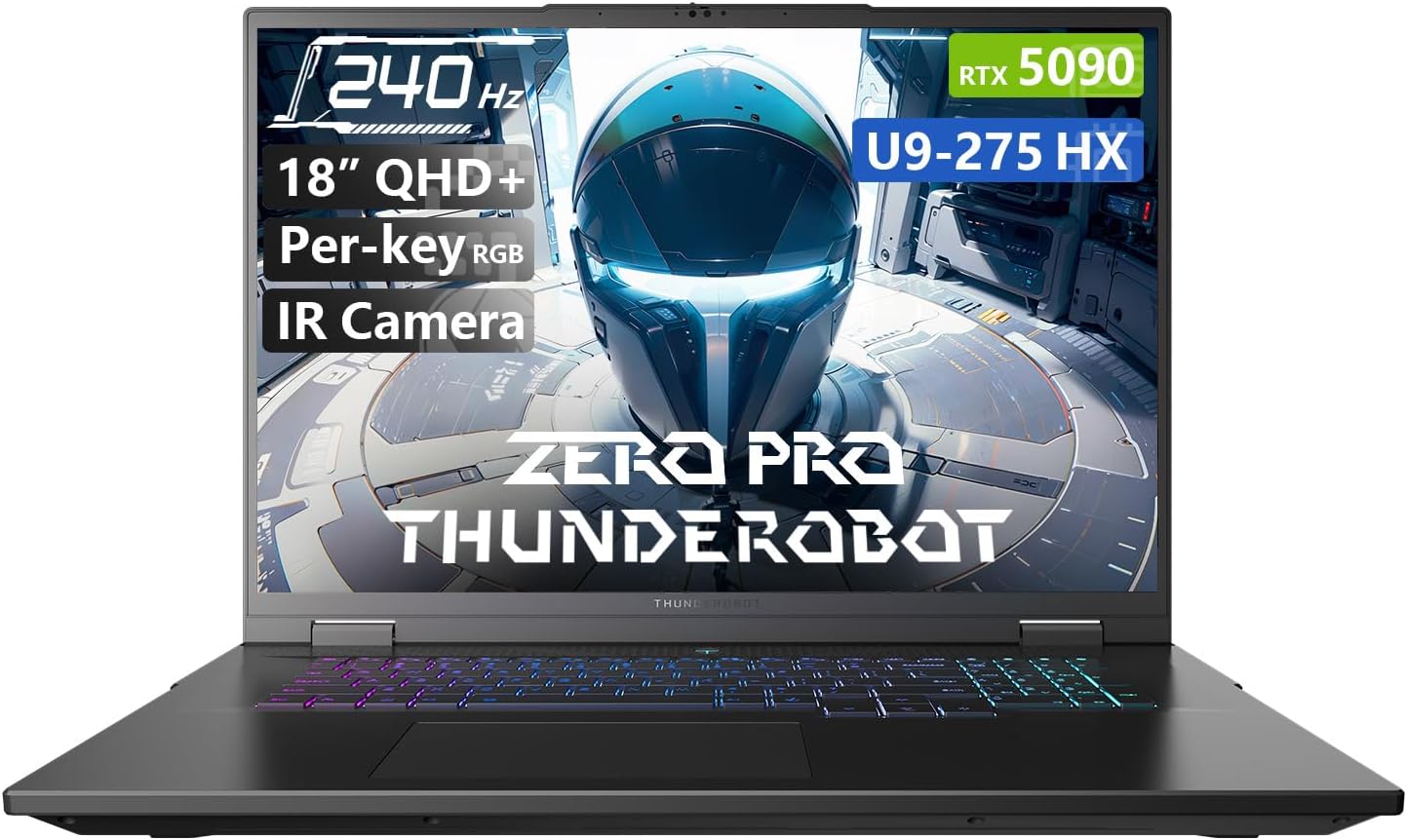
Figure 1: Thunderobot Zero 18 Pro 5090 Gaming Laptop. The image shows the laptop open, revealing the screen with product highlights and the RGB backlit keyboard.
Karatteristiċi Matulview
Teknoloġija tal-Wiri
The laptop features an 18-inch QHD+ (2560x1600 pixels) Bionic Hummingbird Eye-Care display with a 240Hz refresh rate and 4ms response time. This display offers a wide color gamut, enhanced contrast, and anti-glare/anti-reflection properties for visual clarity and reduced eye strain.
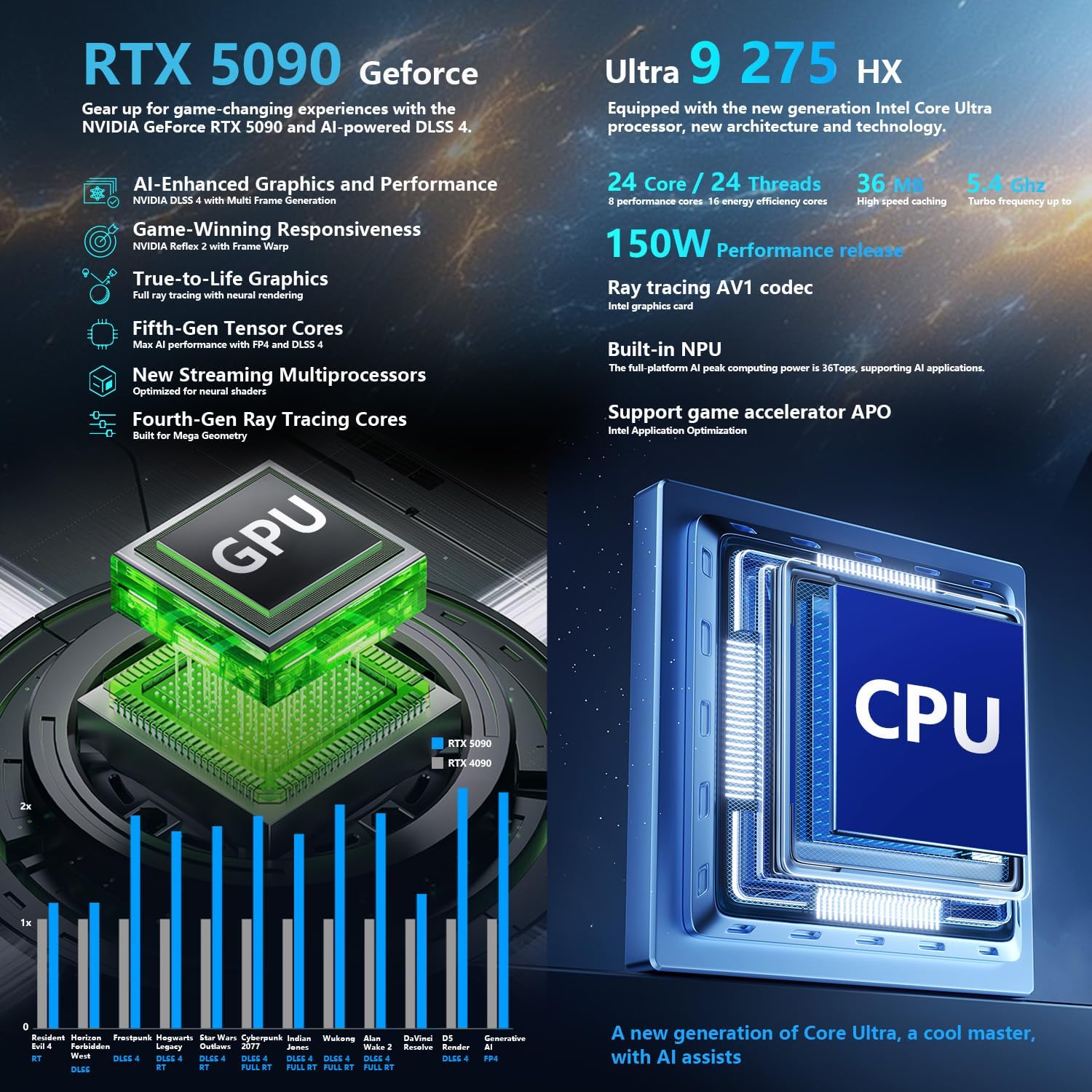
Figure 2: The 18-inch QHD+ Bionic Hummingbird Eye-Care Display, highlighting its 240Hz refresh rate and 2560x1600 resolution.
Core Performance
Equipped with an Intel Core Ultra 9 275HX processor (24 Cores, 24 Threads, up to 5.40GHz) and an NVIDIA GeForce RTX 5090 Laptop GPU, the Zero 18 Pro delivers high-end processing and graphics capabilities. It includes 32GB of DDR5 RAM and a 1TB PCIe M.2 SSD for rapid data access and storage.

Figure 3: Visual representation of the laptop's powerful Intel Core Ultra 9 275HX CPU and NVIDIA GeForce RTX 5090 GPU.
Sistema Avvanzata tat-Tkessiħ
The laptop incorporates a robust 270W thermal design with 3x Night Owl fans and 7x high-efficiency heat pipes, featuring 338 pieces of 0.075mm ultra-thin copper fins. This architecture is designed for efficient heat dissipation during intensive use.

Figure 4: Illustration of the advanced heat dissipation system, including Night Owl fans and high-efficiency heat pipes.
Konnettività u Portijiet
The Zero 18 Pro offers comprehensive connectivity options:
- 3 x Superspeed USB Type-A ports
- 2 x Superspeed USB Type-C ports (including Thunderbolt 5)
- 1 x port HDMI 2.1
- 1 x RJ-45 Ethernet port
- 1 x Port tal-Awdjo (3.5mm)
- Wi-Fi 6E and Bluetooth for wireless connectivity
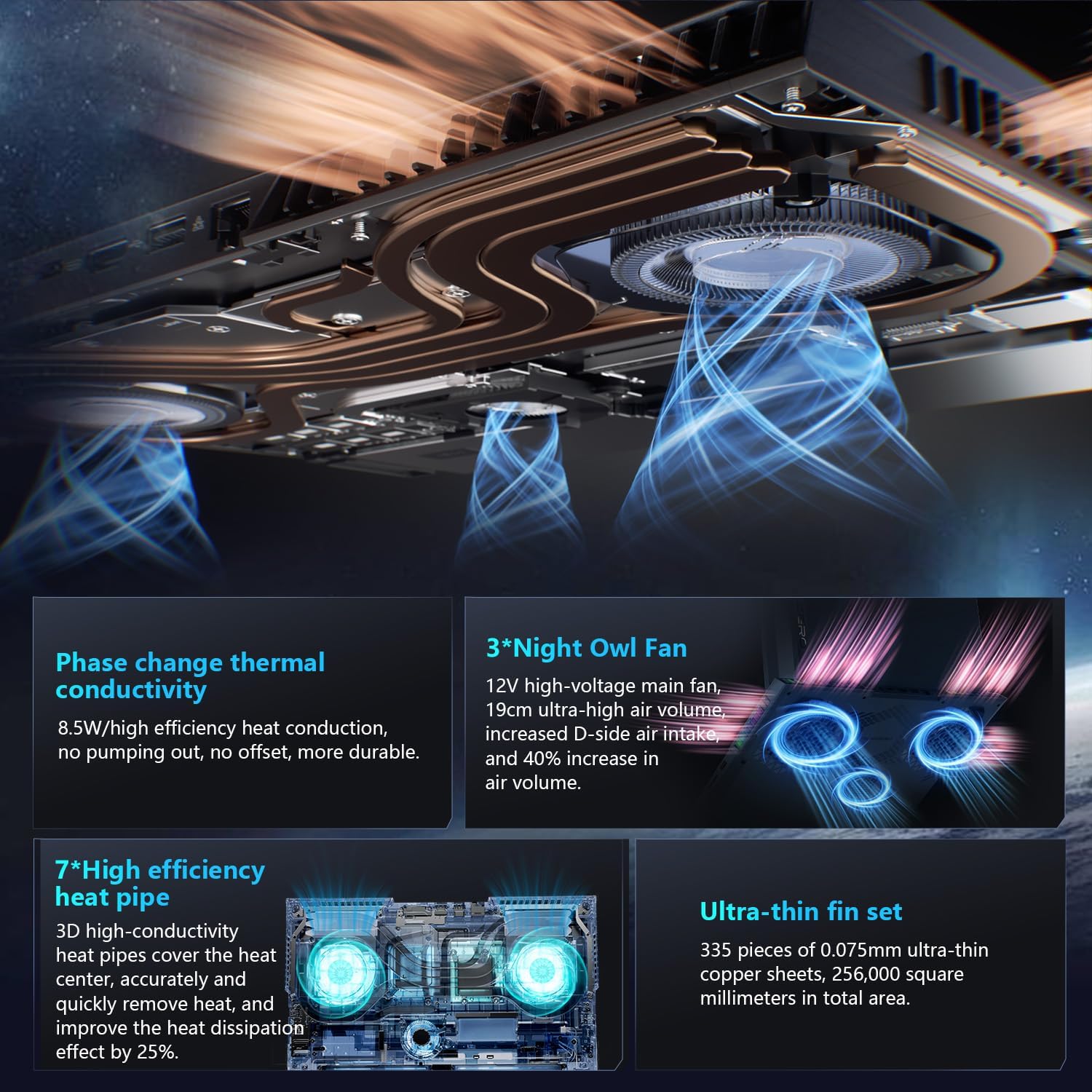
Figura 5: Aktarview of the laptop's rich interfaces and ports for easy expansion and connectivity.
Keyboard and Camera
The laptop features a Per-Key RGB backlit keyboard with an independent numeric keypad. An FHD IR Camera is integrated for secure login and video communication.
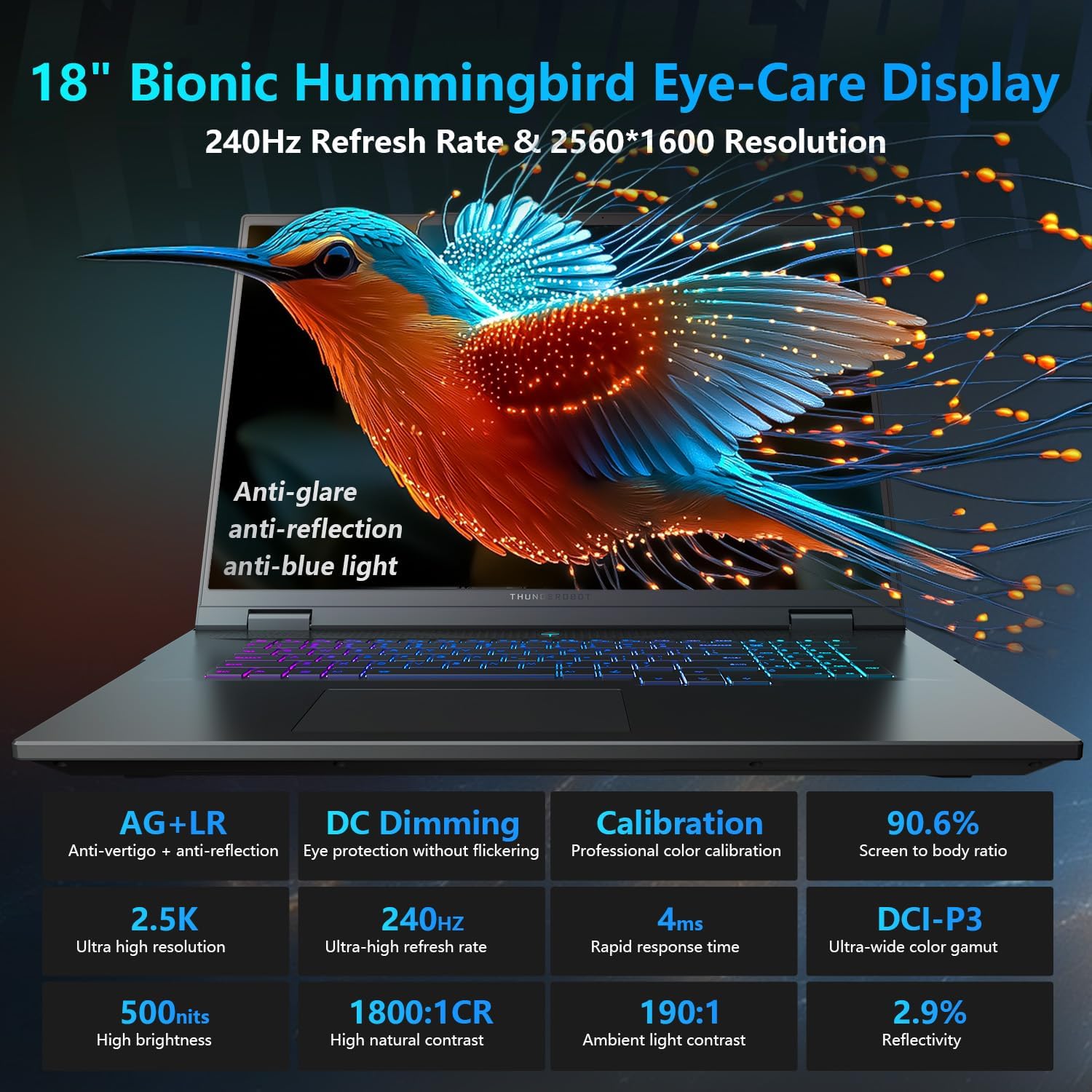
Figure 6: The Per-Key RGB backlit keyboard with dedicated keys for performance and cooling mode switching.
Tħaddim tal-Laptop
Modi ta' Prestazzjoni
The Thunderobot Control Center software allows you to switch between various performance modes: Quiet Mode, Balance Mode, and Turbo Mode. These modes adjust CPU/GPU frequencies and fan speeds to optimize for quiet operation, power saving, or maximum performance. Access these settings via the dedicated shortcut key (Fn+Space) or the Control Center application.

Figure 7: The AI Intelligent Control Center provides performance tuning, intelligent lighting adjustment, and comprehensive system customization.
Issettjar tal-Wiri u l-Awdjo
Adjust display settings such as resolution, refresh rate, and color calibration through Windows display settings or the NVIDIA Control Panel. The integrated 4-speaker system with Smart AMP and Nahimic technology provides high-quality audio. Adjust audio settings via the Windows Sound settings or the Nahimic audio software.
Personalizzazzjoni tat-Tastiera
The Per-Key RGB keyboard lighting can be customized using the Thunderobot Control Center. You can select various lighting effects and colors to personalize your experience.
Video 1: Demonstration of the Thunderobot RGB lighting features on the keyboard and chassis.
Manutenzjoni
Tindif
Regularly clean the screen with a soft, lint-free cloth and a screen-safe cleaning solution. Use compressed air to clear dust from the keyboard and ventilation grilles. Avoid using harsh chemicals or abrasive materials.
Aġġornamenti tas-Software
Keep your Windows operating system, drivers, and firmware updated to ensure optimal performance and security. Check the Thunderobot support websit għall-aħħar rilaxxi tas-sewwieqa.
Storage and RAM Upgrades
The laptop is designed for easy access to internal components for potential upgrades. However, please note that upgrading RAM or adding a second SSD may void the product warranty. Consult with Thunderobot customer service before performing any internal upgrades.
Issolvi l-problemi
- Ebda Qawwa: Kun żgur li l-adapter tal-enerġija huwa konness sew kemm mal-laptop kif ukoll ma' sokit tal-enerġija li jaħdem.
- Kwistjonijiet tal-Wiri: If the screen is blank or flickering, try connecting an external monitor to verify if the issue is with the laptop's display or graphics card. Update graphics drivers.
- Is-sħana żejda: Ensure ventilation grilles are clear of obstructions. Use the Control Center to activate Turbo Mode for maximum cooling during intense tasks.
- Prestazzjoni Lag: Close unnecessary applications, check for background processes, and ensure drivers are up to date. Adjust performance modes in the Control Center.
Speċifikazzjonijiet
| Karatteristika | Dettall |
|---|---|
| Isem tal-Mudell | ZERO 18 Pro |
| Daqs tal-Iskrin | 18 Pulzier |
| Riżoluzzjoni tal-Iskrin | 2560 x 1600 pixel (QHD+) |
| Riżoluzzjoni Massima tal-Iskrin | 2560x1600 Pixel |
| Proċessur | Intel Core Ultra 9 275HX (up to 5.4 GHz, 24 Cores) |
| RAM | 32 GB DDR5 (4800 MHz) |
| Hard Drive | 1 TB SSD (PCIE x 4) |
| Koproċessur tal-Grafika | GeForce RTX 5090 |
| Sistema Operattiva | Windows 11 Home |
| Tip bla fili | 802.11ax (Wi-Fi 6E) |
| Piż tal-oġġett | 15 liri |
| Dimensjonijiet tal-Prodott | 16.04 x 11.78 x 1.41 pulzieri |
Garanzija u Appoġġ
Every Thunderobot laptop includes a 12-month warranty, offering expert support, thorough diagnostics, and genuine parts if a repair is needed. A 90-day warranty is also provided on all warranty replacement parts, ensuring hassle-free repairs. Your complete satisfaction is our commitment.
Figure 8: Thunderobot's commitment to warranty and service for their laptops.


