Introduzzjoni
This manual provides detailed instructions for the installation, operation, and maintenance of your Commercial Electric 12-inch LED Flush Mount Smart CCT and RGB Selectable Light. This fixture is designed to provide versatile lighting options, including adjustable color temperature (CCT), RGB color selection, and a night light feature, all powered by the Hubspace smart home platform. Please read this manual thoroughly before installation and use to ensure proper function and safety.
Informazzjoni dwar is-Sigurtà
- TWISSIJA: Riskju ta' xokk elettriku. Skonnettja l-provvista tal-enerġija mis-circuit breaker jew mill-kaxxa tal-fjużijiet qabel l-installazzjoni jew is-servizz.
- Dan il-prodott għandu jiġi installat skont il-kodiċi tal-installazzjoni applikabbli minn persuna familjari mal-kostruzzjoni u t-tħaddim tal-prodott u l-perikli involuti.
- Use only with 120V, 60Hz circuits.
- Tippruvax timmodifika l-apparat. Kwalunkwe modifika tista' tħassar il-garanzija u toħloq periklu għas-sigurtà.
- Kun żgur li l-konnessjonijiet kollha huma siguri u iżolati kif suppost.
- Tinstallax ħdejn sorsi ta' sħana jew f'żoni b'umdità eċċessiva.
Setup u Installazzjoni
Segwi dawn il-passi biex tinstalla kif suppost l-apparat tad-dawl LED tiegħek li jitwaħħal mal-ħajt.
- Ipprepara għall-Installazzjoni: Turn off power at the circuit breaker. Ensure the power is completely off before proceeding.
- Installazzjoni tal-Bracket tal-Immuntar: Waħħal il-bracket tal-immuntar mal-kaxxa tal-junction billi tuża l-viti pprovduti. Kun żgur li huwa mwaħħal sew.
- Konnessjonijiet tal-Wiring: Connect the fixture's wires to the household wiring.
- Qabbad il-wajer iswed mill-apparat tad-dawl mal-wajer iswed (sħun) mill-kaxxa tal-junction.
- Qabbad il-wajer abjad mill-apparat tad-dawl mal-wajer abjad (newtrali) mill-kaxxa tal-junction.
- Qabbad il-wajer tal-ert aħdar jew tar-ram mikxuf mill-apparat tad-dawl mal-wajer tal-ert mill-kaxxa tal-junction.
- Sikura l-konnessjonijiet kollha bil-ġewż tal-wajer u tejp elettriku.
- Waħħal l-Apparat mal-Bracket: Carefully align the fixture with the mounting bracket and secure it using the provided screws. Ensure the fixture is flush with the ceiling.
- Irrestawra l-Enerġija: Ladarba l-installazzjoni titlesta, restawra l-enerġija fis-circuit breaker.
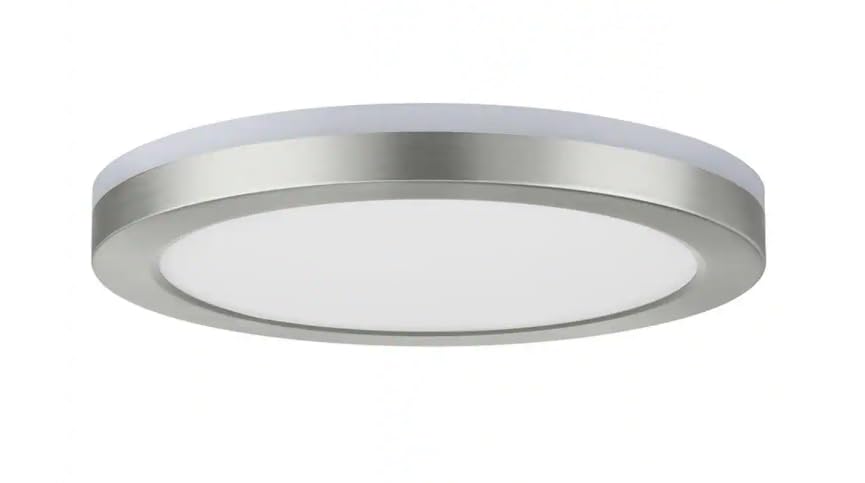
Image: The Commercial Electric 12-inch LED Flush Mount Light, showcasing its brushed nickel finish and low-profile design when installed on a ceiling.
Istruzzjonijiet Operattivi
This smart flush mount light is powered by Hubspace, allowing for advanced control via the Hubspace app or voice assistants.
1. Connecting to Hubspace
- Download the Hubspace App: Fittex għal "Hubspace" in your mobile device's app store and download the application.
- Oħloq Kont: Open the app and follow the prompts to create a new account or log in to an existing one.
- Żid Apparat: In the Hubspace app, tap the "+" icon to add a new device.
- Power Cycle the Light: Turn the light fixture off and on three times at the wall switch. The light should begin to blink, indicating it's in pairing mode.
- Tqabbil Komplet: Follow the in-app instructions to connect the light to your Wi-Fi network. Ensure your Wi-Fi network is 2.4GHz.
2. Light Control Features
- Main Light (CCT Selectable): Adjust the color temperature of the main light from warm white to cool white (e.g., 2700K to 5000K) using the Hubspace app. You can also dim the brightness.
- Dawl ta' wara RGB: Select from a wide spectrum of colors for the RGB backlight feature, creating ambient lighting effects. Control color and brightness via the app.
- Dawl bil-lejl: Activate the dedicated night light mode for a soft, low-intensity illumination, ideal for nighttime use.
- Skedar u Xeni: Use the Hubspace app to set schedules for your light to turn on/off or change settings automatically. Create custom scenes for different moods or activities.
3. Kontroll tal-Vuċi
Once connected to Hubspace, you can link your light to compatible voice assistants like Google Home or Amazon Alexa for hands-free control.
- Google Home: Link your Hubspace account in the Google Home app. Then use commands like, "Hey Google, turn on the ceiling light," or "Hey Google, set the ceiling light to red."
- Amazon Alexa: Enable the Hubspace skill in the Alexa app. Use commands such as, "Alexa, dim the flush mount," or "Alexa, change the flush mount to blue."
Manutenzjoni
- Tindif: Kun żgur li l-elettriku jkun mitfi qabel ma tnaddaf. Imsaħ l-apparat b'ċarruta ratba, niexfa, jew kemxejn imxarrba.amp drapp. Tużax tindif jew solventi li joborxu.
- Lonġevità tal-LED: The integrated LED components are designed for long life and do not require replacement.
Issolvi l-problemi
| Problema | Kawża Possibbli | Soluzzjoni |
|---|---|---|
| Id-dawl ma jixgħelx. | No power; loose wiring; faulty switch. | Iċċekkja s-circuit breaker. Kun żgur li l-konnessjonijiet tal-wajers kollha huma sikuri. Ittestja s-swiċċ tal-ħajt. |
| Id-dawl jitteptep jew jitbaxxa b'mod mhux mistenni. | Loose wiring; incompatible dimmer switch (if applicable); Wi-Fi interference. | Check wiring. Ensure you are using the Hubspace app for dimming. Check Wi-Fi signal strength. |
| Ma nistax nikkonnettja mal-app Hubspace. | Incorrect Wi-Fi network (not 2.4GHz); light not in pairing mode; incorrect password. | Ensure your Wi-Fi is 2.4GHz. Power cycle the light to enter pairing mode. Double-check Wi-Fi password. |
| Il-kontroll tal-vuċi mhux qed jaħdem. | Hubspace account not linked; incorrect device name; internet connectivity issues. | Verify Hubspace account is linked to your voice assistant. Use the exact device name. Check internet connection. |
Speċifikazzjonijiet
- Ditta: Kummerċjali elettriċi
- Numru tal-Mudell: 1011101171
- Dimensjonijiet tal-Prodott: 12 x 12 x 1.33 pulzieri
- Piż tal-oġġett: 3 liri
- Materjal: Plastik
- Stil: Moderna
- Formola ta' Tagħmir tad-Dawl: Ceiling (Flush Mount)
- Tip ta' Kamra: Bedroom, Living Room, Office, Bathroom, etc.
- Sors tal-Enerġija: Hardwired (120V, 60Hz)
- Pjattaforma intelliġenti: Hubspace
- Karatteristiċi: Smart CCT (Color Correlated Temperature) Selectable, RGB Color, Night Light
Garanzija u Appoġġ
This Commercial Electric product is backed by a manufacturer's warranty. For specific warranty details, please refer to the warranty card included with your product or visit the Commercial Electric website. For technical support, troubleshooting assistance, or to inquire about replacement parts, please contact Commercial Electric customer service. Keep your purchase receipt for warranty claims.


