1. Introduzzjoni
The Machenike KG98 is a versatile mechanical keyboard designed for various applications, including gaming, typing, and general computer use across Windows and Mac operating systems. It features a compact 98-key layout, tri-mode connectivity (Bluetooth, 2.4GHz wireless, and wired USB-C), hot-swappable switches, and customizable RGB backlighting. This manual provides detailed instructions for setting up, operating, and maintaining your KG98 keyboard to ensure optimal performance and longevity.
2. Kontenut tal-Pakkett
Jekk jogħġbok ivverifika li l-oġġetti kollha elenkati hawn taħt huma inklużi fil-pakkett tiegħek:
- Machenike KG98 Mechanical Keyboard
- Kejbil USB (Tip-Ċ)
- 2.4GHz Wireless Dongle (typically stored in the keyboard)
- Keycap Puller
- Extra 2 Grey Pre-lubed Linear Switches
- Manwal għall-Utent (dan id-dokument)
3. Prodott Aktarview
The Machenike KG98 keyboard integrates several features for enhanced user experience and customization.

Immaġni: Quddiem view of the Machenike KG98 Mechanical Keyboard, showcasing its 98-key layout and RGB lighting.
Karatteristiċi ewlenin:
- Konnettività Tri-Modalità: Supports Bluetooth 5.0, 2.4GHz wireless, and wired USB-C connections for versatile device compatibility.
- Swiċċijiet li jistgħu jinbidlu bis-sħana: Allows for easy replacement of switches without soldering, enabling personalized typing feel.
- Pre-lubed Linear Switches: Equipped with factory-lubed linear switches for smooth and consistent keystrokes.
- Dawl ta' wara RGB: Features 16.8 million colors and various adjustable lighting effects.
- Disinn Kompatt ta' 98-Key: Offers a full-sized typing experience while saving desk space.
- Multi-functional Toggle Switch: Provides quick control over volume, mute, and RGB lighting modes.
- Disinn Ergonomiku: Gasket structure and PCB single-key slotting design enhance typing comfort and reduce noise.
- Batterija fit-tul: Built-in high-capacity battery for extended wireless use.

Image: Diagram illustrating key features such as tri-mode connectivity, 8000mAh battery, RGB backlight, 98 keys, advanced structure, PBT keycaps, hot-swappable switches, and multifunction toggle switch.
Struttura Interna:
The KG98 incorporates a premium 5-layer acoustic filling and GASKET design for improved sound and feel.

Immaġni: Splodiet view diagram showing the 5-layer acoustic filling components: Keycaps, Switches, Top Case, Flex-Cut PC Positioning Plate, Sandwich Foam, IXPE Switch Pad, PET Acoustic Mat, Per-Key Flex-Cut PCBA Board, Damping Bottom Foam, Silicone Base Pad, Bottom Shell, and Aluminum-Alloy Counterweight.
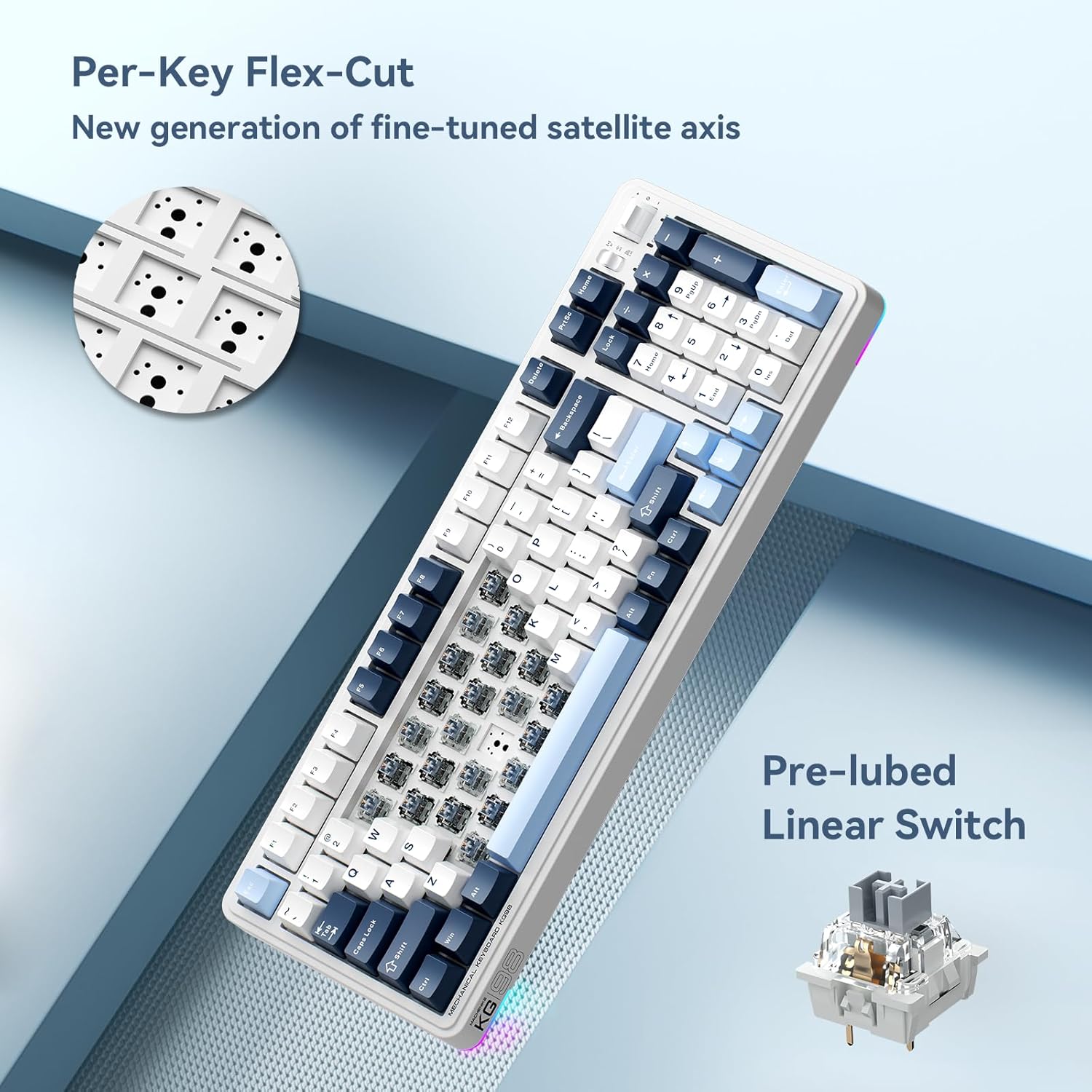
Immaġni: Close-up view of the Per-Key Flex-Cut design for enhanced acoustic performance and a detailed view of a pre-lubed linear switch.
Tipi ta' swiċċ:
The KG98 is compatible with various linear switch types, offering different actuation forces and travel distances.
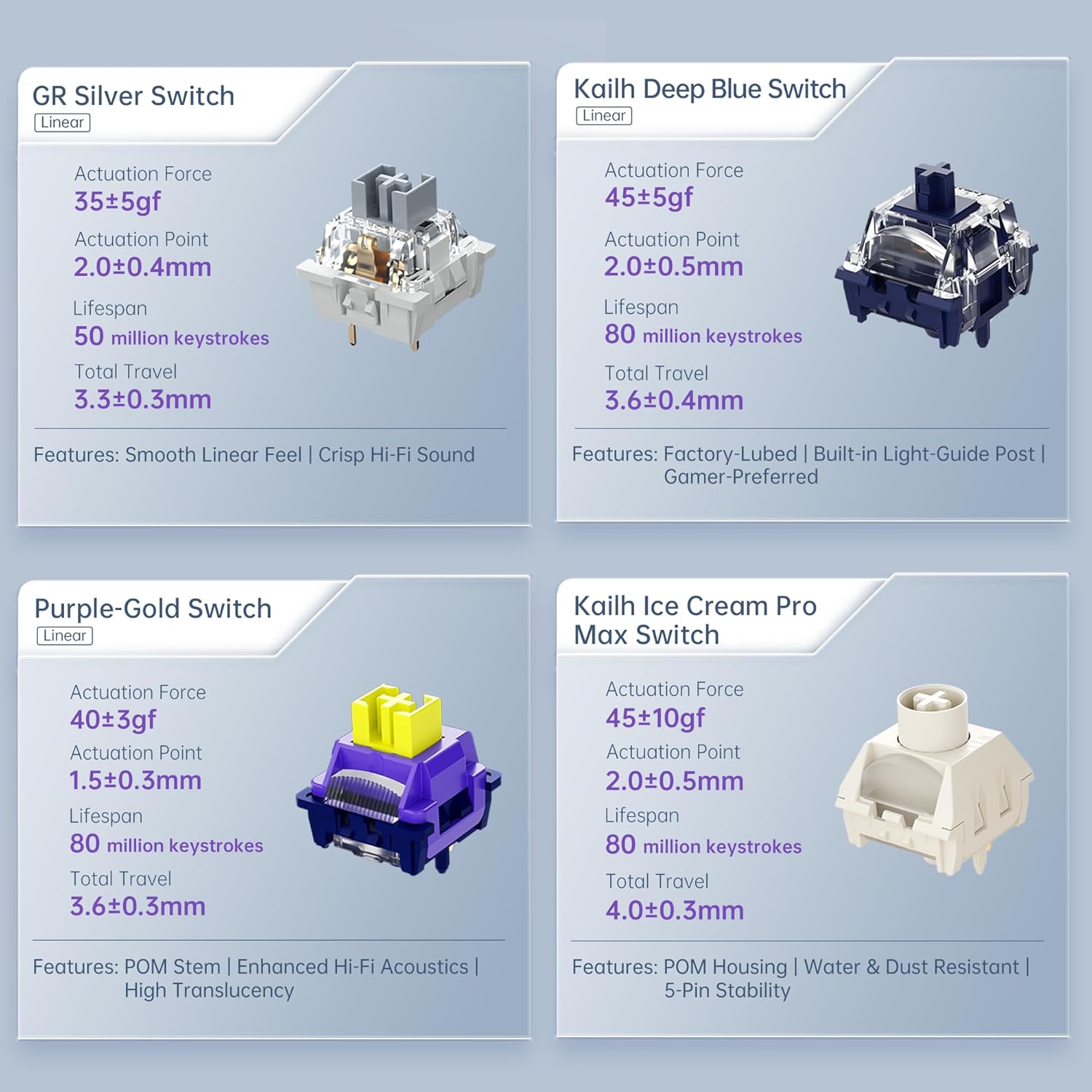
Image: Comparison of different linear switch types including GR Silver, Kailh Deep Blue, Purple-Gold, and Kailh Ice Cream Pro Max, detailing their actuation force, actuation point, lifespan, and total travel.
4. Setup
4.1 Iċċarġjar inizjali
Before first use, connect the keyboard to a USB power source using the provided USB-C cable to ensure it is fully charged. The charging indicator will typically show the charging status and turn off or change color when fully charged.
4.2 Modi ta' Konnettività
The KG98 supports three connection modes: Wired (USB-C), 2.4GHz Wireless, and Bluetooth 5.0. Use the toggle switch located on the top right side of the keyboard to select your desired mode.

Image: Close-up of the multifunction toggle switch and the tri-mode connectivity selector switch on the top right of the keyboard.
4.2.1 Wired Mode (USB-C)
- Set the mode switch on the keyboard to the 'Wired' or 'USB' position.
- Connect the USB-C cable to the keyboard and the other end to your computer's USB port.
- The keyboard will be recognized automatically by your operating system.
4.2.2 Modalità bla fili ta' 2.4GHz
- Locate the 2.4GHz USB dongle, typically stored in a slot on the keyboard.
- Set the mode switch on the keyboard to the '2.4G' position.
- Ipplaggja l-USB dongle f'port USB disponibbli fuq il-kompjuter tiegħek.
- It-tastiera għandha tikkonnettja awtomatikament.
4.2.3 Modalità Bluetooth
- Set the mode switch on the keyboard to the 'BT' position.
- The keyboard will enter pairing mode (an indicator light may flash).
- Fuq l-apparat tiegħek (kompjuter, tablet, smartphone), iftaħ is-settings tal-Bluetooth.
- Fittex għal available devices and select 'Machenike KG98' (or similar name).
- Segwi kwalunkwe prompts fuq l-iskrin biex tlesti l-proċess ta 'tqabbil.
5. Istruzzjonijiet Operattivi
5.1 Standard Key Functions
The KG98 features a standard 98-key layout, including a numeric keypad, function row, and navigation keys. All keys operate as labeled in their default configuration.
5.2 Kontroll tad-Dawl ta' Wara RGB
The keyboard offers 16.8 million colors and multiple dynamic RGB lighting effects. Use the dedicated function keys or the multi-functional toggle switch to cycle through presets and adjust brightness.

Image: The Machenike KG98 keyboard displaying its vibrant 16.8 million color RGB backlighting.
5.3 Multi-functional Toggle Switch
The toggle switch located on the top right of the keyboard provides quick access to media controls and lighting adjustments:
- Kontroll tal-Volum: Push the toggle up or down to adjust the system volume.
- Ixekkel/Ixekkel: Press the toggle switch inwards to mute or unmute audio.
- RGB Mode Cycle: Press and hold the toggle switch to cycle through different RGB lighting effects.
5.4 Hot-Swapping Switches and Keycaps
The KG98 features hot-swappable sockets, allowing you to change mechanical switches without soldering. You can also replace keycaps to customize the keyboard's appearance.
- Tneħħija tal-Keycaps: Use the provided keycap puller to gently grip and lift keycaps straight up.
- Tneħħija tas-Swiċċijiet: Use a switch puller (not always included, but compatible with the provided keycap puller for some designs) to carefully unclip and pull the switch straight up from its socket.
- Installazzjoni ta' Swiċċijiet: Align the pins of the new switch with the holes on the PCB. Gently push the switch down until it clicks into place. Ensure pins are not bent.
- Installazzjoni tal-Keycaps: Allinja l-għatu taċ-ċwievet maz-zokk tas-swiċċ u agħfas 'l isfel sew sakemm ikun bilqiegħda.
6. Manutenzjoni
Regular maintenance helps preserve the keyboard's functionality and appearance.
- Tindif tal-Għotjien taċ-Ċwievet: Remove keycaps using the keycap puller. Clean them with a mild soap solution and a soft cloth, then rinse and dry thoroughly before reattaching.
- Tindif tal-Korp tat-Tastiera: Use a soft, dry cloth to wipe down the keyboard's surface. For stubborn dirt, a slightly damp Jista' jintuża drapp, biex tiżgura li l-ebda likwidu ma jidħol fit-tastiera.
- Tneħħija tat-Trab: Uża arja kkompressata biex tneħħi t-trab u l-fdalijiet minn bejn il-keycaps u s-swiċċijiet.
- Ħażna: Meta ma tkunx qed tużaha għal perjodi twal, aħżen it-tastiera f'post niexef u frisk 'il bogħod mix-xemx diretta.
7 Issolvi l-problemi
If you encounter issues with your Machenike KG98 keyboard, refer to the following common problems and solutions:
| Problema | Kawża Possibbli | Soluzzjoni |
|---|---|---|
| It-tastiera ma tirrispondix (bil-fili) | Loose cable connection, incorrect mode selected, faulty USB port. | Ensure USB-C cable is securely connected. Check if the mode switch is set to 'Wired'. Try a different USB port on your computer. |
| Keyboard not responding (2.4GHz/Bluetooth) | Low battery, incorrect mode, dongle not plugged in (2.4GHz), not paired (Bluetooth), interference. | Charge the keyboard. Ensure the mode switch is set correctly ('2.4G' or 'BT'). For 2.4GHz, ensure dongle is plugged in. For Bluetooth, re-pair the device. Move closer to the receiver or reduce interference. |
| Id-dawl RGB mhux qed jaħdem jew mhux korrett | Modalità tad-dawl mitfija, luminożità baxxa wisq, kunflitt tas-softwer. | Cycle through RGB modes using the multi-functional toggle switch or dedicated keys. Increase brightness. Restart the keyboard or computer. |
| Iċ-ċwievet mhux qed jirreġistraw jew qed jittajpjaw darbtejn | Faulty switch, debris under keycap/switch. | Remove the keycap and switch. Clean the area. Replace the switch with one of the spares provided or a new compatible switch. |
| Il-batterija tiskula malajr | High RGB brightness, frequent wireless use, aging battery. | Reduce RGB brightness or turn off lighting when not needed. Use wired mode when possible. If the battery life significantly degrades, contact support. |
8. Speċifikazzjonijiet
| Karatteristika | Dettall |
|---|---|
| Mudell | KG98 |
| Teknoloġija tal-Konnettività | BT5.0, 2.4G Wireless, USB-C Wired |
| Layout tat-Tastiera | 98 Ċwievet |
| Tip ta' Swiċċ | Pre-lubed Linear Mechanical Switches (Hot-Swappable) |
| Backlighting | RGB (16.8 Miljun Kulur) |
| Kapaċità tal-batterija | 8000mAh (tipiku) |
| Apparati Kompatibbli | PC, Laptop, Gaming Console, Smartphone, Tablet |
| Dimensjonijiet tal-Prodott | 16.61"T x 7.48"W x 2.16"Għ (42.19 x 19.00 x 5.49 ċm) |
| Piż tal-oġġett | 3.52 liri (1.6 kg) |
| Manifattur | Machenike |
9. Garanzija u Appoġġ
Machenike products are manufactured to high-quality standards. For warranty information, technical support, or service inquiries, please refer to the official Machenike webis-sit jew ikkuntattja lid-dipartiment tas-servizz tal-konsumatur tagħhom. Żomm l-irċevuta tax-xiri tiegħek bħala prova tax-xiri għal talbiet ta’ garanzija.


