1. Introduzzjoni
Thank you for choosing the NIMO 15.6" IPS FHD-Gaming-Laptop. This manual provides essential information for setting up, operating, maintaining, and troubleshooting your new laptop. Designed for versatile performance, this laptop is equipped with an AMD Ryzen 5 6600H processor, 32GB DDR5 RAM, and a 1TB SSD, making it suitable for work, gaming, and everyday use. Please read this manual thoroughly before using your device to ensure optimal performance and longevity.

Figure 1.1: NIMO 15.6" IPS FHD-Gaming-Laptop
The NIMO 15.6" IPS FHD-Gaming-Laptop features a sleek design with a vibrant Full HD IPS display, ideal for both productivity and entertainment.
2. X'hemm fil-Kaxxa
Jekk jogħġbok ivverifika li l-oġġetti kollha huma preżenti fil-pakkett:
- 1 x Laptop Nimo N153
- 1 x Ċarġer Veloċi tat-Tip Ċ 100W PD
- 1 x Manwal għall-Utent
- Windows 11 Home (Installat minn qabel)
- 2 Years Warranty, 90 Days Return Information
3. Gwida ta' Setup
3.1 Initial Power-On and Charging
Before first use, ensure your laptop is fully charged. Connect the provided Type-C 100W PD Fast Charger to the laptop's Type-C port and a power outlet. The charge LED indicator will illuminate.
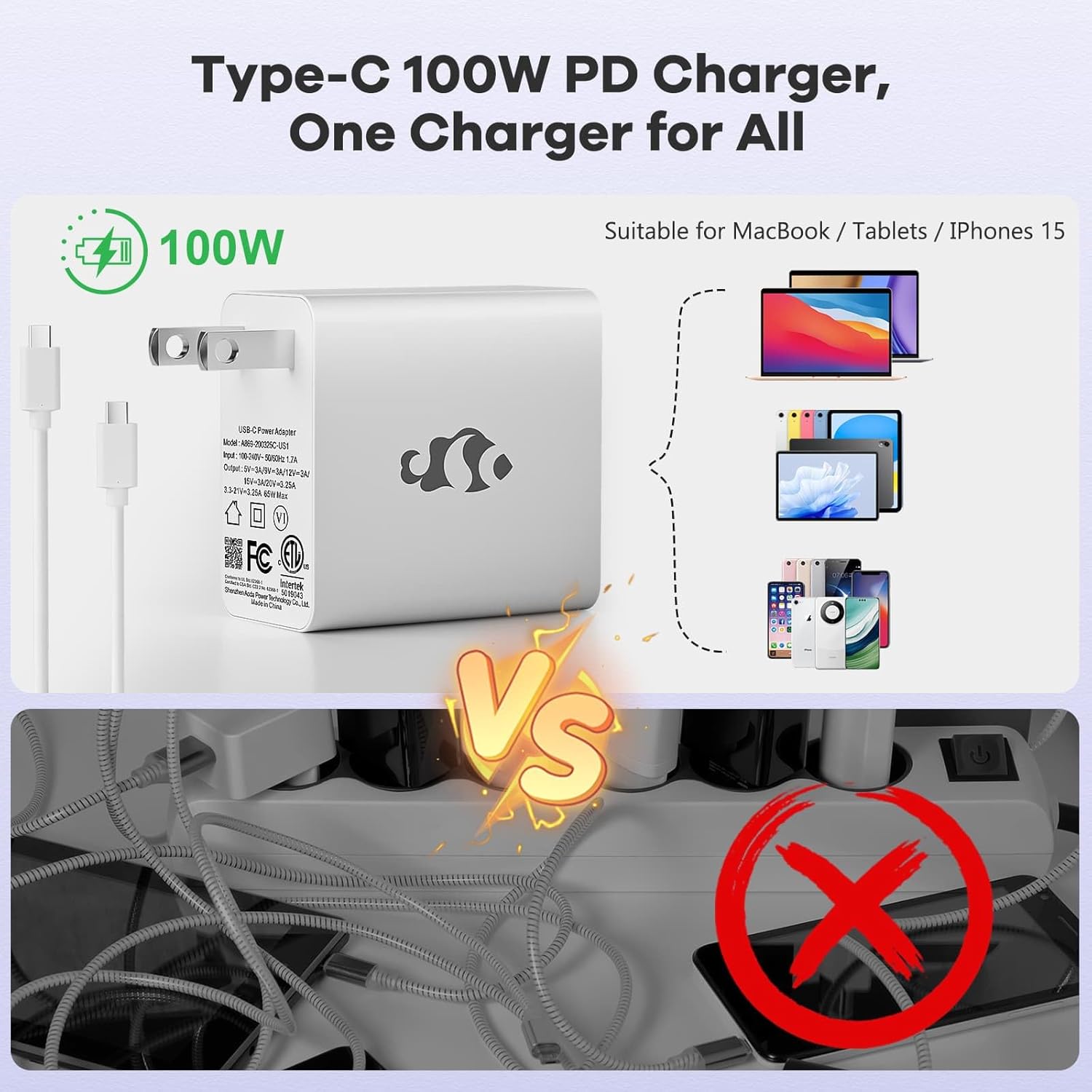
Figure 3.1: Type-C 100W PD Fast Charger
The compact 100W USB-C PD fast charger and 6.56ft cable provide efficient power delivery, compatible with various devices.
3.2 Konnessjoni tal-Periferali
Your NIMO laptop offers multiple ports for enhanced versatility. Refer to the diagram below for port locations and types:
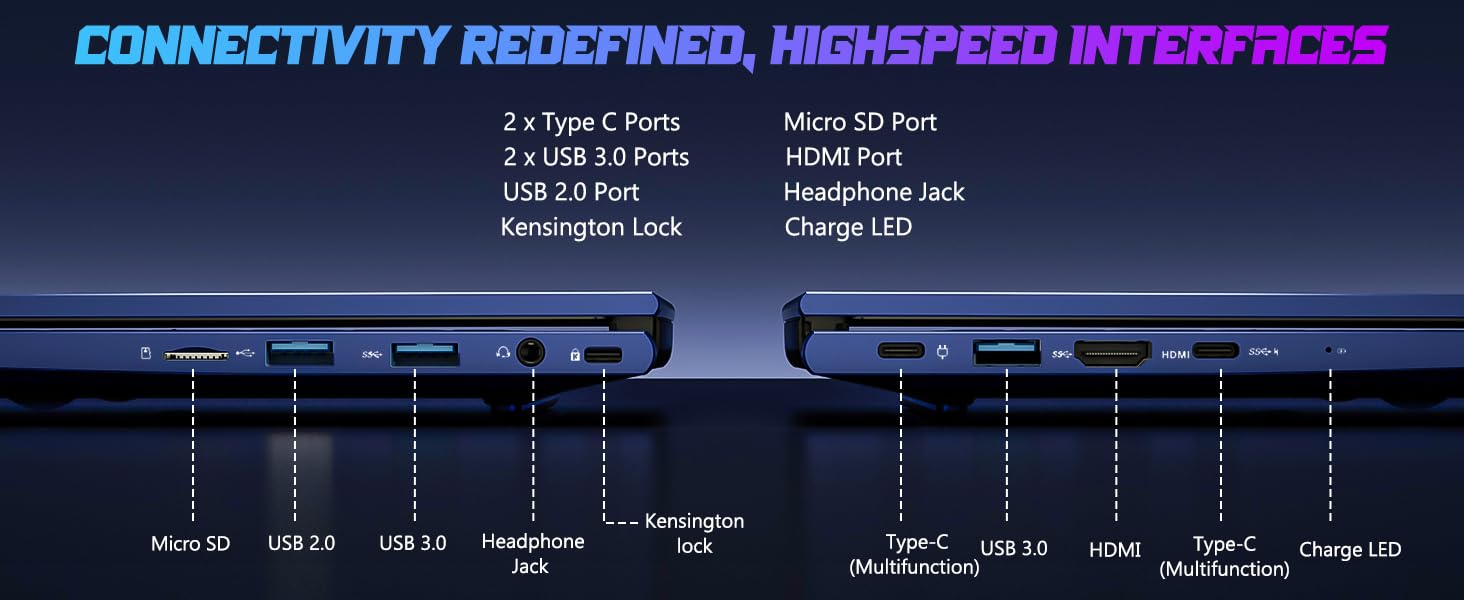
Figura 3.2: Portijiet tal-Konnettività
The laptop includes 2x Type-C ports, 2x USB 3.0 ports, 1x USB 2.0 port, Micro SD port, HDMI port, Headphone Jack, and Kensington Lock for comprehensive connectivity.
- Portijiet USB: Connect external devices such as mice, keyboards, or external storage drives.
- Port HDMI: Qabbad ma' monitor jew TV estern għal display akbar.
- Jack tal-headphone: Għall-ħruġ tal-awdjo għal headphones jew kelliema esterni.
- Slott Mikro SD: Insert a Micro SD card for additional storage or data transfer.
4. It-Tħaddim tal-Laptop Tiegħek
4.1 Karatteristiċi tal-Wiri
The NIMO laptop features a 15.6" FHD IPS (1920x1080) anti-glare display with an 85% screen-to-body ratio, providing clear and vibrant visuals for all your tasks.
4.2 Keyboard and Fingerprint Reader
The laptop is equipped with a backlit keyboard for comfortable typing in various lighting conditions and a multi-touch touchpad for precise navigation. The built-in fingerprint reader allows for secure, one-touch login.

Figure 4.1: Backlit Keyboard and Fingerprint Reader
The backlit keyboard enhances visibility, while the integrated fingerprint reader provides quick and secure access to your system.
4.3 WebPrivatezza tal-kamera
For enhanced privacy, the laptop includes a built-in privacy camera switch, allowing you to easily disable the 2.0M webcam meta ma tkunx qed tintuża.

Figura 4.2: WebTarka tal-kamera
The physical webcam shield provides an extra layer of privacy, ensuring your camera is off when you need it to be.
4.4 Prestazzjoni 'l fuqview
The NIMO laptop is powered by an AMD Ryzen 5 6600H CPU (6 cores, 12 threads, up to 4.5 GHz) and an integrated AMD Radeon 660M GPU (6nm process, 6 GPU cores, 1900 MHz). This configuration provides balanced performance for productivity and light gaming.

Figure 4.3: Outstanding Performance
The AMD Ryzen 5 6600H processor and Radeon 660M iGPU deliver robust performance for various computing tasks.
With 32GB of DDR5 RAM and a 1TB PCIe 4.0 SSD, the laptop ensures seamless multitasking, faster load times, and ample ħażna għal tiegħek files and applications. The memory is upgradable to 64GB and the SSD is detachable for future expansion.

Figure 4.4: Seamless Multitasking and Ample Ħażna
The combination of 32GB DDR5 RAM and a 1TB PCIe 4.0 SSD provides lightning-fast performance and significant storage capacity.
4.5 Ħajja tal-batterija
The laptop is equipped with a 54Wh smart battery, providing up to 5 hours of active use and up to 10 hours of standby time. A 15-minute charge can provide up to 2 hours of standby time with the 100W PD fast charger.

Figure 4.5: 54Wh Smart Battery
The efficient 54Wh smart battery offers extended usage and quick charging capabilities.
5. Manutenzjoni
Biex tiżgura l-lonġevità u l-prestazzjoni ottimali tal-laptop NIMO tiegħek, segwi dawn il-linji gwida ta' manutenzjoni:
- Żommha Nadif: Regularly clean the screen with a microfiber cloth and the keyboard with compressed air to remove dust and debris.
- Aġġornamenti tas-Software: Keep your Windows 11 operating system and drivers updated to ensure security and performance improvements.
- Kura tal-batterija: Avoid completely draining the battery frequently. For long-term storage, charge the battery to about 50-60%.
- Ventilazzjoni xierqa: Ensure the laptop's vents are not obstructed to prevent overheating. Use it on a hard, flat surface.
- Immaniġġjar Sikur: Avoid dropping or subjecting the laptop to strong impacts.
6 Issolvi l-problemi
Din it-taqsima tindirizza kwistjonijiet komuni li tista' tiltaqa' magħhom bil-laptop NIMO tiegħek.
| Problema | Kawża Possibbli | Soluzzjoni |
|---|---|---|
| Il-laptop ma jixgħelx | Batterija baxxa; Problema bl-adapter tal-enerġija | Connect the charger and wait a few minutes. Ensure the power adapter is securely connected to both the laptop and the outlet. |
| Prestazzjoni bil-mod | Too many applications running; Low disk space; Outdated drivers | Agħlaq l-applikazzjonijiet mhux meħtieġa. Illibera l-ispazju fuq id-diska. Aġġorna l-Windows u d-drivers tal-apparat. |
| Kwistjonijiet ta' konnettività Wi-Fi | Wi-Fi adapter off; Router issue; Driver issue | Ensure Wi-Fi is enabled in Windows settings. Restart your router. Update Wi-Fi drivers. |
| Il-backlight tat-tastiera mhux qed jaħdem | Backlight disabled; Driver issue | Press the dedicated backlight key (usually Fn + F key). Check keyboard drivers in Device Manager. |
Jekk tiltaqa' ma' problemi li mhumiex elenkati hawn jew teħtieġ aktar assistenza, jekk jogħġbok ikkuntattja l-appoġġ għall-klijenti ta' NIMO.
7. Speċifikazzjonijiet
Detailed technical specifications for the NIMO 15.6" IPS FHD-Gaming-Laptop:
| Karatteristika | Dettall |
|---|---|
| Daqs tal-Wiri tal-Iskrin Permanenti | 15.6 Pulzier |
| Riżoluzzjoni Massima tal-Iskrin | 1920 x 1080 Pixel (FHD IPS) |
| Proċessur | AMD Ryzen 5 6600H (6 Cores, up to 4.5 GHz) |
| RAM | 32 GB DDR5 (4800 MHz) |
| Hard Drive | 1 TB SSD (PCIe 4.0) |
| Koproċessur tal-Grafika | AMD Radeon 660M (Integrata) |
| Sistema Operattiva | Windows 11 |
| Tip bla fili | 802.11a/b/g/n/ac |
| Portijiet USB | 1x USB 2.0, 3x USB 3.0, 2x Type-C |
| Ħajja Medja tal-Batterija | 5 Hours (active use) |
| Piż tal-oġġett | 3.8 liri |
| Dimensjonijiet tal-Prodott | 14.07 x 8.98 x 0.76 pulzieri |
| Kulur | Blu |
| Karatteristiċi Speċjali | Tastiera b'dawl minn wara, Qarrej tal-marki tas-swaba', Awdjo HD, Tastiera Numerika |
8. Garanzija u Appoġġ
NIMO hija impenjata li tipprovdi prodotti ta’ kwalità għolja u servizz tal-konsumatur eċċellenti.
8.1 Informazzjoni dwar Garanzija
Your NIMO laptop comes with a comprehensive Garanzija tal-Manifattur ta' Sena. This warranty covers defects in materials and workmanship under normal use. Additionally, we offer a Politika ta' Ritorn Mingħajr Tbatija ta' 90 Jum mid-data tax-xiri.
8.2 Appoġġ għall-Klijent
Our dedicated support team is ready to assist you with any questions or issues. For technical support, warranty claims, or general inquiries, please contact us via:
- Email: service@nimopc.com
- Online: Żur in-NIMO uffiċjali websit għal FAQs u riżorsi ta' appoġġ.
We strive to resolve any issues swiftly and ensure your satisfaction.
8.3 Prodott Fuqview Video
Ara dan il-filmat uffiċjali għal tagħrif malajrview of the NIMO laptop's features and benefits:
Video: NIMO Laptop Overview
This video provides a brief look at the NIMO 15.6" laptop, highlighting its key features and user experience, including its display, camera, and overall performance.


