1. Matulview
The RCA WAVE-76 ANC Bluetooth Wireless Headphones provide an immersive audio experience with Active Noise Cancellation (ANC) and Bluetooth 5.4 connectivity. Designed for comfort and convenience, these headphones feature long battery life, dual-device connection, and a transparency mode to keep you aware of your surroundings.

Stampa 1.1: Quddiem view of the RCA WAVE-76 ANC Bluetooth Wireless Headphones. The headphones are black with an adjustable headband and soft earcups.
2. Kontenut tal-Pakkett
Kun żgur li l-oġġetti kollha huma preżenti fil-pakkett:
- RCA WAVE-76 ANC Bluetooth Wireless Headphones
- Cable tal-Iċċarġjar tal-USB-C
- Kejbil tal-Awdjo ta' 3.5mm (AUX)
- Manwal għall-Utent (dan id-dokument)
3. Kontrolli u Indikaturi
Familiarize yourself with the headphone controls for optimal use.

Image 3.1: Diagram illustrating the location of the Adjustable Headband, Active Noise Cancellation (ANC) feature, Type-C Charging port, Power Button, Volume +/- buttons, and ANC Button on the RCA WAVE-76 headphones.
- Buttuna tal-Qawwa: Agħfas u żomm biex tixgħel/titfi. Agħfas qasir għal-logħob/pawża.
- Volum + Buttuna: Agħfas qasir biex iżżid il-volum. Agħfas fit-tul għat-trakka li jmiss.
- Volum - Buttuna: Agħfas qasir biex tnaqqas il-volum. Agħfas fit-tul għat-trakka ta' qabel.
- Buttuna ANC: Press to cycle through ANC On, Transparency Mode, and ANC Off.
- Port tal-Iċċarġjar tat-Tip C: Għall-iċċarġjar tal-headphones.
- Jack Awdjo 3.5mm: Għal konnessjoni bil-fili.
- Indikatur LED: Juri l-istatus tal-enerġija, l-istatus tat-tqabbil, u l-istatus tal-iċċarġjar.
4. Iċċarġjar
Qabel l-ewwel użu, iċċarġja l-headphones kompletament.
- Connect the USB-C charging cable to the Type-C charging port on the headphones.
- Qabbad it-tarf l-ieħor tal-kejbil ma' adapter tal-enerġija USB (mhux inkluż) jew mal-port USB tal-kompjuter.
- L-indikatur LED se juri l-istatus tal-iċċarġjar (eż., aħmar għall-iċċarġjar, blu għal iċċarġjat kompletament).
- A full charge takes approximately 2 hours. A 5-minute fast charge provides up to 4 hours of playtime.
The headphones offer up to 40 hours of playtime with ANC on and 60 hours in normal mode on a full charge.

Image 4.1: The RCA WAVE-76 headphones highlighting the fast charging capability via Type-C, allowing for quick recharges and extended playtime.
5. Setup
5.1 Tixgħel/Jitfi
- Qawwa Mixgħul: Press and hold the Power Button for 3 seconds. The LED indicator will flash blue.
- Itfi: Press and hold the Power Button for 3 seconds. The LED indicator will turn off.
5.2 Tqabbil tal-Bluetooth
- Kun żgur li l-headphones huma mitfija.
- Agħfas u żomm il-Buttuna tal-Qawwa għal 5 sekondi sakemm l-indikatur LED jteptep aħmar u blu alternattivament, u dan jindika l-modalità ta' tqabbil.
- Fuq l-apparat tiegħek (smartphone, tablet, kompjuter), attiva l-Bluetooth u fittex apparati disponibbli.
- Select "RCA WAVE-76" from the list.
- Ladarba konness, l-indikatur LED jteptep bil-mod bil-blu.
5.3 Dual Connections
The headphones can connect to two Bluetooth devices simultaneously.
- Qabbad il-headphones mal-ewwel apparat kif deskritt fit-taqsima 5.2.
- Iddiżattiva l-Bluetooth fuq l-ewwel apparat. Il-headphones jerġgħu jidħlu fil-modalità ta' tqabbil.
- Agħlaq il-headphones mat-tieni apparat.
- Erġa' attiva l-Bluetooth fuq l-ewwel apparat. Il-headphones għandhom jikkonnettjaw awtomatikament maż-żewġ apparati.

Image 5.1: A user demonstrating the dual connection feature of the RCA WAVE-76 headphones, seamlessly switching between a laptop and a smartphone.
5.4 Wired Connection (AUX)
Biex tuża l-headphones fil-modalità bil-fili:
- Qabbad tarf wieħed tal-kejbil tal-awdjo ta' 3.5mm mal-jack tal-awdjo ta' 3.5mm tal-headphones.
- Connect the other end to your audio source's 3.5mm audio output.
- The headphones will automatically switch to wired mode. Bluetooth functions will be disabled.

Image 5.2: A user enjoying music with the RCA WAVE-76 headphones connected via the included 3.5mm AUX cable, demonstrating wired listening freedom.
6. Joperaw
6.1 Kanċellazzjoni Attiva tal-Istorbju (ANC) u Modalità ta' Trasparenza
Press the ANC Button to cycle through the following modes:
- ANC Mixgħul: Reduces external noise by up to 90%. Ideal for travel or noisy environments.
- Modalità ta' Trasparenza: Allows ambient sounds to pass through, keeping you aware of your surroundings. Useful for announcements or conversations.
- ANC Mitfi: Standard listening mode without noise cancellation.

Image 6.1: A user wearing the RCA WAVE-76 headphones, demonstrating the utility of Transparency Mode for staying aware of the environment while listening.
6.2 Daqq tal-Mużika
- Play/Pawsa: Agħfas qasir il-buttuna tal-enerġija.
- Track li jmiss: Long press the Volume + Button.
- Track preċedenti: Long press the Volume - Button.
6.3 Funzjonijiet ta' Sejħa
- Tweġiba/Tmiem Sejħa: Agħfas qasir il-buttuna tal-enerġija.
- Irrifjuta Sejħa: Agħfas fit-tul il-buttuna tal-enerġija.
- Activate Voice Assistant (Siri/Alexa): Agħfas darbtejn il-Buttuna tal-Qawwa.
6.4 Kontroll tal-Volum
- Żid il-Volum: Short press the Volume + Button.
- Naqqas il-Volum: Short press the Volume - Button.
7. Manutenzjoni
- Tindif: Uża drapp artab u niexef biex tnaddaf il-headphones. Tużax kimiċi ħarxa jew materjali li joborxu.
- Ħażna: Store the headphones in a cool, dry place away from direct sunlight and extreme temperatures. When not in use, it is recommended to fold them for compact storage.
- Kura tal-batterija: Biex ittawwal il-ħajja tal-batterija, evita li tiċċarġja l-headphones għalkollox ta’ spiss. Iċċarġjahom regolarment, anke jekk ma tkunx qed tużahom għal perjodi twal.
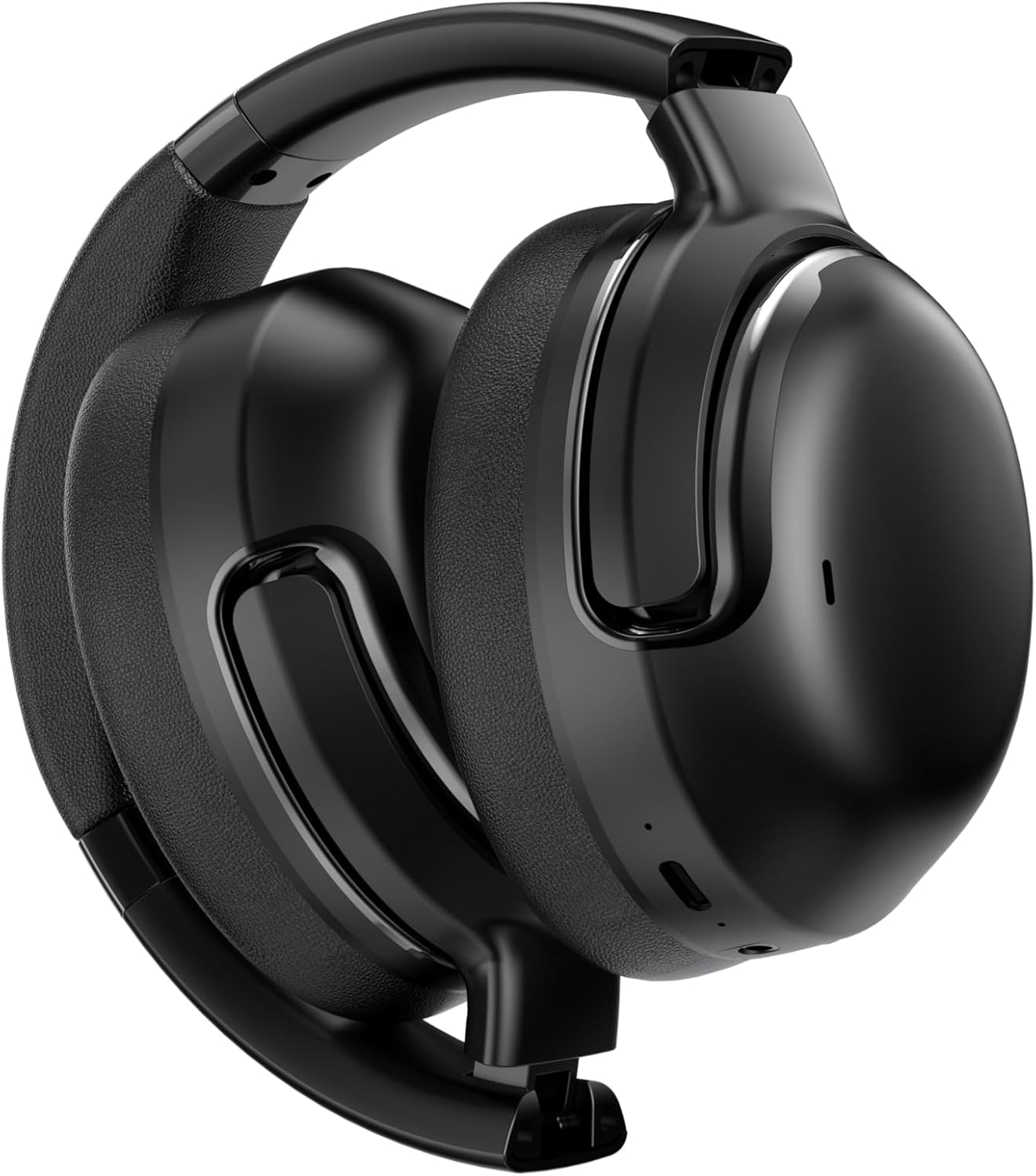
Immaġni 7.1: Ġenb view of the RCA WAVE-76 ANC Bluetooth Wireless Headphones in their folded position, demonstrating their portability and ease of storage.
8 Issolvi l-problemi
| Problema | Kawża Possibbli | Soluzzjoni |
|---|---|---|
| Il-headphones ma jixegħlux | Batterija baxxa | Iċċarġja l-headphones bis-sħiħ. |
| Ma tistax tqabbad mat-tagħmir | Headphones not in pairing mode; Bluetooth off on device | Ensure headphones are in pairing mode (flashing red/blue LED). Enable Bluetooth on your device. |
| L-ebda ħoss | Volume too low; Not connected; Wired mode active | Increase volume on headphones and device. Ensure proper Bluetooth connection or AUX cable connection. |
| L-ANC mhux qed jaħdem b'mod effettiv | ANC off; Improper fit | Press ANC button to activate ANC. Adjust headphones for a snug fit over your ears. |
| Konnessjoni intermittenti | Distance from device; Interference | Move closer to your device. Avoid strong Wi-Fi or other wireless interference sources. |
9. Speċifikazzjonijiet
| Karatteristika | Speċifikazzjoni |
|---|---|
| Isem tal-Mudell | Mewġa 76 |
| Kontroll tal-Ħoss | Kanċellazzjoni Attiva tal-Ħoss |
| Teknoloġija tal-Konnettività | Bil-fili, bla fili |
| Teknoloġija tal-Komunikazzjoni mingħajr Fili | Bluetooth |
| Verżjoni Bluetooth | 5.4 |
| Daqs tas-Sewwieq tal-Awdjo | 40 Millimetru |
| Rispons ta' Frekwenza | 20000 Hz |
| Impedenza | 32 Ohm |
| Headphones Jack | 3.5 mm Jack |
| Ħajja tal-Batterija (ANC Mixgħul) | Sa 40 sigħat |
| Battery Life (Normal Mode) | Sa 60 sigħat |
| Iċċarġjar Mgħaġġel | 5 minuti ta' ħlas għal sagħtejn ta' daqq |
| Metodu ta' Kontroll | Imbotta Buttuna |
| Apparati Kompatibbli | Cellphones, Desktops, Laptops, Music Production Equipment, Tablets |
| Kulur | Iswed |
| UPC | 810185790821 |
10. Garanzija u Appoġġ
RCA products are designed for reliability and performance. For warranty information, please refer to the warranty card included in your product packaging or visit the official RCA website. For technical support or customer service inquiries, please contact RCA customer support through the channels provided on the official websit.


