Introduzzjoni
This user manual provides detailed instructions for the operation, setup, and maintenance of your Donner MAMP2 Awdjo Stereo Amplifier. Please read this manual thoroughly before using the product to ensure proper functionality and safety.
The Donner MAMP2 is a versatile 600W peak 2-channel stereo audio amplifier receiver designed for a superior audio experience. It features a wide range of input options and customizable sound controls, making it suitable for various home audio, karaoke, and theater speaker setups.
Prodott Overview

The Donner MAMP2 amplifier, shown here with its multi-functional remote control, is a compact and powerful unit. The front panel features various controls and input ports, while the rear panel provides speaker terminals and additional input/output options. The included remote allows for convenient control of all amplifier functions from a distance.
Karatteristiċi ewlenin:
- 600W Peak Power (60W x 2 RMS): Delivers robust audio output for an enhanced listening experience.
- 2-Channel Independent Control: Supports up to 2 groups of speakers (4 speakers, 4-8Ω) and one subwoofer.
- Multi-Input Modes: Includes Bluetooth 5.3, USB (up to 64G), RCA, 2 microphone inputs, AUX IN, FM radio, digital fiber, coaxial, and Phono input for turntables.
- Customizable EQ Control: Independent treble, midrange, and bass adjustments via both amplifier and remote. Settings are automatically saved.
- Dual Microphone Interface: Ideal for karaoke and public speaking with a talk-over function to lower background music.
- Upgraded FM Function: Allows quick selection of favorite FM frequencies by direct number input.
Setup
Kontenut tal-Pakkett:
- Donner MAMP2 Awdjo Stereo Ampaktar ħaj
- Multi-functional Remote Control
- Kejbil tal-Enerġija
- Manwal għall-Utent (dan id-dokument)
Konnessjoni ta' Kelliema:
Il-MAMP2 supports up to 4 passive speakers (4-8Ω) and one active subwoofer. Ensure correct polarity (+ to + and - to -) when connecting speaker wires to the ampterminals tal-ispikers tal-lifer.
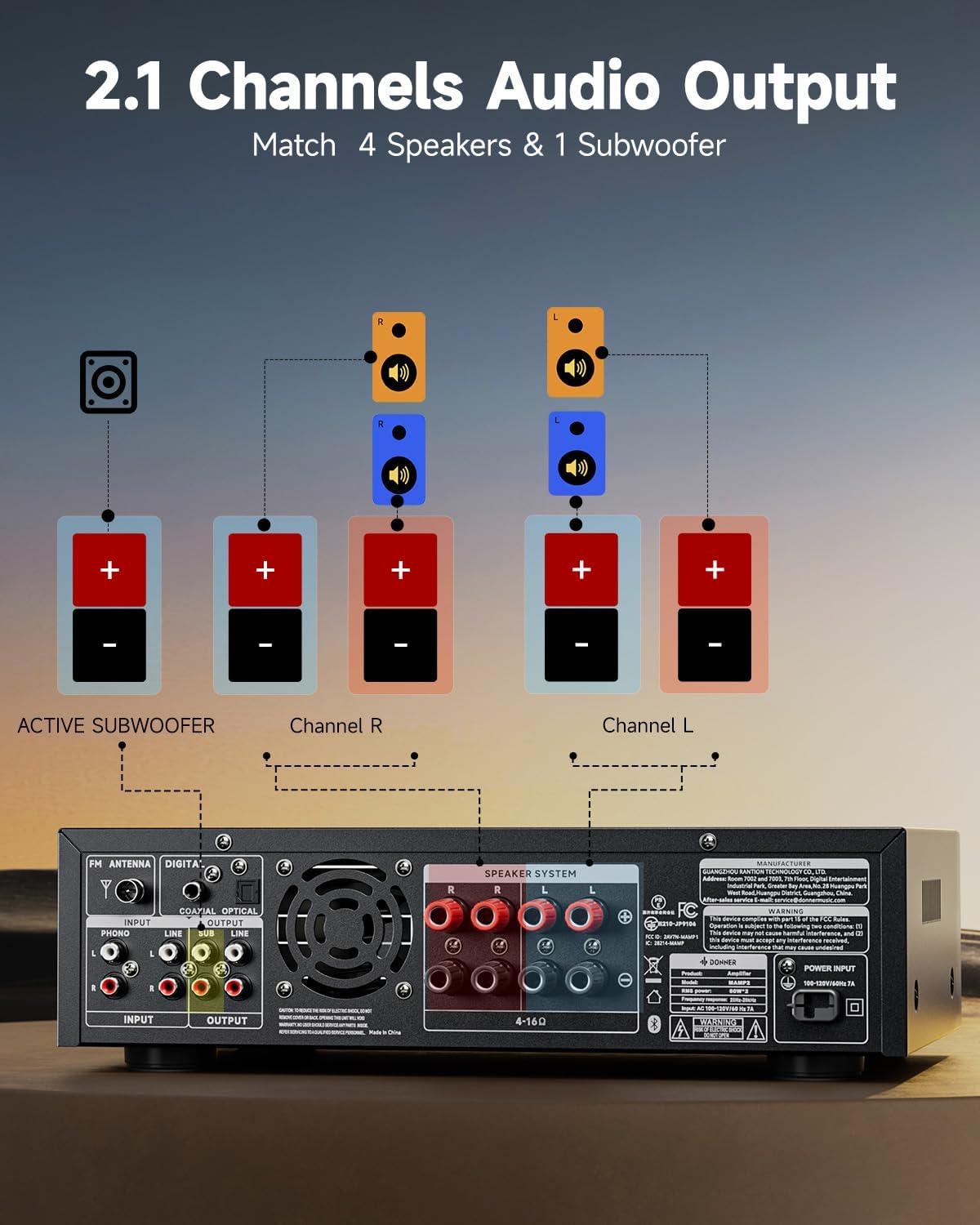
This diagram illustrates the connection of speakers and an active subwoofer to the Donner MAMP2 amplifier. Connect your main left and right speakers to the "Channel L" and "Channel R" terminals respectively. An active subwoofer can be connected to the dedicated "ACTIVE SUBWOOFER" output for enhanced bass.
Konnessjoni ta' Sorsi Awdjo:
Il-MAMP2 offers a variety of input options. Choose the appropriate cable and port for your device.

Il- amplifier supports multiple input sources. For digital audio, use the Optical or Coaxial inputs, suitable for smart TVs. For analog devices, use the RCA or AUX IN ports. A dedicated Phono input is available for turntables. USB input supports media playback up to 64GB. Two 1/4'' microphone inputs are provided for vocal use. FM antenna connection is also available for radio reception.
- Bluetooth 5.3: Għal konnessjoni mingħajr fili minn smartphones, tablets, jew kompjuters.
- USB: Insert a USB drive (up to 64GB) for direct audio playback.
- RCA/AUX IN: Connect traditional audio devices like CD players, DVD players, or other media players.
- Microphone Inputs (1/4''): Connect up to two microphones for karaoke or public address.
- Radju FM: Qabbad l-antenna FM inkluża għar-riċeviment tar-radju.
- Digital Optical/Coaxial: Connect smart TVs or other digital audio sources for high-quality sound.
- Input Phono: Connect a turntable directly to this input.
Istruzzjonijiet Operattivi
Power On/Off:
Agħfas il- Qawwa buttuna fuq il-pannell ta' quddiem jew il-kontroll remot biex tixgħel amplifier mixgħul jew mitfi.
Għażla tal-Input:
Uża l- MODALITÀ button on the front panel or the remote to cycle through available input sources (Bluetooth, USB, RCA, AUX, FM, Optical, Coaxial, Phono).
Kontroll tal-Volum:
Aġġusta l- Master Volum il-pum fuq il-pannell ta' quddiem jew uża l- VOL + / VOL- buttons on the remote control to set the overall sound level.
Aġġustament EQ:
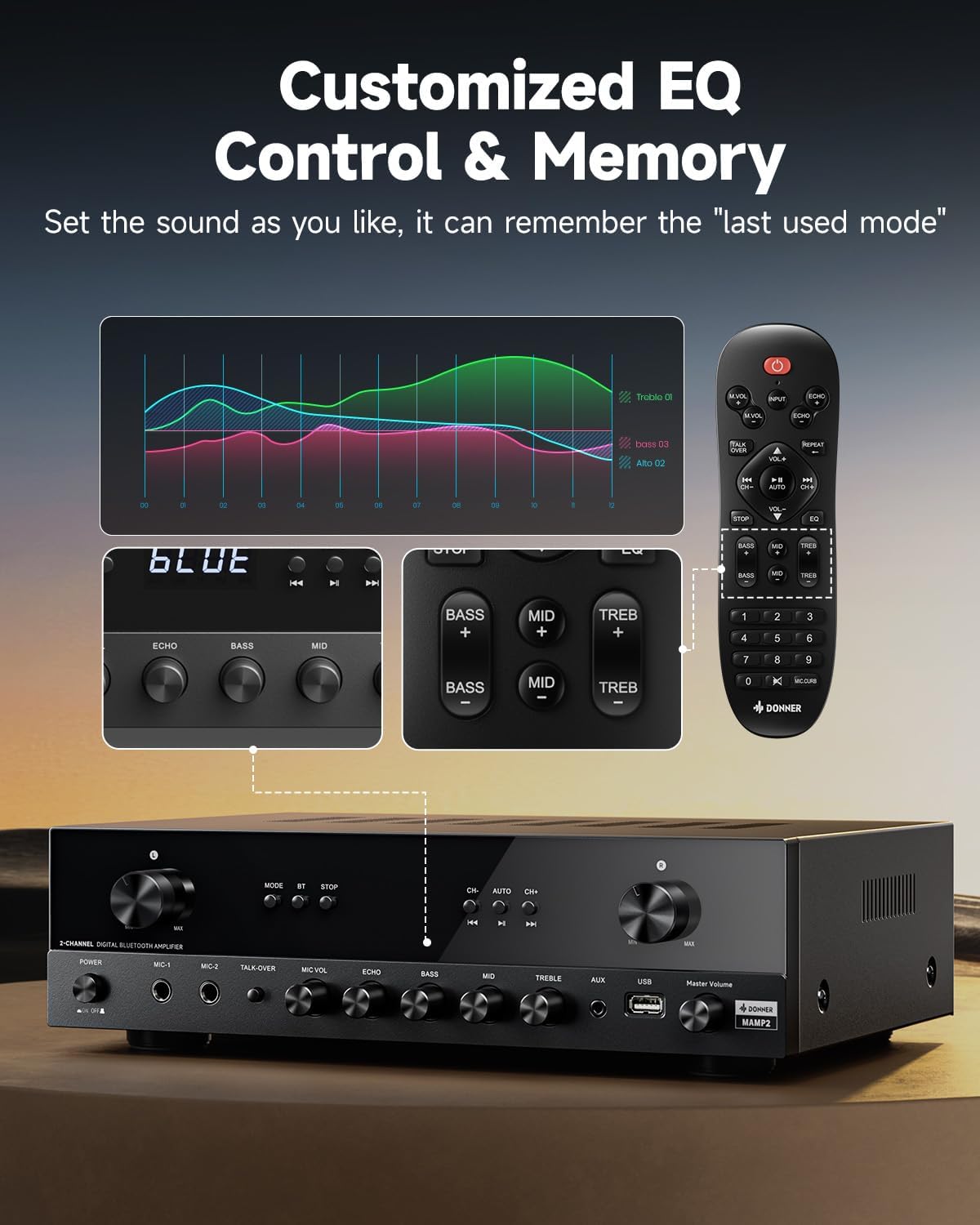
The Donner MAMP2 allows for precise sound customization. Use the dedicated knobs on the front panel or the EQ buttons on the remote control to adjust Bass, Midrange, u Treble levels. The amplifier automatically saves your preferred EQ settings for the next use.
Operazzjoni Bluetooth:
- Agħżel Bluetooth mode using the MODE button. The display will show "BLUE".
- On your device (smartphone, tablet), enable Bluetooth and search for "Donner MAMP2".
- Select "Donner MAMP2" to pair. Once connected, the display will indicate a successful connection.
Tħaddim tar-Radju FM:
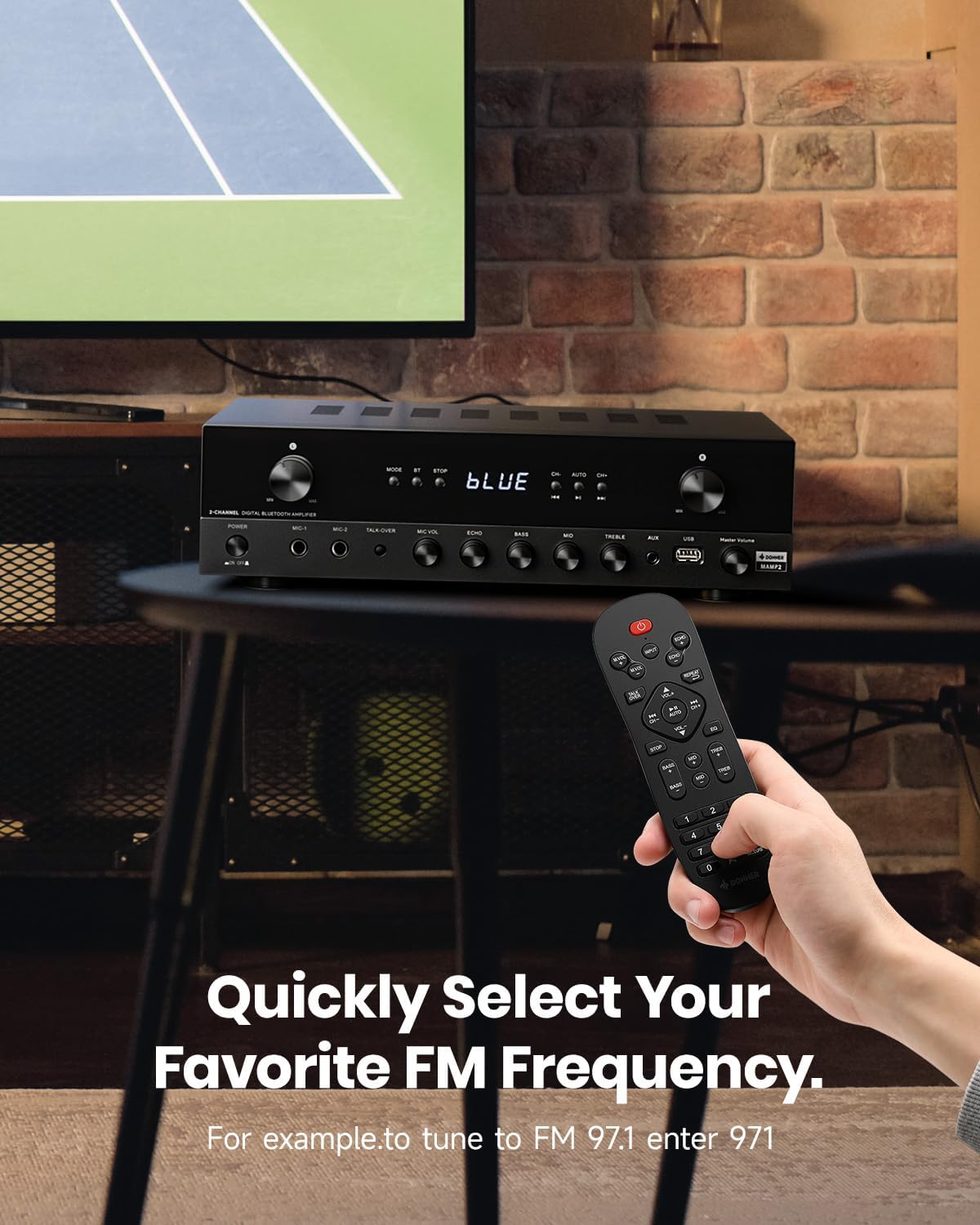
To tune into FM radio, select the FM mode. You can use the CH+ / CH- buttons to scan through stations or directly enter your desired frequency using the number pad on the remote control (e.g., for FM 97.1, enter 971).
Microphone and Karaoke Functions:
- Connect microphones to the 1/4'' MIC inputs on the front panel.
- Aġġusta MIC VOL u ECHO levels using the respective knobs.
- Attiva l- TALK-OVER function to automatically lower background music when speaking into the microphone.
Manutenzjoni
To ensure the longevity and optimal performance of your Donner MAMP2 amplifer, segwi dawn il-linji gwida tal-manutenzjoni:
- Tindif: Uża drapp ratba u niexfa biex timsaħ il-barra tal- amplifier. Do not use liquid cleaners or abrasive materials, as they may damage the finish or internal components.
- Ventilazzjoni: Tiżgura l- amplifier has adequate ventilation. Do not block the ventilation openings on the top or sides of the unit. Avoid placing it in enclosed spaces without airflow.
- Ħażna: Meta ma tkunx qed tużaha għal perjodi twal, aħżenha amplifier f'post frisk u niexef 'il bogħod mix-xemx diretta u minn temperaturi estremi.
- Qawwa: Always disconnect the power cord from the wall outlet before cleaning or if the unit will be unused for a long time.
Issolvi l-problemi
If you encounter issues with your Donner MAMP2 amplifer, irreferi għall-problemi u s-soluzzjonijiet komuni li ġejjin:
| Problema | Kawża Possibbli | Soluzzjoni |
|---|---|---|
| Ebda qawwa | Il-korda tal-enerġija mhux imqabbda; Is-sokket tal-enerġija difettuż | Kun żgur li l-korda tal-enerġija hija mdaħħla sew; Ipprova sokit tal-enerġija differenti. |
| Ebda output tal-ħoss | Incorrect input selected; Volume too low; Speaker wires loose or incorrectly connected; Muted | Select the correct input source; Increase volume; Check speaker wire connections and polarity; Ensure unit is not muted. |
| Il-Bluetooth mhux qed jgħaqqad | Amplifier not in Bluetooth mode; Device too far; Interference | Aqleb amplifier to Bluetooth mode; Move device closer to amplifier; Reduce interference from other wireless devices. |
| Mikrofonu mhux qed jaħdem | Microphone not plugged in correctly; MIC VOL too low; Microphone faulty | Ensure microphone is fully inserted into the MIC input; Increase MIC VOL; Test with another microphone if available. |
| Il-kontroll mill-bogħod ma jaħdimx | Batteries drained; Obstruction between remote and amplifier; Remote sensor blocked | Replace batteries; Remove any obstructions; Ensure remote sensor on ampIl-lifer huwa ċar. |
Jekk il-problema tippersisti wara li tipprova dawn is-soluzzjonijiet, jekk jogħġbok ikkuntattja lis-servizz tal-klijenti ta' Donner għal aktar assistenza.
Speċifikazzjonijiet
| Karatteristika | Dettall |
|---|---|
| Brand | Donner |
| Numru tal-Mudell | MAMP2 |
| Qawwa tal-Ħruġ | 600W Peak (60W x 2 RMS) |
| Numru ta 'Kanali | 2 |
| Teknoloġija tal-Konnettività | Bluetooth 5.3, USB, RCA, AUX, FM, Optical, Coaxial, Phono |
| Apparati Kompatibbli | Kelliema |
| Inputs tal-mikrofonu | Dual 1/4'' |
| Appoġġ USB | Sa 64GB |
| Dimensjonijiet tal-Prodott | 35 x 24.8 x 9.8 ċm |
| Piż tal-oġġett | 4.7 kg |
| Karatteristika Speċjali | Compact Design, Customizable EQ, Talk-Over Function |
Garanzija u Appoġġ
Donner products come with a standard manufacturer's warranty. For specific warranty terms and conditions, please refer to the warranty card included with your product or visit the official Donner websit.
For technical support, troubleshooting assistance beyond this manual, or warranty claims, please contact Donner customer service:
- Websit: www.donnerdeal.com
- Email: support@donnerdeal.com
- Telefon: Please check the Donner websit għal numri ta' kuntatt reġjonali.
When contacting support, please have your product model number (MAMP2) and purchase information ready.


