Introduzzjoni
Welcome to the DIERYA M1 Wireless Gaming Mouse user manual. This guide provides detailed instructions for setting up, operating, and maintaining your new mouse. Please read this manual thoroughly to ensure proper use and to maximize your gaming and productivity experience.
Kontenut tal-Pakkett
Ivverifika li l-oġġetti kollha huma preżenti fil-pakkett tiegħek:
- M1 Mouse bla fili
- Nylon USB-A to C Cable
- Manwal għall-Utent
Prodott Overview
The DIERYA M1 mouse features a lightweight, ergonomic design with multiple programmable buttons and versatile connectivity options.

Deskrizzjoni tal-Immaġni: An overhead view of the black DIERYA M1 wireless gaming mouse, showcasing its honeycomb shell design and RGB lighting. A small USB receiver is positioned to the right of the mouse.
Komponenti tal-ġurdien

Deskrizzjoni tal-Immaġni: An overhead and underside view of the DIERYA M1 mouse with various components labeled. These include the Left Button, Right Button, Mouse Wheel (Middle Button), DPI Adjustment Button (6 Adjustable DPI Levels), Forward Button, Back Button, Type-C Interface, Power & Light Switch, and 2.4G Receiver Storage Compartment. The mouse features a honeycomb shell design.
- Buttuna tax-Xellug: Funzjoni standard tal-ikklikkjar tax-xellug.
- Buttuna tal-lemin: Funzjoni standard tal-ikklikkjar tal-lemin.
- Mouse Wheel (Middle Button): Scroll and middle-click function.
- Buttuna tal-Aġġustament tad-DPI: Jiċċikla permezz ta' livelli ta' DPI stabbiliti minn qabel.
- Buttuna 'l quddiem: Jinnaviga 'l quddiem ġewwa web browsers jew applikazzjonijiet.
- Buttuna Lura: Jinnaviga lura ġewwa web browsers jew applikazzjonijiet.
- Interface tat-Tip C: Għal konnessjoni bil-fili u ċċarġjar.
- Power & Light Switch: Controls power and RGB lighting.
- 2.4G Receiver Storage Compartment: Located on the underside for storing the USB dongle.
Setup
The DIERYA M1 mouse offers three connectivity modes: 2.4GHz Wireless, Bluetooth 5.2, and USB-C Wired.

Deskrizzjoni tal-Immaġni: An illustration demonstrating the three connectivity modes of the M1 mouse: Bluetooth 5.2 pairing with a smartphone, 2.4GHz Wireless with a USB dongle connected to a laptop, and USB-C Wired connection to a laptop. Polling rates for each mode are indicated.
1. Konnessjoni bla fili ta' 2.4GHz
- Locate the 2.4G USB receiver in the storage compartment on the underside of the mouse.
- Ipplaggja r-riċevitur USB f'port USB-A disponibbli fuq il-kompjuter tiegħek.
- Turn on the mouse using the Power & Light Switch.
- The mouse will automatically connect to the receiver. The polling rate in this mode is 1000Hz.
2. Konnessjoni Bluetooth 5.2
- Turn on the mouse using the Power & Light Switch.
- Press and hold the dedicated connectivity mode button (refer to the product's specific button combination if not a dedicated button) to switch to Bluetooth mode. The LED indicator will show the active connection.
- On your device (PC, Mac, Laptop, iPad), go to Bluetooth settings and search for "DIERYA M1".
- Select the mouse to pair. The polling rate in Bluetooth mode is 125Hz.
- The mouse supports dual-device pairing in Bluetooth mode. Refer to the software for managing multiple Bluetooth connections.
3. Konnessjoni bil-Wajer USB-C
- Connect the provided USB-A to C cable to the Type-C interface on the front of the mouse.
- Ipplaggja t-tarf USB-A tal-kejbil f'port USB disponibbli fuq il-kompjuter tiegħek.
- The mouse will function immediately as a wired mouse. This mode also charges the mouse. The polling rate in wired mode is 1000Hz.
Istruzzjonijiet Operattivi
Aġġustament DPI
The mouse features a dedicated DPI adjustment button to cycle through six preset DPI levels: 400, 800, 1600, 3200, 4800, and 6400. The scroll wheel LED and RGB lighting strip provide instant color-coded feedback for the current DPI setting.
Deskrizzjoni tal-Immaġni: An image illustrating the DPI range from 200 to 24,000 and the corresponding scroll wheel LED colors for preset DPI levels (400, 800, 1600, 3200, 4800, 6400). The image also shows a software interface for advanced DPI customization.
Dawl RGB
The DIERYA M1 mouse features 16.8 million color RGB lighting with 13 vibrant effects, including Breath, Static, Flow, and Starlight. These can be customized via the dedicated driver software.
Buttuni programmabbli
All six buttons on the DIERYA M1 mouse are fully programmable. Use the dedicated driver software to assign macros, remap functions, and customize button actions.
Ġestjoni tal-batterija
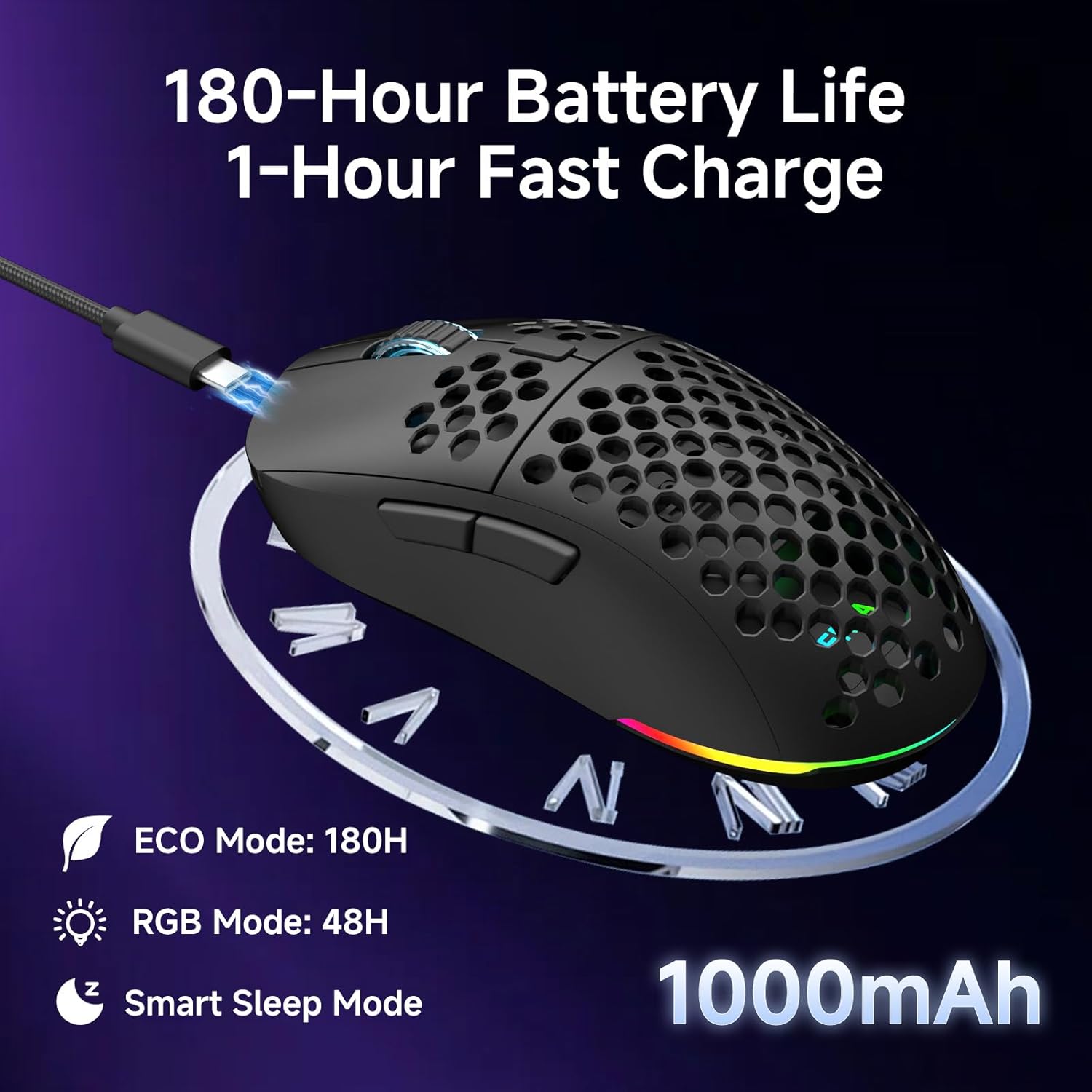
The mouse is equipped with a 1000mAh rechargeable battery.
- Ħajja tal-batterija: Up to 180 hours in ECO mode, or 48 hours with full RGB lighting.
- Iċċarġjar: Fast USB-C charging allows a full charge in approximately 1 hour.
- Smart Sleep Modes: The mouse enters intelligent sleep modes after 1 and 5 minutes of inactivity to conserve power. These timers can be customized via software.

Deskrizzjoni tal-Immaġni: An image showing the DIERYA M1 mouse connected via USB-C for charging, highlighting its 1000mAh battery, 180-hour ECO mode battery life, 48-hour RGB mode battery life, and smart sleep mode feature.
Installazzjoni ta' Software u Driver
Customization Software
To unlock the full potential of your DIERYA M1 mouse, including DPI customization (up to 24,000 DPI), report rate adjustment (125-1000Hz), button remapping, macro creation, RGB lighting effects, and sleep timer settings, download and install the dedicated driver software.
The software allows you to define every detail and save up to 4 device profiles.
Visit the official DIERYA website for the latest software download: www.dierya.com/support (Eżampil-link, il-link attwali jista' jvarja).

Deskrizzjoni tal-Immaġni: A screenshot of the DIERYA M1 mouse driver software interface, showing options for key assignment, DIY macros, customizable RGB lighting, DPI adjustment, report rate adjustment, and profile tagħbija.
Manutenzjoni
Tindif u Kura
- Regularly clean the mouse with a soft, dry cloth.
- Għal ħmieġ iebes, neħħi ftitampLaħlaħ id-drapp bl-ilma jew b'soluzzjoni ħafifa tat-tindif. Evita kimiċi ħarxa.
- Do not immerse the mouse in water or any liquids.
- Keep the PTFE feet clean to ensure smooth gliding.
Ħażna
- When not in use, store the 2.4G USB receiver in its dedicated compartment on the underside of the mouse.
- Aħżen il-maws f'post frisk u niexef 'il bogħod mix-xemx diretta u minn temperaturi estremi.
Issolvi l-problemi
Kwistjonijiet Komuni u Soluzzjonijiet
- Il-maws ma jirrispondix:
- Kun żgur li l-maws ikun mixgħul.
- Iċċekkja l-livell tal-batterija u ċċarġjaha jekk meħtieġ.
- For 2.4GHz wireless, ensure the USB receiver is securely plugged in.
- For Bluetooth, ensure the mouse is paired and selected in your device's Bluetooth settings.
- Try connecting via USB-C wired mode to confirm functionality.
- Ibda mill-ġdid il-kompjuter tiegħek.
- Dewmien jew moviment irregolari:
- Ensure the mouse is within range of the receiver (for 2.4GHz) or your device (for Bluetooth).
- Iċċekkja għal interferenza minn apparat ieħor mingħajr fili.
- Naddaf is-senser ottiku fuq in-naħa ta' taħt tal-maws.
- Ensure the mouse is used on a suitable surface (not highly reflective or transparent).
- Update mouse drivers via the software.
- Id-DPI mhux qed jinbidel:
- Press the DPI adjustment button firmly.
- Ensure the mouse software is installed and running correctly if custom DPI settings are configured.
- Id-dawl RGB mhux qed jaħdem:
- Check the Power & Light Switch position.
- Kun żgur li l-batterija għandha ċarġ suffiċjenti.
- Adjust lighting settings through the driver software.
Speċifikazzjonijiet
Dettalji Tekniċi
| Karatteristika | Dettall |
|---|---|
| Mudell | M1 |
| Konnettività | 2.4GHz bla fili, Bluetooth 5.2, USB-C bil-fili |
| Firxa tad-DPI | 200 - 24,000 DPI |
| Ir-Rata tal-Votazzjoni | 125-1000Hz |
| Veloċità tat-Traċċar | 300 FPS |
| Aċċelerazzjoni | 35G |
| Kapaċità tal-batterija | 1000mAh |
| Ħajja tal-batterija | Up to 180 hours (ECO mode), 48 hours (RGB on) |
| Ħin tal-Iċċarġjar | Appross. 1 siegħa |
| Piż | 90 gramma |
| Dimensjonijiet | 125 x 63 x 41 mm |
| Swiċċijiet | Huano Micro Switches (20 million clicks) |
| Saqajn | PTFE |
| Dawl RGB | 16.8 Million Colors, 13 Effects |
| Buttuni programmabbli | 6 |
| Kompatibilità | PC, Mac, Laptop, iPad, Chromebook |
Garanzija u Appoġġ
Garanzija tal-Prodott
DIERYA products typically come with a limited warranty. Please refer to the warranty card included in your package or visit the official DIERYA websit għal termini u kundizzjonijiet dettaljati tal-garanzija. Żomm il-prova tax-xiri tiegħek għal talbiet ta' garanzija.
Appoġġ għall-Klijent
If you encounter any issues or have questions regarding your DIERYA M1 Wireless Gaming Mouse, please contact DIERYA customer support.
- Websit: www.dierya.com/support (Eżampil-link, il-link attwali jista' jvarja)
- Email: Irreferi għall-imballaġġ tal-prodott jew websit għall-indirizz elettroniku ta' appoġġ.
When contacting support, please provide your product model (M1) and a detailed description of the issue.


