Introduzzjoni
This manual provides detailed instructions for the assembly, operation, and maintenance of your GAOMON White 4-Drawer Dresser. Please read this manual thoroughly before beginning assembly or use to ensure proper installation and safe operation. Keep this manual for future reference.

Image: The GAOMON White 4-Drawer Dresser, featuring a modern design with gold metal handles and legs, situated in a living space.
Informazzjoni dwar is-Sigurtà
Biex tevita korrimenti u ħsara lill-prodott, segwi l-linji gwida ta' sigurtà li ġejjin:
- Assemblea Adult Meħtieġa: This product contains small parts and requires adult assembly.
- Apparat kontra l-ponta: Always install the included anti-tip device to secure the dresser to a wall. This is crucial to prevent serious injury from tipping furniture.
- Limiti tal-Piż: Do not exceed the recommended weight limits for the top surface or drawers. Overloading can cause instability or structural damage.
- Wiċċ Stabbli: Place the dresser on a flat, level, and stable surface.
- Sigurtà tat-Tfal: Do not allow children to climb on or play with the dresser. Keep small parts and packaging materials away from children.
- Għodda xierqa: Uża biss l-għodda speċifikata fl-istruzzjonijiet tal-assemblaġġ.
Kontenut tal-Pakkett
Qabel l-assemblaġġ, ivverifika li l-komponenti kollha elenkati hawn taħt huma preżenti u mhux imħassra. Jekk xi partijiet huma nieqsa jew imħassra, ikkuntattja l-appoġġ għall-klijenti immedjatament.
- Pannelli tad-Dresser (Fuq, Isfel, Ġnub, Wara)
- Drawer Fronts, Sides, and Bottoms
- Gold Metal Handles
- Saqajn tal-metall tad-deheb
- Drawer Slides (Left and Right)
- Ħardwer tal-Assemblaġġ (Viti, kavilji, serraturi tal-cam, eċċ.)
- Kit ta' Apparat Kontra t-Tqilb
- Manwal ta' Istruzzjoni
Istruzzjonijiet ta' Twaqqif u Assemblaġġ
Assembly typically requires two adults and takes approximately 1-2 hours. Follow the steps carefully.
Pass 1: Ipprepara l-Ispazju tax-Xogħol Tiegħek
Clear a spacious, clean area. Lay out all parts and hardware. Identify each component using the provided labels or diagrams in the separate assembly guide (if applicable).
Pass 2: Arma l-Qafas Prinċipali
Connect the side panels to the bottom panel using the specified hardware. Ensure all connections are secure. Attach the back panel sections, if provided in multiple pieces, ensuring they align correctly.
Pass 3: Installa s-Slajds tal-Kxaxen
Attach the drawer slides to the inner sides of the dresser frame. Pay close attention to the orientation (left/right) and ensure they are level and securely fastened. The review mentions: "Be sure to look closely at the pictures in the manual and make sure your drawer guides are the right way up and the right way facing--the guides are for right and left side, so they are different, and it really matters which side they go on!"
Step 4: Assemble Drawers
For each of the four drawers, connect the side panels to the front and back panels. Slide the drawer bottom into the grooves. Attach the corresponding drawer slides to the sides of each drawer. Finally, attach the gold metal handles to the drawer fronts.
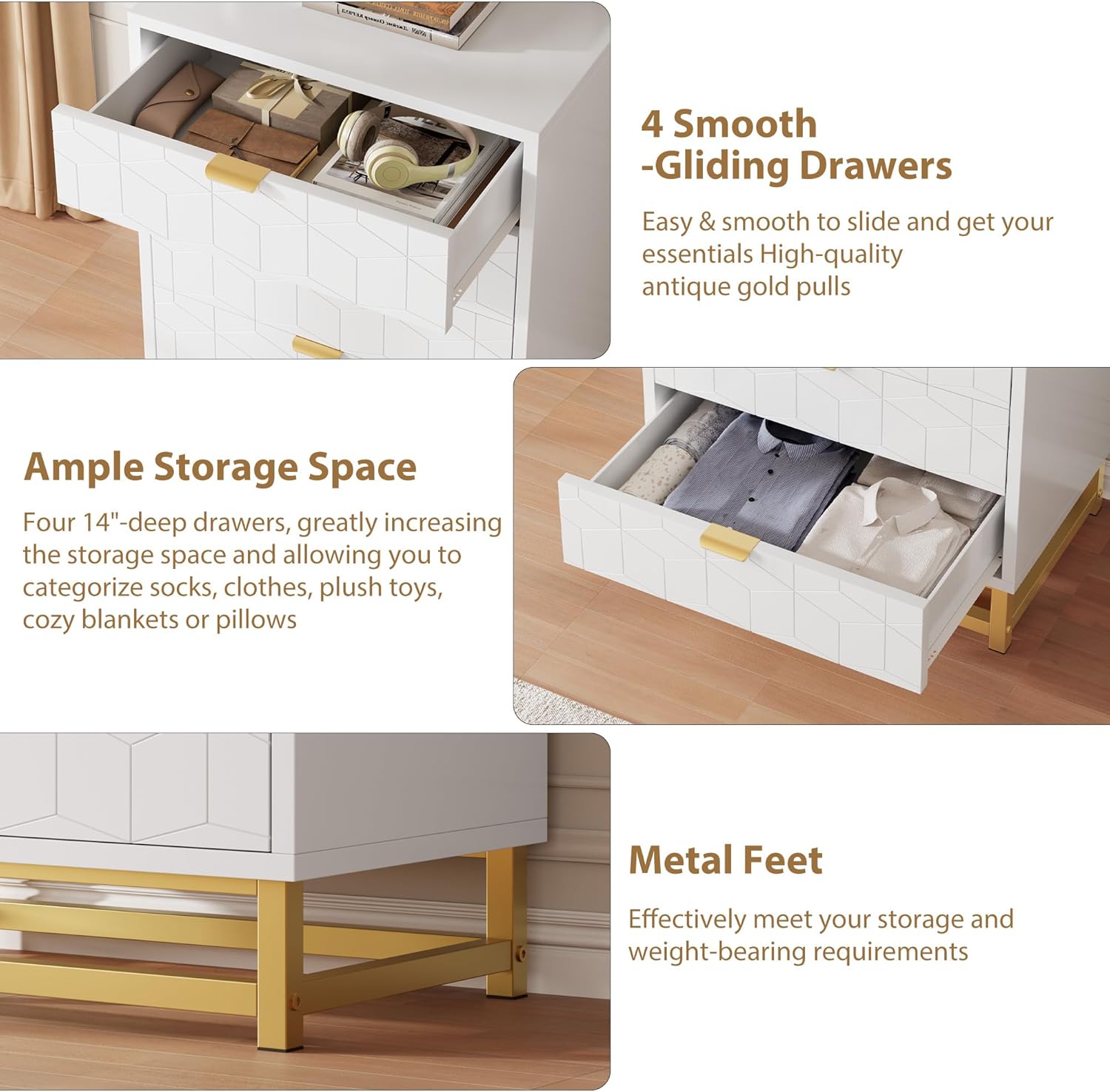
Immaġni: Close-up view highlighting the smooth-gliding drawers and the sturdy gold metal feet of the dresser.
Step 5: Insert Drawers
Carefully align the assembled drawers with the slides in the main frame and push them in until they click into place or slide smoothly. Test each drawer for proper function.
Step 6: Attach Metal Legs
Secure the gold metal legs to the bottom of the dresser frame using the provided hardware. Ensure they are firmly attached and the dresser is stable.

Image: The base of two GAOMON dressers, showcasing the gold metal leg design and how they appear when placed next to each other.
Step 7: Install Anti-Tip Device
Locate a suitable wall stud behind the dresser. Attach one end of the anti-tip strap to the back of the dresser and the other end to the wall using the provided screws and anchors. This step is critical for safety.
Istruzzjonijiet Operattivi
Your GAOMON 4-Drawer Dresser is designed for organized storage in various rooms.
- Użu tal-kexxun: Open and close drawers smoothly using the gold metal handles. Avoid forcing drawers open or shut.
- Kapaċità tal-Ħażna: The four deep drawers provide ample space for clothing, accessories, and other items. Distribute weight evenly within drawers to prevent strain on the slides.
- Wiċċ ta 'fuq: Il-wiċċ ta' fuq jista' jintuża għal oġġetti dekorattivi, lamps, or other lightweight objects. Do not place excessively heavy items on the top surface.

Image: The GAOMON 4-Drawer Dresser with two drawers partially open, illustrating its storage capacity for various items like clothes and accessories.
Manutenzjoni
Manutenzjoni regolari tgħin biex tippreserva d-dehra u l-funzjonalità tal-kredenza tiegħek.
- Tindif: Imsaħ l-uċuħ b'artab, damp drapp. Evita prodotti tat-tindif li joborxu jew kimiċi ħarxa, li jistgħu jagħmlu ħsara lill-finitura.
- Tixrid: Clean spills immediately to prevent staining or damage to the engineered wood.
- Ħardwer: Iċċekkja l-viti u l-qafliet kollha perjodikament biex tiżgura li jibqgħu ssikkati. Erġa' ssikkahom kif meħtieġ.
- Slajds tal-Kxaxen: Jekk il-kxaxen isiru iebsin, jista' jiġi applikat ammont żgħir ta' lubrikant tas-silikon fuq is-slajds.
Issolvi l-problemi
| Problema | Kawża Possibbli | Soluzzjoni |
|---|---|---|
| Il-kxaxen ma jiżżerżqux bla xkiel. | Misaligned drawer slides; loose hardware; debris in slides. | Check slide alignment and tighten hardware. Clean slides. Apply silicone lubricant if needed. |
| Dresser is wobbly or unstable. | Ħardwer tal-assemblaġġ maħlul; art irregolari; apparat kontra t-twaqqigħ mhux installat. | Ensure all screws are tightened. Adjust furniture levelers if present. Install anti-tip device securely. |
| Gap in back panel. | Back panel not fully seated or connecting piece missed during assembly. | Ensure back panel sections are fully inserted into grooves and any connecting pieces are used. |
Speċifikazzjonijiet
| Karatteristika | Dettall |
|---|---|
| Brand | GAOMON |
| Isem tal-Mudell | KmfT9fsUb1jubHsmxlsxBwNzpeE |
| Dimensjonijiet tal-Prodott | 15.8"D x 23.6"W x 34.5"H |
| Kulur | Abjad |
| Materjal | Injam Inġinerija |
| Tip Finish | Illustrat |
| Numru ta 'Kxaxen | 4 |
| Piż tal-oġġett | 60 Liri |
| Assemblea Meħtieġa | Iva |
| UPC | 199414272810 |

Image: A detailed diagram illustrating the overall dimensions of the dresser (15.8"D x 23.6"W x 34.5"H) and the internal dimensions of a single drawer (14"D x 22.2"W x 6.5"H).
Garanzija u Appoġġ
For warranty information or assistance with your GAOMON dresser, please refer to the warranty card included in your package or contact GAOMON customer support directly. Contact details are typically available on the manufacturer's official webis-sit jew permezz tal-punt tax-xiri tiegħek.
If you have questions regarding assembly or missing parts, please reach out to customer service for prompt assistance.


