1. Introduzzjoni
Grazzi tax-xiriasing the AIKELA ZJ-027 5-in-1 Induction Bluetooth Speaker. This versatile device combines a wireless induction speaker, Bluetooth speaker, power bank, phone stand, and LED light, designed to enhance your audio and mobile experience. Please read this manual carefully to ensure proper use and optimal performance.
2. Informazzjoni dwar is-Sigurtà
- Żomm l-apparat 'il bogħod mill-ilma, umdità, u temperaturi estremi.
- Tippruvax iżarma jew isewwi l-apparat lilek innifsek. Ikkuntattja l-appoġġ tal-klijent għall-assistenza.
- Uża biss il-kejbil tal-iċċarġjar provdut jew wieħed ekwivalenti ċċertifikat.
- Evita li tpoġġi oġġetti tqal fuq l-apparat.
- Żomm fejn ma jintlaħaqx mit-tfal.
3. Kontenut tal-Pakkett
Ivverifika li l-oġġetti kollha huma preżenti fil-pakkett tiegħek:
- AIKELA 5-in-1 Induction Speaker (Model: ZJ-027) x 1
- Kejbil tal-Iċċarġjar tat-Tip C x 1
- Manwal tal-Utent x 1
- Gwida għall-Bidu Mgħaġġel x 1

Image: What you will receive with your AIKELA ZJ-027 speaker.
4. Prodott Aktarview
The AIKELA ZJ-027 is a multifunctional device designed for convenience and enhanced audio. It features:
- Induction Speaker: Play audio by simply placing your phone on the stand, no Bluetooth pairing needed.
- Speaker Bluetooth: Connect wirelessly via Bluetooth 5.3 for stable, high-quality audio.
- Stand tat-Telefon: Adjustable 360° vertical rotation for optimal viewangoli.
- Bank tal-Enerġija: Built-in 3500mAh battery for emergency phone charging.
- Dawl LED: Colorful ambient lighting with multiple modes.

Image: The AIKELA ZJ-027 5-in-1 Induction Speaker in use, highlighting its multiple functions.

Immaġni: Dettaljata view of the speaker driver, illustrating its capability for massive, booming sound with crystal-clear quality.
5. Setup
5.1 Iċċarġjar tal-Ispeaker
Before first use, fully charge the speaker. Connect the provided Type-C cable to the charging port on the speaker and the other end to a USB power adapter (not included). A full charge takes approximately 2 hours and provides 5-8 hours of playtime, depending on volume levels.

Image: Battery life and charging time information.
5.2 Adjusting the Phone Stand
The integrated phone stand can be rotated 360° vertically to achieve your desired viewing angle. Ensure the non-slip silicone on the base, back, and slot keeps your phone secure.
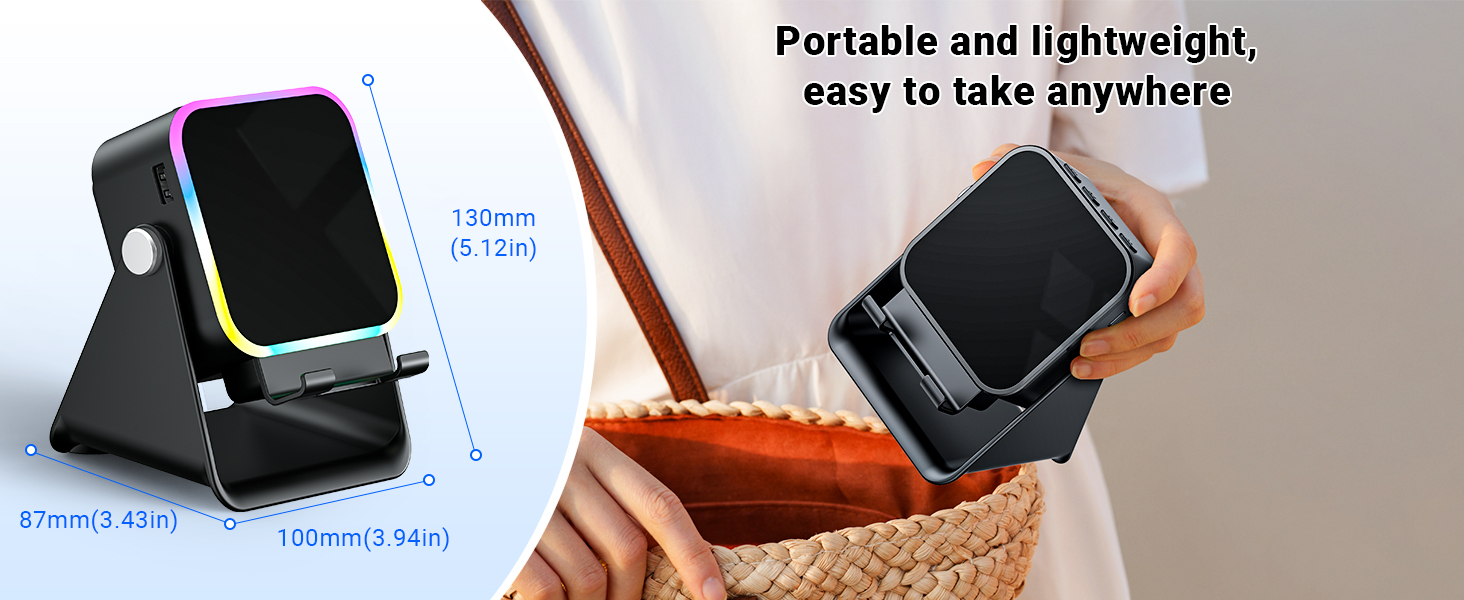
Image: Adjustable stand with 360° rotation and non-slip base for stability.
6. Operazzjoni
6.1 Power On/Off
Agħfas fit-tul il-buttuna tal-qawwa (⏻) biex tixgħel jew titfi l-apparat.
6.2 Switching Modes (Induction / Bluetooth)
After powering on, the device will typically start in Induction Mode. To switch between Induction Mode and Bluetooth Mode, short press the 'M' button.
Video: Demonstrates how to use both Induction and Bluetooth modes, including switching between them and proper phone placement.
6.3 Modalità ta 'Induzzjoni
In Induction Mode, no Bluetooth connection is required. Simply place your smartphone correctly on the stand. The speaker's inductive chip will capture and amplify audio directly from your phone.
- Pożizzjoni tat-Telefon: Ensure your phone is placed correctly on the stand, typically in portrait orientation, for optimal sound transfer.
- Aġġustament tal-Volum: Adjust your phone's volume to 50% or higher for the best playback experience. You can also use the volume buttons on the speaker.
- Kompatibilità: Induction mode is primarily compatible with smartphones. It does not support iPads or tablets.
- Mitfi Awtomatiku: The speaker will automatically turn off after 10 minutes of standby in Induction Mode.

Image: Guide on how to correctly place your phone and adjust volume for Induction Mode.
6.4 Modalità Bluetooth
For wireless audio streaming, switch to Bluetooth Mode:
- Agħfas fit-tul il-buttuna tal-qawwa biex tixgħel il-kelliem.
- Short press the 'M' button to switch to Bluetooth Mode (you will hear an audible prompt).
- On your phone or tablet, go to Bluetooth settings and search for "ZJ-027".
- Select "ZJ-027" to pair. For Android devices, enable "Sync volume with phone" in Bluetooth settings after pairing for optimal control.
- Ladarba tkun konness, tista' ddoqq l-awdjo mit-tagħmir tiegħek permezz tal-ispiker.
In Bluetooth mode, you can place your phone horizontally or vertically on the stand. The Bluetooth range is approximately 10 meters.

Image: Visual representation of Induction Mode (no Bluetooth) and Bluetooth Mode (10m range).
6.5 Funzjonijiet tad-Dawl LED
The speaker features colorful LED lights:
- Ibdel il-Modalitajiet tad-Dawl: Single-click the 'M' button to cycle through different light colors and patterns.
- Ixgħel/Itfi Dwal: Long-press the 'M' button to turn the LED lights on or off.

Image: Multiple light strip patterns to choose from.
6.6 Power Bank Function (Emergency Charge)
The speaker can act as an emergency power bank for your phone. Connect your phone's charging cable (not included) to the USB-A output port on the speaker and to your phone. This is a wired charging function, not wireless charging.
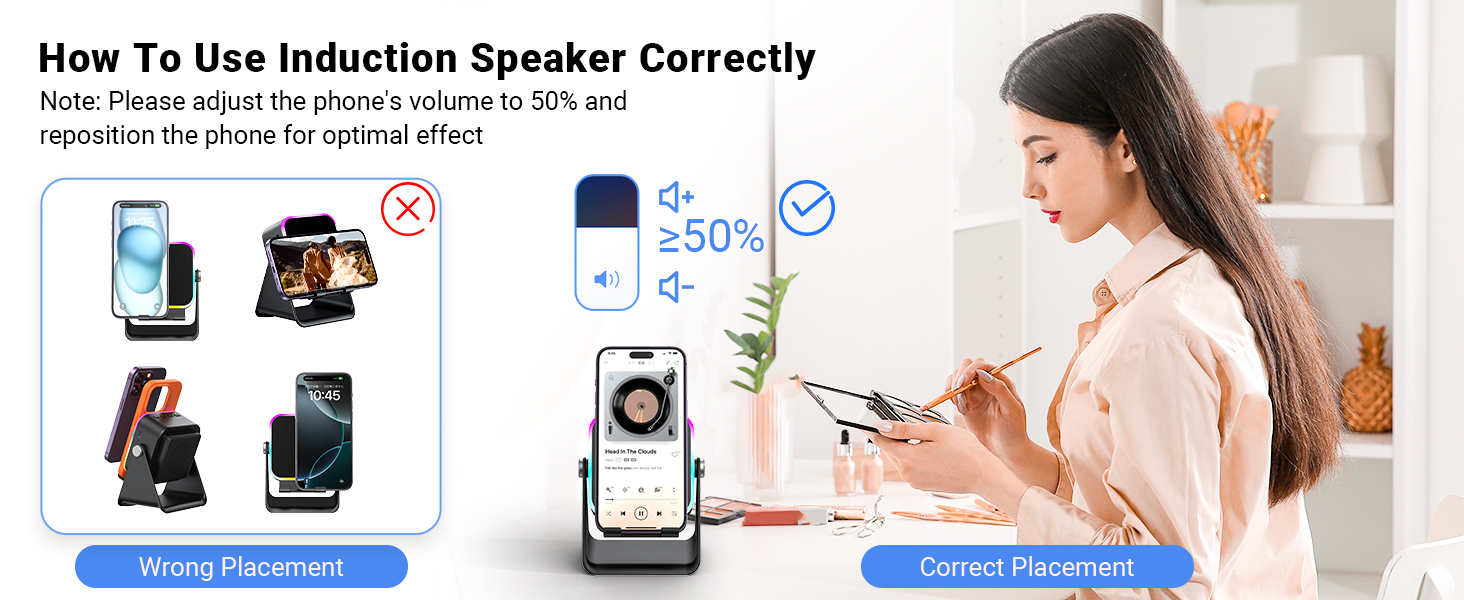
Image: The speaker's 3500mAh power bank function for emergency charging.
7. Manutenzjoni
- Naddaf l-apparat b'ċarruta ratba u niexfa. Tużax prodotti tat-tindif jew solventi li joborxu.
- Evita li tesponi l-apparat għad-dawl tax-xemx dirett għal perjodi estiżi.
- Aħżen l-apparat f'post frisk u niexef meta ma jkunx qed jintuża.
8 Issolvi l-problemi
Q1: What should I do if the volume is too low?
- If in Induction mode, place the phone correctly on the holder, and then adjust the phone's volume to 50% or higher.
- If you are using an Android device and using Bluetooth mode, first pair the Bluetooth device. Then enable "Sync volume with phone" in your phone's Bluetooth settings.
Q2: What should I do if the sound cuts in and out in Induction mode?
- Ensure the phone is correctly placed on the holder.
- The working principle of Induction mode is that the speaker's inductive chip captures audio from the phone and amplifies it through the speaker. The louder the phone's volume, the louder the speaker's output. Therefore, we recommend setting the phone's volume to 50% or higher to ensure uninterrupted playback.
9. Speċifikazzjonijiet
| Karatteristika | Dettall |
|---|---|
| Isem tal-Mudell | ZJ-027 |
| Tip ta' Kelliem | Speaker li jista ’jinġarr |
| Karatteristiċi Speċjali | Bluetooth Speaker, Built-In Powerbank, Induction Speaker, LED Light, Phone Stand |
| Apparati Kompatibbli | Android Phone, iPad, iPhone |
| Kulur | Iswed |
| Dimensjonijiet tal-Prodott | 5"D x 2"W x 3"H |
| Piż tal-oġġett | 0.34 Kilogrammi (12 uqija) |
| Medda Bluetooth Massima | 10 Meters |
| Batterija | 1 Batterija meħtieġa (inkluża) |
| Manifattur | AIKELA |
| Qawwa tal-Ħruġ Massimu tal-Ispeaker | 1 Watts |
| Teknoloġija tal-Konnettività | Bluetooth, Induction |
| Materjal | Acrylonitrile Butadiene Styrene (ABS) |
10. Garanzija u Appoġġ
AIKELA provides 12 months of support for your Phone Amplifier Speaker. If you encounter any issues or have questions, please contact customer service. You can typically find contact information by navigating to 'Find Order' on the platform where you purchased the product.


