1. Introduzzjoni
This manual provides instructions for the setup, operation, and maintenance of your TRIGKEY Key R8 Mini PC. Please read this manual thoroughly before using the device.

Stampa 1.1: Quddiem view of the TRIGKEY Key R8 Mini PC.
2. Kontenut tal-Pakkett
Ivverifika li l-oġġetti kollha huma preżenti fil-pakkett:
- 1 x TRIGKEY Key R8 Mini PC (8745HS model)
- 1 x Manwal għall-Utent
- 1 x HDMI Cable (100CM)
- 1 x Adapter tal-Enerġija (19V/5.26A)
3. Prodott Aktarview: Ports and Components
The TRIGKEY Key R8 Mini PC features a variety of ports and components for connectivity and expansion. Refer to the diagram below for a visual guide.
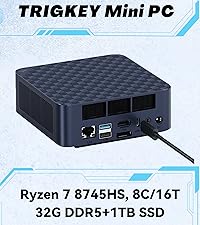
Image 3.1: Detailed port layout of the Mini PC.
Portijiet tal-Panew ta' Quddiem:
- USB4 Port (40Gbps/TBT3/PD/DP1.4): 1 port. Supports high-speed data transfer, power delivery, and DisplayPort 1.4 video output.
- Type-C USB3.2 Port (10Gbps): 1 port.
- 3.5mm Audio Jack: For headphones or speakers.
- Buttuna tal-Qawwa: To turn the device on/off.
Portijiet tal-Panel ta' Wara:
- LAN Port (2.5G): 1 port. For wired network connection.
- USB3.2 Ports (10Gbps): 2 ports.
- USB2.0 Port (480Mbps): 1 port.
- HDMI 2.1 Port (4K 120Hz): 1 port. For video output.
- DP1.4 Port (4K 144Hz): 1 port. For video output.
- 3.5mm Audio Jack: For headphones or speakers.
- DC IN (Pogopin)Għall-konnessjoni tal-adapter tal-enerġija.
4. Istruzzjonijiet ta' Setup
- Connect to a Display: Connect your monitor(s) to the Mini PC using the HDMI, DisplayPort, or USB4 ports. The device supports up to three 4K displays simultaneously.
- Qabbad il-Periferali: Connect your keyboard, mouse, and other USB devices to the available USB ports.
- Qabbad man-Netwerk: For a wired connection, connect an Ethernet cable to the 2.5G LAN port. For wireless, the device supports WiFi 6.
- Qabbad l-Enerġija: Plug the power adapter into the DC IN port on the rear panel, then plug the adapter into a power outlet.
- Qawwa Mixgħul: Press the power button on the front panel to start the Mini PC.

Image 4.1: Connecting the 2.5G Ethernet cable.
5. Sistema Operattiva
The TRIGKEY Key R8 Mini PC comes with an operating system pre-installed. Follow the on-screen instructions for initial setup. The device supports features such as Wake On LAN and Auto Power On, which can be configured in the BIOS settings.
6. Memory and Storage Expansion
The Mini PC is equipped with 32GB LPDDR5 5600MHz RAM (dual-channel, 2x16GB) and supports expansion up to 256GB (128GB*2). It also includes a 1TB M.2 PCIe 4.0 SSD and features dual SSD slots, supporting up to 4TB*2 for a total of 8TB storage.

Image 6.1: Illustration of DDR5 5600MHz memory modules.

Image 6.2: Illustration of dual M.2 PCIe 4.0 SSD slots.
For detailed instructions on upgrading RAM or SSD, refer to the official TRIGKEY support resources or consult a qualified technician.
7. Konfigurazzjoni tad-Displej
The Mini PC supports triple display output via its HDMI2.1, DisplayPort1.4, and USB4 ports. Each port can support up to 4K resolution at 144Hz (DP1.4) or 120Hz (HDMI2.1). This allows for an extended desktop environment across multiple screens.

Immaġni 7.1: Eż.ample of triple display setup with the Mini PC.
8. Konnettività tan-Netwerk u mingħajr Fili
The device features a 2.5G LAN port for high-speed wired internet. For wireless connectivity, it includes dual-band WiFi 6, offering transmission speeds up to 2.4Gbps. Bluetooth 5.2 is also integrated for connecting wireless peripherals.

Image 8.1: WiFi 6 connectivity diagram.

Image 8.2: Bluetooth 5.2 connectivity diagram.
9. Konfigurazzjoni tal-Awdjo
The Mini PC features dual 3.5mm audio jacks, one on the front and one on the rear. If both jacks are used simultaneously, the front jack takes priority, and the rear jack's audio output will be automatically disabled.
10. Manutenzjoni
- Keep the device in a clean, dry environment away from direct sunlight and heat sources.
- Żgura ventilazzjoni xierqa billi ma timblokkax il-ventijiet tal-arja.
- Naddaf il-barra b'ċarruta ratba u niexfa. Tużax prodotti tat-tindif likwidi.
- Regularly back up important data.
- Keep the operating system and drivers updated.
11 Issolvi l-problemi
| Ħruġ | Kawża Possibbli | Soluzzjoni |
|---|---|---|
| Ebda qawwa | L-adapter tal-enerġija mhux imqabbad jew difettuż. | Ensure power adapter is securely connected to the device and a working power outlet. Test with another outlet if possible. |
| L-ebda wiri | Monitor not connected, incorrect input selected, or faulty cable. | Check display cable connections. Ensure the correct input source is selected on your monitor. Try a different cable or port. |
| L-ebda konnessjoni tal-internet (bil-fili) | Kejbil Ethernet skonnettjat jew problema fin-netwerk. | Verify Ethernet cable is securely connected. Check router/modem status. Restart network devices. |
| L-ebda konnessjoni tal-internet (bla fili) | WiFi disabled, incorrect password, or signal issue. | Ensure WiFi is enabled in the operating system. Verify WiFi password. Move closer to the router or check for interference. |
| Prestazzjoni bil-mod | Too many applications running, insufficient RAM, or storage nearly full. | Close unnecessary applications. Check system resources. Consider upgrading RAM or SSD if consistently slow. |
12. Speċifikazzjonijiet
| Karatteristika | Dettall |
|---|---|
| Proċessur | AMD Ryzen 7 8745HS (8 Cores, 16 Threads, up to 4.9GHz, 16MB L3 Cache) |
| Grafika | Integrated AMD Radeon 780M (12 Cores, 2600MHz) |
| RAM | 32GB LPDDR5 5600MHz (Dual-channel, 2x16GB), expandable up to 256GB |
| Ħażna | 1TB M.2 PCIe 4.0 SSD, dual M.2 slots, expandable up to 8TB (4TB*2) |
| Output tal-vidjo | 1x HDMI 2.1 (4K 120Hz), 1x DP 1.4 (4K 144Hz), 1x USB4 (4K 144Hz) - Triple Display Support |
| Portijiet USB | 1x USB4 (40Gbps/TBT3/PD/DP1.4), 1x Type-C USB3.2 (10Gbps), 2x USB3.2 (10Gbps), 1x USB2.0 (480Mbps) |
| Netwerk | 1x 2.5G LAN Port, WiFi 6, Bluetooth 5.2 |
| Awdjo | 2x 3.5mm Audio Jacks (Realtek ALC897) |
| Input tal-Enerġija | DC IN (Pogopin) 19V/5.26A |
| Sistema Operattiva | Pre-installed OS (as per product configuration) |
| Dimensjonijiet | 12 x 12 x 8 ċm (dimensjonijiet approssimattivi tal-pakkett) |
| Piż | 1 kg (approximate parcel weight) |
13. Garanzija u Appoġġ
The TRIGKEY Key R8 Mini PC comes with a one-year warranty. For technical support or warranty claims, please contact TRIGKEY customer service.
- Appoġġ bl-Email: support@trigkey.com
- Appoġġ tat-Telefon: +86 18138216795
- Manifattur: Shenzhen AZW Technology Co., Ltd,

Image 13.1: TRIGKEY customer support team.


